PostgreSQL Replication & High Availability: Streaming Replication, Patroni & Failover (2026)
A complete production guide to PostgreSQL high availability: physical streaming replication with WAL, synchronous vs asynchronous trade-offs, Patroni + etcd for automatic leader election and failover, PgBouncer connection pooling, read replica routing in Spring Boot with AbstractRoutingDataSource, pgBackRest backups, and a full DR runbook.
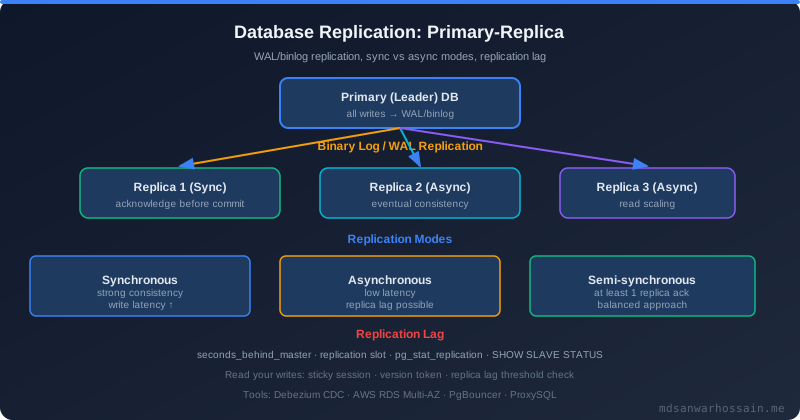
1. Why High Availability? RTO & RPO Explained
A single-node PostgreSQL instance is a single point of failure. Hardware failure, OS crash, or a botched migration can bring your entire application offline. Two metrics define your HA requirements:
- RTO (Recovery Time Objective): Maximum acceptable downtime. "We can be down for at most 30 seconds." Drives your failover automation strategy.
- RPO (Recovery Point Objective): Maximum acceptable data loss. "We cannot lose more than 0 committed transactions." Drives your replication mode (sync vs async).
| HA Level | RTO Target | RPO Target | Approach |
|---|---|---|---|
| Single node + backup | > 1 hour | Hours (last backup) | Restore from pgBackRest |
| Async streaming replication | 1–5 min (manual) | Seconds (lag-dependent) | Manual promotion or Patroni |
| Patroni + async replication | < 30 s | Seconds (last replicated LSN) | Automatic promotion via DCS |
| Patroni + sync replication | < 30 s | 0 (zero data loss) | synchronous_commit = on |
A single-node PostgreSQL fails at production scale for three reasons: no failover (any crash = downtime), no read scalability (all queries hit one server), and no parallel backup without blocking writes.
2. Streaming Replication Concepts: WAL & Standbys
PostgreSQL writes every change to the Write-Ahead Log (WAL) before applying it to heap data files. WAL records are binary, append-only, and crash-safe. Streaming replication ships these WAL bytes in real time to standby servers.
- WAL sender: A background process on the primary that reads WAL and streams it over a TCP connection to each standby's WAL receiver.
- WAL receiver: On the standby, writes received WAL to its own pg_wal directory and signals the startup process to apply (replay) it.
- LSN (Log Sequence Number): A 64-bit byte offset into the WAL stream, used to measure replication lag.
- Replication slot: Server-side state that prevents WAL deletion until all slots confirm they've consumed it. Essential for logical replication; optional but useful for physical standbys with short expected downtime.
- Hot standby: A standby in recovery mode that still accepts read-only SQL queries, enabling read scale-out.
wal_level = replica          # minimum for streaming replication
max_wal_senders = 10         # max concurrent WAL sender processes
wal_keep_size = 1GB          # retain this much WAL for slow standbys (no slot)
hot_standby = on             # allow reads on standby (set on standby too)
archive_mode = on
archive_command = 'pgbackrest --stanza=main archive-push %p'
host replication replicator 10.0.1.0/24 scram-sha-256
3. Synchronous vs Asynchronous Replication Trade-offs
| Mode | Durability | Write Latency | Data Loss Risk | Use Case |
|---|---|---|---|---|
| Asynchronous (default) | Primary only | Lowest | Seconds of transactions | Read scale-out, DR replicas |
| remote_write | WAL written on standby OS | + 1 RTT | Very low (OS crash only) | Good balance for most apps |
| remote_apply | Applied on standby | + apply time | None | Readable standby always current |
| on (synchronous) | WAL flushed on standby disk | + 1–2 RTT | Zero (RPO=0) | Fintech, healthcare, audit logs |
# Wait for at least one standby named 'standby1' OR 'standby2' to flush WAL
synchronous_commit = on
synchronous_standby_names = 'FIRST 1 (standby1, standby2)'

# For ANY 1 of 2 standbys to acknowledge (quorum)
# synchronous_standby_names = 'ANY 1 (standby1, standby2)'

# Per-transaction override (useful for non-critical writes):
# SET LOCAL synchronous_commit TO off;
Warning: With synchronous_commit = on, if all synchronous standbys disconnect, the primary blocks all writes until one reconnects. Use ANY 1 quorum mode with at least two synchronous standby candidates.
4. Setting Up Physical Streaming Replication
-- On primary:
CREATE USER replicator REPLICATION LOGIN PASSWORD 'str0ngPass!';

-- On standby server (-Xs = stream WAL, -R = write recovery config):
pg_basebackup -h 10.0.1.10 -U replicator \
  -D /var/lib/postgresql/16/main -P -Xs -R --checkpoint=fast
primary_conninfo = 'host=10.0.1.10 port=5432 user=replicator password=str0ngPass!'
primary_slot_name = 'standby1_slot'

touch /var/lib/postgresql/16/main/standby.signal
pg_ctlcluster 16 main start
SELECT client_addr, state, sent_lsn, replay_lsn,
       pg_size_pretty(sent_lsn - replay_lsn) AS lag
FROM pg_stat_replication;
pg_rewind: Re-sync a former primary as a standby without a full base backup: pg_rewind --target-pgdata=... --source-server="host=new-primary ...". Far faster than pg_basebackup on large databases.
5. Logical Replication & Use Cases
Physical replication copies everything at the byte level and requires the standby to be on the same PostgreSQL major version. Logical replication replicates at the SQL row level, supports cross-version and cross-database replication, and can replicate a subset of tables.
- Use case 1: Zero-downtime major version upgrades (replicate from PG15 primary to PG16 standby, then switch over).
- Use case 2: Selective table replication to an analytics DB.
- Use case 3: Multi-master with conflict resolution (BDR/pglogical).
-- postgresql.conf: wal_level = logical
CREATE PUBLICATION orders_pub FOR TABLE orders, order_items;
-- Or replicate entire database:
-- CREATE PUBLICATION all_pub FOR ALL TABLES;
CREATE SUBSCRIPTION orders_sub
  CONNECTION 'host=10.0.1.10 dbname=appdb user=replicator password=str0ngPass!'
  PUBLICATION orders_pub
  WITH (copy_data = true, create_slot = true);

-- Monitor subscription status
SELECT subname, received_lsn, latest_end_lsn FROM pg_stat_subscription;
6. Patroni + etcd: Automatic Leader Election & Failover
Patroni is a Python daemon that runs on each PostgreSQL node and uses a Distributed Configuration Store (DCS) — etcd, Consul, or ZooKeeper — for leader election. The leader holds a lock in etcd with a TTL; if the primary fails to renew the lock before TTL expiry, a standby acquires it and promotes itself.
scope: postgres-ha
name: pg-node1
restapi:
  listen: 0.0.0.0:8008
  connect_address: 10.0.1.10:8008
etcd3:
  hosts: 10.0.1.20:2379,10.0.1.21:2379,10.0.1.22:2379
bootstrap:
  dcs:
    ttl: 30                         # leader lock TTL in seconds
    loop_wait: 10                   # health-check interval
    maximum_lag_on_failover: 1048576  # don't promote if > 1MB behind
    synchronous_mode: false         # set true for zero-loss failover
  initdb: [{encoding: UTF8}, {data-checksums: true}]
postgresql:
  listen: 0.0.0.0:5432
  connect_address: 10.0.1.10:5432
  data_dir: /var/lib/postgresql/16/main
  bin_dir: /usr/lib/postgresql/16/bin
  authentication:
    replication: {username: replicator, password: str0ngPass!}
    superuser: {username: postgres, password: s3cr3t!}
  parameters:
    wal_level: replica
    max_wal_senders: 10
    wal_keep_size: 1GB
# List cluster state (shows primary + replica lag)
patronictl -c /etc/patroni.yml list

# Planned switchover (graceful, zero data loss)
patronictl -c /etc/patroni.yml switchover --master pg-node1 --candidate pg-node2

# Emergency failover (promotes best standby immediately)
patronictl -c /etc/patroni.yml failover postgres-ha

# Pause/resume auto-failover (for maintenance)
patronictl -c /etc/patroni.yml pause
patronictl -c /etc/patroni.yml resume
Failover flow: (1) Primary crashes → stops renewing etcd lock → TTL expires (up to 30s). (2) etcd notifies Patroni on standbys. (3) Standby with highest LSN acquires lock → runs pg_ctl promote. (4) Other standbys reconfigure to replicate from new primary. (5) HAProxy/PgBouncer health-checks detect the new primary and re-route connections.
7. PgBouncer Connection Pooling in HA Setup
PostgreSQL creates a new OS process per client connection (up to ~3MB RAM each). At 500+ concurrent app connections, memory pressure becomes a bottleneck. PgBouncer maintains a small pool of actual backend connections and multiplexes thousands of client connections across them.
| Pool Mode | Connection Held Until | Transactions/Connection | Use Case |
|---|---|---|---|
| session | Client disconnects | All session txns | Compatibility, SET/PREPARE statements |
| transaction | Transaction ends | High multiplexing | Most Spring Boot apps (recommended) |
| statement | Statement ends | Maximum multiplexing | Autocommit-only workloads |
[databases]
appdb = host=10.0.1.10 port=5432 dbname=appdb  # points to primary (or HAProxy VIP)
appdb_ro = host=10.0.1.11 port=5432 dbname=appdb  # points to replica

[pgbouncer]
listen_port = 6432
listen_addr = 0.0.0.0
auth_type = scram-sha-256
auth_file = /etc/pgbouncer/userlist.txt
pool_mode = transaction
max_client_conn = 5000
default_pool_size = 25       # backend connections per db/user pair
min_pool_size = 5
reserve_pool_size = 5
reserve_pool_timeout = 3
server_idle_timeout = 600
client_idle_timeout = 0
log_connections = 0
log_disconnections = 0
stats_period = 60
Configure Spring Boot's datasource URL to point to PgBouncer (jdbc:postgresql://pgbouncer-host:6432/appdb). Set HikariCP maximum-pool-size to ~10 per instance — PgBouncer multiplexes all app instances into a small backend pool.
8. Read Replica Routing in Spring Boot (AbstractRoutingDataSource)
public class RoutingDataSource extends AbstractRoutingDataSource {
    @Override
    protected Object determineCurrentLookupKey() {
        return TransactionSynchronizationManager.isCurrentTransactionReadOnly()
                ? "REPLICA" : "PRIMARY";
    }
}
@Configuration
public class DataSourceConfig {
    @Bean @ConfigurationProperties("spring.datasource.primary")
    public DataSource primaryDataSource() { return DataSourceBuilder.create().build(); }

    @Bean @ConfigurationProperties("spring.datasource.replica")
    public DataSource replicaDataSource() { return DataSourceBuilder.create().build(); }

    @Bean @Primary
    public DataSource routingDataSource(
            @Qualifier("primaryDataSource") DataSource primary,
            @Qualifier("replicaDataSource") DataSource replica) {
        RoutingDataSource routing = new RoutingDataSource();
        routing.setTargetDataSources(Map.of("PRIMARY", primary, "REPLICA", replica));
        routing.setDefaultTargetDataSource(primary);
        return routing;
    }
}
spring:
  datasource:
    primary:
      url: jdbc:postgresql://pgbouncer:6432/appdb
      username: appuser
      password: ${DB_PASSWORD}
      hikari:
        maximum-pool-size: 10
        pool-name: PrimaryPool
    replica:
      url: jdbc:postgresql://pgbouncer:6432/appdb_ro
      username: appuser
      password: ${DB_PASSWORD}
      hikari:
        maximum-pool-size: 20   # more reads than writes
        pool-name: ReplicaPool
@Service
public class ProductService {

    @Transactional(readOnly = true)   // ← routes to REPLICA
    public List<Product> findAll() {
        return productRepository.findAll();
    }

    @Transactional                    // ← routes to PRIMARY
    public Product create(ProductRequest req) {
        return productRepository.save(new Product(req));
    }
}
9. Monitoring Replication Lag (pg_stat_replication)
SELECT application_name, client_addr, state,
       pg_size_pretty(sent_lsn - replay_lsn) AS lag_size,
       EXTRACT(EPOCH FROM replay_lag) AS replay_lag_sec,
       sync_state
FROM pg_stat_replication ORDER BY replay_lag DESC;
SELECT slot_name, slot_type, active,
       pg_size_pretty(pg_wal_lsn_diff(pg_current_wal_lsn(), restart_lsn)) AS retained_wal
FROM pg_replication_slots;
-- retained_wal > 5GB = WARNING: drop or resume the slot!
- alert: PostgresReplicationLagHigh
  expr: pg_replication_lag > 30
  for: 2m
  labels: {severity: warning}
  annotations:
    summary: "Replication lag {{ $value }}s on {{ $labels.instance }}"
10. Backup with pgBackRest & PITR
pgBackRest is the gold standard for PostgreSQL backups: parallel compression, S3/GCS/Azure storage, WAL archiving for PITR, incremental backups, and built-in backup verification.
[global]
repo1-type=s3
repo1-s3-bucket=my-pg-backups
repo1-s3-endpoint=s3.amazonaws.com
repo1-s3-region=us-east-1
repo1-retention-full=4       # keep 4 full backups
repo1-retention-diff=14
repo1-cipher-type=aes-256-cbc
compress-type=lz4
process-max=4                # parallel compression

[main]
pg1-path=/var/lib/postgresql/16/main
# Full backup every Sunday 01:00
0 1 * * 0  postgres  pgbackrest --stanza=main --type=full backup
# Incremental daily
0 1 * * 1-6 postgres  pgbackrest --stanza=main --type=incr backup

# PITR: restore to timestamp (before a bad migration)
pg_ctlcluster 16 main stop
pgbackrest --stanza=main --delta --type=time \
  "--target=2026-04-11 14:25:00+00" --target-action=promote restore
pg_ctlcluster 16 main start
11. Disaster Recovery Runbook
Automated failover (Patroni): Patroni handles this automatically. Your runbook is: (1) Receive PagerDuty alert. (2) Run patronictl list to confirm new primary. (3) Verify application traffic is routed correctly via PgBouncer/HAProxy health checks. (4) Investigate and repair the failed node. (5) Rejoin it as a standby with patronictl reinit.
# 1. Confirm primary is truly dead
pg_isready -h 10.0.1.10 -p 5432   # should fail
# 2. Choose standby with highest replay_lsn
psql -h 10.0.1.11 -c "SELECT pg_last_wal_replay_lsn();"
# 3. Promote the best standby
pg_ctlcluster 16 main promote
# 4. Update HAProxy backend to new primary IP
echo "set server pg_backend/pg-node1 addr 10.0.1.11" | socat stdio /var/run/haproxy/admin.sock
# 5. Reconfigure remaining standbys: edit primary_conninfo, then:
SELECT pg_reload_conf();
# 6. Rejoin old primary as standby using pg_rewind (faster than basebackup)
pg_rewind --target-pgdata=/var/lib/postgresql/16/main \
          --source-server="host=10.0.1.11 user=postgres"
# 1. Document current primary:  patronictl list
# 2. Simulate crash: kill -9 $(pgrep -f patroni) on primary node
# 3. Measure failover time: watch patronictl list  (target: < 30s)
# 4. Verify data consistency: SELECT COUNT(*) on critical tables
# 5. Rejoin failed node: patronictl reinit postgres-ha pg-node1
12. Production Checklist
- wal_level = replica on all nodes
- At least 2 standbys (1 sync + 1 async)
- Patroni + 3-node etcd cluster
- PgBouncer in transaction pool mode
- HAProxy health-check on Patroni :8008
- pg_stat_replication monitored & alerted
- Replication lag alert (<30s warn / <120s crit)
- No orphaned replication slots
- pgBackRest full weekly + incremental daily
- WAL archiving enabled (archive_mode=on)
- PITR tested within retention window
- pgbackrest verify run weekly
- AbstractRoutingDataSource read/write split
- max_connections tuned (RAM / 3MB)
- scram-sha-256 auth in pg_hba.conf
- data-checksums enabled
- DR runbook tested quarterly
- RTO < 30s and RPO defined per SLA