Spring Boot Actuator in Production: Custom Health Checks, Metrics & Security Hardening
Ever deployed a microservice only to realize you're flying blind? No visibility into JVM health, no way to check if database connections are healthy, no metrics to debug that mysterious latency spike at 2 AM. That's the black-box service problem, and Spring Boot Actuator solves it.
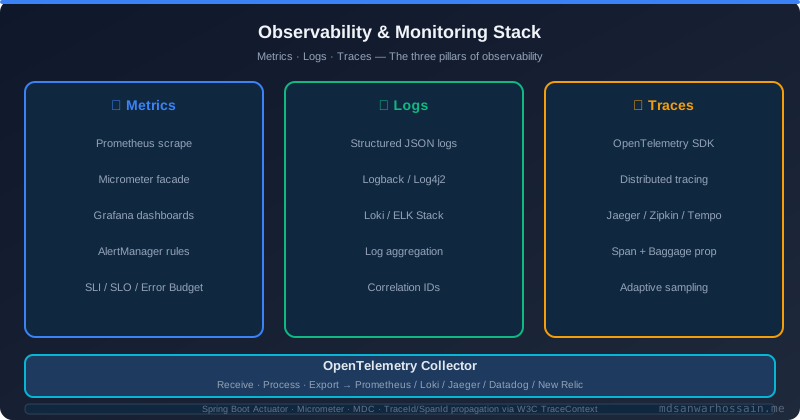
Actuator exposes production-ready endpoints for monitoring and managing your application. But here's the catch: most teams enable it with defaults, exposing /actuator/env to the internet and wondering why they got breached. Or they write custom health checks that block the entire liveness probe thread.
This guide shows you how we use Actuator in production systems serving 10M+ requests/day—custom health indicators, secure endpoint exposure, Micrometer metrics, and Kubernetes integration.
Table of Contents
- Actuator Architecture: Endpoints, InfoContributor, HealthIndicator
- Building Custom Health Indicators
- Micrometer Metrics: Counters, Gauges, and Timers
- Securing Actuator Endpoints
- Kubernetes Liveness/Readiness Probe Integration
- Production Debugging with /threaddump and /heapdump
- Failure Scenarios and Troubleshooting
- Key Takeaways
- Conclusion
Actuator Architecture: Endpoints, InfoContributor, HealthIndicator
Actuator is built on three core abstractions:
- Endpoints — Expose application internals (health, metrics, beans, env)
- HealthIndicator — Contribute to
/actuator/healthwith custom checks - InfoContributor — Add metadata to
/actuator/info
Enable Actuator in pom.xml:
<dependency>
    <groupId>org.springframework.boot</groupId>
    <artifactId>spring-boot-starter-actuator</artifactId>
</dependency>
By default, only /health and /info are exposed over HTTP. Enable more in application.yml:
management:
  endpoints:
    web:
      exposure:
        include: health,info,metrics,prometheus
  endpoint:
    health:
      show-details: when-authorized
Building Custom Health Indicators
Spring Boot auto-configures health checks for DataSource, Redis, Kafka, etc. But what about your critical external API dependency?
@Component
public class PaymentGatewayHealthIndicator implements HealthIndicator {

    @Autowired
    private RestTemplate restTemplate;

    @Override
    public Health health() {
        try {
            // Call external service health endpoint with timeout
            ResponseEntity<String> response = restTemplate.exchange(
                "https://payment-api.example.com/health",
                HttpMethod.GET,
                null,
                String.class
            );

            if (response.getStatusCode() == HttpStatus.OK) {
                return Health.up()
                    .withDetail("gateway", "payment-api")
                    .withDetail("latency", "45ms")
                    .build();
            }

            return Health.down()
                .withDetail("reason", "Non-200 status: " + response.getStatusCode())
                .build();

        } catch (Exception e) {
            return Health.down()
                .withDetail("error", e.getMessage())
                .withException(e)
                .build();
        }
    }
}
Health Check Timeout Trap
Kubernetes liveness probes have a 1-second default timeout. If your health check calls slow external APIs, use @Async or cache results. Never block the health endpoint.
Micrometer Metrics: Counters, Gauges, and Timers
Actuator uses Micrometer—a dimensional metrics facade that works with Prometheus, Datadog, CloudWatch, etc.
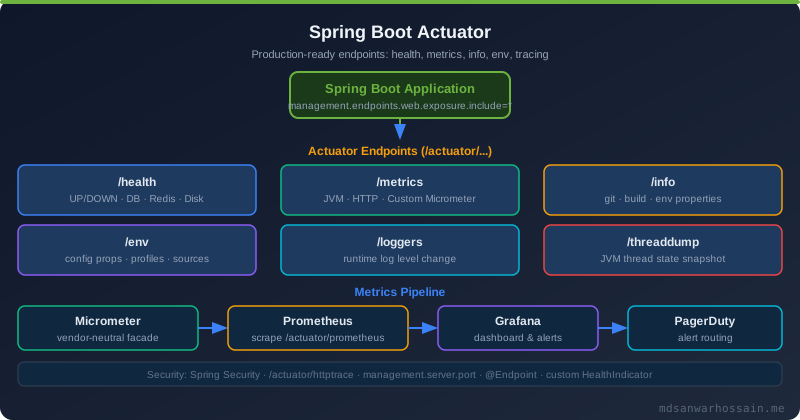
Counter example — Increment on every payment attempt:
@Service
public class PaymentService {

    private final Counter paymentCounter;

    public PaymentService(MeterRegistry registry) {
        this.paymentCounter = Counter.builder("payments.attempted")
            .tag("service", "checkout")
            .description("Total payment attempts")
            .register(registry);
    }

    public void processPayment(Payment payment) {
        paymentCounter.increment();
        // business logic
    }
}
Timer example — Measure external API call duration:
@Service
public class ExternalApiClient {

    private final Timer apiTimer;

    public ExternalApiClient(MeterRegistry registry) {
        this.apiTimer = Timer.builder("external.api.calls")
            .tag("api", "payment-gateway")
            .description("Payment gateway API call duration")
            .register(registry);
    }

    public Response callApi() {
        return apiTimer.record(() -> {
            return restTemplate.getForObject(...);
        });
    }
}
Securing Actuator Endpoints
Default configuration exposes sensitive endpoints to the internet. Secure them with Spring Security:
@Configuration
public class ActuatorSecurityConfig {

    @Bean
    public SecurityFilterChain actuatorSecurity(HttpSecurity http) throws Exception {
        http
            .securityMatcher(EndpointRequest.toAnyEndpoint())
            .authorizeHttpRequests(auth -> auth
                .requestMatchers(EndpointRequest.to("health", "info")).permitAll()
                .anyRequest().hasRole("ACTUATOR_ADMIN")
            )
            .httpBasic();
        return http.build();
    }
}
Expose only health and info publicly. Everything else (env, beans, heapdump) requires authentication.
Kubernetes Liveness/Readiness Probe Integration
Spring Boot 2.3+ provides dedicated liveness and readiness states:
management:
  endpoint:
    health:
      probes:
        enabled: true
  health:
    livenessState:
      enabled: true
    readinessState:
      enabled: true
Kubernetes deployment:
livenessProbe:
  httpGet:
    path: /actuator/health/liveness
    port: 8080
  initialDelaySeconds: 30
  periodSeconds: 10

readinessProbe:
  httpGet:
    path: /actuator/health/readiness
    port: 8080
  initialDelaySeconds: 10
  periodSeconds: 5
Production Debugging with /threaddump and /heapdump
When your app is hanging in production, use /actuator/threaddump to see what threads are blocked:
curl -u admin:secret https://api.example.com/actuator/threaddump > threaddump.jsonFor memory leaks, trigger a heap dump:
curl -u admin:secret -X POST https://api.example.com/actuator/heapdump -o heapdump.hprofAnalyze with VisualVM or Eclipse MAT.
Failure Scenarios and Troubleshooting
Scenario 1: Pod restarting every 30 seconds — Liveness probe fails because health check calls slow DB query. Fix: Move DB check to readiness only.
Scenario 2: Metrics endpoint returns 404 — Forgot to add micrometer-registry-prometheus dependency. Fix: Add the correct registry dependency.
Scenario 3: Health endpoint exposed to internet — Security misconfiguration. Fix: Use Spring Security to restrict access.
Key Takeaways
- Use custom HealthIndicators for critical external dependencies
- Secure sensitive endpoints — only expose health/info publicly
- Separate liveness and readiness — liveness = "is the app alive?", readiness = "can it serve traffic?"
- Instrument business metrics with Micrometer counters and timers
- Set timeouts on health checks — never block Kubernetes probes
Conclusion
Spring Boot Actuator transforms your microservices from black boxes into observable systems. Combined with proper security, custom health checks, and Kubernetes integration, you get production-grade monitoring out of the box.
Customizing the /info Endpoint for Build and Git Metadata
The /actuator/info endpoint is underused. By adding the spring-boot-maven-plugin info goal, you can expose build version, git commit SHA, and branch name—invaluable for debugging "which version is running in prod?":
<!-- pom.xml -->
<plugin>
    <groupId>org.springframework.boot</groupId>
    <artifactId>spring-boot-maven-plugin</artifactId>
    <executions>
        <execution>
            <goals><goal>build-info</goal></goals>
        </execution>
    </executions>
</plugin>

<!-- Also add git-commit-id plugin for git info -->
<plugin>
    <groupId>io.github.git-commit-id</groupId>
    <artifactId>git-commit-id-maven-plugin</artifactId>
    <version>7.0.0</version>
    <executions>
        <execution>
            <goals><goal>revision</goal></goals>
        </execution>
    </executions>
</plugin>
# application.yml
management:
info:
git:
mode: full
build:
enabled: true
env:
enabled: true
info:
app:
name: payment-service
team: core-backend
contact: team-backend@brac-it.com.bdNow GET /actuator/info returns:
{
  "build": {
    "version": "2.4.1",
    "artifact": "payment-service",
    "time": "2026-04-28T10:32:00Z"
  },
  "git": {
    "branch": "main",
    "commit": {
      "id": "a3f4b2c",
      "time": "2026-04-28T09:15:00Z",
      "message": "fix: null pointer in payment retry logic"
    }
  },
  "app": {
    "name": "payment-service",
    "team": "core-backend"
  }
}
At BRAC IT, we display this in our internal developer portal alongside Kubernetes pod status. When an incident fires, the first thing we check is git.commit.message — it immediately tells us if a recent deployment is the culprit.
Composite Health Checks with Groups
Spring Boot 2.4+ introduced health groups—you can define separate health groups for liveness and readiness with different checks in each:
management:
  endpoint:
    health:
      group:
        liveness:
          include: livenessState,diskSpace
          # Only checks app is alive — not external deps
        readiness:
          include: readinessState,db,redis,kafka,paymentGateway
          # All deps must be up to accept traffic
This is the correct Kubernetes pattern:
| Probe | Endpoint | Failure Action | Include External Deps? |
|---|---|---|---|
| Liveness | /actuator/health/liveness |
Restart pod | ❌ No — restarts won't help |
| Readiness | /actuator/health/readiness |
Remove from load balancer | ✅ Yes — stops traffic until deps recover |
Production Insight from BRAC IT
We discovered the hard way that including payment gateway health in the liveness probe caused cascading pod restarts when the external API had a 30-second blip. Moving external deps to readiness-only stopped the restarts — pods stayed alive but removed themselves from load balancer rotation until the API recovered.
Building Custom Actuator Endpoints
Sometimes built-in endpoints aren't enough. You can create fully custom endpoints exposed under /actuator:
@Component
@Endpoint(id = "feature-flags")
public class FeatureFlagsEndpoint {

    @Autowired
    private FeatureFlagService featureFlagService;

    @ReadOperation
    public Map<String, Boolean> getFlags() {
        return featureFlagService.getAllFlags();
    }

    @WriteOperation
    public void toggleFlag(@Selector String flagName,
                           @Param("enabled") boolean enabled) {
        featureFlagService.setFlag(flagName, enabled);
        log.info("Feature flag {} set to {} via Actuator", flagName, enabled);
    }
}

// Now accessible at:
// GET  /actuator/feature-flags        → all flags
// POST /actuator/feature-flags/{name} → toggle a flag
We used this pattern at BRAC IT to create a /actuator/circuit-breakers endpoint that shows the state of all Resilience4j circuit breakers in real time — invaluable during incidents when you need to see at a glance which downstream dependencies are failing.
Prometheus + Grafana Integration Checklist
Add the Prometheus registry to expose metrics in the Prometheus scrape format:
<dependency>
    <groupId>io.micrometer</groupId>
    <artifactId>micrometer-registry-prometheus</artifactId>
</dependency>
Configure scraping in your prometheus.yml:
scrape_configs:
  - job_name: 'payment-service'
    metrics_path: '/actuator/prometheus'
    static_configs:
      - targets: ['payment-service:8080']
    # In Kubernetes, use kubernetes_sd_configs instead
Essential Grafana panels for every Spring Boot service:
| Panel | Metric | Alert Threshold |
|---|---|---|
| Request rate | http_server_requests_seconds_count |
— |
| P99 latency | http_server_requests_seconds{quantile="0.99"} |
> 2s |
| JVM heap used | jvm_memory_used_bytes{area="heap"} |
> 85% of max |
| DB connection pool | hikaricp_connections_pending |
> 5 pending |
| GC pause time | jvm_gc_pause_seconds_max |
> 500ms |
| Error rate | http_server_requests_seconds{status=~"5.."} |
> 1% of requests |
At BRAC IT: How We Use Actuator in 20+ Microservices
At BRAC IT we run a microfinance platform on Kubernetes with over 20 Spring Boot microservices. Actuator is the backbone of our operational visibility. Every service exposes a standard set of endpoints behind an internal-only management port (8081), and our Grafana dashboards are populated entirely from Prometheus scraping /actuator/prometheus. Before we standardised on Actuator, incident diagnosis meant SSHing into pods and scanning raw logs. Now the first step in any runbook is: check Actuator.
Three Actuator features that have saved us the most time in production incidents:
- /actuator/info with git metadata — when a service behaves differently after a release, we check the git commit SHA and message in /info first. This immediately tells us whether the cause is a code change and who made it, cutting triage time from 30 minutes to under 2.
- Custom PaymentGatewayHealthIndicator — our payment service calls a third-party BKASH API. When that API degrades, our custom health indicator marks the service as OUT_OF_SERVICE within 30 seconds, removing it from readiness and stopping traffic routing automatically.
- /actuator/threaddump during memory incidents — we had a recurring memory leak in Q3 2025. Using heapdump and Eclipse MAT we identified a ThreadLocal variable not being cleaned up in a custom filter. Without Actuator, that investigation would have required a maintenance window to attach a Java agent.
One governance rule we established early: expose the management port on 8081, not on the same port as the application. This lets us expose all endpoints freely within the cluster without any risk of external exposure:
management:
  server:
    port: 8081          # separate from app port 8080
  endpoints:
    web:
      exposure:
        include: "*"    # safe — port 8081 not exposed outside cluster
  endpoint:
    health:
      show-details: always
      probes:
        enabled: true
  info:
    git:
      mode: full
    build:
      enabled: true
Caching Health Results to Prevent Probe Overload
Kubernetes probes call /actuator/health every 5–10 seconds per pod. If your custom health indicators make external API calls on each invocation, a 10-pod deployment with 5-second intervals generates 120 health-check calls per minute to every checked dependency. This can trigger rate limiting on downstream services or create circular dependency failures where the health check itself causes the health check to fail.
Spring Boot 2.5+ supports health endpoint caching natively:
management:
  endpoint:
    health:
      cache:
        time-to-live: 10s   # cache health results for 10 seconds
For expensive indicators that call external APIs, use a background-refresh pattern — the indicator returns a cached result instantly while a scheduler refreshes it in the background:
@Component
public class AsyncExternalApiHealthIndicator implements HealthIndicator {

    private volatile Health cachedHealth = Health.unknown().build();

    @Scheduled(fixedDelay = 30_000)   // refresh every 30 seconds
    public void refreshHealth() {
        try {
            ResponseEntity<Void> resp =
                restTemplate.getForEntity(HEALTH_URL, Void.class);
            cachedHealth = resp.getStatusCode().is2xxSuccessful()
                ? Health.up().withDetail("latency", measureLatencyMs() + "ms").build()
                : Health.down().withDetail("status", resp.getStatusCode()).build();
        } catch (Exception e) {
            cachedHealth = Health.down(e).build();
        }
    }

    @Override
    public Health health() {
        return cachedHealth;   // returns instantly — never blocks Kubernetes
    }
}
This pattern ensures Kubernetes probes respond in under 1 millisecond regardless of external API latency, completely eliminating the risk of probe timeouts causing unnecessary pod restarts during dependency slowdowns.
Key Takeaways
- Use custom HealthIndicators for critical external dependencies
- Separate liveness and readiness — liveness = "is the app alive?", readiness = "can it serve traffic?"
- Never include slow external dependencies in liveness probes — cascading restarts will make your outage worse
- Instrument business metrics with Micrometer counters and timers, not just technical metrics
- Expose /info with build and git metadata — saves hours during incident triage
- Secure sensitive endpoints — only expose health/info publicly, require ACTUATOR_ADMIN role for everything else
- Build custom endpoints for operational tasks your team runs frequently (feature flags, circuit breakers)
Conclusion
Spring Boot Actuator transforms your microservices from black boxes into observable systems. The combination of custom health indicators, Micrometer business metrics, properly secured endpoints, and Kubernetes probe integration gives you production-grade observability with minimal boilerplate.
The patterns in this post—composite health groups, custom endpoints, git-enriched /info, and Prometheus integration—are what we use at BRAC IT across our 20+ microservices. They've saved us countless hours of incident investigation by making the state of every service immediately visible.
Next, dive deeper into distributed tracing with OpenTelemetry and JVM profiling with JFR to complete your observability stack.
Common Actuator Anti-Patterns to Avoid
After auditing many production Spring Boot services, these are the Actuator anti-patterns that appear most often:
Exposing all endpoints on the public port. The most dangerous anti-pattern. /actuator/heapdump returns the entire JVM heap — including passwords, tokens, and PII stored in memory — as a downloadable file. /actuator/env exposes all environment variables including credentials. Always run management on a separate internal port, or secure sensitive endpoints with Spring Security roles.
Using /health instead of dedicated liveness/readiness endpoints. The general /actuator/health endpoint aggregates all health indicators. If any one fails (even a non-critical one), the endpoint returns DOWN. Kubernetes will restart perfectly healthy pods because a non-critical indicator returned DOWN. Use the dedicated liveness and readiness group endpoints with explicitly scoped indicators.
Calling slow external APIs on every health check invocation. A health indicator that makes a synchronous HTTP call to an external service adds that service's latency (potentially hundreds of milliseconds) to every Kubernetes probe. Under load, this can cause probe timeouts. Use the async background-refresh pattern described in this post for any indicator that calls an external dependency.
No custom business metrics. The default Micrometer metrics cover JVM and HTTP. But "loan applications processed per minute" and "payment success rate" are the metrics your business stakeholders care about. If your Grafana dashboard only shows JVM heap and HTTP latency, you are running blind on business outcomes. Add at least 3–5 business-specific counters and timers to every service.
Ignoring the /actuator/info endpoint. Most teams expose health and metrics but never configure info. Two lines of Maven plugin configuration give you build version, git commit SHA, and branch in every service — priceless during incident triage. There is no good reason not to configure it.
Leave a Comment
Related Posts

Software Engineer · Java · Spring Boot · Microservices