AWS API Gateway Production Patterns: REST vs HTTP API, Lambda Integration & Authorization
AWS API Gateway is the front door for millions of serverless applications — yet most teams ship with the wrong gateway type, misconfigured throttling, and zero caching, leaving performance and cost on the table. This deep-dive covers every production decision: from choosing REST vs HTTP API and wiring Lambda proxy integration, to locking down Cognito JWT auth, tuning burst limits, and serving your API over CloudFront with a custom domain.
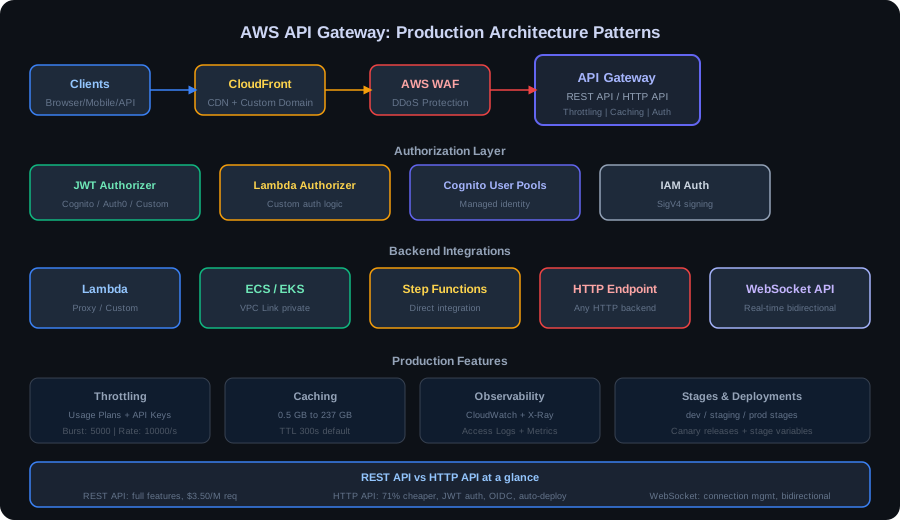
TL;DR — API Gateway Decision Rule
"Use HTTP API for new greenfield serverless APIs (70% cheaper, lower latency, built-in JWT auth). Use REST API only when you need request validation, edge caching, WAF integration, or API keys with usage plans. Never use WebSocket API without message routing via a DynamoDB connection registry."
Table of Contents
- Three Gateway Types Explained
- REST API vs HTTP API: The Decision Framework
- Lambda Integration Patterns: Proxy vs Custom
- Authorization: JWT, Lambda Authorizers, Cognito & IAM
- Request Validation: Models, Validators & Parameter Mapping
- Throttling & Rate Limiting: Usage Plans & Burst Limits
- API Gateway Caching: Cost vs Performance
- Custom Domains, SSL & CloudFront Integration
- Observability: CloudWatch, X-Ray & Access Logs
- WebSocket API: Real-Time Bidirectional Patterns
- Production Best Practices: Versioning, Canary & Error Standards
- Conclusion & Production Readiness Checklist
1. Three Gateway Types Explained
AWS API Gateway offers three distinct products under the same brand. Choosing the wrong one is the most expensive mistake teams make — and it is non-trivial to migrate later.
REST API (v1) — The Feature-Rich Workhorse
The original API Gateway product, launched in 2015. REST API supports the full feature set: request/response transformation, payload validation against JSON Schema models, stage variables, edge caching via a managed CloudFront distribution, usage plans with API keys, and deep WAF integration. It is the only option that supports edge-optimized endpoints (served from CloudFront POPs globally). The trade-off is cost and latency — REST API charges roughly $3.50 per million API calls, and each request goes through more processing stages.
HTTP API (v2) — The Modern Default
Launched in 2020, HTTP API is purpose-built for low-latency, cost-efficient serverless APIs. At $1.00 per million API calls (71% cheaper than REST API), it uses a leaner processing pipeline with lower p99 latencies. HTTP API ships with first-class JWT authorizers (Cognito, Auth0, Okta — no Lambda required), automatic CORS configuration, and native Lambda proxy and HTTP proxy integrations. It lacks REST API's full request/response transformation, edge caching, and API key-based usage plans.
WebSocket API — Real-Time Persistent Connections
WebSocket API enables persistent, two-way communication between clients and backends — the foundation for real-time features like live dashboards, chat, collaborative editing, and push notifications. The gateway manages connection lifecycle ($connect, $disconnect, $default route handlers) and provides a callback URL for server-initiated pushes. Connection IDs are ephemeral and must be stored in DynamoDB or ElastiCache for server-push scenarios.
| Feature | REST API (v1) | HTTP API (v2) | WebSocket API |
|---|---|---|---|
| Price (per 1M calls) | $3.50 | $1.00 | $1.00 + $0.25/M msgs |
| JWT Authorizer (native) | ❌ (Lambda only) | ✅ Built-in | ❌ (Lambda only) |
| Edge Caching | ✅ Built-in | ❌ (Use CloudFront) | N/A |
| Request Validation | ✅ JSON Schema | ❌ | ❌ |
| Usage Plans / API Keys | ✅ | ❌ | ❌ |
| VTL Transformations | ✅ Full VTL | ❌ | ❌ |
| Persistent Connection | ❌ | ❌ | ✅ WebSocket |
2. REST API vs HTTP API: The Decision Framework
The question is not "which is better" — it is "which features does my use case actually require?" The vast majority of new serverless APIs should default to HTTP API and add REST API only when specific capabilities are needed.
| Requirement | Choose REST API | Choose HTTP API |
|---|---|---|
| Authorization | IAM, Custom Lambda Authorizer, Cognito User Pools | JWT (Cognito, Auth0, Okta) — no Lambda cold start |
| Caching | Built-in TTL cache, per-method cache keys | Add CloudFront distribution separately |
| API Monetization | Usage Plans + API Keys (throttle per customer) | Not supported natively |
| Payload Transformation | VTL mapping templates for req/resp reshaping | Parameter mapping only (headers, query strings) |
| Cost Sensitivity | Higher; $3.50/M calls | Lower; $1.00/M calls (71% cheaper) |
| Latency | Slightly higher overhead per request | Lower latency pipeline (~15–20ms less p99) |
Migration Considerations (REST → HTTP API)
Migrating from REST API to HTTP API is not a simple swap. Audit these before migrating:
- Lambda authorizers: HTTP API Lambda authorizers use a different event format (payload version 2.0); rewrite or use the compatibility shim.
- VTL mapping templates: HTTP API has no VTL support. Any request/response reshaping must move into Lambda code.
- API keys & usage plans: If customers authenticate via API key, you cannot migrate without adding a WAF header-check rule or building a custom key validation layer in Lambda.
- Caching: Replace built-in REST API cache with a CloudFront distribution (potentially better performance & more cache controls anyway).
- Endpoint URL changes: HTTP API uses
execute-api.amazonaws.com/routeformat but the default domain changes — update DNS / custom domain mappings.
Never migrate production REST APIs to HTTP API solely based on cost. Run a parallel stack in staging, replay production traffic via CloudWatch Logs Insights, and validate authorizer behavior, error responses, and header passthrough before cutting over.
3. Lambda Integration Patterns: Proxy vs Custom
API Gateway can integrate with Lambda in two fundamentally different ways. Getting this right determines how much control your Lambda function has over the HTTP conversation — and how testable your Lambda code is.
Lambda Proxy Integration (Recommended for Most Cases)
In proxy integration, API Gateway forwards the entire HTTP request as a structured JSON event to your Lambda and expects a structured JSON response back. Your Lambda controls the HTTP status code, headers, and body — giving you maximum flexibility. The event structure for REST API proxy (payload version 1.0) looks like this:
// Lambda Proxy Integration — Java (AWS Lambda Handler)
// Handles API Gateway proxy request & returns structured response

import com.amazonaws.services.lambda.runtime.Context;
import com.amazonaws.services.lambda.runtime.RequestHandler;
import com.amazonaws.services.lambda.runtime.events.APIGatewayProxyRequestEvent;
import com.amazonaws.services.lambda.runtime.events.APIGatewayProxyResponseEvent;
import com.fasterxml.jackson.databind.ObjectMapper;
import java.util.Map;

public class ProductHandler
        implements RequestHandler<APIGatewayProxyRequestEvent, APIGatewayProxyResponseEvent> {

    private static final ObjectMapper mapper = new ObjectMapper();

    @Override
    public APIGatewayProxyResponseEvent handleRequest(
            APIGatewayProxyRequestEvent request, Context context) {

        // Extract path parameters & query strings
        String productId = request.getPathParameters().get("productId");
        Map<String, String> queryParams = request.getQueryStringParameters();

        // Extract caller identity from JWT claims (set by API Gateway authorizer)
        Map<String, Object> claims =
            (Map<String, Object>) request.getRequestContext()
                                         .getAuthorizer().get("claims");
        String userId = (String) claims.get("sub");

        try {
            Product product = productService.findById(productId);
            return new APIGatewayProxyResponseEvent()
                    .withStatusCode(200)
                    .withHeaders(Map.of(
                        "Content-Type",                "application/json",
                        "X-Request-Id",               context.getAwsRequestId(),
                        "Cache-Control",              "max-age=60, private"
                    ))
                    .withBody(mapper.writeValueAsString(product));

        } catch (ProductNotFoundException e) {
            return new APIGatewayProxyResponseEvent()
                    .withStatusCode(404)
                    .withBody("{\"error\":\"Product not found\",\"code\":\"PRODUCT_404\"}");
        } catch (Exception e) {
            context.getLogger().log("Unhandled error: " + e.getMessage());
            return new APIGatewayProxyResponseEvent()
                    .withStatusCode(500)
                    .withBody("{\"error\":\"Internal server error\",\"requestId\":\""
                              + context.getAwsRequestId() + "\"}");
        }
    }
}
HTTP API Payload Format 2.0 (Simplified)
HTTP API v2 uses a leaner payload format. The Lambda function receives a simpler event with JWT claims available at event.requestContext.authorizer.jwt.claims:
// HTTP API v2 Payload — key structural differences from v1
{
  "version": "2.0",
  "routeKey": "GET /products/{productId}",
  "rawPath": "/products/prod-123",
  "rawQueryString": "includeVariants=true",
  "requestContext": {
    "accountId": "123456789012",
    "apiId": "abc123def4",
    "http": {
      "method": "GET",
      "path": "/products/prod-123",
      "sourceIp": "203.0.113.42"
    },
    "authorizer": {
      "jwt": {
        "claims": {
          "sub": "user-uuid-here",
          "email": "user@example.com",
          "cognito:groups": "['admin','users']"
        },
        "scopes": ["products:read"]
      }
    }
  },
  "pathParameters": {"productId": "prod-123"},
  "queryStringParameters": {"includeVariants": "true"},
  "body": null,
  "isBase64Encoded": false
}
Custom Integration — When VTL Transformation Matters
Custom integration (REST API only) lets you use Velocity Template Language (VTL) mapping templates to transform the request before it reaches Lambda and transform the response before it returns to the client. This is powerful for legacy backends that expect non-JSON payloads or when you want to invoke Lambda directly with a clean domain model rather than the raw HTTP event. However, VTL is notoriously hard to debug — prefer proxy integration plus lightweight transformation in Lambda for new projects.
4. Authorization: JWT Authorizers, Lambda Authorizers, Cognito & IAM
API Gateway supports four distinct authorization mechanisms. Picking the wrong one adds unnecessary Lambda cold starts, cost, and operational complexity.
JWT Authorizer (HTTP API Only) — The Modern Default
HTTP API's native JWT authorizer validates tokens against any JWKS (JSON Web Key Set) endpoint — Cognito User Pool, Auth0, Okta, or any RFC 7517-compliant provider — without a Lambda function. It checks signature, expiry, issuer, and audience. Claims are passed to Lambda at no extra cost. This is the lowest-latency, lowest-cost authorization path for JWT-based APIs.
# OpenAPI YAML — HTTP API with JWT Authorizer (Cognito)
openapi: "3.0.1"
info:
  title: "Products API"
  version: "1.0"

x-amazon-apigateway-auth:
  type: "JWT"

components:
  securitySchemes:
    CognitoJWTAuth:
      type: "oauth2"
      flows: {}
      x-amazon-apigateway-authorizer:
        identitySource: "$request.header.Authorization"
        type: "jwt"
        jwtConfiguration:
          audience:
            - "7k3abc123def456ghi789"          # Cognito App Client ID
          issuer: "https://cognito-idp.us-east-1.amazonaws.com/us-east-1_POOLID"

paths:
  /products/{productId}:
    get:
      operationId: "getProduct"
      security:
        - CognitoJWTAuth: ["products:read"]   # Scope enforcement
      parameters:
        - name: productId
          in: path
          required: true
          schema:
            type: string
      x-amazon-apigateway-integration:
        type: "aws_proxy"
        httpMethod: "POST"                     # Always POST for Lambda proxy
        uri: "arn:aws:apigateway:us-east-1:lambda:path/2015-03-31/functions/${ProductFunctionArn}/invocations"
        payloadFormatVersion: "2.0"
      responses:
        "200":
          description: "Product retrieved successfully"
        "401":
          description: "Unauthorized — missing or invalid JWT"
        "403":
          description: "Forbidden — insufficient scopes"
Lambda Authorizer — Fine-Grained Custom Logic
Use a Lambda authorizer when you need custom logic beyond JWT validation: checking revocation lists, reading database permissions, validating HMAC signatures, or correlating session tokens. The authorizer returns an IAM policy document. REST API authorizers can cache the policy by token hash for up to 3,600 seconds — reducing Lambda invocations dramatically for high-traffic APIs.
- Token-based authorizer: Receives the header/query parameter value. Returns Allow/Deny IAM policy. Best for API key or opaque token validation.
- Request-based authorizer: Receives the full request context including headers, path, method. Best for multi-factor auth decisions (IP allowlisting + token).
- Cache wisely: Cache TTL = 300–3600s reduces authorizer Lambda cost by up to 99% for chatty clients. Use
$context.identity.sourceIp + $request.header.Authorizationas the cache key for per-token granularity.
Cognito User Pool Authorizer (REST API)
REST API's native Cognito User Pool authorizer validates Cognito-issued ID or access tokens without a Lambda function. It only works with Cognito (unlike HTTP API JWT authorizer which supports any OIDC/OAuth2 provider). Group membership from Cognito is available as a header via context variables. Prefer HTTP API JWT authorizer for new projects — it is more flexible and equally performant.
IAM Authorization — Service-to-Service APIs
IAM authorization uses SigV4-signed requests — ideal for internal service-to-service communication where callers are AWS entities (Lambda, ECS tasks, EC2 with IAM roles). Callers sign requests with their AWS credentials. No JWT or API key management required. Leverage resource-based policies to restrict which accounts or VPCs can invoke the API. This is the correct choice for private APIs that must never be exposed to the public internet.
- External users + HTTP API: JWT Authorizer (Cognito / Auth0 / Okta)
- External users + REST API: Cognito User Pool Authorizer or Lambda Authorizer
- API monetization / partner APIs: API Keys + Usage Plans (REST API)
- Custom token / revocation checks: Lambda Authorizer with TTL cache
- Internal AWS service-to-service: IAM Authorization + SigV4 signing
5. Request Validation: Models, Validators & Parameter Mapping
Validating requests at the API Gateway layer — before they reach Lambda — is one of the highest-leverage optimizations available in REST API. It rejects malformed requests immediately, reducing Lambda invocations, cost, and attack surface.
JSON Schema Models (REST API)
Define JSON Schema models for your request bodies. API Gateway validates the payload against the schema before invoking Lambda — returning 400 Bad Request with a descriptive error for schema violations, at zero Lambda cost:
# REST API — JSON Schema Model for CreateOrderRequest
{
  "$schema": "http://json-schema.org/draft-04/schema#",
  "title": "CreateOrderRequest",
  "type": "object",
  "required": ["customerId", "items"],
  "properties": {
    "customerId": {
      "type": "string",
      "pattern": "^cust-[a-f0-9]{8}$"
    },
    "items": {
      "type": "array",
      "minItems": 1,
      "items": {
        "type": "object",
        "required": ["productId", "quantity"],
        "properties": {
          "productId": {"type": "string"},
          "quantity": {"type": "integer", "minimum": 1, "maximum": 99}
        }
      }
    },
    "couponCode": {"type": "string", "maxLength": 20}
  },
  "additionalProperties": false
}
Parameter Mapping (HTTP API)
HTTP API supports parameter mapping to transform request parameters — rewrite headers, add or remove query strings, or inject context variables — before forwarding to the Lambda integration. This is the HTTP API alternative to VTL for lightweight transformations. Use it to inject a correlation ID header, normalize path parameters, or strip internal headers before they reach your function.
6. Throttling & Rate Limiting: Usage Plans, API Keys & Burst Limits
API Gateway throttling operates at three nested levels. Understanding this hierarchy is critical — misunderstanding it is how teams get surprise 429s in production at volumes well below their expected limits.
Three-Level Throttling Hierarchy
- Account-level limit: Default 10,000 RPS steady-state, 5,000 burst across all APIs in a region. This is a soft limit — request an increase via AWS Support before launch. Hitting this limit affects all APIs in your account and region.
- Stage-level limit: Set default throttling per API stage (e.g., prod stage: 2,000 RPS, 1,000 burst). Protects your backend from a single API consuming the entire account quota.
- Method-level limit (REST API): Override throttling per HTTP method per resource. Use this to apply stricter limits to expensive write endpoints (
POST /orders: 100 RPS) vs. cheap read endpoints (GET /products: 2,000 RPS).
Usage Plans & API Keys (REST API)
Usage plans are the REST API mechanism for per-client throttling and quota enforcement — essential for B2B API products and partner integrations. Here is a Terraform snippet for a tiered usage plan:
# Terraform — API Gateway Usage Plans + API Keys (Tiered)

resource "aws_api_gateway_usage_plan" "basic" {
  name        = "basic-plan"
  description = "Basic tier: 1000 req/day, 10 RPS"

  api_stages {
    api_id = aws_api_gateway_rest_api.products_api.id
    stage  = aws_api_gateway_stage.prod.stage_name
  }

  throttle_settings {
    burst_limit = 20
    rate_limit  = 10
  }

  quota_settings {
    limit  = 1000
    period = "DAY"
  }
}

resource "aws_api_gateway_usage_plan" "professional" {
  name        = "professional-plan"
  description = "Professional tier: 50000 req/day, 100 RPS"

  api_stages {
    api_id = aws_api_gateway_rest_api.products_api.id
    stage  = aws_api_gateway_stage.prod.stage_name
  }

  throttle_settings {
    burst_limit = 200
    rate_limit  = 100
  }

  quota_settings {
    limit  = 50000
    period = "DAY"
  }
}

resource "aws_api_gateway_api_key" "partner_acme" {
  name    = "partner-acme-key"
  enabled = true
}

resource "aws_api_gateway_usage_plan_key" "acme_professional" {
  key_id        = aws_api_gateway_api_key.partner_acme.id
  key_type      = "API_KEY"
  usage_plan_id = aws_api_gateway_usage_plan.professional.id
}API Gateway uses a token bucket algorithm. burst_limit is the bucket size — how many requests can be served instantaneously. rate_limit is the refill rate per second. A burst of 5,000 requests against a 10 RPS rate with 5,000 burst capacity will succeed — but subsequent requests will be throttled at 10 RPS until the bucket refills. Design your client retry logic with exponential backoff for 429 responses.
7. API Gateway Caching: Cost vs Performance
REST API's built-in cache is an ElastiCache cluster provisioned by AWS, priced per hour regardless of traffic. For high-traffic APIs serving cacheable responses, it pays for itself within days. For low-traffic APIs, it is pure overhead — CloudFront is almost always a better alternative.
Cache Configuration Decisions
- Cache capacity: Choose between 0.5 GB ($14.40/month) and 237 GB ($3,408/month). For most production APIs serving product catalogs, price lists, or configuration endpoints, 6.1 GB ($168/month) is a good starting point.
- TTL per method: Default TTL is 300 seconds but override per method. Product catalogue: 3600s. User profile: 60s. Real-time pricing: 0s (disable caching for that method).
- Cache key customization: By default, API Gateway caches by URL path only. Add query string parameters or headers to the cache key when different values should produce different cached responses (e.g.,
locale,currencyquery params). - Cache invalidation: Send
Cache-Control: max-age=0request header to bypass the cache for a specific request. Use theFlushStageCacheAPI or console to purge the entire stage cache after deployments.
When to Use CloudFront Instead
CloudFront in front of HTTP API (or REST API) gives you a globally distributed cache at PoPs close to users, richer cache control (vary by header, cookie, query string), WAF integration, DDoS protection via AWS Shield, and better cache hit ratios for geographically distributed users. The break-even: if your API has <5M requests/day, CloudFront will almost always be cheaper and better performing than the built-in REST API cache.
8. Custom Domains, SSL & CloudFront Integration
Exposing your API on execute-api.amazonaws.com is unacceptable for production. Custom domain names provide a stable URL, enable gradual stage migration, and keep your branding consistent. The full production setup involves ACM, Route 53, API Gateway Custom Domain, and optionally CloudFront.
CDK Java — HTTP API with Custom Domain & Lambda Integration
// AWS CDK (Java) — HTTP API + Custom Domain + Lambda Integration
import software.amazon.awscdk.services.apigatewayv2.*;
import software.amazon.awscdk.services.apigatewayv2.integrations.HttpLambdaIntegration;
import software.amazon.awscdk.services.certificatemanager.*;
import software.amazon.awscdk.services.route53.*;
import software.amazon.awscdk.services.route53.targets.*;
import software.amazon.awscdk.services.lambda.*;

public class ApiGatewayStack extends Stack {

    public ApiGatewayStack(Construct scope, String id, StackProps props) {
        super(scope, id, props);

        // Lambda function for product handler
        Function productFn = Function.Builder.create(this, "ProductHandler")
                .runtime(Runtime.JAVA_21)
                .handler("me.mdsanwarhossain.ProductHandler::handleRequest")
                .code(Code.fromAsset("target/product-lambda.jar"))
                .memorySize(512)
                .timeout(Duration.seconds(29))   // API GW max timeout = 29s
                .snapStart(SnapStartConf.ON_PUBLISHED_VERSIONS)
                .build();

        // HTTP API definition with CORS
        HttpApi api = HttpApi.Builder.create(this, "ProductsHttpApi")
                .apiName("products-api")
                .corsPreflight(CorsPreflightOptions.builder()
                        .allowOrigins(List.of("https://app.example.com"))
                        .allowMethods(List.of(CorsHttpMethod.GET, CorsHttpMethod.POST))
                        .allowHeaders(List.of("Content-Type", "Authorization"))
                        .maxAge(Duration.hours(1))
                        .build())
                .build();

        // Lambda integration
        HttpLambdaIntegration productIntegration =
                new HttpLambdaIntegration("ProductIntegration", productFn,
                        HttpLambdaIntegrationProps.builder()
                                .payloadFormatVersion(PayloadFormatVersion.VERSION_2_0)
                                .build());

        // JWT Authorizer — Cognito
        HttpJwtAuthorizer jwtAuth = HttpJwtAuthorizer.Builder
                .create("CognitoAuthorizer",
                        "https://cognito-idp.us-east-1.amazonaws.com/us-east-1_POOLID")
                .jwtAudience(List.of("YOUR_COGNITO_APP_CLIENT_ID"))
                .build();

        // Routes
        api.addRoutes(AddRoutesOptions.builder()
                .path("/products/{productId}")
                .methods(List.of(HttpMethod.GET))
                .integration(productIntegration)
                .authorizer(jwtAuth)
                .build());

        // ACM Certificate (must be in us-east-1 for CloudFront)
        Certificate cert = Certificate.fromCertificateArn(this, "Cert",
                "arn:aws:acm:us-east-1:123456789012:certificate/CERT-UUID");

        // Custom Domain
        DomainName domainName = DomainName.Builder.create(this, "ApiDomain")
                .domainName("api.example.com")
                .certificate(cert)
                .build();

        ApiMapping.Builder.create(this, "ApiMapping")
                .api(api)
                .domainName(domainName)
                .stage(api.getDefaultStage())
                .build();

        // Route 53 alias to API Gateway custom domain
        HostedZone zone = HostedZone.fromLookup(this, "Zone",
                HostedZoneProviderProps.builder().domainName("example.com").build());

        ARecord.Builder.create(this, "ApiARecord")
                .zone(zone)
                .recordName("api")
                .target(RecordTarget.fromAlias(
                        new ApiGatewayv2DomainProperties(
                                domainName.getRegionalDomainName(),
                                domainName.getRegionalHostedZoneId())))
                .build();
    }
}
Base Path Mappings for Versioned APIs
Use base path mappings to serve multiple API stages or multiple API versions under a single custom domain. For example: api.example.com/v1 → REST API v1 prod stage; api.example.com/v2 → HTTP API v2 prod stage. This allows zero-downtime major version rollouts where clients migrate from v1 to v2 at their own pace without any DNS changes.
9. Observability: CloudWatch Logs, Metrics, X-Ray & Access Logs
Without proper observability, API Gateway is a black box. Enable all three layers — execution logs, access logs, and X-Ray tracing — from day one. The combined cost is minimal; the debugging value in production is enormous.
Execution Logs vs Access Logs
- Execution logs (CloudWatch Logs): Verbose per-request logs including VTL template evaluation, authorizer response, integration request/response. Use ERROR level in production to avoid excessive log volume and cost. Enable INFO/FULL level temporarily when debugging a specific issue.
- Access logs (custom CloudWatch Log Group): Structured JSON access logs — one record per request. Include
$context.requestId,$context.status,$context.integrationLatency,$context.responseLatency,$context.identity.sourceIp, and$context.authorizer.principalId. These are the logs you query in Logs Insights for SLA monitoring and anomaly detection.
Key CloudWatch Metrics to Alert On
- 4XXError rate > 5%: Likely client integration issues or auth failures. Alert at p95 over 5-minute windows.
- 5XXError rate > 1%: Lambda errors or integration timeouts. Page on-call immediately. Correlate with Lambda
Errorsmetric. - IntegrationLatency p99 > 5s: Lambda cold starts or slow downstream calls. Correlate with Lambda
InitDuration. - CacheHitCount / CacheMissCount (REST API): Monitor cache hit ratio. Ratio below 70% suggests cache key misconfiguration or TTL too short for the traffic pattern.
- Count by Stage: Track request volume per stage to detect traffic anomalies and plan capacity adjustments.
AWS X-Ray Tracing
Enable X-Ray active tracing on both the API Gateway stage and the Lambda function. The service map in the X-Ray console visualizes the full request path: API Gateway → Lambda → downstream services (DynamoDB, RDS, external HTTP). Segment annotations (custom key-value tags on Lambda subsegments) allow you to filter traces by userId, orderId, or any business dimension — invaluable for reproducing customer-reported issues.
10. WebSocket API: Real-Time Bidirectional Communication Patterns
WebSocket API is the right tool for real-time features that require server-push: live dashboards, collaborative editing, order tracking, multiplayer game state, and chat applications. The architecture has unique operational challenges not present in REST/HTTP APIs.
Connection Lifecycle & Registry Pattern
Every WebSocket connection gets a unique connectionId from API Gateway. Your Lambda handlers receive $connect, $disconnect, and message route events. To push messages from the server to clients (the key use case), store active connection IDs in DynamoDB and use the Management API endpoint:
// WebSocket API — Java Lambda Handler for all routes
import com.amazonaws.services.lambda.runtime.Context;
import com.amazonaws.services.lambda.runtime.RequestHandler;
import com.amazonaws.services.lambda.runtime.events.APIGatewayV2WebSocketEvent;
import com.amazonaws.services.lambda.runtime.events.APIGatewayV2WebSocketResponse;
import software.amazon.awssdk.services.apigatewaymanagementapi.*;
import software.amazon.awssdk.services.dynamodb.*;
import software.amazon.awssdk.core.SdkBytes;

public class WebSocketHandler
        implements RequestHandler<APIGatewayV2WebSocketEvent, APIGatewayV2WebSocketResponse> {

    private final DynamoDbClient dynamo = DynamoDbClient.create();
    private final String TABLE = System.getenv("CONNECTIONS_TABLE");

    @Override
    public APIGatewayV2WebSocketResponse handleRequest(
            APIGatewayV2WebSocketEvent event, Context context) {

        String routeKey     = event.getRequestContext().getRouteKey();
        String connectionId = event.getRequestContext().getConnectionId();
        String domainName   = event.getRequestContext().getDomainName();
        String stage        = event.getRequestContext().getStage();

        return switch (routeKey) {
            case "$connect"    -> handleConnect(connectionId, event);
            case "$disconnect" -> handleDisconnect(connectionId);
            default            -> handleMessage(connectionId, domainName, stage, event.getBody());
        };
    }

    private APIGatewayV2WebSocketResponse handleConnect(
            String connectionId, APIGatewayV2WebSocketEvent event) {

        // Store connection in DynamoDB (TTL = 2 hours)
        dynamo.putItem(r -> r.tableName(TABLE).item(Map.of(
            "connectionId", AttributeValue.fromS(connectionId),
            "userId",       AttributeValue.fromS(getUserIdFromAuth(event)),
            "connectedAt",  AttributeValue.fromN(String.valueOf(Instant.now().getEpochSecond())),
            "ttl",          AttributeValue.fromN(
                                String.valueOf(Instant.now().plusSeconds(7200).getEpochSecond()))
        )));
        return ok();
    }

    private APIGatewayV2WebSocketResponse handleDisconnect(String connectionId) {
        dynamo.deleteItem(r -> r.tableName(TABLE)
            .key(Map.of("connectionId", AttributeValue.fromS(connectionId))));
        return ok();
    }

    private APIGatewayV2WebSocketResponse handleMessage(
            String connectionId, String domain, String stage, String body) {

        // Build Management API client pointing to THIS API's endpoint
        String endpoint = "https://" + domain + "/" + stage;
        ApiGatewayManagementApiClient mgmtClient =
                ApiGatewayManagementApiClient.builder()
                        .endpointOverride(URI.create(endpoint))
                        .build();

        // Echo back to sender (or fan out to other connections from DynamoDB)
        mgmtClient.postToConnection(r -> r
                .connectionId(connectionId)
                .data(SdkBytes.fromUtf8String("{\"echo\":\"" + body + "\"}")));

        return ok();
    }

    private APIGatewayV2WebSocketResponse ok() {
        return APIGatewayV2WebSocketResponse.builder().withStatusCode(200).build();
    }
}
WebSocket Production Considerations
- Idle connection timeout: API Gateway drops WebSocket connections after 10 minutes of inactivity. Implement a client-side heartbeat (ping every 9 minutes) to keep connections alive.
- Message size limit: Maximum frame size is 128 KB for incoming messages, 32 KB for server-push messages. Chunk large payloads at the application layer.
- Stale connection IDs: Always handle
GoneException(410) from the Management API — it means the client disconnected but the DynamoDB record was not yet cleaned up. Delete the stale record immediately. - Fan-out at scale: For broadcasting to thousands of connections (e.g., live sports scores), use SQS/SNS to fan out to multiple Lambda concurrencies, each sending to a shard of connection IDs.
- Authorization: Use a Lambda authorizer on the
$connectroute. Subsequent messages on the same connection are trusted — no per-message auth overhead.
11. Production Best Practices: Versioning, Stage Variables, Canary & Error Standards
The gap between a working API and a production-ready API is in the operational details: how you deploy changes safely, how you version across client cohorts, and how you standardize error responses so clients can handle failures gracefully.
API Versioning Strategies
- URI versioning (
/v1/orders,/v2/orders): Most explicit and cache-friendly. Use base path mappings on a custom domain to host multiple versions simultaneously. Recommended for public-facing APIs with external consumers. - Header versioning (
API-Version: 2): Cleaner URLs, but harder to test in browsers and harder to cache at CloudFront. Use for internal APIs where you control all clients. - Stage-based versioning (
prod,v2-beta): Cheapest to operate — just create a new stage. Good for internal Beta testing; poor for long-term multi-version support.
Stage Variables for Environment Parity
Stage variables act as environment-specific configuration injected into your API at runtime. Use them to parameterize Lambda function ARNs/aliases, backend URLs, and feature flags without redeployment. For example, a stage variable lambdaAlias set to prod, staging, or dev lets you point the same API definition to different Lambda aliases — enabling safe blue/green Lambda deployments without touching API Gateway.
Canary Deployments
REST API supports native canary releases: deploy a new API version and route a percentage of traffic (e.g., 5%) to the canary while 95% hits the stable baseline. Monitor the canary's 4XX/5XX rates and latency via CloudWatch. If healthy, promote to 100% with a single API call. If degraded, roll back instantly. This is the lowest-risk way to ship breaking API changes.
Error Response Standardization
Standardize all error responses across your API to follow RFC 7807 (Problem Details) or a consistent internal schema. Configure API Gateway default responses (400, 403, 404, 429, 500) with a custom error template so gateway-level rejections match your application errors — clients should never see a naked HTML error page from API Gateway.
# API Gateway Default Response Override (Terraform)
# Ensures 429 throttle responses match RFC 7807 error format

resource "aws_api_gateway_gateway_response" "throttle_429" {
  rest_api_id   = aws_api_gateway_rest_api.products_api.id
  response_type = "THROTTLED"
  status_code   = "429"

  response_templates = {
    "application/json" = jsonencode({
      type     = "https://api.example.com/errors/rate-limit-exceeded"
      title    = "Too Many Requests"
      status   = 429
      detail   = "Request rate limit exceeded. Retry after $context.error.message seconds."
      instance = "$context.requestId"
    })
  }

  response_parameters = {
    "gatewayresponse.header.Retry-After"              = "'60'"
    "gatewayresponse.header.X-Request-Id"             = "context.requestId"
    "gatewayresponse.header.Access-Control-Allow-Origin" = "'*'"
  }
}

resource "aws_api_gateway_gateway_response" "unauthorized_401" {
  rest_api_id   = aws_api_gateway_rest_api.products_api.id
  response_type = "UNAUTHORIZED"
  status_code   = "401"

  response_templates = {
    "application/json" = jsonencode({
      type   = "https://api.example.com/errors/unauthorized"
      title  = "Unauthorized"
      status = 401
      detail = "Valid authentication credentials are required."
    })
  }
}
12. Conclusion & Production Readiness Checklist
AWS API Gateway has matured into an exceptionally capable platform, but its depth is a double-edged sword. Teams that skip the fundamentals — choosing the wrong gateway type, skipping request validation, misconfiguring throttle limits, or shipping with no access logs — pay in production incidents. The teams that master it use API Gateway as a genuine security and reliability layer, offloading cross-cutting concerns from Lambda and reducing operational complexity.
- New greenfield API: Default to HTTP API + JWT Authorizer + CloudFront. Add REST API only when you need request validation, usage plans, or VTL transformations.
- Authorization: Never expose a Lambda function without an authorizer. Use JWT authorizers for user-facing APIs; IAM auth for internal service-to-service.
- Observability: Enable access logs and X-Ray from day one. Set CloudWatch alarms on 5XX rate, integration latency p99, and throttle count.
- Rate limiting: Always configure stage-level throttle limits. Request account-limit increases to AWS Support before launch.
- Error standards: Override all default gateway responses to return RFC 7807-compliant JSON with CORS headers.
Production Readiness Checklist
- ☐ Gateway type chosen based on feature requirements (HTTP API vs REST API)
- ☐ All routes protected by an authorizer (JWT, Lambda, Cognito, or IAM)
- ☐ Request body validation configured (JSON Schema models for REST API)
- ☐ Stage-level throttle limits set; account-level limit increase requested if needed
- ☐ Access logs enabled with structured JSON format including requestId & latency
- ☐ X-Ray tracing enabled on both API Gateway stage and Lambda functions
- ☐ Custom domain configured with ACM certificate and Route 53 alias record
- ☐ Default gateway responses overridden with consistent RFC 7807 error format
- ☐ CloudWatch alarms on 5XXError rate, IntegrationLatency p99, ThrottleCount
- ☐ Canary deployment configured for safe production releases
- ☐ CORS headers configured (auto CORS on HTTP API, or gateway responses on REST API)
- ☐ WebSocket connection registry (DynamoDB TTL) and stale connectionId handling
Every production serverless team eventually converges on the same hard-won lessons: start with HTTP API, add CloudFront for caching, lock down authorization first, instrument everything with access logs and X-Ray from day one, and treat your API Gateway configuration as infrastructure-as-code (CDK or Terraform) — never click-ops in the console for production resources.
Leave a Comment
Related Posts

Software Engineer · Java · Spring Boot · Microservices · AWS · Serverless