AWS WAF & Shield: Protecting Production APIs from OWASP Threats & DDoS Attacks
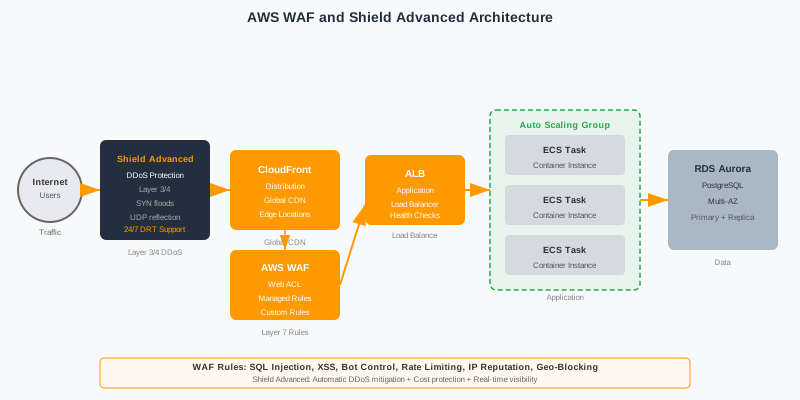
Every public-facing API is under constant attack. SQL injections probe your login endpoints, bots hammer your checkout flows, and volumetric floods target your ALBs. This comprehensive guide shows you how to layer AWS WAF and Shield Advanced correctly — from Terraform-managed Web ACLs and managed rule groups to custom rate-limit rules, bot control, and DRT-backed DDoS response — so your Java/Spring Boot APIs stay up and compliant under real-world adversarial conditions.
TL;DR — Security Rule in One Sentence
"Enable AWS WAF with AWSManagedRulesCommonRuleSet and AWSManagedRulesAmazonIpReputationList as your baseline. Add custom rate-limit rules per endpoint, enable Bot Control for public APIs, and integrate Shield Advanced for any production service with an SLA. Log every WAF decision to CloudWatch Logs and alert on rule group block spikes."
Table of Contents
- Why WAF and Shield Are Non-Negotiable Before Production
- AWS WAF Architecture: Web ACLs, Rules, and Rule Groups
- Managed Rule Groups: AWS Core and Threat Intelligence
- Custom Rules: Rate Limiting, IP Reputation, Header Inspection
- Bot Control: Separating Legitimate Bots from Malicious Traffic
- Geo-Blocking and IP Set Management
- AWS Shield Standard vs Shield Advanced
- DDoS Response Team (DRT) and Shield Advanced Benefits
- WAF Logging, Monitoring, and CloudWatch Metrics
- WAF Pre-Production Checklist for Java APIs
- Conclusion & Security Checklist
1. Why WAF and Shield Are Non-Negotiable Before Production
The OWASP Top 10 is not a theoretical list — it is a ranked catalog of attacks that hit production APIs every day. SQL injection, cross-site scripting, and broken object-level authorization are not edge cases; they are the bread-and-butter techniques of automated attack campaigns that continuously scan the internet for exposed endpoints. A Java Spring Boot API exposed directly to the public internet without a WAF is effectively an open invitation: within hours of deployment, your access logs will show probe traffic from distributed bot networks testing every known vulnerability pattern.
DDoS attacks compound the problem by targeting different layers simultaneously. Volumetric attacks at Layer 3/4 flood your network bandwidth and exhaust connection tables at your load balancer. Protocol attacks exploit TCP handshake mechanics to hold connections open, draining server resources without sending a single application request. Application-layer attacks (Layer 7) are the most dangerous: they look like legitimate traffic but systematically hammer expensive API endpoints — think POST /api/search with complex query bodies — until your database connection pool is exhausted and your service latency spikes into timeouts. AWS WAF and Shield together provide coordinated defenses across all three attack layers.
The cost of not having WAF is not hypothetical. The average cost of a data breach in 2025 exceeded $4.88 million (IBM Cost of a Data Breach Report). A single SQL injection exploit that extracts a customer table can trigger GDPR/CCPA breach notifications, regulatory fines, and months of remediation work. Availability incidents caused by DDoS — even a 30-minute outage on an e-commerce checkout — directly translate to lost revenue. And compliance frameworks such as PCI DSS v4, SOC 2 Type II, and HIPAA explicitly require web application firewalls as a technical control, meaning skipping WAF can fail an audit and block enterprise sales cycles.
Spring Boot APIs face a unique threat profile compared to monolithic applications. Microservices expose many more API endpoints than traditional apps, and each endpoint is a potential attack surface. REST APIs often accept complex JSON bodies that can contain injection payloads. Actuator endpoints, if misconfigured, expose sensitive operational data. Spring Security handles authentication and authorization, but it operates inside the application layer — WAF provides an additional perimeter defense that stops attacks before they ever reach your JVM process, reducing both security risk and infrastructure cost from malicious traffic.
| OWASP Top 10 Threat | Attack Vector | WAF Mitigation | Managed Rule |
|---|---|---|---|
| A01 - Broken Access Control | Path traversal, IDOR manipulation | URI path inspection, regex rules | CommonRuleSet |
| A03 - Injection (SQLi, LDAPi) | Malicious SQL in query/body params | SQL injection pattern detection | SQLiRuleSet |
| A03 - XSS | Script tags in input fields/headers | XSS signature matching | CommonRuleSet |
| A05 - Security Misconfiguration | Probing /actuator, /.env, /admin | URI block list, KnownBadInputs | KnownBadInputsRuleSet |
| A06 - Vulnerable Components | Log4Shell, Spring4Shell exploits | Known exploit signatures | KnownBadInputsRuleSet |
| A07 - Auth Failures | Credential stuffing, brute force | Rate limiting + Bot Control | Bot Control + Custom Rate Rule |
| A09 - Security Logging Failures | Log injection, log suppression | WAF full request logging | WAF Logging Config |
| A10 - SSRF | Internal AWS metadata endpoint abuse | SSRF signature + URL inspection | CommonRuleSet |
2. AWS WAF Architecture: Web ACLs, Rules, and Rule Groups
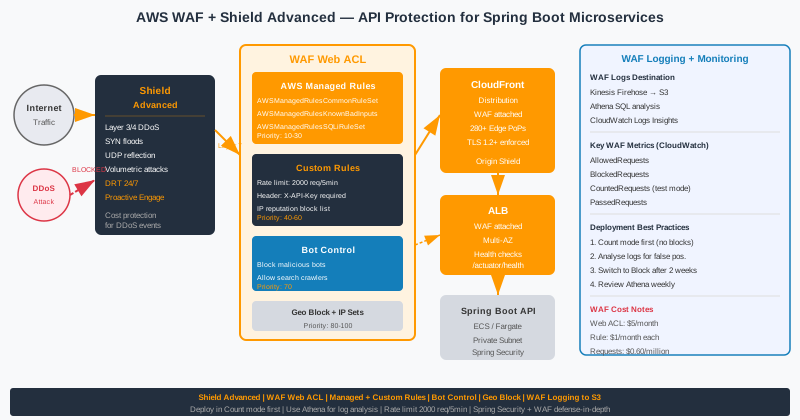
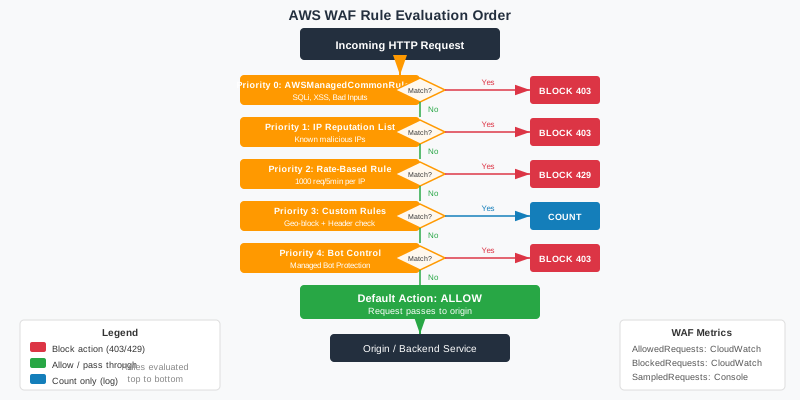
AWS WAF v2 is organized around the Web ACL (Access Control List), which is the top-level resource that contains all your WAF rules. A Web ACL defines a default action (Allow or Block) that applies to any request not explicitly matched by a rule. Rules within a Web ACL are evaluated in priority order — lower priority number = higher evaluation precedence. Each rule has an action: Allow, Block, Count, CAPTCHA, or Challenge. The first matching rule determines the final disposition of the request, unless the rule uses Count mode, which lets evaluation continue to subsequent rules.
A Web ACL has a scope that determines which AWS resources it can protect. CLOUDFRONT scope deploys the Web ACL globally via CloudFront's edge network and must be created in us-east-1. REGIONAL scope protects Application Load Balancers, API Gateway REST APIs, API Gateway HTTP APIs, AppSync GraphQL APIs, and Cognito User Pools within a specific AWS region. For most Java microservice architectures using ALB or API Gateway, you will create regional Web ACLs in each region where your services run.
Rules consume Web ACL Capacity Units (WCU), with a default limit of 5,000 WCU per Web ACL (soft limit, can be increased). Different rule types cost different WCU amounts: a simple IP set match costs 1 WCU, a regex match costs 25 WCU, a managed rule group like CommonRuleSet costs 700 WCU. You must monitor your WCU budget carefully when stacking multiple managed rule groups plus custom rules. The AWS Console shows your current WCU usage, and Terraform's `aws_wafv2_web_acl` resource will error if you exceed the limit at deploy time.
Beyond rules, Web ACLs reference IP sets (lists of CIDR ranges for allow/block decisions) and regex pattern sets (reusable regex patterns for matching request components). Both are managed resources that can be shared across multiple Web ACLs within the same scope and region. Rule groups are reusable collections of rules — either AWS-managed or customer-managed — that encapsulate a set of related security logic and are referenced from Web ACLs by name and version.
# Terraform: Create a regional WAF Web ACL for ALB
resource "aws_wafv2_web_acl" "api_waf" {
  name        = "api-waf-production"
  description = "WAF for Spring Boot API Gateway ALB"
  scope       = "REGIONAL"
  default_action {
    allow {}
  }
  # Visibility configuration for CloudWatch metrics
  visibility_config {
    cloudwatch_metrics_enabled = true
    metric_name                = "ApiWafMetrics"
    sampled_requests_enabled   = true
  }
  # Rule 1: AWS Managed Common Rule Set (Priority 10)
  rule {
    name     = "AWSManagedRulesCommonRuleSet"
    priority = 10
    override_action {
      none {}
    }
    statement {
      managed_rule_group_statement {
        name        = "AWSManagedRulesCommonRuleSet"
        vendor_name = "AWS"
      }
    }
    visibility_config {
      cloudwatch_metrics_enabled = true
      metric_name                = "CommonRuleSetMetrics"
      sampled_requests_enabled   = true
    }
  }
  # Rule 2: IP Reputation List (Priority 20)
  rule {
    name     = "AWSManagedRulesAmazonIpReputationList"
    priority = 20
    override_action {
      none {}
    }
    statement {
      managed_rule_group_statement {
        name        = "AWSManagedRulesAmazonIpReputationList"
        vendor_name = "AWS"
      }
    }
    visibility_config {
      cloudwatch_metrics_enabled = true
      metric_name                = "IpReputationMetrics"
      sampled_requests_enabled   = true
    }
  }
  tags = {
    Environment = "production"
    Team        = "platform-security"
  }
}
# Associate Web ACL with ALB
resource "aws_wafv2_web_acl_association" "api_alb" {
  resource_arn = aws_lb.api_alb.arn
  web_acl_arn  = aws_wafv2_web_acl.api_waf.arn
}
3. Managed Rule Groups: AWS Core and Threat Intelligence
AWS-managed rule groups are pre-built, continuously updated rule collections maintained by the AWS Threat Intelligence team. They are the fastest path to comprehensive protection because AWS engineers track new exploit signatures, CVEs, and attack campaigns in real-time and push updates to managed rule groups transparently — your Web ACL gets updated without any action on your part. For most APIs, starting with two or three managed rule groups gives you 80% of the protection value you need before you write a single custom rule.
The AWSManagedRulesCommonRuleSet (CRS) is the cornerstone of any WAF configuration. It contains 700 WCU worth of rules covering the OWASP Top 10: SQL injection, XSS, CSRF, path traversal, SSRF, Log4Shell signatures, Spring4Shell detection, and general request anomaly detection. By default every rule in the CRS is in Block mode. However, you can override individual rules to Count mode if they produce false positives for your application — for example, if your API legitimately accepts large request bodies, you may need to override the SizeRestrictions_BODY rule to Count and set your own size limit via a custom rule.
The AWSManagedRulesAmazonIpReputationList blocks IP addresses that AWS has identified as sources of malicious activity: known botnets, Tor exit nodes, scanners, and hosts associated with DDoS attacks. This rule group is refreshed continuously from Amazon's global threat intelligence network and is one of the highest signal-to-noise managed rule groups available. Pairing it with AWSManagedRulesAnonymousIpList — which blocks VPNs, proxies, and Tor — gives you broad coverage against anonymous evasion techniques used by attackers who try to obscure their origin IP.
For APIs specifically, AWSManagedRulesKnownBadInputsRuleSet and AWSManagedRulesSQLiRuleSet are both essential. The KnownBadInputs group blocks exploit payloads for recent high-severity CVEs — it was the first managed rule updated with Log4Shell (CVE-2021-44228) detection within hours of public disclosure. The SQLi rule set uses dedicated SQL injection detection heuristics that go deeper than the generic SQL injection rules in CRS, covering more obfuscation techniques such as hex encoding, comment injection, and time-based blind SQL injection patterns. Pricing is approximately $1.00 per million requests per rule group, on top of the base Web ACL fee of $5/month.
| Managed Rule Group | Description | WCU | Primary Use Case |
|---|---|---|---|
| AWSManagedRulesCommonRuleSet | OWASP Top 10 core protections (SQLi, XSS, LFI, SSRF) | 700 | All web APIs — mandatory baseline |
| AWSManagedRulesAmazonIpReputationList | Blocks known malicious IPs from AWS threat intel | 25 | Block botnets, scanners, known attackers |
| AWSManagedRulesAnonymousIpList | Blocks Tor, VPNs, hosting providers used as proxies | 50 | Block anonymous evasion techniques |
| AWSManagedRulesKnownBadInputsRuleSet | Exploit patterns for Log4Shell, Spring4Shell, SSRF | 200 | Block known CVE exploit payloads |
| AWSManagedRulesSQLiRuleSet | Advanced SQL injection detection with obfuscation bypass coverage | 200 | APIs with database-connected endpoints |
| AWSManagedRulesLinuxRuleSet | Linux OS command injection and LFI patterns | 200 | APIs running on Linux with file access |
# Terraform: Override individual rule in CRS to Count mode
# (avoids false positive on large JSON bodies)
rule {
  name     = "AWSManagedRulesCommonRuleSet"
  priority = 10
  override_action {
    none {}
  }
  statement {
    managed_rule_group_statement {
      name        = "AWSManagedRulesCommonRuleSet"
      vendor_name = "AWS"
      # Override SizeRestrictions_BODY to Count instead of Block
      rule_action_override {
        name = "SizeRestrictions_BODY"
        action_to_use {
          count {}
        }
      }
      # Override GenericRFI_BODY to Count for APIs with URL params in body
      rule_action_override {
        name = "GenericRFI_BODY"
        action_to_use {
          count {}
        }
      }
    }
  }
  visibility_config {
    cloudwatch_metrics_enabled = true
    metric_name                = "CommonRuleSetMetrics"
    sampled_requests_enabled   = true
  }
}
4. Custom Rules: Rate Limiting, IP Reputation, Header Inspection
Managed rule groups cover broad attack patterns, but your API has unique security requirements that only custom rules can address. Rate limiting is the most critical custom rule for most APIs: you need per-IP rate limits on authentication endpoints to prevent credential stuffing, per-IP limits on search endpoints to prevent scraping, and per-API-key limits on metered endpoints to prevent abuse by individual customers. AWS WAF rate-based rules let you define limits in terms of requests per 5-minute window, with the ability to scope the limit by IP, forwarded IP, or a specific header value.
IP set rules let you maintain allow-lists and deny-lists of specific CIDR ranges. Allow-lists are useful for internal monitoring systems (health checks, uptime robots), CI/CD pipelines, and trusted partner integrations that you never want blocked by other rules. Deny-lists are useful for permanently blocking known abusers, competitors scraping your pricing APIs, or ranges associated with fraudulent activity you've manually identified. Unlike managed IP reputation lists which are auto-updated, custom IP sets must be maintained by your team — use automation to populate them from threat intelligence feeds or your SIEM alerts.
Header inspection rules add API-specific security checks that no generic managed rule group can provide. For example, you can require that every request to your internal API gateway include a specific header (e.g., X-Api-Key or X-Internal-Token) and block any request missing it. This creates a lightweight "pre-authentication" filter at the WAF layer before requests ever reach your Spring Boot application. Combined with a WAF rule that validates the format of the header value using a regex pattern set, this blocks a large category of unauthenticated probing traffic with extremely low WCU cost.
Size constraint rules protect against HTTP request smuggling and oversized payload attacks. Define maximum sizes for request URI length, query string length, body size, and individual header values. Requests exceeding these limits are blocked before they consume application resources. JSON body inspection is particularly important for REST APIs: WAF can parse the JSON body and inspect individual field values for injection patterns, rather than doing a naive string search on the raw body — this reduces false positives while improving detection accuracy for deeply nested JSON payloads.
# Terraform: Rate limiting rule — 100 req/5min per IP per path
resource "aws_wafv2_web_acl" "api_waf" {
  # ... other config ...
  # Custom Rate Limit on /api/auth/* — 100 req per 5 min per IP
  rule {
    name     = "RateLimitAuthEndpoint"
    priority = 1
    action {
      block {}
    }
    statement {
      rate_based_statement {
        limit              = 100
        aggregate_key_type = "IP"
        scope_down_statement {
          byte_match_statement {
            search_string = "/api/auth/"
            field_to_match {
              uri_path {}
            }
            text_transformation {
              priority = 0
              type     = "LOWERCASE"
            }
            positional_constraint = "STARTS_WITH"
          }
        }
      }
    }
    visibility_config {
      cloudwatch_metrics_enabled = true
      metric_name                = "RateLimitAuthMetrics"
      sampled_requests_enabled   = true
    }
  }
  # Custom Rule: Block requests missing required API key header
  rule {
    name     = "RequireApiKeyHeader"
    priority = 5
    action {
      block {}
    }
    statement {
      and_statement {
        statement {
          byte_match_statement {
            search_string = "/api/v"
            field_to_match { uri_path {} }
            text_transformation {
              priority = 0
              type     = "LOWERCASE"
            }
            positional_constraint = "STARTS_WITH"
          }
        }
        statement {
          not_statement {
            statement {
              size_constraint_statement {
                comparison_operator = "GT"
                size                = 0
                field_to_match {
                  single_header {
                    name = "x-api-key"
                  }
                }
                text_transformation {
                  priority = 0
                  type     = "NONE"
                }
              }
            }
          }
        }
      }
    }
    visibility_config {
      cloudwatch_metrics_enabled = true
      metric_name                = "MissingApiKeyMetrics"
      sampled_requests_enabled   = true
    }
  }
}
Spring Boot Integration Pattern
When WAF sits in front of your Spring Boot application via ALB, WAF adds headers to the forwarded request that your application can use for auditing and debugging. The X-Amzn-Waf-Action header (in Count mode) and the AWS Request ID allow you to correlate WAF decisions with application logs. Configure your Spring Boot logging filter to capture the WAF-injected headers and include them in your structured log output, creating a complete audit trail from edge to application.
// Spring Boot: Log WAF-forwarded headers for audit trail
@Component
public class WafAuditFilter implements Filter {
    private static final Logger log = LoggerFactory.getLogger(WafAuditFilter.class);
    @Override
    public void doFilter(ServletRequest req, ServletResponse res,
                         FilterChain chain) throws IOException, ServletException {
        HttpServletRequest httpReq = (HttpServletRequest) req;
        // Log WAF-related headers for audit correlation
        String sourceIp = httpReq.getHeader("X-Forwarded-For");
        String awsRequestId = httpReq.getHeader("X-Amzn-RequestId");
        String wafLabel = httpReq.getHeader("X-Amzn-Waf-Action");
        if (awsRequestId != null) {
            log.info("WAF_AUDIT uri={} source_ip={} aws_request_id={} waf_action={}",
                httpReq.getRequestURI(), sourceIp, awsRequestId,
                wafLabel != null ? wafLabel : "ALLOW");
        }
        chain.doFilter(req, res);
    }
}
5. Bot Control: Separating Legitimate Bots from Malicious Traffic
Bot traffic is a double-edged problem: you need to allow legitimate crawlers from Google, Bing, and monitoring services while blocking scrapers, credential stuffers, inventory hoarders, and automated checkout bots. The challenge is that sophisticated bots have learned to mimic legitimate browser behavior — they rotate IPs, randomize User-Agents, respect robots.txt, and even execute JavaScript. AWS WAF Bot Control uses machine learning and behavioral analysis to classify bots with much higher accuracy than simple User-Agent matching.
AWS WAF Bot Control comes in two tiers. The Common Bot Control managed rule group (SignalCommonBot) detects and manages common, well-categorized bots: search engine crawlers, monitoring services, SEO tools, and automation frameworks. It verifies claims made in the User-Agent header (confirming Google's bot actually comes from Google's IP ranges) and adds labels to requests based on their bot category. You can then write label-based rules downstream to allow verified search engines while blocking unverified bot traffic.
Targeted Bot Control (an add-on to Common Bot Control) addresses the harder problem: sophisticated bots that are designed to evade detection. It uses browser interrogation techniques — JavaScript challenges, browser fingerprinting, and behavioral analytics — to detect headless browsers (Puppeteer, Playwright, Selenium) masquerading as real users. For APIs that are also accessed via web browsers (B2C applications), Targeted Bot Control can significantly reduce credential stuffing and web scraping even from bots that have properly configured browser emulation.
The CAPTCHA and Challenge actions in WAF Bot Control allow you to add friction for suspected bots without immediately blocking them. The Challenge action serves a cryptographic challenge that requires JavaScript execution — it transparently distinguishes real browsers from simple HTTP clients. CAPTCHA serves a visible CAPTCHA puzzle when higher confidence is needed. These actions are most useful for public-facing endpoints where you want to frustrate automation without creating a hard block that could affect legitimate users. For pure machine-to-machine API endpoints with known client patterns, a hard block on unverified bots is more appropriate.
| Bot Category | Examples | WAF Label | Recommended Action |
|---|---|---|---|
| Verified Search Engines | Googlebot, Bingbot | awswaf:managed:aws:bot-control:bot:verified | Allow |
| Monitoring / Uptime Bots | Pingdom, StatusCake, Datadog | awswaf:managed:aws:bot-control:bot:monitoring | Allow (add to IP allow-list) |
| Scrapers (unverified) | Scrapy, Python requests, curl-based | awswaf:managed:aws:bot-control:bot:scraper | Block |
| Credential Stuffers | Sentry MBA, OpenBullet | awswaf:managed:aws:bot-control:targeted | Block + Rate Limit |
| Headless Browsers | Puppeteer, Playwright, Selenium | awswaf:managed:aws:bot-control:targeted:headless-browser | CAPTCHA or Block |
| Inventory Hoarders | Scalper bots, resale automation | Behavioral pattern + rate limit | Rate Limit + CAPTCHA |
# Terraform: Bot Control managed rule with label-based allow for verified search engines
rule {
  name     = "AWSManagedRulesBotControlRuleSet"
  priority = 30
  override_action {
    none {}
  }
  statement {
    managed_rule_group_statement {
      name        = "AWSManagedRulesBotControlRuleSet"
      vendor_name = "AWS"
      managed_rule_group_configs {
        aws_managed_rules_bot_control_rule_set {
          inspection_level = "COMMON"
        }
      }
    }
  }
  visibility_config {
    cloudwatch_metrics_enabled = true
    metric_name                = "BotControlMetrics"
    sampled_requests_enabled   = true
  }
}
# Allow verified search engine bots via label match BEFORE Bot Control rule
rule {
  name     = "AllowVerifiedSearchBots"
  priority = 25  # Higher priority than Bot Control
  action {
    allow {}
  }
  statement {
    label_match_statement {
      scope = "LABEL"
      key   = "awswaf:managed:aws:bot-control:bot:verified"
    }
  }
  visibility_config {
    cloudwatch_metrics_enabled = true
    metric_name                = "AllowedSearchBotsMetrics"
    sampled_requests_enabled   = true
  }
}
6. Geo-Blocking and IP Set Management
Geographic restriction is one of the most cost-effective security controls available in AWS WAF. If your service only legally operates in specific countries (due to compliance requirements, licensing restrictions, or regulatory mandates), blocking all traffic from unauthorized geographies at the WAF layer eliminates entire categories of attack traffic before it consumes any application resources. A fintech API restricted to APAC markets can block 95% of global IP space and immediately reduce attack surface to only the geographies it actually serves.
AWS WAF geo match rules use a regularly updated IP-to-country database maintained by AWS. You specify the set of country codes using ISO 3166-1 alpha-2 format (US, GB, AU, SG, etc.). You have two strategies: allow-list (only allow traffic from explicitly listed countries, block everything else — the most restrictive and recommended for compliance-sensitive APIs) and block-list (block traffic from specific high-risk countries while allowing the rest — useful when you can't enumerate all allowed countries but know specific problematic sources). Allow-list is almost always the correct choice for B2B APIs.
There is an important distinction between WAF geo-match rules and CloudFront's built-in geo-restriction feature. CloudFront geo-restriction is simpler and cheaper (no additional WAF cost), but it applies at the distribution level and cannot be combined with other WAF conditions — you either block the country or you don't. WAF geo-match rules can be combined with other conditions using AND/OR logic: for example, "block requests from country X UNLESS they have a valid internal API key header." This composability makes WAF geo rules much more powerful for nuanced access control scenarios.
IP set management requires operational discipline. A manual IP deny-list quickly becomes stale: attackers rotate through CIDR ranges, cloud provider IP blocks change, and VPN IP pools are continuously updated. Automate IP set updates by integrating your WAF IP sets with threat intelligence APIs (commercial feeds or open-source lists like emerging-threats.net) via Lambda functions triggered on a schedule. For allow-lists, ensure you have a process to add new partner IPs and CI/CD runner IPs as they change — a stale allow-list that blocks your own monitoring system is a reliability risk.
# Terraform: Geo-match rule — allow-list approach
# Only allow AU, SG, US, GB; block everything else
resource "aws_wafv2_web_acl" "api_waf" {
  # ... other config ...
  rule {
    name     = "GeoBlockNonOperatingCountries"
    priority = 50
    action {
      block {}
    }
    statement {
      not_statement {
        statement {
          geo_match_statement {
            country_codes = ["AU", "SG", "US", "GB", "NZ", "CA"]
          }
        }
      }
    }
    visibility_config {
      cloudwatch_metrics_enabled = true
      metric_name                = "GeoBlockMetrics"
      sampled_requests_enabled   = true
    }
  }
}
# IP Set: Internal monitoring allow-list
resource "aws_wafv2_ip_set" "internal_allow" {
  name               = "internal-monitoring-allow"
  description        = "Datadog, PagerDuty, and CI/CD runner IPs"
  scope              = "REGIONAL"
  ip_address_version = "IPV4"
  addresses = [
    "54.236.202.0/24",   # Datadog US
    "34.201.0.0/16",     # CI/CD runners
  ]
}
# Rule: Allow internal monitoring IPs (highest priority — evaluated first)
rule {
  name     = "AllowInternalMonitoring"
  priority = 0  # Lowest number = highest priority
  action {
    allow {}
  }
  statement {
    ip_set_reference_statement {
      arn = aws_wafv2_ip_set.internal_allow.arn
    }
  }
  visibility_config {
    cloudwatch_metrics_enabled = true
    metric_name                = "InternalAllowMetrics"
    sampled_requests_enabled   = true
  }
}
7. AWS Shield Standard vs Shield Advanced
AWS Shield Standard is automatically enabled for every AWS account at no additional charge. It provides protection against the most common Layer 3 and Layer 4 DDoS attacks — SYN floods, UDP floods, ICMP floods, and reflection attacks — using AWS's global infrastructure and the always-on traffic monitoring embedded in every AWS edge location. Shield Standard is effective against volumetric attacks because AWS absorbs the traffic at the network layer before it reaches your resources, but it provides no visibility into the attacks, no L7 protection, and no access to DDoS response specialists.
Shield Advanced is the enterprise-grade DDoS protection tier at $3,000/month per organization (not per account — the subscription covers all resources in all accounts under the same billing). The additional cost buys you substantially more: dedicated DDoS protection engineering via the Shield Response Team (SRT), 24/7 available during active attacks; advanced CloudWatch metrics including DDoS attack vectors, attack volume, and mitigation status; automatic application layer (L7) DDoS mitigation integrated with WAF; and AWS cost protection, which issues credits for scale-out costs (EC2, data transfer, etc.) caused by DDoS attacks.
The decision to upgrade to Shield Advanced should be straightforward for any service with a meaningful revenue SLA. If a 30-minute DDoS outage costs you more than $3,000 in lost revenue, customer penalties, or SLA breach credits — Shield Advanced pays for itself in a single incident. Additionally, PCI DSS v4, HIPAA, and certain financial services regulations increasingly reference the need for active DDoS mitigation capabilities, which Shield Advanced satisfies in ways that Shield Standard does not.
| Feature | Shield Standard | Shield Advanced |
|---|---|---|
| Cost | Free (included with AWS) | $3,000/month per organization |
| L3/L4 DDoS Coverage | ✅ SYN floods, UDP floods, reflection | ✅ All L3/L4 + enhanced capacity |
| L7 Application DDoS | ❌ Not covered | ✅ Auto-mitigation via WAF integration |
| DRT (SRT) Access | ❌ No | ✅ 24/7 during active attacks |
| SLA Support | Standard AWS support | Business/Enterprise support included |
| DDoS Cost Protection | ❌ No credits for attack-related scale-out | ✅ AWS credits for EC2/data transfer spikes |
| Advanced Metrics & Reporting | ❌ No attack visibility | ✅ CloudWatch DDoS metrics, attack reports |
# Terraform: Enable Shield Advanced and protect ALB + CloudFront
resource "aws_shield_protection" "api_alb_protection" {
  name         = "api-alb-shield-advanced"
  resource_arn = aws_lb.api_alb.arn
  tags = {
    Environment = "production"
    Team        = "platform-security"
  }
}
resource "aws_shield_protection" "cloudfront_protection" {
  name         = "api-cloudfront-shield-advanced"
  resource_arn = aws_cloudfront_distribution.api_cdn.arn
}
# Shield Advanced automatic response - link to WAF for L7 auto-mitigation
resource "aws_shield_protection_group" "api_services" {
  protection_group_id = "api-production-group"
  aggregation         = "MAX"
  pattern             = "ARBITRARY"
  members = [
    aws_lb.api_alb.arn,
    aws_cloudfront_distribution.api_cdn.arn,
  ]
}
8. DDoS Response Team (DRT) and Shield Advanced Benefits
The Shield Response Team (SRT, formerly DRT) is AWS's 24/7 dedicated DDoS response unit staffed by engineers who specialize exclusively in DDoS mitigation. As a Shield Advanced subscriber, you can contact the SRT during an active attack by opening a support case with category "DDoS" — you will reach a specialist within minutes, not hours. The SRT can review your WAF rules, suggest real-time mitigations, analyze attack traffic patterns, and even temporarily deploy WAF rules on your behalf (with your permission) if you grant them IAM access to your WAF configuration.
Shield Advanced's proactive engagement feature allows AWS to contact you proactively when they detect a significant DDoS attack targeting your protected resources — even before you notice availability degradation. You configure health checks and contact information in the Shield Advanced console, and AWS monitors your health check status. If an attack causes your health checks to fail, the SRT will attempt to contact you via the escalation path you've defined, ensuring you're never caught off-guard by a large attack. This is particularly valuable for on-call teams managing services across multiple time zones.
The DDoS cost protection benefit is often underappreciated. During a large DDoS attack, your EC2 Auto Scaling groups may scale out to handle the flood of traffic, CloudFront may transfer petabytes of junk data, and NAT Gateway data processing costs can spike dramatically — all billed to your account for traffic that generated zero real revenue. Shield Advanced provides AWS service credits for these attack-attributable costs, removing the financial sting of a successful volumetric attack. Submit a credit request through the Shield Advanced console within 60 days of the attack, and AWS will review the traffic patterns to confirm the spike was attack-related.
For L7 DDoS protection, Shield Advanced integrates directly with WAF to enable automatic application layer DDoS mitigation. When enabled, Shield Advanced uses machine learning to detect application layer flood patterns and automatically deploys WAF rules to mitigate them — without any human action. This is particularly effective against HTTP flood attacks that target a specific endpoint with high-volume legitimate-looking requests. The automatically deployed rules are temporary and removed once the attack subsides, leaving your WAF configuration unchanged.
# Terraform: Enable Shield Advanced auto-mitigation for L7 DDoS
# This links Shield Advanced to your WAF Web ACL for automatic response
resource "aws_shield_application_layer_automatic_response" "api_auto_response" {
  resource_arn = aws_lb.api_alb.arn
  action {
    block {}  # Automatically BLOCK during detected DDoS — use "count" for test mode
  }
}
# CloudWatch alarm for Shield DDoS detection
resource "aws_cloudwatch_metric_alarm" "ddos_detected" {
  alarm_name          = "shield-ddos-detected-api"
  comparison_operator = "GreaterThanThreshold"
  evaluation_periods  = 1
  metric_name         = "DDoSDetected"
  namespace           = "AWS/DDoSProtection"
  period              = 60
  statistic           = "Sum"
  threshold           = 0  # Alert on any DDoS event
  dimensions = {
    ResourceArn = aws_lb.api_alb.arn
  }
  alarm_description = "DDoS attack detected on API ALB by Shield Advanced"
  alarm_actions     = [aws_sns_topic.security_alerts.arn]
  ok_actions        = [aws_sns_topic.security_alerts.arn]
}
9. WAF Logging, Monitoring, and CloudWatch Metrics
WAF logging is non-negotiable for any production deployment. Without logs, you cannot investigate security incidents, tune rules to reduce false positives, prove compliance to auditors, or understand whether your WAF is actually providing value. AWS WAF supports three logging destinations: Amazon CloudWatch Logs (best for real-time alerting and short-term retention), Amazon S3 (best for long-term retention, cost-effective archival, and Athena queries), and Amazon Kinesis Data Firehose (best for streaming logs to your SIEM or a custom analytics pipeline in near-real-time).
Each WAF log record contains rich fields: timestamp (millisecond precision), action (ALLOW/BLOCK/COUNT/CAPTCHA/CHALLENGE), terminatingRuleId (the name of the rule that made the final decision), terminatingRuleType (REGULAR/RATE_BASED/MANAGED_RULE_GROUP), httpRequest object (URI, HTTP method, headers, client IP, country), and labels (array of labels applied by matched rules). The terminatingRuleId is your most important debugging field — if legitimate requests are being blocked, this tells you exactly which rule is responsible.
CloudWatch Metrics are automatically published by WAF for every rule in your Web ACL when cloudwatch_metrics_enabled is true (which you should always set). The key metrics are: AllowedRequests, BlockedRequests, CountedRequests, and PassedRequests (for rules that don't match). Create CloudWatch alarms on BlockedRequests to detect unusual attack traffic volumes. A good baseline alarm: if BlockedRequests from any single managed rule group exceeds 1,000 per minute (significantly above your normal blocked rate), alert your security team — this indicates an active, targeted attack campaign.
For long-term analysis, store WAF logs in S3 and query them with Athena. WAF logs are written in JSON format and can be analyzed with standard SQL. Common Athena queries for security analysis: top 10 blocked IPs by country, attack pattern distribution by rule group, hourly block rate trends for a specific endpoint, and comparison of block rates before/after rule changes. Create a WAF CloudWatch Dashboard combining BlockedRequests, AllowedRequests, and your custom rule metrics into a single operational view that your security team checks daily.
# Terraform: WAF logging to CloudWatch Logs + S3 via Kinesis Firehose
resource "aws_cloudwatch_log_group" "waf_logs" {
  name              = "/aws/wafv2/api-waf-production"
  retention_in_days = 90  # 90-day retention for compliance
  tags = {
    Environment = "production"
    Purpose     = "waf-security-logs"
  }
}
resource "aws_wafv2_web_acl_logging_configuration" "api_waf_logging" {
  log_destination_configs = [aws_cloudwatch_log_group.waf_logs.arn]
  resource_arn            = aws_wafv2_web_acl.api_waf.arn
  # Redact sensitive headers from logs for privacy compliance
  redacted_fields {
    single_header {
      name = "authorization"
    }
  }
  redacted_fields {
    single_header {
      name = "x-api-key"
    }
  }
  # Log filter: only log BLOCK decisions to reduce log volume (optional)
  logging_filter {
    default_behavior = "DROP"  # DROP = don't log; KEEP = log
    filter {
      behavior = "KEEP"
      condition {
        action_condition {
          action = "BLOCK"
        }
      }
      requirement = "MEETS_ANY"
    }
  }
}
# CloudWatch alarm: excessive blocks (possible active attack)
resource "aws_cloudwatch_metric_alarm" "waf_block_spike" {
  alarm_name          = "waf-block-spike-api"
  comparison_operator = "GreaterThanThreshold"
  evaluation_periods  = 2
  metric_name         = "BlockedRequests"
  namespace           = "AWS/WAFV2"
  period              = 60
  statistic           = "Sum"
  threshold           = 1000
  dimensions = {
    WebACL = "api-waf-production"
    Region = "ap-southeast-1"
    Rule   = "ALL"
  }
  alarm_description = "WAF blocking more than 1000 req/min — possible attack"
  alarm_actions     = [aws_sns_topic.security_alerts.arn]
}
Athena Query: Top Blocked IPs by Country
-- Athena SQL: Top 20 blocked source IPs and their countries (last 24h)
SELECT
    httprequest.clientip AS source_ip,
    httprequest.country AS country,
    terminatingruleid AS blocked_by_rule,
    COUNT(*) AS block_count
FROM waf_logs
WHERE action = 'BLOCK'
  AND from_unixtime(timestamp / 1000) >= NOW() - INTERVAL '24' HOUR
GROUP BY httprequest.clientip, httprequest.country, terminatingruleid
ORDER BY block_count DESC
LIMIT 20;
10. WAF Pre-Production Checklist for Java APIs
Before deploying any Java/Spring Boot API to production, work through each item in this checklist. This covers WAF design, rule configuration, bot control, Shield integration, logging, monitoring, and testing — the complete security lifecycle for WAF-protected APIs. Treat this as a living document: revisit it quarterly and after any significant infrastructure change.
WAF Design & Architecture
- ✅ Web ACL created in correct scope (REGIONAL for ALB/API Gateway, CLOUDFRONT for global CDN)
- ✅ Web ACL associated with all public-facing resources (ALB, API Gateway, CloudFront distribution)
- ✅ Default action set to ALLOW (rules define blocks); never use BLOCK as default without full traffic analysis
- ✅ WCU budget reviewed — total WCU consumption < 4,500 to leave headroom for future rules
- ✅ All WAF resources managed via Terraform or CloudFormation — no manual console changes
- ✅ WAF applied in COUNT mode in staging/pre-prod environment for rule validation before blocking in production
Rules & Managed Rule Groups
- ✅ AWSManagedRulesCommonRuleSet enabled at priority 10
- ✅ AWSManagedRulesAmazonIpReputationList enabled at priority 20
- ✅ AWSManagedRulesSQLiRuleSet enabled for any API with database-backed endpoints
- ✅ AWSManagedRulesKnownBadInputsRuleSet enabled to catch CVE exploit payloads
- ✅ CRS false-positive rules identified and overridden to COUNT mode (not disabled)
- ✅ Custom rate-limit rules created for all authentication endpoints (suggested: 100 req/5min per IP)
- ✅ Custom rate-limit rules created for high-cost endpoints (search, bulk export)
Bot Control & Geo-Blocking
- ✅ Bot Control (Common level minimum) enabled for all public-facing APIs
- ✅ Verified search engine bot labels used to allow Googlebot/Bingbot via allow rule
- ✅ Scraper and credential-stuffer bot labels result in BLOCK action
- ✅ Geo allow-list configured if service has geographic regulatory restrictions
- ✅ Internal monitoring IPs (Datadog, Pingdom) added to IP allow-list at highest priority
- ✅ CI/CD runner CIDR ranges added to IP allow-list so deployments and health checks aren't blocked
Shield, Logging & Monitoring
- ✅ Shield Advanced enabled if monthly revenue SLA > $3,000 or compliance mandates active DDoS protection
- ✅ Shield automatic response enabled (L7 auto-mitigation) and linked to Web ACL
- ✅ SRT (Shield Response Team) contact information configured and proactive engagement enabled
- ✅ WAF logging enabled to CloudWatch Logs with 90-day retention minimum
- ✅ WAF logs also streamed to S3 for Athena long-term analysis
- ✅ Sensitive headers (Authorization, X-Api-Key) redacted from WAF logs
- ✅ CloudWatch alarm on BlockedRequests spike (> 1,000/min relative to baseline)
- ✅ CloudWatch alarm on DDoSDetected Shield metric (threshold: 0, alert on any event)
- ✅ WAF CloudWatch Dashboard created and reviewed as part of weekly security review
- ✅ WAF penetration test performed quarterly (with AWS approval if required by contract)
11. Conclusion & Security Checklist
AWS WAF and Shield form a complementary, layered defense that no production Java/Spring Boot API should operate without. WAF addresses application-layer threats — injection attacks, XSS, malicious bots, and credential stuffing — with a combination of AWS-managed intelligence and your own custom business logic encoded as rules. Shield addresses network-layer threats — volumetric floods and protocol attacks — with global infrastructure-level absorption, backed by AWS's dedicated SRT for Advanced subscribers. Neither tool alone is sufficient; together they cover the full spectrum from OWASP A01 through L3 DDoS.
The managed rule groups are your fastest path to baseline protection. AWSManagedRulesCommonRuleSet and AWSManagedRulesAmazonIpReputationList together block the overwhelming majority of automated attack traffic targeting web APIs, and they self-update as new attack patterns emerge. Start with these two, measure your block rates, analyze false positives carefully, and override (never disable) rules that create friction for legitimate traffic. Then layer in SQLiRuleSet, KnownBadInputsRuleSet, and Bot Control as your operational confidence grows.
Custom rate-limiting rules are where WAF becomes uniquely tailored to your application's security requirements. No managed rule can know that your login endpoint should accept a maximum of 100 requests per 5 minutes per IP, or that your bulk-export endpoint should be limited to 5 requests per hour per API key. These business-specific thresholds are the difference between a generic WAF deployment and a WAF configuration that actually models your application's expected usage patterns and blocks deviations from them. Document your rate limit rationale alongside your Terraform code so future engineers understand why each limit exists.
Finally, WAF and Shield are not set-and-forget controls. Review your WAF metrics weekly, investigate spikes in blocked traffic, update your IP sets as your infrastructure changes, and re-evaluate your managed rule group versions when AWS releases updates. Security at the edge is an ongoing operational discipline, not a one-time configuration task. The investment in building robust WAF observability — CloudWatch dashboards, Athena queries, SNS alarms — pays dividends every time your security team needs to respond to an incident or explain your security posture to an auditor.
Key Takeaways
- Start with two managed rule groups: AWSManagedRulesCommonRuleSet + AWSManagedRulesAmazonIpReputationList — this covers 80% of common attack traffic.
- Always run new rules in COUNT mode in your staging environment before switching to BLOCK in production to avoid false-positive outages.
- Rate-limit every authentication endpoint with a custom rate-based rule (100 req/5min per IP is a conservative starting point for most APIs).
- Enable Bot Control for any public API — it dramatically reduces bot-driven credential stuffing and scraping with minimal false positives for legitimate users.
- Upgrade to Shield Advanced if your monthly revenue SLA or compliance requirements demand active DDoS response with SRT support and cost protection.
- Log every WAF decision to CloudWatch Logs with a 90-day retention minimum, and create alarms on BlockedRequests spikes to detect active attacks.
- Manage all WAF resources with Terraform — manual console changes create drift and make incident root-cause analysis harder when rules need to be audited.
