AWS Route 53 & CloudFront: DNS Failover, Health Checks & CDN Optimization for Production
Route 53 and CloudFront are the front-line traffic gatekeepers for every serious AWS workload. Together they give you 100% DNS SLA, global CDN caching, health-check-driven failover, edge-level WAF protection, and HTTPS termination — all before a single request reaches your origin. This guide is a battle-tested reference for backend engineers who need to configure, tune, and validate these services for production Java APIs and modern web applications.
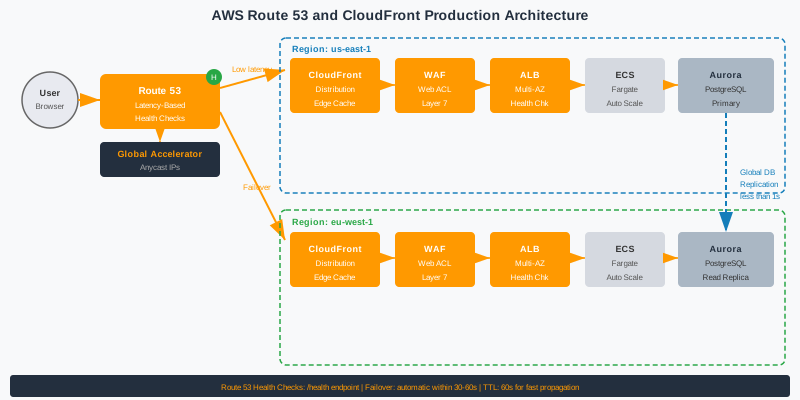
TL;DR — Key Rule in One Paragraph
"Use Route 53 latency routing with health checks for active-active multi-region APIs. Configure CloudFront with path-based cache behaviors, set conservative TTLs for API responses (0–60s), and aggressive TTLs for static assets (86400s+). Enable Origin Shield in the region closest to your origin. Attach WAF to CloudFront for edge-level OWASP protection."
Table of Contents
- Route 53 and CloudFront as Production Traffic Gatekeepers
- Route 53 Routing Policies: Latency, Weighted, Failover, Geolocation
- Health Checks: Endpoint, Calculated, and CloudWatch Alarm Checks
- DNS Failover Architecture with Active-Passive and Active-Active
- CloudFront Cache Behaviors: Path Patterns and TTL Strategy
- Origin Groups and Origin Failover for High Availability
- Origin Shield: Reducing Origin Load and Improving Cache Hit Ratio
- Lambda@Edge and CloudFront Functions for Request Manipulation
- HTTPS Enforcement, Custom SSL Certificates, and Security Policies
- WAF Integration with CloudFront for Edge Security
- Pre-Production DNS and CDN Checklist
1. Route 53 and CloudFront as Production Traffic Gatekeepers
AWS Route 53 is not a conventional DNS resolver — it is a globally distributed, Anycast DNS system backed by a 100% uptime SLA, the only DNS service in the world to carry that guarantee. Every Route 53 query is answered from the nearest of hundreds of globally distributed PoPs, typically in under 10 ms. Beyond raw resolution speed, Route 53's killer feature for production systems is its deep integration with health checks: it can automatically remove unhealthy endpoints from DNS responses in near-real-time, making DNS itself an active layer of your high-availability strategy rather than a passive naming service.
CloudFront complements Route 53 by operating at the HTTP/HTTPS layer. With over 450 Points of Presence (PoPs) across 90+ cities globally, CloudFront caches your content at the edge closest to each user, dramatically reducing origin load and round-trip latency. For a Java Spring Boot API serving users across North America, Europe, and Asia, routing through CloudFront can reduce p99 latency by 40–70 ms simply by serving cached responses from a nearby PoP rather than hitting a single-region ALB. CloudFront also handles SSL/TLS termination at the edge, DDoS absorption via AWS Shield Standard (included at no extra cost), and serves as the attachment point for AWS WAF.
The cost of not using a CDN in front of your API is measurable: every request travels the full geographic distance to your origin, your ALB and compute absorb 100% of request load including traffic spikes, static assets consume expensive origin bandwidth, and you lose the edge-level caching that could serve thousands of identical requests without ever reaching your application code. Equally important, without CloudFront in front, you must implement WAF and DDoS protection at the ALB/EC2 layer, which is more expensive and adds latency for all users rather than blocking at the edge.
The integration between Route 53 and CloudFront is tight: you create an Alias record in Route 53 pointing to your CloudFront distribution's domain name (e.g., d1234abcd.cloudfront.net). Alias records resolve without an extra DNS lookup, eliminating the CNAME chain and improving resolution speed. When Route 53 health checks detect origin failure, they can update routing to a failover CloudFront distribution or alternate origin group — combining DNS-layer failover with CDN-layer origin failover for defence-in-depth resilience.
| Routing Policy | Health Checks | Use Case | Multi-Value |
|---|---|---|---|
| Simple | No | Single resource, static site | No |
| Weighted | Optional | A/B testing, canary, blue-green | No |
| Latency | Recommended | Active-active multi-region | No |
| Failover | Required | Active-passive disaster recovery | No |
| Geolocation | Optional | Data residency, localization | No |
| Geoproximity | Optional | Traffic Flow bias, expand/shrink regions | Requires Traffic Flow |
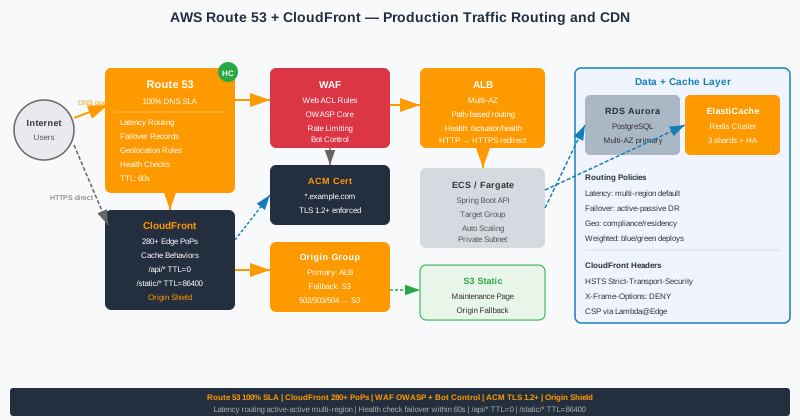
2. Route 53 Routing Policies: Latency, Weighted, Failover, Geolocation
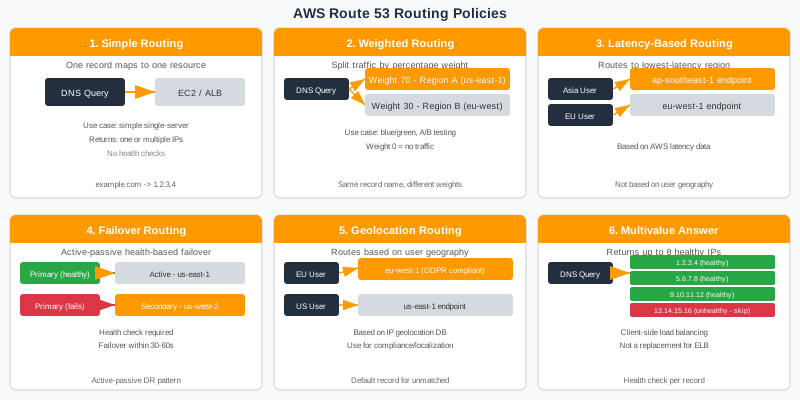
Route 53 supports six routing policies, each designed for a specific traffic-management pattern. Choosing the wrong one for your architecture is a common mistake — particularly using Simple when Latency routing would halve your global response times, or using Failover when you should be running active-active with Latency + health checks. Understanding the mechanics of each policy prevents expensive architectural rework after go-live.
Simple routing maps a DNS name to one or more IP addresses with no routing logic. Route 53 returns all values in random order (basic round-robin). It does not support health checks — if your single endpoint fails, DNS continues to resolve to the failed address until you manually update the record. Simple routing is only appropriate for truly stateless services with no availability requirements: static S3 websites, trivial redirect endpoints, or development environments. Never use it for production APIs.
Weighted routing allows you to assign integer weights (0–255) to multiple records with the same name. Route 53 routes traffic proportionally: if record A has weight 90 and record B has weight 10, roughly 90% of traffic goes to A. This is the mechanism for canary deployments (ship to 5% → validate → 100%), blue-green switches (shift weight from old stack to new), and A/B testing (split traffic between feature variants). When combined with health checks, unhealthy records are excluded from the weighted pool automatically. A weight of 0 removes the record from rotation without deleting it — useful for temporarily pulling an endpoint out during maintenance.
Latency routing is the right default for multi-region active-active APIs. Route 53 measures latency from each AWS Region to the requester's approximate location (based on the resolver IP), then routes to the region with the lowest measured latency. Latency data is continuously updated by AWS — you do not configure or maintain latency tables. Combined with health checks, latency routing automatically routes around a failing region, making it the most powerful policy for global Java microservice deployments. Configure it with records in us-east-1 and eu-west-1 and you get automatic geo-aware failover for free.
Geolocation routing routes based on the country or continent of the requester's IP. Unlike latency routing (which optimizes for speed), geolocation routing is about jurisdiction: EU users must hit EU servers for GDPR data residency; Japanese users must see localized content served from ap-northeast-1. Geolocation policies require a default record — any IP that doesn't match a configured location uses it. Geoproximity routing extends this by letting you define a bias (positive = expand, negative = shrink) to shift boundaries between regions, useful when one region is closer in latency but another has spare capacity.
Below is a complete Terraform example for latency routing across two regions with health checks — the canonical pattern for active-active production APIs:
# Terraform: Route 53 Latency Routing with Health Checks (2 regions)
resource "aws_route53_health_check" "us_east_1" {
  fqdn              = "api-us-east-1.internal.example.com"
  port              = 443
  type              = "HTTPS"
  resource_path     = "/actuator/health"
  failure_threshold = 3
  request_interval  = 10
  tags = { Name = "api-us-east-1-health" }
}
resource "aws_route53_health_check" "eu_west_1" {
  fqdn              = "api-eu-west-1.internal.example.com"
  port              = 443
  type              = "HTTPS"
  resource_path     = "/actuator/health"
  failure_threshold = 3
  request_interval  = 10
  tags = { Name = "api-eu-west-1-health" }
}
resource "aws_route53_record" "api_latency_us" {
  zone_id        = var.hosted_zone_id
  name           = "api.example.com"
  type           = "A"
  set_identifier = "us-east-1"
  latency_routing_policy {
    region = "us-east-1"
  }
  health_check_id = aws_route53_health_check.us_east_1.id
  alias {
    name                   = aws_lb.us_east_1_alb.dns_name
    zone_id                = aws_lb.us_east_1_alb.zone_id
    evaluate_target_health = true
  }
}
resource "aws_route53_record" "api_latency_eu" {
  zone_id        = var.hosted_zone_id
  name           = "api.example.com"
  type           = "A"
  set_identifier = "eu-west-1"
  latency_routing_policy {
    region = "eu-west-1"
  }
  health_check_id = aws_route53_health_check.eu_west_1.id
  alias {
    name                   = aws_lb.eu_west_1_alb.dns_name
    zone_id                = aws_lb.eu_west_1_alb.zone_id
    evaluate_target_health = true
  }
}
| Policy | Use When | Avoid When |
|---|---|---|
| Simple | Single endpoint, no HA required | Any production API |
| Weighted | Canary deploy, A/B testing | Latency-sensitive global traffic |
| Latency | Multi-region active-active APIs | Strict jurisdiction requirements |
| Failover | Active-passive DR, cost-sensitive | When secondary must serve traffic |
| Geolocation | Data residency, localization | Optimizing pure latency |
| Geoproximity | Traffic Flow, capacity shifting | Without Traffic Flow product |
3. Health Checks: Endpoint, Calculated, and CloudWatch Alarm Checks
Route 53 health checks are the engine that makes intelligent routing work. Without them, Failover and Latency routing policies become static — they route to whichever record is configured regardless of whether the endpoint is responding. Health checks continuously probe your endpoints from multiple global locations and feed status signals back into Route 53's routing decisions, enabling near-real-time automatic DNS failover when endpoints fail.
Endpoint health checks probe an HTTP, HTTPS, or TCP endpoint directly. For HTTP/HTTPS checks you specify a domain name or IP, port, path, and optionally a string that must appear in the response body (up to 5,120 bytes of the response). The evaluation interval can be 10 seconds (fast, ~$1/month) or 30 seconds (standard, ~$0.50/month). The failure threshold controls how many consecutive failures before the endpoint is marked unhealthy — typically 3 failures at 10-second intervals means a 30-second detection window. Route 53 checks from 3 of its 15 global checker locations; an endpoint must fail in at least 2 of the 3 assigned locations to be considered unhealthy.
Calculated health checks aggregate the results of up to 256 child health checks using AND or OR logic. They're essential for complex architectures: a "region healthy" check might require that at least 2 out of 3 service endpoints in that region are healthy (OR logic), while a "database cluster healthy" calculated check might require that both the primary and at least one replica are up (AND logic). Calculated checks are how you build composite health signals for microservice clusters without routing traffic to a region where a critical downstream dependency (e.g., RDS primary) is down.
CloudWatch alarm health checks let you base Route 53 routing decisions on any CloudWatch metric. This is the most powerful type: you can fail over based on SQS queue depth exceeding 10,000 messages (indicating consumer lag), application error rate exceeding 5%, JVM heap usage crossing 90%, or any custom business metric you emit. This turns Route 53 into a circuit-breaker at the DNS level — when your application signals distress through metrics even before requests start failing, DNS routing can proactively shift traffic away.
For Java Spring Boot APIs, expose a detailed /actuator/health endpoint that checks downstream dependencies (database, Redis, downstream services). Configure Route 53 health checks to probe this endpoint with string matching on "status":"UP" in the response. This way, if your app is running but RDS is down, the health check correctly marks the endpoint as unhealthy and triggers DNS failover.
# Terraform: Comprehensive Health Check Configuration
resource "aws_route53_health_check" "api_endpoint" {
  fqdn                            = "api.example.com"
  port                            = 443
  type                            = "HTTPS_STR_MATCH"
  resource_path                   = "/actuator/health"
  search_string                   = "\"status\":\"UP\""
  failure_threshold               = 3
  request_interval                = 10
  measure_latency                 = true
  enable_sni                      = true
  regions = ["us-east-1", "eu-west-1", "ap-southeast-1"]
  tags = { Name = "api-endpoint-health", Environment = "production" }
}
# Calculated health check: region is healthy if endpoint AND DB check pass
resource "aws_route53_health_check" "region_healthy" {
  type                            = "CALCULATED"
  child_health_threshold          = 2  # both children must be healthy
  child_healthchecks              = [
    aws_route53_health_check.api_endpoint.id,
    aws_route53_health_check.rds_alarm.id,
  ]
  tags = { Name = "region-calculated-health" }
}
# CloudWatch alarm health check for RDS
resource "aws_route53_health_check" "rds_alarm" {
  type                            = "CLOUDWATCH_METRIC"
  cloudwatch_alarm_name           = aws_cloudwatch_metric_alarm.rds_cpu.alarm_name
  cloudwatch_alarm_region         = "us-east-1"
  insufficient_data_health_status = "Unhealthy"
  tags = { Name = "rds-cloudwatch-health" }
}
4. DNS Failover Architecture with Active-Passive and Active-Active
DNS-based failover is one of the most cost-effective high-availability mechanisms available in AWS. Unlike application-layer load balancing (which requires all backends to be running and consuming compute costs), DNS failover can route traffic to a completely separate stack — even a different AWS account or cloud provider — in response to endpoint failures. Understanding the two primary failover patterns and their tradeoffs is essential before choosing your architecture.
Active-Passive (Failover Policy) designates one record as Primary and another as Secondary. Route 53 sends all traffic to the Primary as long as its health check passes. When the Primary fails, Route 53 automatically begins returning the Secondary record. The secondary is typically a read-only replica, a static maintenance page in S3, or a hot-standby in a different region with replicated data. The secondary receives zero traffic under normal operations, so it can be minimal compute (e.g., a pre-scaled ASG with 1 warm instance). Recovery is automatic as soon as the primary health check passes again — no manual DNS updates required.
Active-Active (Latency + Health Checks) is the preferred architecture for APIs serving global users. Both (or all) regions serve production traffic simultaneously, each handling users closest to them via latency routing. Health checks continuously monitor each region; if one fails, Route 53 stops routing new requests to it within one health check interval. Active-active provides higher baseline throughput (all regions share load), better latency (each user hits the nearest region), and faster failover than active-passive because no "warm-up" is needed — the surviving regions are already serving traffic at scale. The tradeoff is data consistency complexity: you need multi-region data replication (Aurora Global Database, DynamoDB Global Tables) and potentially conflict resolution strategies.
Understanding failover timing is critical for setting expectations with SRE teams. Total failover time = TTL + health check interval × failure threshold. With TTL=60s, 10s interval, and threshold=3: worst case is 60s (cached DNS) + 30s (3 consecutive failures) = 90 seconds before DNS stops returning the failed endpoint. During a live incident, pre-lower your TTL to 10s if you anticipate needing rapid failover — but remember DNS resolvers may ignore TTLs below 30s, and some corporate resolvers cache aggressively regardless of TTL.
DNS propagation reality: even after Route 53 updates its response, existing cached DNS entries at recursive resolvers worldwide take up to TTL seconds to expire. This is why low TTL (30–60s in production, 10s in pre-failover state) is non-negotiable for services with failover requirements. Route 53's own DNS resolution is instant — the latency is entirely in client-side and resolver-side TTL caches. Always test your failover procedure in staging: simulate a health check failure, measure actual traffic shift time, and document it in your runbook.
| Dimension | Active-Passive | Active-Active |
|---|---|---|
| Traffic distribution | 100% to primary | Split across all regions |
| Failover time | 60–120s (TTL + health check) | 30–60s (existing regions absorb load) |
| Cost | Lower (secondary at minimum) | Higher (all regions full-size) |
| Complexity | Low | High (data replication, conflict resolution) |
| Best for | DR, cost-sensitive workloads | Global high-traffic production APIs |
5. CloudFront Cache Behaviors: Path Patterns and TTL Strategy
CloudFront cache behaviors are the mechanism by which you apply different caching, forwarding, and routing rules to different URL patterns within a single distribution. A CloudFront distribution evaluates incoming requests against its list of cache behaviors in order of specificity, falling back to the default cache behavior (*) if no specific pattern matches. Getting your cache behavior configuration right is the highest-leverage CloudFront optimization — it determines what gets cached, for how long, and what gets forwarded to your origin.
The canonical pattern for a Java Spring Boot application is: a /api/* behavior with caching disabled (or very short TTL) pointing to your ALB origin; a /static/* behavior with long TTL pointing to S3; an /images/* behavior with very long TTL and image compression; and a default * behavior for your frontend HTML with moderate TTL. This gives each content type the appropriate caching strategy without overloading a single behavior with conflicting requirements.
The TTL hierarchy in CloudFront has four levels: Minimum TTL (floor — CloudFront will never cache shorter than this even if Cache-Control says shorter), Maximum TTL (ceiling — CloudFront will never cache longer than this even if Cache-Control says longer), Default TTL (used when origin sends no Cache-Control header), and Cache-Control from origin (honored within min/max bounds). For API responses from Spring Boot, set Cache-Control to no-cache, no-store at the application level and configure minimum TTL = 0, default TTL = 0 in CloudFront. For static assets built with content-hash filenames (e.g., main.abc123.js), set Cache-Control: max-age=31536000, immutable and CloudFront default TTL = 86400.
Cache policies (the modern approach, replacing legacy cache settings) define which request attributes form the cache key: headers, cookies, and query strings. Use the AWS-managed CachingOptimized policy for static assets (caches aggressively, no headers/cookies in key). Use CachingDisabled for API endpoints. For authenticated content, create a custom cache policy that includes the Authorization header in the cache key — or better, use signed URLs/cookies for protected content so the cache key remains authorization-neutral.
Origin request policies control which headers, cookies, and query strings CloudFront forwards to your origin (separate from what's in the cache key). For API behaviors, use AllViewer to forward all viewer headers/cookies/query strings to the origin. For static asset behaviors, use a minimal policy that forwards no cookies and no headers — this maximizes cache hit ratio by ensuring the same object is served to all users regardless of their request headers.
# Terraform: CloudFront Distribution with Multiple Cache Behaviors
resource "aws_cloudfront_distribution" "main" {
  enabled             = true
  is_ipv6_enabled     = true
  comment             = "Production API + Static Assets Distribution"
  default_root_object = "index.html"
  aliases             = ["api.example.com", "www.example.com"]
  # Origin: Spring Boot ALB
  origin {
    domain_name = aws_lb.main.dns_name
    origin_id   = "alb-origin"
    custom_origin_config {
      http_port              = 80
      https_port             = 443
      origin_protocol_policy = "https-only"
      origin_ssl_protocols   = ["TLSv1.2"]
      origin_read_timeout    = 30
      origin_keepalive_timeout = 5
    }
    origin_shield {
      enabled              = true
      origin_shield_region = "us-east-1"
    }
  }
  # Origin: S3 Static Assets
  origin {
    domain_name            = aws_s3_bucket.static.bucket_regional_domain_name
    origin_id              = "s3-static"
    origin_access_control_id = aws_cloudfront_origin_access_control.main.id
  }
  # Cache Behavior: /api/* — no caching, forward all to ALB
  ordered_cache_behavior {
    path_pattern               = "/api/*"
    target_origin_id           = "alb-origin"
    viewer_protocol_policy     = "redirect-to-https"
    allowed_methods            = ["DELETE","GET","HEAD","OPTIONS","PATCH","POST","PUT"]
    cached_methods             = ["GET","HEAD"]
    cache_policy_id            = data.aws_cloudfront_cache_policy.caching_disabled.id
    origin_request_policy_id   = data.aws_cloudfront_origin_request_policy.all_viewer.id
    compress                   = true
  }
  # Cache Behavior: /static/* — aggressive caching from S3
  ordered_cache_behavior {
    path_pattern               = "/static/*"
    target_origin_id           = "s3-static"
    viewer_protocol_policy     = "redirect-to-https"
    allowed_methods            = ["GET","HEAD","OPTIONS"]
    cached_methods             = ["GET","HEAD"]
    cache_policy_id            = data.aws_cloudfront_cache_policy.caching_optimized.id
    compress                   = true
  }
  # Cache Behavior: /images/* — long TTL + image optimization
  ordered_cache_behavior {
    path_pattern               = "/images/*"
    target_origin_id           = "s3-static"
    viewer_protocol_policy     = "redirect-to-https"
    allowed_methods            = ["GET","HEAD"]
    cached_methods             = ["GET","HEAD"]
    cache_policy_id            = data.aws_cloudfront_cache_policy.caching_optimized.id
    compress                   = true
  }
  # Default Behavior: HTML, catch-all
  default_cache_behavior {
    target_origin_id           = "s3-static"
    viewer_protocol_policy     = "redirect-to-https"
    allowed_methods            = ["GET","HEAD","OPTIONS"]
    cached_methods             = ["GET","HEAD"]
    cache_policy_id            = data.aws_cloudfront_cache_policy.caching_optimized.id
    compress                   = true
  }
  viewer_certificate {
    acm_certificate_arn      = aws_acm_certificate.main.arn
    ssl_support_method       = "sni-only"
    minimum_protocol_version = "TLSv1.2_2021"
  }
  restrictions {
    geo_restriction { restriction_type = "none" }
  }
  web_acl_id = aws_wafv2_web_acl.cloudfront.arn
}
| Resource Type | Min TTL | Default TTL | Max TTL | Cache-Control |
|---|---|---|---|---|
| REST API responses | 0 | 0 | 1 | no-cache, no-store |
| HTML pages | 0 | 60 | 3600 | max-age=60 |
| CSS / JS (hashed) | 86400 | 86400 | 31536000 | max-age=31536000, immutable |
| Images (hashed) | 86400 | 604800 | 31536000 | max-age=604800, immutable |
| Web fonts | 86400 | 2592000 | 31536000 | max-age=2592000, immutable |
6. Origin Groups and Origin Failover for High Availability
CloudFront Origin Groups provide CDN-layer origin failover, complementing the DNS-layer failover provided by Route 53. An origin group consists of a primary origin and a secondary origin. When the primary origin returns a specified HTTP error status (502, 503, 504, or connection timeout) or when a connection cannot be established, CloudFront automatically retries the request against the secondary origin — transparently from the viewer's perspective. This adds a second layer of resilience: even if Route 53 DNS failover is in progress (which takes 30–90 seconds), CloudFront can immediately fall back to an alternate origin at the CDN layer.
The most common origin group pattern for Java APIs is: primary = Application Load Balancer in the primary region, secondary = a static S3 bucket serving a maintenance page or last-known-good static snapshot of the UI. When your Spring Boot application is deploying (rolling update with brief unavailability), CloudFront catches the 502/503 responses and serves the S3 fallback, preventing users from seeing error pages during deployment windows. This "warm static fallback" pattern is simple, cheap, and dramatically improves perceived reliability.
For more sophisticated scenarios, the secondary origin can be an ALB in a different region. This gives you CloudFront-level active-passive failover: primary ALB in us-east-1, secondary ALB in us-west-2, with CloudFront switching between them in seconds (not the 30–90s DNS failover window). Note that this requires your application sessions to be externalised (Redis for Spring Session, JWT for stateless APIs) so a user whose request hits a different region after origin failover does not lose their session state.
Timeout settings matter for origin failover: CloudFront's default connection timeout is 10 seconds and read timeout is 30 seconds. For high-latency API origins, increase the read timeout to match your slowest expected response (e.g., 60s for complex queries). However, do not set unnecessarily high timeouts — they delay origin failover triggering. A 30s read timeout with 3 connection attempts means up to 90s before failover activates if the origin hangs. Tune these conservatively: set timeouts just above your 99th percentile response time.
# Terraform: CloudFront Origin Group with ALB Primary + S3 Fallback
resource "aws_cloudfront_distribution" "with_failover" {
  # Primary: ALB origin
  origin {
    domain_name = aws_lb.primary.dns_name
    origin_id   = "primary-alb"
    custom_origin_config {
      http_port                = 80
      https_port               = 443
      origin_protocol_policy   = "https-only"
      origin_ssl_protocols     = ["TLSv1.2"]
      origin_read_timeout      = 30
      origin_keepalive_timeout = 5
    }
  }
  # Secondary: S3 static fallback/maintenance page
  origin {
    domain_name            = aws_s3_bucket.maintenance.bucket_regional_domain_name
    origin_id              = "s3-maintenance-fallback"
    origin_access_control_id = aws_cloudfront_origin_access_control.main.id
  }
  # Origin Group: auto-failover on 5xx
  origin_group {
    origin_id = "alb-with-s3-fallback"
    failover_criteria {
      status_codes = [502, 503, 504]
    }
    member {
      origin_id = "primary-alb"
    }
    member {
      origin_id = "s3-maintenance-fallback"
    }
  }
  default_cache_behavior {
    target_origin_id       = "alb-with-s3-fallback"
    viewer_protocol_policy = "redirect-to-https"
    allowed_methods        = ["GET","HEAD","OPTIONS","PUT","POST","PATCH","DELETE"]
    cached_methods         = ["GET","HEAD"]
    cache_policy_id        = data.aws_cloudfront_cache_policy.caching_disabled.id
  }
  enabled         = true
  is_ipv6_enabled = true
  viewer_certificate {
    acm_certificate_arn      = aws_acm_certificate.main.arn
    ssl_support_method       = "sni-only"
    minimum_protocol_version = "TLSv1.2_2021"
  }
  restrictions {
    geo_restriction { restriction_type = "none" }
  }
}
7. Origin Shield: Reducing Origin Load and Improving Cache Hit Ratio
CloudFront Origin Shield is an additional caching layer positioned between CloudFront's edge PoPs and your origin server. Without Origin Shield, each of CloudFront's 450+ edge PoPs can independently make cache-miss requests to your origin. For a piece of content that expires frequently, this means your origin could receive hundreds of simultaneous requests from different PoPs during a cache expiry window — known as a cache stampede at the CDN level. Origin Shield collapses all of those requests into a single geographic point, dramatically reducing origin load.
With Origin Shield enabled, the request path becomes: Viewer → Edge PoP → Origin Shield PoP → Your Origin. If the Edge PoP has the object cached, the request terminates there. If not, the request goes to Origin Shield. If Origin Shield has it cached, the request terminates there without touching your origin. Only on a complete miss does the request reach your origin — and Origin Shield serializes concurrent requests for the same object, so only one request goes to the origin even if hundreds of PoPs miss simultaneously. In production, this typically reduces origin requests by 60–80% for content with moderate cache hit ratios.
Region selection for Origin Shield is critical: choose the AWS region geographically and network-topologically closest to your origin. If your ALB is in us-east-1, configure Origin Shield in us-east-1. If your origin is in eu-west-1 (Ireland), use eu-west-1 for Origin Shield. The goal is to minimize the additional latency added by the extra hop — within the same region, the Origin Shield → Origin leg adds only a few milliseconds. Choosing a distant Origin Shield region negates its performance benefits and adds latency for all cache misses.
Origin Shield's incremental cost is approximately $0.0075 per 10,000 requests that pass through it (cache misses at the shield layer). For a service receiving 10 million requests/day with a 90% cache hit ratio at the edge, roughly 1 million requests/day pass through Origin Shield — costing about $750/month. But if Origin Shield improves your cache hit ratio from 85% to 95%, the saved compute on your origin (EC2, ALB, application processing) often vastly exceeds this cost. Run a cost model before enabling: compare origin compute costs at current hit ratio vs projected savings at improved hit ratio.
# Terraform: CloudFront Origin with Origin Shield
resource "aws_cloudfront_distribution" "with_origin_shield" {
  origin {
    domain_name = aws_lb.main.dns_name
    origin_id   = "alb-origin-with-shield"
    custom_origin_config {
      http_port              = 80
      https_port             = 443
      origin_protocol_policy = "https-only"
      origin_ssl_protocols   = ["TLSv1.2"]
      origin_read_timeout    = 30
    }
    # Enable Origin Shield in the same region as your ALB
    origin_shield {
      enabled              = true
      origin_shield_region = "us-east-1"  # Must match ALB region
    }
  }
  # ... rest of distribution config
  enabled         = true
  is_ipv6_enabled = true
  default_cache_behavior {
    target_origin_id       = "alb-origin-with-shield"
    viewer_protocol_policy = "redirect-to-https"
    allowed_methods        = ["GET","HEAD","OPTIONS"]
    cached_methods         = ["GET","HEAD"]
    cache_policy_id        = data.aws_cloudfront_cache_policy.caching_optimized.id
    compress               = true
  }
  viewer_certificate {
    acm_certificate_arn      = aws_acm_certificate.main.arn
    ssl_support_method       = "sni-only"
    minimum_protocol_version = "TLSv1.2_2021"
  }
  restrictions {
    geo_restriction { restriction_type = "none" }
  }
}
8. Lambda@Edge and CloudFront Functions for Request Manipulation
CloudFront supports two edge compute mechanisms for request and response manipulation: Lambda@Edge and CloudFront Functions. They share the property of running at CloudFront edge locations rather than in a central region, but differ dramatically in capability, latency overhead, trigger points, and cost. Choosing the right one for each use case is important — using Lambda@Edge for simple header injection wastes money and adds unnecessary cold-start latency, while using CloudFront Functions for JWT validation hits its CPU execution limits.
Lambda@Edge runs full Node.js (18.x) or Python (3.11) Lambda functions at CloudFront edge locations. It can intercept requests and responses at four points: viewer request (before the cache check), origin request (on cache miss, before the request goes to origin), origin response (before the response is cached), and viewer response (before the response is sent to the viewer). Lambda@Edge functions must be deployed in us-east-1 (replicated globally by CloudFront automatically). Maximum execution time is 5 seconds for viewer events and 30 seconds for origin events. Memory: up to 10 GB. Use Lambda@Edge for complex logic: JWT validation, database lookups, A/B testing with persistent user assignment, geolocation-based content transformation, and authentication token refresh.
CloudFront Functions run a restricted JavaScript (ECMAScript 5.1) runtime with ultra-low latency (sub-millisecond overhead). They can only intercept viewer request and viewer response events — they cannot trigger on origin events. Maximum execution time is 1 ms; memory is limited to 2 MB. Pricing is $0.10 per million invocations — 6× cheaper than Lambda@Edge. CloudFront Functions are ideal for: URL normalization and rewriting, HTTP → HTTPS redirects, adding security response headers, simple A/B testing cookie setting, and request validation that doesn't require external calls. The sub-millisecond execution constraint means no I/O operations are possible.
Security headers injection is the most common and impactful CloudFront Functions use case. Adding HSTS, X-Frame-Options, X-Content-Type-Options, and Content-Security-Policy at the edge means these headers are applied to every response — including static assets from S3 — without touching your application code or Spring Boot security configuration. Below are both a CloudFront Function for security headers and a Lambda@Edge example for JWT validation:
// CloudFront Function: Security Headers Injection (viewer response)
// Runtime: cloudfront-js-2.0, ECMAScript 5.1
function handler(event) {
    var response = event.response;
    var headers = response.headers;
    // Strict Transport Security: enforce HTTPS for 1 year
    headers['strict-transport-security'] = {
        value: 'max-age=31536000; includeSubDomains; preload'
    };
    // Prevent clickjacking
    headers['x-frame-options'] = { value: 'DENY' };
    // Prevent MIME type sniffing
    headers['x-content-type-options'] = { value: 'nosniff' };
    // XSS protection (legacy browsers)
    headers['x-xss-protection'] = { value: '1; mode=block' };
    // Referrer policy: don't leak URL to cross-origin requests
    headers['referrer-policy'] = {
        value: 'strict-origin-when-cross-origin'
    };
    // Content Security Policy: restrict resource loading
    headers['content-security-policy'] = {
        value: "default-src 'self'; " +
               "script-src 'self' 'unsafe-inline' https://pagead2.googlesyndication.com; " +
               "style-src 'self' 'unsafe-inline' https://cdnjs.cloudflare.com; " +
               "img-src 'self' data: https:; " +
               "connect-src 'self' https://api.example.com; " +
               "frame-ancestors 'none';"
    };
    // Permissions Policy: restrict browser feature access
    headers['permissions-policy'] = {
        value: 'camera=(), microphone=(), geolocation=(self), payment=()'
    };
    return response;
}
// Lambda@Edge: JWT Token Validation at Edge (viewer request)
// Runtime: nodejs18.x, deployed in us-east-1
const { createPublicKey, createVerify } = require('crypto');
// Public key for RS256 JWT verification (loaded from env or hardcoded)
const PUBLIC_KEY = process.env.JWT_PUBLIC_KEY;
exports.handler = async (event) => {
    const request = event.Records[0].cf.request;
    const headers = request.headers;
    // Allow preflight requests through
    if (request.method === 'OPTIONS') return request;
    const authHeader = headers['authorization'] && headers['authorization'][0];
    if (!authHeader || !authHeader.value.startsWith('Bearer ')) {
        return {
            status: '401',
            statusDescription: 'Unauthorized',
            headers: {
                'www-authenticate': [{ value: '******"api.example.com"' }],
                'content-type': [{ value: 'application/json' }]
            },
            body: JSON.stringify({ error: 'Missing or invalid Authorization header' })
        };
    }
    const token = authHeader.value.slice(7);
    try {
        const [headerB64, payloadB64, signature] = token.split('.');
        const signingInput = `${headerB64}.${payloadB64}`;
        const payload = JSON.parse(Buffer.from(payloadB64, 'base64').toString());
        // Check expiry
        if (payload.exp && payload.exp < Math.floor(Date.now() / 1000)) {
            return { status: '401', statusDescription: 'Unauthorized',
                body: JSON.stringify({ error: 'Token expired' }) };
        }
        // Verify signature
        const verify = createVerify('SHA256');
        verify.update(signingInput);
        const valid = verify.verify(PUBLIC_KEY,
            Buffer.from(signature, 'base64url'));
        if (!valid) throw new Error('Invalid signature');
        // Inject user context headers for downstream services
        request.headers['x-user-id'] = [{ value: payload.sub }];
        request.headers['x-user-role'] = [{ value: payload.role || 'user' }];
        return request;
    } catch (err) {
        return { status: '403', statusDescription: 'Forbidden',
            body: JSON.stringify({ error: 'Invalid token' }) };
    }
};
| Dimension | Lambda@Edge | CloudFront Functions |
|---|---|---|
| Runtime | Node.js 18.x, Python 3.11 | JavaScript (ES 5.1) |
| Trigger points | Viewer req/resp + Origin req/resp | Viewer req/resp only |
| Max duration | 5s (viewer) / 30s (origin) | 1 ms |
| Memory | 128 MB – 10,240 MB | 2 MB |
| Cost | $0.60/million invocations | $0.10/million invocations |
| Best use case | JWT auth, DB lookup, A/B at origin | Security headers, URL rewriting |
9. HTTPS Enforcement, Custom SSL Certificates, and Security Policies
HTTPS enforcement for CloudFront distributions is non-negotiable for production workloads, and the configuration details matter significantly for security posture and browser compatibility. CloudFront's Viewer Protocol Policy controls how CloudFront handles viewer (end-user) connections. Set it to redirect-to-https for all behaviors — this automatically redirects HTTP requests to HTTPS with a 301 redirect at the CloudFront edge, before the request reaches your origin. Never use "HTTP and HTTPS Allowed" in production: it silently downgrades encrypted connections, exposes session tokens in plaintext, and prevents HSTS headers from being trusted by browsers.
AWS Certificate Manager (ACM) is the recommended way to provision SSL/TLS certificates for CloudFront. There is one non-obvious but critical constraint: ACM certificates for CloudFront must be created in us-east-1 (N. Virginia), regardless of where your origin or users are located. This is because CloudFront is a global service that references certificates from a single global control plane. If you provision a certificate in eu-west-1, you will not be able to attach it to CloudFront. Always provision CloudFront certificates in us-east-1, even for EU-only deployments.
CloudFront's Minimum Protocol Version security policy controls the minimum TLS version and cipher suites accepted from viewers. As of 2026, TLSv1.2_2021 is the recommended setting — it requires TLS 1.2 or higher and supports only the strongest cipher suites (ECDHE with AES-256-GCM and AES-128-GCM). Avoid older policies like TLSv1 or TLSv1.1 — these are vulnerable to POODLE and BEAST attacks and should have been deprecated years ago. Use TLSv1.2_2021 unless you have documented requirements to support legacy clients (which you should be actively working to eliminate).
For custom domains, the complete setup chain is: ACM certificate in us-east-1 → attached to CloudFront distribution as an alternate domain name → Route 53 Alias record pointing to the CloudFront domain name. Use an Alias record (not a CNAME) for the zone apex (e.g., example.com) — CNAME records cannot be created at the zone apex per DNS standards, but Route 53 Alias records can. Alias records also resolve faster (no extra DNS lookup) and are free of charge.
# Terraform: Full Route 53 Alias + CloudFront with ACM Certificate
# ACM Certificate — MUST be in us-east-1 for CloudFront
resource "aws_acm_certificate" "cloudfront_cert" {
  provider          = aws.us_east_1  # alias for us-east-1 provider
  domain_name       = "example.com"
  subject_alternative_names = ["www.example.com", "api.example.com"]
  validation_method = "DNS"
  lifecycle {
    create_before_destroy = true
  }
  tags = { Name = "cloudfront-ssl-cert", Environment = "production" }
}
# DNS validation records
resource "aws_route53_record" "cert_validation" {
  for_each = {
    for dvo in aws_acm_certificate.cloudfront_cert.domain_validation_options : dvo.domain_name => {
      name   = dvo.resource_record_name
      type   = dvo.resource_record_type
      record = dvo.resource_record_value
    }
  }
  zone_id = var.hosted_zone_id
  name    = each.value.name
  type    = each.value.type
  records = [each.value.record]
  ttl     = 60
}
resource "aws_acm_certificate_validation" "cloudfront_cert" {
  provider                = aws.us_east_1
  certificate_arn         = aws_acm_certificate.cloudfront_cert.arn
  validation_record_fqdns = [for record in aws_route53_record.cert_validation : record.fqdn]
}
# CloudFront Distribution with SSL
resource "aws_cloudfront_distribution" "secure" {
  aliases = ["example.com", "www.example.com", "api.example.com"]
  enabled = true
  viewer_certificate {
    acm_certificate_arn            = aws_acm_certificate_validation.cloudfront_cert.certificate_arn
    ssl_support_method             = "sni-only"      # SNI — free, requires modern clients
    minimum_protocol_version       = "TLSv1.2_2021"  # Strong cipher suites only
  }
  # ... origins, behaviors, etc.
  restrictions {
    geo_restriction { restriction_type = "none" }
  }
}
# Route 53 Alias record for apex domain (example.com → CloudFront)
resource "aws_route53_record" "apex" {
  zone_id = var.hosted_zone_id
  name    = "example.com"
  type    = "A"
  alias {
    name                   = aws_cloudfront_distribution.secure.domain_name
    zone_id                = aws_cloudfront_distribution.secure.hosted_zone_id
    evaluate_target_health = false  # CloudFront has its own health monitoring
  }
}
# Route 53 Alias for www subdomain
resource "aws_route53_record" "www" {
  zone_id = var.hosted_zone_id
  name    = "www.example.com"
  type    = "A"
  alias {
    name                   = aws_cloudfront_distribution.secure.domain_name
    zone_id                = aws_cloudfront_distribution.secure.hosted_zone_id
    evaluate_target_health = false
  }
}
10. WAF Integration with CloudFront for Edge Security
Attaching AWS WAF to your CloudFront distribution is one of the highest-ROI security investments you can make. WAF rules evaluated at CloudFront edge locations block malicious requests before they consume any compute, bandwidth, or database resources at your origin. Compared to running WAF at the ALB level, edge-level WAF evaluation stops attacks geographically closer to their source, reduces origin load from attack traffic, and provides a consistent security boundary regardless of whether traffic arrives through CloudFront or a secondary ingress path.
There is one critical constraint: WAF Web ACLs attached to CloudFront distributions must be created with scope = "CLOUDFRONT" in the us-east-1 region. Regional WAF Web ACLs (used for ALBs, API Gateway) cannot be attached to CloudFront. This is the same constraint as ACM certificates and applies for the same reason — CloudFront operates from a global control plane in us-east-1. Always create your CloudFront WAF resources with the us-east-1 provider alias in Terraform.
The most impactful managed rule groups to attach to CloudFront WAF are: AWSManagedRulesCommonRuleSet (OWASP Top 10 coverage: SQL injection, XSS, path traversal, protocol attacks), AWSManagedRulesKnownBadInputsRuleSet (Log4Shell, Spring4Shell, and similar CVE patterns), and AWSManagedRulesAmazonIpReputationList (blocks known AWS-observed malicious IPs, botnets, scanners). Add a rate-based rule with a per-IP threshold (e.g., 2000 requests per 5 minutes) to block volumetric attacks without blocking legitimate burst traffic from your highest-traffic users.
WAF geo-blocking at the CloudFront level is distinct from Route 53 geolocation routing. Route 53 geolocation routes requests to different origins based on geography (for data residency or localization). CloudFront + WAF geo-blocking outright denies requests from specified countries, returning a 403 before the request reaches your application. Use Route 53 geolocation to route to compliant regional infrastructure; use WAF geo-blocking to block countries where you have no business presence and no legitimate users. Never use WAF geo-blocking as a security measure alone — determined attackers use proxies and VPNs trivially.
Enable WAF logging from CloudFront to S3 or Kinesis Data Firehose for security analytics and compliance. WAF logs include the full request URI, matched rules, action taken, country of origin, and timestamp. Feed these logs into your SIEM (Splunk, Elastic, OpenSearch) to detect patterns, fine-tune rules, and generate compliance evidence. CloudFront access logs (separate from WAF logs) capture all requests including cached hits and provide cache statistics, viewer IP, response code, and bytes transferred — essential for cache hit ratio monitoring and capacity planning.
# Terraform: CloudFront WAF Web ACL (must be in us-east-1)
resource "aws_wafv2_web_acl" "cloudfront" {
  provider    = aws.us_east_1  # Required for CloudFront scope
  name        = "cloudfront-production-waf"
  description = "WAF for CloudFront distribution - OWASP + rate limiting"
  scope       = "CLOUDFRONT"  # Critical: must be CLOUDFRONT, not REGIONAL
  default_action {
    allow {}
  }
  # OWASP Core Rule Set
  rule {
    name     = "AWSManagedRulesCommonRuleSet"
    priority = 10
    override_action { none {} }
    statement {
      managed_rule_group_statement {
        name        = "AWSManagedRulesCommonRuleSet"
        vendor_name = "AWS"
      }
    }
    visibility_config {
      cloudwatch_metrics_enabled = true
      metric_name                = "AWSManagedRulesCommonRuleSetMetric"
      sampled_requests_enabled   = true
    }
  }
  # Known Bad Inputs: Log4Shell, Spring4Shell, etc.
  rule {
    name     = "AWSManagedRulesKnownBadInputsRuleSet"
    priority = 20
    override_action { none {} }
    statement {
      managed_rule_group_statement {
        name        = "AWSManagedRulesKnownBadInputsRuleSet"
        vendor_name = "AWS"
      }
    }
    visibility_config {
      cloudwatch_metrics_enabled = true
      metric_name                = "KnownBadInputsMetric"
      sampled_requests_enabled   = true
    }
  }
  # AWS IP Reputation List (botnets, scanners, malicious IPs)
  rule {
    name     = "AWSManagedRulesAmazonIpReputationList"
    priority = 30
    override_action { none {} }
    statement {
      managed_rule_group_statement {
        name        = "AWSManagedRulesAmazonIpReputationList"
        vendor_name = "AWS"
      }
    }
    visibility_config {
      cloudwatch_metrics_enabled = true
      metric_name                = "IpReputationListMetric"
      sampled_requests_enabled   = true
    }
  }
  # Rate limiting: 2000 requests per 5 minutes per IP
  rule {
    name     = "RateLimitPerIP"
    priority = 40
    action { block {} }
    statement {
      rate_based_statement {
        limit              = 2000
        aggregate_key_type = "IP"
      }
    }
    visibility_config {
      cloudwatch_metrics_enabled = true
      metric_name                = "RateLimitPerIPMetric"
      sampled_requests_enabled   = true
    }
  }
  visibility_config {
    cloudwatch_metrics_enabled = true
    metric_name                = "CloudFrontWAFMetric"
    sampled_requests_enabled   = true
  }
  tags = { Name = "cloudfront-waf", Environment = "production" }
}
# WAF Logging to S3
resource "aws_wafv2_web_acl_logging_configuration" "cloudfront" {
  provider                = aws.us_east_1
  log_destination_configs = [aws_kinesis_firehose_delivery_stream.waf_logs.arn]
  resource_arn            = aws_wafv2_web_acl.cloudfront.arn
  logging_filter {
    default_behavior = "DROP"  # Only log non-allows (blocks and counts)
    filter {
      behavior = "KEEP"
      condition {
        action_condition { action = "BLOCK" }
      }
      requirement = "MEETS_ANY"
    }
  }
}
# Attach WAF to CloudFront distribution
resource "aws_cloudfront_distribution" "protected" {
  web_acl_id = aws_wafv2_web_acl.cloudfront.arn
  # ... rest of distribution config
  enabled = true
  restrictions { geo_restriction { restriction_type = "none" } }
  viewer_certificate {
    acm_certificate_arn      = aws_acm_certificate_validation.cloudfront_cert.certificate_arn
    ssl_support_method       = "sni-only"
    minimum_protocol_version = "TLSv1.2_2021"
  }
}
11. Pre-Production DNS and CDN Checklist
Before declaring a Route 53 + CloudFront configuration production-ready, validate every item on this checklist. Production DNS and CDN misconfigurations are high-impact — a misconfigured TTL or missing health check can result in minutes or hours of downtime during a failure scenario. This checklist consolidates the most common gaps observed in production deployments.
Run through this checklist in a staging environment that mirrors production DNS and CloudFront configuration as closely as possible. Automated DNS and CDN validation should be part of your CI/CD pipeline: tools like dig, curl -I, and AWS CLI commands can validate most of these items programmatically. Consider encoding critical checks (health check response, SSL certificate validity, WAF rule count, cache headers) into a pre-production validation script that runs as part of your deployment pipeline before promoting to production.
DNS Configuration
- ☑ Route 53 hosted zone created and NS records delegated at registrar
- ☑ Alias records (not CNAME) used for apex domain and CloudFront
- ☑ TTL set to 60s or lower on all production records (lower to 10s before planned failover)
- ☑ Routing policy verified: Latency for global APIs, Failover for DR, Weighted for canary
- ☑ Set identifier is unique across all records with the same name and type
Health Checks
- ☑ Endpoint health checks configured with HTTPS and string match on
"status":"UP" - ☑ Request interval set to 10s for critical endpoints (not 30s)
- ☑ Failure threshold set to 3 (balances speed vs false positives)
- ☑ Health check endpoint (
/actuator/health) includes downstream dependency checks - ☑ Calculated health checks used where multiple endpoints must all be healthy
CloudFront Cache and HTTPS
- ☑ Viewer protocol policy set to
redirect-to-httpson ALL cache behaviors - ☑ ACM certificate provisioned in us-east-1 and validated
- ☑ Minimum protocol version set to
TLSv1.2_2021 - ☑ Cache behaviors configured per path pattern: /api/* (no cache), /static/* (long TTL)
- ☑ Origin request policy verified: /api/* forwards all headers, /static/* forwards minimal
- ☑ Origin Shield enabled and set to the same region as ALB
- ☑ HSTS header injected via CloudFront Function on all responses
Security, WAF, and Monitoring
- ☑ WAF Web ACL (CLOUDFRONT scope, us-east-1) attached to CloudFront distribution
- ☑ AWSManagedRulesCommonRuleSet and AWSManagedRulesKnownBadInputsRuleSet enabled
- ☑ Rate-based rule configured (2000 requests/5 minutes per IP or tighter)
- ☑ WAF logging to S3 or Kinesis Firehose enabled and log retention set
- ☑ CloudFront access logging enabled to S3 with appropriate bucket policy
- ☑ CloudWatch alarms on 5xxErrorRate, 4xxErrorRate, and CacheHitRate
- ☑ Failover tested: simulated primary endpoint failure, verified DNS shift and CloudFront origin failover
- ☑ Origin group configured with maintenance-page S3 fallback for 502/503/504
After completing this checklist, run a final end-to-end validation: use curl -v https://api.example.com/actuator/health to verify SSL, HSTS, and response headers. Use dig api.example.com to confirm the correct Route 53 record is resolving. Simulate a health check failure by stopping your origin and verify that CloudFront returns the S3 fallback page and that Route 53 stops resolving the failed endpoint within 30–60 seconds. Document failover timing and recovery behavior in your SLA documentation and runbook before going live.
