AWS DynamoDB Single-Table Design, GSI Patterns & Production Best Practices 2026
DynamoDB can handle millions of requests per second at single-digit millisecond latency — but only if you design your data model correctly from day one. Engineers who bring a relational mindset to DynamoDB end up with expensive hot partitions, missing access patterns, and runaway costs. This comprehensive guide covers AWS DynamoDB single-table design, GSI patterns, partition key strategies, capacity planning, and every production best practice you need to build bulletproof NoSQL data models on AWS in 2026.
TL;DR — Key DynamoDB Design Rule
"Define your access patterns before you design your table. DynamoDB rewards you for knowing exactly how your application queries data, and punishes you for discovering new patterns after launch. Single-table design, entity prefixes, and GSI overloading are the tools — access patterns first is the philosophy."
Table of Contents
- Why DynamoDB? When to Choose NoSQL Over RDS
- DynamoDB Core Concepts: Tables, Items, Keys
- Single-Table Design: The Complete Guide
- Partition Key Strategies: Avoiding Hot Partitions
- GSI & LSI Patterns: Inverting Access Patterns
- Capacity Planning: On-Demand vs Provisioned Throughput
- DynamoDB Streams & Change Data Capture
- Transactions & Conditional Writes
- DynamoDB Production Best Practices
- Security: Encryption, IAM & VPC Endpoints
- Monitoring, Performance Tuning & Anti-Patterns
- Conclusion & Production Checklist
1. Why DynamoDB? When to Choose NoSQL Over RDS
The single biggest mistake engineers make is choosing DynamoDB because it's serverless, cheap, or trendy — without asking whether their access patterns actually benefit from its architecture. DynamoDB is a key-value and document store optimized for predictable, high-throughput workloads at any scale. It is not a replacement for PostgreSQL in every scenario.
The core trade-off: DynamoDB sacrifices query flexibility (no arbitrary SQL joins, no ad-hoc aggregations) in exchange for guaranteed single-digit millisecond latency at any scale, automatic sharding, built-in replication across three AZs, and zero server management. When your access patterns are well-known and your scale demands it, DynamoDB wins decisively.
| Factor | DynamoDB | RDS / PostgreSQL |
|---|---|---|
| Access Patterns | Known, predictable, high volume | Flexible, ad-hoc, exploratory |
| Scalability | Unlimited, automatic horizontal scaling | Vertical + read replicas, manual sharding |
| Consistency Model | Eventually consistent (default), strongly consistent available | ACID transactions by default |
| Joins & Aggregations | Not supported — model pre-joins | Full SQL: JOINs, GROUP BY, window functions |
| Latency at Scale | <5ms p99 at millions of TPS | Increases under heavy load without tuning |
| Ideal Use Cases | User sessions, shopping carts, leaderboards, IoT, gaming | Financial ledgers, reporting, complex business logic |
Strong DynamoDB Indicators
- Your application serves >10,000 requests/second and latency SLAs are strict (<10ms)
- Data access patterns are well-understood upfront (e-commerce cart, user profiles, session state)
- You need zero ops — no patching, no vacuuming, no replication configuration
- Workloads are bursty and unpredictable — on-demand capacity mode handles traffic spikes automatically
- You're building event-driven systems and need DynamoDB Streams for CDC fanout
2. DynamoDB Core Concepts: Tables, Items, Attributes, Primary Keys
Before diving into single-table design, you must have a precise mental model of DynamoDB's data structures. Unlike relational databases where you think in terms of rows, columns, and foreign keys, DynamoDB thinks in terms of items and attributes addressed by keys.
Primary Key Types
- Simple primary key (Partition Key only): Each item is uniquely identified by a single attribute. DynamoDB hashes this value to determine the physical storage partition. Best for lookups by a single unique identifier (userId, orderId).
- Composite primary key (Partition Key + Sort Key): Two attributes together identify a unique item. Multiple items can share the same partition key but must have different sort keys. This enables one-to-many relationships within a single partition and range queries using the sort key.
Partition keys are hashed internally — you cannot range-query on a partition key. Sort keys are stored in sorted order within a partition, enabling range queries, begins_with, and between conditions. This asymmetry is the foundation of DynamoDB's entire access pattern model.
Item Size, Attribute Types, and Limits
- Max item size: 400 KB. Large items increase both storage cost and consumed WCUs (1 WCU = 1 KB written). Design to keep frequently accessed items small.
- Attribute types: String (S), Number (N), Binary (B), Boolean (BOOL), Null (NULL), List (L), Map (M), String Set (SS), Number Set (NS), Binary Set (BS).
- Schema-less: Only key attributes (PK, SK) must be declared at table creation. All other attributes are optional and can vary per item — enabling heterogeneous entity storage in single-table design.
- No transactions across tables unless using DynamoDB Transactions (TransactWrite/TransactGet), which support up to 100 items per transaction.
3. Single-Table Design: The Complete Guide
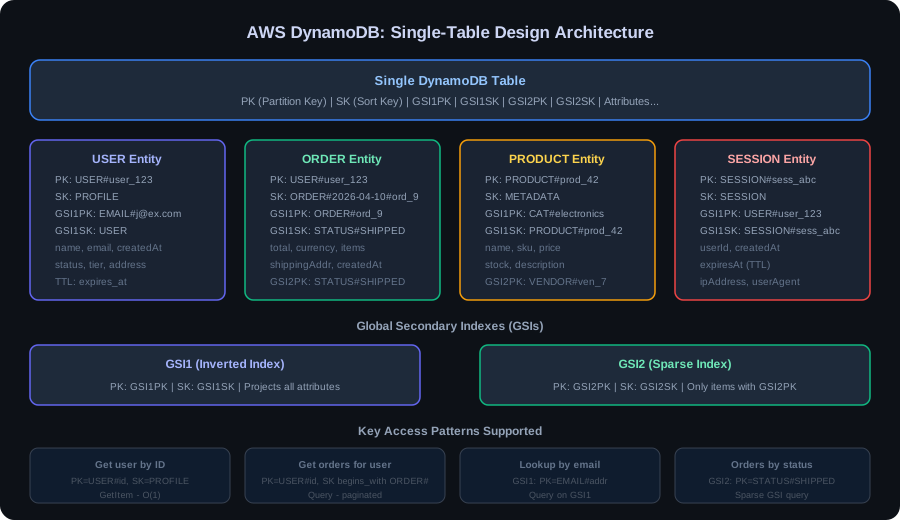
Single-table design (STD) is the approach of storing all entity types for an application in a single DynamoDB table, using generic attribute names (PK, SK, GSI1PK, GSI1SK) with structured prefixes to differentiate entity types. It is the recommended approach by AWS DynamoDB experts including Rick Houlihan, who pioneered the pattern.
The core insight: DynamoDB charges per request, not per table scan. Fetching a user and all their orders in a single Query call (using a composite key pattern) is far cheaper and faster than making multiple round trips to separate tables. Single-table design co-locates related items on the same partition, enabling single-request retrieval of hierarchical data.
Access Patterns First: The Canonical Workflow
- List every access pattern your application needs — get user by ID, list orders for user, get order items, find products by category, etc.
- Determine which patterns are primary (used on every request) and which are secondary (used less frequently).
- Assign each access pattern to either the base table (PK+SK), a GSI, or an LSI.
- Design PK and SK values to satisfy the maximum number of patterns with the minimum number of indexes.
- Only then write code. The table design is the contract; the code implements it.
Entity Prefixes & Key Schema
Use string prefixes to encode the entity type directly in the key value. This makes items self-describing and prevents key collisions between entity types:
# E-Commerce Single-Table Key Schema

# Get user by ID
PK = "USER#u-123"          SK = "PROFILE"

# Get all orders for user (Query PK = USER#u-123, SK begins_with ORDER#)
PK = "USER#u-123"          SK = "ORDER#2026-04-10T12:00:00Z#o-789"

# Get specific order
PK = "ORDER#o-789"         SK = "METADATA"

# Get all items in an order
PK = "ORDER#o-789"         SK = "ITEM#p-456"
PK = "ORDER#o-789"         SK = "ITEM#p-789"

# Get product by ID
PK = "PRODUCT#p-456"       SK = "DETAILS"

# GSI1: Get orders by status (GSI1PK = ORDER_STATUS#PENDING)
GSI1PK = "ORDER_STATUS#PENDING"   GSI1SK = "2026-04-10T12:00:00Z#o-789"
| Access Pattern | PK | SK | Index |
|---|---|---|---|
| Get user profile | USER#<id> | PROFILE | Base table |
| List orders for user | USER#<id> | ORDER# (begins_with) | Base table |
| Get order details | ORDER#<id> | METADATA | Base table |
| List items in order | ORDER#<id> | ITEM# (begins_with) | Base table |
| Orders by status + date | ORDER_STATUS#<status> | <timestamp>#<orderId> | GSI1 |
| Products by category | CATEGORY#<name> | PRODUCT#<id> | GSI2 |
4. Partition Key Strategies: Avoiding Hot Partitions
A hot partition occurs when too many requests are routed to a single physical partition. DynamoDB distributes data across partitions using a hash of the partition key. If many items share the same partition key — or one partition key attracts disproportionate traffic — that partition's throughput limit (3,000 RCU and 1,000 WCU) becomes the bottleneck for your entire workload.
Write Sharding
For high-cardinality write targets (a global leaderboard counter, a viral post's like count), append a random suffix to spread writes across N logical shards:
// Write sharding: spread writes across 10 shards
int SHARD_COUNT = 10;
String shardSuffix = String.valueOf(ThreadLocalRandom.current().nextInt(SHARD_COUNT));
String pk = "LEADERBOARD#global#" + shardSuffix;

// To read total, query all shards and aggregate in application
for (int i = 0; i < SHARD_COUNT; i++) {
    String shardPk = "LEADERBOARD#global#" + i;
    // GetItem / Query each shard and sum
}
Adaptive Capacity & Burst
DynamoDB's Adaptive Capacity (enabled by default) automatically redistributes throughput from underused partitions to overloaded ones within a table. It can absorb short bursts on hot partitions but is not a substitute for good key design. Additionally, DynamoDB's burst capacity retains unused RCU/WCU for up to 300 seconds and can apply them during spikes. Never rely on burst as a design strategy — use it as a safety net only.
Partition Key Anti-Patterns to Avoid
- Using a low-cardinality attribute as PK (e.g., status = "ACTIVE" / "INACTIVE") — concentrates all traffic on two partitions
- Using a sequential ID or timestamp as PK — causes monotonic writes to the same partition ("hot end")
- Using a single tenant ID as PK in a multi-tenant system when one tenant dominates traffic — classic hot partition problem
- Using date strings as PK (e.g., "2026-04-10") — all writes for a day hit one partition; use date + random suffix or time-based sharding
5. GSI & LSI Patterns: Inverting Access Patterns
Global Secondary Indexes (GSIs) are the primary mechanism for supporting access patterns that the base table's PK+SK cannot directly serve. A GSI is essentially a second copy of your table (a projection) organized around a different partition key and optional sort key. You can have up to 20 GSIs per table.
GSI vs LSI: When to Use Each
- LSI (Local Secondary Index): Same partition key as the base table, different sort key. Must be defined at table creation — cannot be added later. Shares the base table's RCU/WCU. Limited to 10 GB per partition key value. Use when you need to sort or filter items within a partition by a different attribute (e.g., sort orders by creation date instead of order ID).
- GSI (Global Secondary Index): Any attributes as PK and SK. Can be created and deleted after table creation. Has its own provisioned or on-demand throughput. Supports eventual consistency only. Use for all other non-primary access patterns.
GSI Overloading
GSI overloading reuses the same GSI to serve multiple access patterns by populating the GSI key attributes with different values per entity type. This reduces the total number of indexes needed:
// GSI1 (GSI1PK + GSI1SK) serves multiple patterns via overloading:

// Pattern A: Get all employees in a department
// GSI1PK = "DEPT#engineering"   GSI1SK = "EMP#e-001"

// Pattern B: Get all open tickets by priority
// GSI1PK = "PRIORITY#HIGH"      GSI1SK = "TICKET#2026-04-10T09:00:00Z"

// Pattern C: Get products by supplier
// GSI1PK = "SUPPLIER#s-42"      GSI1SK = "PRODUCT#p-200"

// All three patterns use GSI1 — different entity types, same index
Sparse Indexes
DynamoDB only adds items to a GSI if the GSI's partition key attribute exists on the item. This creates sparse indexes — indexes that only contain a subset of items. This is powerful for filtering: only write the GSI key attribute on items that should appear in that index. For example, set needsReview = "true" only on flagged records, and create a GSI on needsReview. The GSI will only contain flagged items, giving you a cheap filter with no scan.
6. Capacity Planning: On-Demand vs Provisioned Throughput
Getting capacity mode and sizing right is one of the most impactful cost and reliability decisions you'll make with DynamoDB. The choice between on-demand and provisioned isn't binary — it depends on your traffic predictability and cost sensitivity.
WCU & RCU Formulas
// WCU (Write Capacity Unit) Calculation
// 1 WCU = 1 strongly consistent write of items up to 1 KB/second
// Item size rounds UP to nearest 1 KB

// Example: 500 writes/sec, average item size 2.5 KB
WCUs_required = 500 * ceil(2.5) = 500 * 3 = 1500 WCU

// RCU (Read Capacity Unit) Calculation
// 1 RCU = 1 strongly consistent read of items up to 4 KB/second
//       = 2 eventually consistent reads of items up to 4 KB/second

// Example: 2000 reads/sec, eventually consistent, average item 3 KB
RCUs_required = ceil(2000 / 2) * ceil(3 / 4) = 1000 * 1 = 1000 RCU

// Transactional writes cost 2x WCU; transactional reads cost 2x RCU

// Monthly cost estimate (us-east-1, 2026 pricing):
// On-Demand:   $1.25 per million write requests, $0.25 per million reads
// Provisioned: $0.00065/WCU-hour, $0.00013/RCU-hour
// 1500 WCU provisioned = 1500 * 0.00065 * 730 hours = ~$712/month
// 1500 WCU on-demand at 100M writes = 100 * $1.25 = $125/month
// Break-even: ~57M writes/month favors on-demand; above that, provisioned wins
On-Demand vs Provisioned Decision Matrix
- On-Demand: Choose when traffic is unpredictable, spiky, or bursty. New applications, dev/test environments, event-driven workloads with unknown peak patterns. Zero capacity planning required — DynamoDB scales instantly. Pay per request.
- Provisioned + Auto-Scaling: Choose when traffic is predictable and you need cost optimization. Set min/max capacity and a target utilization (70–80%). Auto-scaling responds in ~5 minutes — combine with DynamoDB burst to handle short spikes.
- Reserved Capacity: Purchase 100+ WCU/RCU for 1 or 3 years at 53–77% savings over provisioned on-demand pricing. Only buy what you're confident in; combine with auto-scaling for the variable portion.
7. DynamoDB Streams & Change Data Capture
DynamoDB Streams captures a time-ordered sequence of item-level changes (inserts, updates, deletes) in a DynamoDB table. Each stream record contains the old and/or new image of the modified item. Records are retained for 24 hours and can be consumed by AWS Lambda, Kinesis Data Streams (via Kinesis Data Streams for DynamoDB), or custom consumers.
Event-Driven Patterns with Streams
- Aggregation and rollup: Maintain separate aggregate items (e.g., total order count per user) updated by a stream-driven Lambda function, avoiding expensive Scan operations.
- Cross-region replication: Use DynamoDB Global Tables (which uses Streams internally) for multi-region active-active replication with <1 second replication lag.
- Search index sync: On every item change, a Lambda function updates a corresponding document in OpenSearch/Elasticsearch — enabling full-text search without expensive DynamoDB scans.
- Cache invalidation: On item update, evict the corresponding key from ElastiCache/Redis to maintain cache consistency.
- Event fanout: Lambda processes stream records and publishes domain events to SNS/EventBridge for downstream services to consume — the Outbox pattern done natively.
Stream View Types
- KEYS_ONLY: Only PK and SK of the changed item. Minimum cost and payload size.
- NEW_IMAGE: The full item state after the change. Good for projection to other stores.
- OLD_IMAGE: The full item state before the change. Good for auditing and undo logic.
- NEW_AND_OLD_IMAGES: Both before and after states. Required for delta detection and conflict resolution. Doubles stream record size — factor into Lambda memory and execution time.
8. DynamoDB Transactions & Conditional Writes
DynamoDB transactions (launched in 2018) provide ACID guarantees across multiple items within a single AWS account and region. TransactWrite supports up to 100 items across one or more tables in a single atomic operation. TransactGet reads up to 100 items consistently.
Conditional Writes & Optimistic Locking
Conditional expressions make a write (Put, Update, Delete) succeed only if a specified condition is true at write time — without requiring a transaction. This is the cheapest form of optimistic concurrency control in DynamoDB:
// Optimistic locking with version attribute
UpdateItemRequest request = UpdateItemRequest.builder()
    .tableName("AppTable")
    .key(Map.of(
        "PK", AttributeValue.fromS("ORDER#o-789"),
        "SK", AttributeValue.fromS("METADATA")
    ))
    .updateExpression("SET #status = :newStatus, version = :newVersion")
    .conditionExpression("version = :expectedVersion")
    .expressionAttributeNames(Map.of("#status", "status"))
    .expressionAttributeValues(Map.of(
        ":newStatus", AttributeValue.fromS("SHIPPED"),
        ":newVersion", AttributeValue.fromN("3"),
        ":expectedVersion", AttributeValue.fromN("2")  // Must match current
    ))
    .build();
// Throws ConditionalCheckFailedException if version has changed (concurrent update)
Use attribute_not_exists(PK) as a condition on PutItem to implement idempotent creates — the write only succeeds if the item doesn't already exist, preventing duplicate creation under at-least-once delivery.
9. DynamoDB Production Best Practices
Java SDK v2: DynamoDB Enhanced Client
The AWS SDK v2 Enhanced Client provides a type-safe, annotation-driven API for DynamoDB that avoids manual AttributeValue marshalling. It is the recommended approach for Java Spring Boot microservices in 2026:
// DynamoDB Enhanced Client — Save & Get with annotations (Java SDK v2)

@DynamoDbBean
public class Order {
    private String pk;
    private String sk;
    private String orderId;
    private String userId;
    private String status;
    private Instant createdAt;
    private BigDecimal totalAmount;

    @DynamoDbPartitionKey
    @DynamoDbAttribute("PK")
    public String getPk() { return pk; }

    @DynamoDbSortKey
    @DynamoDbAttribute("SK")
    public String getSk() { return sk; }

    // GSI key attribute
    @DynamoDbSecondaryPartitionKey(indexNames = "GSI1")
    @DynamoDbAttribute("GSI1PK")
    public String getGsi1Pk() {
        return "ORDER_STATUS#" + this.status;
    }

    // ... getters/setters omitted for brevity
}

@Service
public class OrderRepository {
    private final DynamoDbTable<Order> table;

    public OrderRepository(DynamoDbEnhancedClient enhancedClient) {
        this.table = enhancedClient.table("AppTable", TableSchema.fromBean(Order.class));
    }

    public void saveOrder(Order order) {
        order.setPk("ORDER#" + order.getOrderId());
        order.setSk("METADATA");
        table.putItem(order);
    }

    public Optional<Order> getOrder(String orderId) {
        Key key = Key.builder()
            .partitionValue("ORDER#" + orderId)
            .sortValue("METADATA")
            .build();
        return Optional.ofNullable(table.getItem(key));
    }
}
GSI Query with Java SDK v2
// Query GSI1: Get pending orders after a specific timestamp

public List<Order> getPendingOrdersAfter(Instant after) {
    DynamoDbIndex<Order> gsi1 = table.index("GSI1");

    QueryConditional queryConditional = QueryConditional
        .sortGreaterThan(Key.builder()
            .partitionValue("ORDER_STATUS#PENDING")
            .sortValue(after.toString())
            .build());

    PageIterable<Order> results = gsi1.query(r -> r
        .queryConditional(queryConditional)
        .limit(100)
        .scanIndexForward(false)  // descending: most recent first
    );

    return results.items().stream().collect(Collectors.toList());
}
TTL, Batch Operations & Error Handling
- TTL (Time to Live): Set a numeric attribute (Unix epoch seconds) on items that should expire automatically. DynamoDB deletes expired items asynchronously at no WCU cost within 48 hours of expiry. Use TTL for session state, temporary tokens, and cache entries in DynamoDB to keep table size bounded.
- BatchWriteItem: Write or delete up to 25 items per batch call, reducing round trips. Note: BatchWriteItem is not atomic — partial failures are common. Always process
UnprocessedItemswith exponential back-off and jitter. - BatchGetItem: Retrieve up to 100 items or 16 MB per call across multiple tables. Unprocessed keys due to throttling must be retried. SDK v2 handles this automatically with
RetryPolicy. - Pagination: DynamoDB Query and Scan return up to 1 MB of data per call. Use
LastEvaluatedKey(the exclusive start key for the next page) to paginate. Never assume a single Query returns all results. - Error handling: Catch
ProvisionedThroughputExceededException,TransactionConflictException, andConditionalCheckFailedExceptionspecifically. Use AWS SDK v2's built-in retry with exponential backoff plus full jitter for transient errors.
10. DynamoDB Security: Encryption, IAM Fine-Grained Access, VPC Endpoints
Encryption at Rest
All DynamoDB tables are encrypted at rest by default using AWS-owned keys (free). For compliance requirements (PCI-DSS, HIPAA, SOC2), use AWS KMS Customer Managed Keys (CMK): you control the key lifecycle, can audit all key usage in CloudTrail, and can revoke access by disabling the key. CMK encryption adds ~1ms of latency to operations and costs $1/month per key plus $0.03 per 10,000 API calls to KMS.
IAM Fine-Grained Access Control
DynamoDB supports attribute-level IAM conditions, enabling you to restrict which items or attributes a principal can access based on their identity. This is called Fine-Grained Access Control (FGAC):
// IAM policy: Allow users to access only their own items (leading key condition)
{
  "Version": "2012-10-17",
  "Statement": [{
    "Effect": "Allow",
    "Action": ["dynamodb:GetItem", "dynamodb:PutItem", "dynamodb:UpdateItem"],
    "Resource": "arn:aws:dynamodb:us-east-1:123456789:table/AppTable",
    "Condition": {
      "ForAllValues:StringLike": {
        "dynamodb:LeadingKeys": ["USER#${cognito-identity.amazonaws.com:sub}"]
      }
    }
  }]
}
VPC Endpoints
By default, DynamoDB is accessed over the public internet (HTTPS). For applications running in a VPC (EC2, ECS, EKS, Lambda in VPC), use a VPC Gateway Endpoint for DynamoDB. This routes traffic through the AWS private network — no NAT Gateway charges, no public IP required, and traffic never leaves the AWS backbone. VPC Endpoint policies add an additional IAM authorization layer that applies to all traffic through the endpoint. This is a zero-cost security and cost optimization for any production application.
11. Monitoring, Performance Tuning & Anti-Patterns to Avoid
Key CloudWatch Metrics to Monitor
- ConsumedReadCapacityUnits / ConsumedWriteCapacityUnits: Track actual vs provisioned consumption per table and GSI. Alert at >80% of provisioned capacity.
- ThrottledRequests: Any value >0 in production requires investigation. Throttling degrades latency and triggers SDK retry storms.
- SystemErrors: HTTP 500-level errors from DynamoDB. Rare but retryable — monitor for spikes that indicate AWS-side issues.
- SuccessfulRequestLatency: Track p50, p99, and p999 latency. p99 >10ms for GetItem on a well-designed table is a signal of hot partitions or item size issues.
- TransactionConflict: Track transaction abort rate. High conflict rates indicate contention on shared items — redesign the access pattern or use conditional writes instead.
- ReplicationLatency (Global Tables): Target <1 second. Rising replication latency indicates a write-heavy table under cross-region load imbalance.
DynamoDB Anti-Patterns: What NOT to Do
Top Anti-Patterns That Kill DynamoDB Performance
- Scan instead of Query: A full-table Scan reads every item, consuming enormous RCUs and returning slowly. If you're using Scan in production for anything other than a one-time data migration, your data model needs to change. Define GSIs to serve all access patterns with Query operations.
- N+1 Query Problem: Fetching a list of IDs and then issuing one GetItem per ID is the DynamoDB equivalent of N+1 queries. Use BatchGetItem or redesign the data model to fetch related items with a single Query.
- Storing large blobs in DynamoDB: DynamoDB items max out at 400 KB and charge per KB. Store large binary objects (images, PDFs, videos) in S3 and keep only the S3 URL reference in DynamoDB.
- Using a relational schema: Normalizing data into many small tables and then joining at application level is the worst of both worlds — it loses DynamoDB's single-partition co-location benefits and adds code complexity. Design for read patterns, not normalization.
- Ignoring GSI throttling: GSIs have their own throughput. A GSI write consumes WCU from the GSI's capacity, not the base table. A hot GSI is a common silent killer — always provision GSI capacity separately.
- Using DynamoDB for reporting: DynamoDB is not an analytics database. For aggregate reports, use DynamoDB Streams → Kinesis Firehose → S3 → Athena or Redshift for reporting queries. Never run report-style scans in production.
DynamoDB Accelerator (DAX)
DynamoDB Accelerator (DAX) is a fully managed, in-memory cache for DynamoDB that delivers microsecond read latency. It is a drop-in replacement for the DynamoDB SDK client (API-compatible). DAX caches GetItem and Query results with a configurable TTL (default 5 minutes). Use DAX when your application has read-heavy workloads with high cache hit rates (profile pages, product catalog, leaderboards). Note that DAX runs inside your VPC on dedicated nodes — it is not serverless and adds $0.269–$3.503/hour per node depending on instance type. For most write-heavy or low-latency-sensitive write applications, DynamoDB's native <5ms latency is sufficient without DAX.
12. Conclusion & Production Checklist
AWS DynamoDB is one of the most powerful databases in the cloud when you design it correctly, and one of the most expensive and frustrating when you don't. The single-table design philosophy, access-patterns-first thinking, and disciplined use of GSI overloading and sparse indexes give you a data model that can serve millions of requests per second at <5ms latency indefinitely. The engineers who master DynamoDB production best practices build systems that never need database downtime, never need to scale up a server, and never pay for capacity they don't use.
In 2026, DynamoDB continues to evolve — zero-ETL integrations with Redshift and S3, improved DynamoDB Streams throughput, and deeper integration with AWS Graviton-powered infrastructure make it a stronger choice than ever for the right workloads. Master the fundamentals in this guide and you'll be equipped to design DynamoDB tables that scale with your business.
DynamoDB Production Launch Checklist
- ✅ Document all access patterns before designing the table schema
- ✅ Use single-table design with entity prefixes (USER#, ORDER#, PRODUCT#)
- ✅ High-cardinality partition key — verify key distribution covers >100 distinct values
- ✅ No Scan in production code — every access pattern served by Query or GetItem
- ✅ GSI capacity provisioned separately from base table
- ✅ On-demand mode for new tables until traffic patterns are established
- ✅ Auto-scaling configured with target 70% utilization on provisioned tables
- ✅ TTL enabled for all time-bound data (sessions, tokens, temp state)
- ✅ Point-in-Time Recovery (PITR) enabled on all production tables
- ✅ VPC Gateway Endpoint configured for private DynamoDB access
- ✅ CloudWatch alarms on ThrottledRequests, ConsumedCapacity, and p99 latency
- ✅ IAM least-privilege with resource-level and condition-based policies
- ✅ BatchWriteItem UnprocessedItems handled with exponential back-off
- ✅ Idempotent writes using attribute_not_exists or version conditions
