AWS VPC Production Networking: Subnets, Security Groups, NACLs & VPC Endpoints for Java Microservices
Your VPC is the load-bearing wall of your cloud security posture. Get it wrong and every security control on top of it is built on sand. This comprehensive guide covers every production VPC decision — from three-tier subnet design and security group chaining, to VPC endpoints that eliminate internet exposure for your AWS service calls, NAT Gateway HA patterns, and Transit Gateway for multi-account architectures. Built for Java/Spring Boot microservice teams deploying on ECS and EKS.
TL;DR — The One Paragraph You Must Read
"Never deploy Java microservices into a default VPC. Use a three-tier subnet model (public/private/isolated), enforce security group chaining so each tier only accepts traffic from the tier above it, eliminate internet-bound traffic to AWS services via VPC endpoints, and use NAT Gateway only in private subnets — never in isolated subnets. Treat your VPC design as load-bearing security infrastructure."
Table of Contents
- Why VPC Design Determines Your Security Posture
- Subnet Strategy: Public, Private, and Isolated Tiers
- Security Groups vs NACLs: When to Use Each
- Security Group Chaining for Microservices
- VPC Endpoints: Eliminating Internet Exposure for AWS Services
- NAT Gateway vs NAT Instance: Cost and Reliability
- VPC Flow Logs: Traffic Visibility and Threat Detection
- Transit Gateway: Multi-Account and Multi-VPC Connectivity
- PrivateLink for Third-Party SaaS Services
- Pre-Production VPC Checklist
- Conclusion & Key Principles
1. Why VPC Design Determines Your Security Posture
Amazon VPC (Virtual Private Cloud) is the network perimeter for every resource you deploy on AWS. Unlike on-premises networks where the physical data center provides implicit segmentation, AWS gives you a blank canvas — and blank canvases default to dangerously permissive configurations. The choices you make at VPC design time ripple through every layer of your stack: how services communicate, where data can flow, what an attacker can reach after a compromise, and which compliance frameworks you can certify against.
The default VPC is the single most common security anti-pattern in AWS environments. AWS creates it automatically in every region for every account to simplify onboarding, but its design reflects convenience, not security. All subnets in the default VPC are public (they have a route to an Internet Gateway), the default security group allows all outbound traffic and all inbound traffic from instances in the same security group, and instances launched without careful thought may receive public IP addresses. Teams that spin up RDS databases, ElastiCache clusters, or EC2 instances in the default VPC and later discover they have been publicly addressable for months are experiencing one of the most common AWS security failures.
There are three distinct threat surfaces in a cloud network: north-south traffic (internet to your application), east-west traffic (between your own microservices), and exfiltration traffic (your application calling out to the internet). Most teams obsess over north-south (WAF, SSL, ALB) while leaving east-west completely flat and ignoring exfiltration entirely. A compromised Spring Boot service in a flat VPC can freely call any other service on any port, and can establish outbound connections to attacker-controlled servers to exfiltrate data. Proper VPC design addresses all three vectors simultaneously.
The principle of least network privilege states that every resource should only be able to initiate or accept connections that are strictly required for its function. A Java microservice that processes payments should not be able to directly access the user-profile database. Your order service should not be able to open a TCP connection to an arbitrary internet host. Your RDS cluster should never be reachable from the internet at all, even via a bastion host if SSM Session Manager is available. When you encode least privilege into your VPC topology — rather than relying solely on application-layer controls — you add a defense-in-depth layer that survives application bugs, misconfigured IAM policies, and lateral movement after an initial compromise.
| Attribute | Default VPC | Custom Production VPC |
|---|---|---|
| Subnet Type | All public (routed to IGW) | Public, private, isolated tiers |
| Internet Gateway | Attached to all subnets | Only public subnet route table |
| Security Groups | Open default SG | Chained, least-privilege SGs |
| Recommendation | ❌ Never use for production | ✅ Mandatory for all workloads |
2. Subnet Strategy: Public, Private, and Isolated Tiers
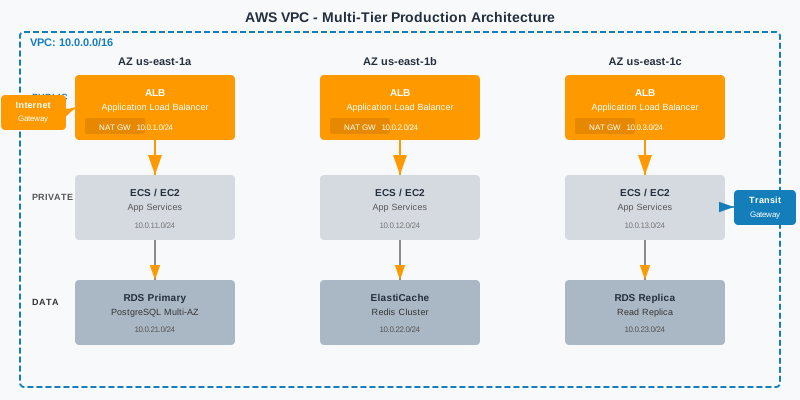
The three-tier subnet model is the industry standard for production AWS deployments and forms the backbone of every well-architected VPC. The three tiers — public, private, and isolated — enforce separation of concerns at the network level. Each tier has a distinct route table, distinct NACL rules, and distinct security group profiles. Resources placed in the wrong tier automatically violate least privilege regardless of what the application code does.
Public subnets are the only subnets with a route to the Internet Gateway (IGW). The only resources that belong here are your Application Load Balancer (ALB), NAT Gateways (one per AZ), and optionally bastion hosts or VPN endpoints. Nothing else. Public subnets should be sized small — a /24 per AZ is more than sufficient. Do not deploy application servers, databases, or caches in public subnets, ever. Even if you protect them with security groups, public subnets create unnecessary exposure surface.
Private subnets have no route to the IGW. Outbound internet access is routed through the NAT Gateway in the public subnet of the same AZ. This is where your ECS tasks, EKS pods, EC2 application servers, and Spring Boot microservices live. Private subnets are sized generously — /20 per AZ — because this is where your workloads scale. Resources here can initiate outbound connections (via NAT) but cannot be directly reached from the internet. All inbound traffic arrives via the ALB in the public tier.
Isolated subnets have no route to the internet whatsoever — no IGW route, no NAT Gateway route. Traffic in and out of isolated subnets is only possible via other resources within the VPC or via VPC endpoints. This is where RDS PostgreSQL, Aurora, ElastiCache Redis, and any other data stores live. Isolated subnets enforce that your database layer is completely unreachable from the internet at the routing layer, not just at the security group layer. This is defense in depth: even if an attacker compromises a misconfigured security group, the route table prevents any internet reachability.
Always design for a minimum of three Availability Zones. Single-AZ deployments are not production-grade. With three AZs, you tolerate a complete AZ failure with only a 33% capacity reduction. Your CIDR plan should allocate cleanly across AZs with room to grow. A /16 VPC (65,536 IPs) divided into /20 subnets per AZ per tier gives you 12 subnets before you need to reclaim space. Reserve a /18 block for future use as you add more tiers (e.g., a management or inspection tier for a firewall).
| Tier | AZ-a CIDR | AZ-b CIDR | AZ-c CIDR |
|---|---|---|---|
| Public | 10.0.0.0/24 | 10.0.1.0/24 | 10.0.2.0/24 |
| Private (App) | 10.0.16.0/20 | 10.0.32.0/20 | 10.0.48.0/20 |
| Isolated (Data) | 10.0.64.0/20 | 10.0.80.0/20 | 10.0.96.0/20 |
# Terraform: Production VPC with three-tier subnet design
resource "aws_vpc" "main" {
  cidr_block           = "10.0.0.0/16"
  enable_dns_support   = true
  enable_dns_hostnames = true
  tags = {
    Name        = "prod-vpc"
    Environment = "production"
    ManagedBy   = "terraform"
  }
}
# Public subnets (ALB, NAT Gateway only)
resource "aws_subnet" "public" {
  for_each = {
    "a" = { cidr = "10.0.0.0/24", az = "us-east-1a" }
    "b" = { cidr = "10.0.1.0/24", az = "us-east-1b" }
    "c" = { cidr = "10.0.2.0/24", az = "us-east-1c" }
  }
  vpc_id                  = aws_vpc.main.id
  cidr_block              = each.value.cidr
  availability_zone       = each.value.az
  map_public_ip_on_launch = false  # Never auto-assign public IPs
  tags = {
    Name = "prod-public-${each.key}"
    Tier = "public"
  }
}
# Private subnets (ECS/EKS workloads)
resource "aws_subnet" "private" {
  for_each = {
    "a" = { cidr = "10.0.16.0/20", az = "us-east-1a" }
    "b" = { cidr = "10.0.32.0/20", az = "us-east-1b" }
    "c" = { cidr = "10.0.48.0/20", az = "us-east-1c" }
  }
  vpc_id            = aws_vpc.main.id
  cidr_block        = each.value.cidr
  availability_zone = each.value.az
  tags = {
    Name = "prod-private-${each.key}"
    Tier = "private"
    # Required for EKS auto-discovery
    "kubernetes.io/role/internal-elb" = "1"
  }
}
# Isolated subnets (RDS, ElastiCache — NO internet route)
resource "aws_subnet" "isolated" {
  for_each = {
    "a" = { cidr = "10.0.64.0/20", az = "us-east-1a" }
    "b" = { cidr = "10.0.80.0/20", az = "us-east-1b" }
    "c" = { cidr = "10.0.96.0/20", az = "us-east-1c" }
  }
  vpc_id            = aws_vpc.main.id
  cidr_block        = each.value.cidr
  availability_zone = each.value.az
  tags = {
    Name = "prod-isolated-${each.key}"
    Tier = "isolated"
  }
}
# Internet Gateway (public tier only)
resource "aws_internet_gateway" "main" {
  vpc_id = aws_vpc.main.id
  tags   = { Name = "prod-igw" }
}
# Public route table
resource "aws_route_table" "public" {
  vpc_id = aws_vpc.main.id
  route {
    cidr_block = "0.0.0.0/0"
    gateway_id = aws_internet_gateway.main.id
  }
  tags = { Name = "prod-rt-public" }
}
# Isolated route table (no internet route whatsoever)
resource "aws_route_table" "isolated" {
  vpc_id = aws_vpc.main.id
  tags   = { Name = "prod-rt-isolated" }
}
3. Security Groups vs NACLs: When to Use Each
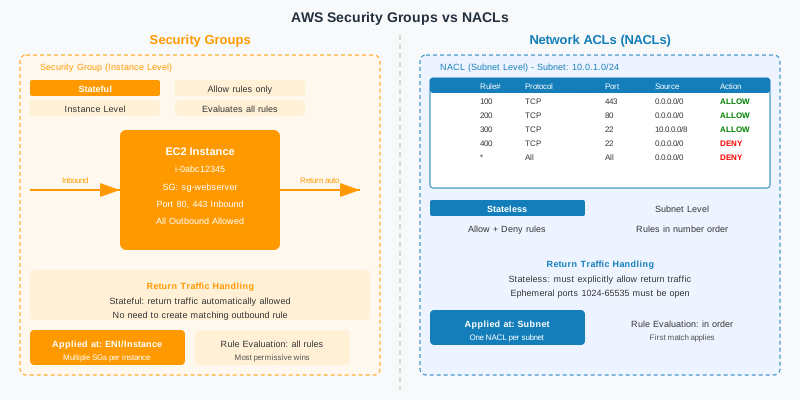
Security Groups (SGs) and Network Access Control Lists (NACLs) are both firewall mechanisms in AWS, but they operate at different layers, with different statefulness, and serve different purposes. Understanding when to use each — and how they interact — is fundamental to production VPC security. Most AWS architects lean heavily on Security Groups for the bulk of their logic and reserve NACLs for specific subnet-level use cases.
Security Groups are stateful and operate at the ENI (Elastic Network Interface) level, which means they are associated with individual resources: EC2 instances, RDS clusters, Lambda functions with VPC access, ECS tasks, and more. Stateful means that if you allow an inbound TCP connection on port 8080, the return traffic (the response packets) is automatically allowed without needing an explicit outbound rule. Security Groups are "allow-only" — you can only create allow rules, never explicit deny rules. Traffic that doesn't match any allow rule is implicitly denied.
NACLs are stateless and operate at the subnet level, evaluating rules for every packet independently without tracking connection state. This means you must explicitly allow both inbound and outbound traffic, including the ephemeral port range (1024–65535) for return traffic. NACLs support both allow and deny rules, evaluated in order from lowest to highest rule number — the first matching rule wins. This makes NACLs ideal for blocking entire IP ranges (e.g., blocking known malicious CIDR blocks) at the subnet boundary before traffic even reaches your Security Groups.
A common production pattern: use Security Groups for all your primary allow-list logic (which services talk to which, on which ports), and use NACLs as a coarse-grained deny layer on isolated subnets to ensure no internet traffic reaches them even if a route table is accidentally misconfigured. NACLs also help with compliance requirements that mandate explicit network-level controls documented separately from application-layer controls.
| Attribute | Security Groups | NACLs |
|---|---|---|
| Statefulness | ✅ Stateful (return traffic auto-allowed) | ❌ Stateless (both directions must be explicit) |
| Applied at | ENI / resource level | Subnet level |
| Rule type | Allow only (implicit deny) | Allow and explicit Deny |
| Evaluation | All rules evaluated, most permissive wins | Lowest rule number match wins, then stops |
| Use case | Primary allow logic, SG chaining | Block IP ranges, subnet-level compliance controls |
# Terraform: NACL for isolated (data) subnets
# Denies ALL internet-originated traffic at the subnet boundary
resource "aws_network_acl" "isolated" {
  vpc_id     = aws_vpc.main.id
  subnet_ids = [for s in aws_subnet.isolated : s.id]
  # Allow inbound from private subnets only (app tier CIDR blocks)
  ingress {
    rule_no    = 100
    protocol   = "tcp"
    action     = "allow"
    cidr_block = "10.0.16.0/20"  # private-a
    from_port  = 5432
    to_port    = 5432
  }
  ingress {
    rule_no    = 110
    protocol   = "tcp"
    action     = "allow"
    cidr_block = "10.0.32.0/20"  # private-b
    from_port  = 5432
    to_port    = 5432
  }
  ingress {
    rule_no    = 120
    protocol   = "tcp"
    action     = "allow"
    cidr_block = "10.0.48.0/20"  # private-c
    from_port  = 5432
    to_port    = 5432
  }
  # Allow ephemeral ports for return traffic
  ingress {
    rule_no    = 200
    protocol   = "tcp"
    action     = "allow"
    cidr_block = "10.0.0.0/16"
    from_port  = 1024
    to_port    = 65535
  }
  # Deny everything else
  ingress {
    rule_no    = 32766
    protocol   = "-1"
    action     = "deny"
    cidr_block = "0.0.0.0/0"
    from_port  = 0
    to_port    = 0
  }
  # Egress: allow responses back to private subnets
  egress {
    rule_no    = 100
    protocol   = "tcp"
    action     = "allow"
    cidr_block = "10.0.0.0/16"
    from_port  = 1024
    to_port    = 65535
  }
  egress {
    rule_no    = 32766
    protocol   = "-1"
    action     = "deny"
    cidr_block = "0.0.0.0/0"
    from_port  = 0
    to_port    = 0
  }
  tags = { Name = "prod-nacl-isolated" }
}
4. Security Group Chaining for Microservices
Security group chaining — also called security group referencing — is the single most powerful technique for implementing least-privilege networking in AWS. Instead of using CIDR blocks as source/destination in security group rules (e.g., source: 10.0.0.0/8), you reference security group IDs (e.g., source: sg-0abc123). When an inbound rule says "allow port 8080 from sg-alb-prod", it means exactly that: only network interfaces associated with the ALB security group can reach this port. IP address changes, scaling events, and rolling deployments are all handled automatically.
The canonical chain for a three-tier Spring Boot microservice deployment is: ALB SG → App SG → DB SG. The ALB Security Group allows inbound 443 from 0.0.0.0/0 (the internet). The App Security Group allows inbound 8080 only from the ALB Security Group. The DB Security Group allows inbound 5432 only from the App Security Group. At no point does any component need to know IP addresses. This design scales perfectly: if you add 200 ECS tasks, they all have the App SG attached and immediately get database access. No security group rule updates needed.
For microservice-to-microservice communication in a service mesh, you extend this pattern by creating a dedicated security group per service and referencing source SGs across services. The Order Service SG only allows inbound from the API Gateway SG and the Payment Service SG. The Inventory Service SG only allows inbound from the Order Service SG. This creates a machine-readable, auditable map of your service communication topology that is enforced at the network layer, independent of application code.
A critical rule: never use wide CIDR blocks as security group sources. Using 10.0.0.0/8 as a source in a security group rule is functionally identical to saying "any resource in this organization can reach me on this port." In a large organization with hundreds of AWS accounts connected via Transit Gateway, that's potentially thousands of services. Use specific security group references or, for cross-account access, use VPC Lattice or PrivateLink.
# Terraform: Security Group Chaining — ALB → Spring Boot App → RDS
# 1. ALB Security Group (internet-facing)
resource "aws_security_group" "alb" {
  name        = "prod-sg-alb"
  description = "ALB: accept HTTPS from internet, send to app on 8080"
  vpc_id      = aws_vpc.main.id
  ingress {
    description = "HTTPS from internet"
    from_port   = 443
    to_port     = 443
    protocol    = "tcp"
    cidr_blocks = ["0.0.0.0/0"]
  }
  ingress {
    description = "HTTP redirect (redirected to HTTPS by ALB listener rule)"
    from_port   = 80
    to_port     = 80
    protocol    = "tcp"
    cidr_blocks = ["0.0.0.0/0"]
  }
  egress {
    description     = "Forward to app tier on 8080"
    from_port       = 8080
    to_port         = 8080
    protocol        = "tcp"
    security_groups = [aws_security_group.app.id]
  }
  tags = { Name = "prod-sg-alb", Tier = "public" }
}
# 2. App Security Group (Spring Boot / ECS tasks)
resource "aws_security_group" "app" {
  name        = "prod-sg-app"
  description = "App tier: accept from ALB only, send to RDS on 5432"
  vpc_id      = aws_vpc.main.id
  ingress {
    description     = "HTTP from ALB only (SG reference)"
    from_port       = 8080
    to_port         = 8080
    protocol        = "tcp"
    security_groups = [aws_security_group.alb.id]
  }
  egress {
    description     = "PostgreSQL to RDS"
    from_port       = 5432
    to_port         = 5432
    protocol        = "tcp"
    security_groups = [aws_security_group.db.id]
  }
  egress {
    description = "HTTPS to AWS services via VPC endpoints and NAT"
    from_port   = 443
    to_port     = 443
    protocol    = "tcp"
    cidr_blocks = ["0.0.0.0/0"]
  }
  egress {
    description = "Redis ElastiCache"
    from_port   = 6379
    to_port     = 6379
    protocol    = "tcp"
    security_groups = [aws_security_group.cache.id]
  }
  tags = { Name = "prod-sg-app", Tier = "private" }
}
# 3. RDS Security Group (PostgreSQL)
resource "aws_security_group" "db" {
  name        = "prod-sg-rds"
  description = "RDS: accept PostgreSQL from app SG only"
  vpc_id      = aws_vpc.main.id
  ingress {
    description     = "PostgreSQL from app tier only (SG reference)"
    from_port       = 5432
    to_port         = 5432
    protocol        = "tcp"
    security_groups = [aws_security_group.app.id]
  }
  # No egress needed — RDS only responds, never initiates
  tags = { Name = "prod-sg-rds", Tier = "isolated" }
}
# 4. ElastiCache Security Group
resource "aws_security_group" "cache" {
  name        = "prod-sg-cache"
  description = "ElastiCache Redis: accept from app SG only"
  vpc_id      = aws_vpc.main.id
  ingress {
    description     = "Redis from app tier only"
    from_port       = 6379
    to_port         = 6379
    protocol        = "tcp"
    security_groups = [aws_security_group.app.id]
  }
  tags = { Name = "prod-sg-cache", Tier = "isolated" }
}
5. VPC Endpoints: Eliminating Internet Exposure for AWS Services
When your Spring Boot application running in a private subnet calls s3.amazonaws.com or dynamodb.us-east-1.amazonaws.com, where does that traffic go? Without VPC endpoints, it leaves your private subnet, hits the NAT Gateway, gets a public IP assigned, and traverses the public internet to reach the AWS service — even though both your application and the AWS service are physically in the same AWS region, often in the same availability zone. This is both a security anti-pattern and a performance problem. VPC endpoints solve this by routing AWS service traffic privately over the AWS backbone, never touching the internet.
AWS offers two types of VPC endpoints. Gateway endpoints are available for S3 and DynamoDB only, are entirely free of charge, and work by adding entries to your route tables. They are the simplest and highest-value VPC endpoints to deploy — there is no reason not to have them in every VPC. Interface endpoints (powered by AWS PrivateLink) create an ENI in your subnet with a private IP address, and use DNS to redirect calls to AWS services to that private endpoint. Interface endpoints cost $0.01 per AZ per hour plus data processing charges, but they enable private access to dozens of AWS services including SSM Parameter Store, Secrets Manager, ECR, CloudWatch Logs, SQS, SNS, KMS, Lambda, and many more.
Beyond cost and latency, VPC endpoints are a critical data exfiltration prevention control. With S3 gateway endpoints, you can apply an endpoint policy that restricts which S3 buckets can be accessed through the endpoint. A compromised application in your VPC can use the S3 endpoint, but your endpoint policy can prevent it from writing data to an attacker-controlled S3 bucket in a different AWS account. Without this control, any application with AWS credentials and internet access (via NAT) can exfiltrate data to any S3 bucket in any account.
For ECS and EKS deployments, the minimum set of interface endpoints you need are: com.amazonaws.REGION.ecr.api, com.amazonaws.REGION.ecr.dkr, com.amazonaws.REGION.logs (CloudWatch Logs), com.amazonaws.REGION.secretsmanager, and com.amazonaws.REGION.ssm. With these in place and NAT Gateway removed from isolated subnets, your container images are pulled from ECR privately, logs are shipped to CloudWatch privately, and secrets are retrieved from Secrets Manager privately — all without internet routing.
| Service | Endpoint Type | Cost | Use Case |
|---|---|---|---|
| S3 | Gateway | Free | Static assets, backups, audit logs |
| DynamoDB | Gateway | Free | Session store, key-value workloads |
| Secrets Manager | Interface | $0.01/hr per AZ | DB credentials, API keys for Spring Boot |
| ECR (API + DKR) | Interface | $0.01/hr per AZ each | Private container image pull for ECS/EKS |
| CloudWatch Logs | Interface | $0.01/hr per AZ | Container logs, application metrics |
| SQS / SNS | Interface | $0.01/hr per AZ | Event-driven microservice messaging |
| SSM Parameter Store | Interface | $0.01/hr per AZ | Config values, feature flags |
# Terraform: S3 Gateway Endpoint with restrictive policy
resource "aws_vpc_endpoint" "s3" {
  vpc_id            = aws_vpc.main.id
  service_name      = "com.amazonaws.us-east-1.s3"
  vpc_endpoint_type = "Gateway"
  route_table_ids   = concat(
    [for rt in aws_route_table.private : rt.id],
    [aws_route_table.isolated.id]
  )
  policy = jsonencode({
    Statement = [{
      Effect    = "Allow"
      Principal = "*"
      Action    = ["s3:GetObject", "s3:PutObject", "s3:ListBucket"]
      Resource  = [
        "arn:aws:s3:::my-app-prod-bucket",
        "arn:aws:s3:::my-app-prod-bucket/*",
        # Allow access to AWS-managed buckets (ECR, SSM, etc.)
        "arn:aws:s3:::prod-us-east-1-starport-layer-bucket/*",
        "arn:aws:s3:::amazon-ssm-us-east-1/*"
      ]
      # Prevents exfiltration: deny access to buckets outside our account
      Condition = {
        StringEquals = {
          "s3:ResourceAccount" = ["123456789012"]
        }
      }
    }]
  })
  tags = { Name = "prod-vpce-s3" }
}
# Secrets Manager Interface Endpoint
resource "aws_vpc_endpoint" "secrets_manager" {
  vpc_id              = aws_vpc.main.id
  service_name        = "com.amazonaws.us-east-1.secretsmanager"
  vpc_endpoint_type   = "Interface"
  subnet_ids          = [for s in aws_subnet.private : s.id]
  security_group_ids  = [aws_security_group.vpc_endpoints.id]
  private_dns_enabled = true  # Redirects secretsmanager.* DNS automatically
  tags = { Name = "prod-vpce-secretsmanager" }
}
# Security Group for Interface Endpoints
resource "aws_security_group" "vpc_endpoints" {
  name        = "prod-sg-vpce"
  description = "Interface VPC Endpoints: accept HTTPS from private subnets"
  vpc_id      = aws_vpc.main.id
  ingress {
    description = "HTTPS from private subnets only"
    from_port   = 443
    to_port     = 443
    protocol    = "tcp"
    cidr_blocks = ["10.0.16.0/20", "10.0.32.0/20", "10.0.48.0/20"]
  }
  tags = { Name = "prod-sg-vpce" }
}
Spring Boot: Accessing S3 via VPC Endpoint
With private DNS enabled on the endpoint, your existing AWS SDK configuration works transparently. No code changes needed — the DNS resolution automatically routes to the private endpoint IP.
// Spring Boot S3 Configuration — works identically with VPC endpoint
// No endpoint URL override needed when private_dns_enabled = true
@Configuration
public class S3Config {
    @Bean
    public S3Client s3Client(AwsCredentialsProvider credentialsProvider) {
        return S3Client.builder()
            .region(Region.US_EAST_1)
            .credentialsProvider(credentialsProvider)
            // S3 calls automatically route to VPC endpoint via DNS
            // Traffic never leaves the AWS backbone
            .build();
    }
}
// Usage: identical regardless of VPC endpoint presence
@Service
public class DocumentService {
    private final S3Client s3Client;
    private static final String BUCKET = "my-app-prod-bucket";
    public void uploadDocument(String key, byte[] content) {
        s3Client.putObject(
            PutObjectRequest.builder()
                .bucket(BUCKET)
                .key(key)
                .build(),
            RequestBody.fromBytes(content)
        );
        // This call routes: ECS task → VPC Endpoint ENI → S3 (private)
        // Not: ECS task → NAT GW → Internet → S3
    }
}
6. NAT Gateway vs NAT Instance: Cost and Reliability
Resources in private subnets that need to initiate outbound connections to the internet (to call third-party APIs, download packages, fetch license updates) require a NAT device. AWS offers two options: the managed NAT Gateway service and self-managed NAT Instances running on EC2. The right choice depends on your traffic volume, operational maturity, and cost sensitivity — but for production workloads, NAT Gateway is almost always the correct answer.
NAT Gateway is a fully managed, highly available service within a single Availability Zone. It automatically scales from 5 Gbps to 100 Gbps, handles connection tracking, and requires zero maintenance. Pricing is $0.045 per hour plus $0.045 per GB of data processed. For high-availability, you must deploy one NAT Gateway per AZ — typically three for a three-AZ architecture. Each private subnet's route table sends 0.0.0.0/0 to the NAT Gateway in its own AZ, ensuring that an AZ failure doesn't force traffic through a different AZ's NAT Gateway (which would incur cross-AZ data transfer charges and become a bottleneck).
NAT Instances are EC2 instances configured for IP masquerading (source NAT). They are cheaper in low-traffic scenarios because you pay only EC2 instance costs (~$0.023/hr for t3.small). However, they are single points of failure unless you build your own HA solution, they cap at the instance's network bandwidth, they require you to disable the EC2 "source/destination check", they need OS patching and security updates, and they require custom failover automation. For any production workload, the operational burden outweighs the cost savings. Use NAT Instances only for development/staging environments with very low traffic.
The biggest cost surprise with NAT Gateway is data processing charges. Every byte that passes through a NAT Gateway costs $0.045/GB. If your ECS tasks are pulling large container images from Docker Hub through NAT Gateway, you can accumulate hundreds of dollars per month in NAT data processing charges. The fix: use ECR interface endpoints for all container image pulls (free for ECR traffic, bypasses NAT entirely) and S3 gateway endpoints for S3 traffic. Monitor the BytesOutToDestination CloudWatch metric on your NAT Gateways to identify and eliminate unnecessary internet-routed traffic.
| Attribute | NAT Gateway | NAT Instance |
|---|---|---|
| Management | Fully managed by AWS | Self-managed EC2 |
| High Availability | ✅ Per-AZ deployment | ❌ Requires custom HA scripting |
| Bandwidth | 5 Gbps → 100 Gbps (auto-scales) | Limited to instance type network cap |
| Cost (3 AZs) | ~$97/mo base + data charges | ~$50/mo (3× t3.small) + data |
| Recommendation | ✅ Production always | Dev/test with low traffic only |
# Terraform: One NAT Gateway per AZ for high availability
resource "aws_eip" "nat" {
  for_each = { "a" = "us-east-1a", "b" = "us-east-1b", "c" = "us-east-1c" }
  domain   = "vpc"
  tags     = { Name = "prod-eip-nat-${each.key}" }
}
resource "aws_nat_gateway" "main" {
  for_each = {
    "a" = aws_subnet.public["a"].id
    "b" = aws_subnet.public["b"].id
    "c" = aws_subnet.public["c"].id
  }
  allocation_id = aws_eip.nat[each.key].id
  subnet_id     = each.value
  tags = { Name = "prod-natgw-${each.key}" }
  depends_on = [aws_internet_gateway.main]
}
# Per-AZ private route tables (traffic stays in same AZ)
resource "aws_route_table" "private" {
  for_each = { "a" = "a", "b" = "b", "c" = "c" }
  vpc_id   = aws_vpc.main.id
  route {
    cidr_block     = "0.0.0.0/0"
    nat_gateway_id = aws_nat_gateway.main[each.key].id
  }
  tags = { Name = "prod-rt-private-${each.key}" }
}
# Cost monitoring: CloudWatch alarm if NAT data exceeds threshold
resource "aws_cloudwatch_metric_alarm" "nat_bytes_high" {
  for_each            = { "a" = "a", "b" = "b", "c" = "c" }
  alarm_name          = "nat-gateway-high-data-${each.key}"
  comparison_operator = "GreaterThanThreshold"
  evaluation_periods  = 1
  metric_name         = "BytesOutToDestination"
  namespace           = "AWS/NATGateway"
  period              = 3600
  statistic           = "Sum"
  threshold           = 10737418240  # 10 GB/hr = investigate
  alarm_description   = "NAT Gateway data exceeds 10 GB/hr - investigate VPC endpoints"
  dimensions = {
    NatGatewayId = aws_nat_gateway.main[each.key].id
  }
}
7. VPC Flow Logs: Traffic Visibility and Threat Detection
VPC Flow Logs capture metadata about every network flow accepted or rejected by your security groups and NACLs. They do not capture packet payloads (this is not a full packet capture tool), but the metadata — source IP, destination IP, source port, destination port, protocol, bytes, packets, action (ACCEPT/REJECT), and log status — is invaluable for security analysis, troubleshooting connectivity issues, and compliance reporting. Flow logs can be published to CloudWatch Logs (lower latency, higher cost) or S3 (higher latency, lower cost, better for long-term analysis with Athena).
Enable flow logs at the VPC level rather than the subnet or ENI level — VPC-level capture ensures you don't miss any resource added to the VPC. The performance impact on your network is zero: flow logging is entirely outside the data path. The cost is primarily CloudWatch Logs or S3 storage plus data ingestion. For high-traffic VPCs, S3 delivery with Athena querying is significantly cheaper than CloudWatch Logs Insights for bulk analysis.
Flow logs enable several critical security detection use cases. Port scans appear as a burst of REJECT records to many different destination ports from a single source IP in a short time window. Data exfiltration attempts appear as large outbound byte counts to unexpected external IPs. Lateral movement appears as connection attempts between services that should never communicate, visible as REJECT records between internal IPs. Crypto-mining appears as persistent outbound connections to mining pool IP ranges on ports 3333, 4444, or 8333.
Integration with GuardDuty multiplies the value of flow logs significantly. GuardDuty analyzes VPC Flow Logs, DNS query logs, and CloudTrail management events using ML models to detect threats automatically — compromised instance communications with known C2 servers, unusual API calls, and more. GuardDuty findings surface actionable alerts without requiring you to write Athena queries for every threat pattern. Enable GuardDuty in all regions in all accounts; the cost is typically less than one hour of engineer time per month.
# Terraform: VPC Flow Logs to S3 with Athena-compatible format
resource "aws_s3_bucket" "flow_logs" {
  bucket = "prod-vpc-flow-logs-${data.aws_caller_identity.current.account_id}"
  tags = { Name = "prod-vpc-flow-logs", Purpose = "security-audit" }
}
resource "aws_s3_bucket_lifecycle_configuration" "flow_logs" {
  bucket = aws_s3_bucket.flow_logs.id
  rule {
    id     = "expire-old-logs"
    status = "Enabled"
    expiration { days = 90 }
    noncurrent_version_expiration { noncurrent_days = 30 }
  }
}
resource "aws_flow_log" "vpc" {
  vpc_id               = aws_vpc.main.id
  traffic_type         = "ALL"  # ACCEPT, REJECT, and ALL
  log_destination_type = "s3"
  log_destination      = "${aws_s3_bucket.flow_logs.arn}/vpc-flow-logs/"
  # Custom format with all fields for rich analysis
  log_format = "$${version} $${account-id} $${interface-id} $${srcaddr} $${dstaddr} $${srcport} $${dstport} $${protocol} $${packets} $${bytes} $${windowstart} $${windowend} $${action} $${log-status} $${vpc-id} $${subnet-id} $${instance-id} $${tcp-flags} $${type} $${pkt-srcaddr} $${pkt-dstaddr}"
  destination_options {
    file_format                = "parquet"  # More efficient for Athena
    hive_compatible_partitions = true
    per_hour_partition         = true
  }
  tags = { Name = "prod-flow-log-vpc" }
}
Athena SQL: Detecting Top Talkers and Anomalies
-- Athena: Create VPC Flow Log table (Parquet format)
CREATE EXTERNAL TABLE vpc_flow_logs (
  version        int,
  account_id     string,
  interface_id   string,
  srcaddr        string,
  dstaddr        string,
  srcport        int,
  dstport        int,
  protocol       bigint,
  packets        bigint,
  bytes          bigint,
  windowstart    bigint,
  windowend      bigint,
  action         string,
  log_status     string,
  vpc_id         string,
  subnet_id      string,
  instance_id    string,
  tcp_flags      int,
  type           string,
  pkt_srcaddr    string,
  pkt_dstaddr    string
)
PARTITIONED BY (region string, year string, month string, day string, hour string)
STORED AS PARQUET
LOCATION 's3://prod-vpc-flow-logs-123456789012/vpc-flow-logs/AWSLogs/123456789012/vpcflowlogs/'
TBLPROPERTIES ("projection.enabled"="true", ...);
-- Query 1: Top 10 external destination IPs by bytes (detect exfiltration)
SELECT
  dstaddr,
  SUM(bytes)   AS total_bytes,
  COUNT(*)     AS flow_count,
  MIN(srcaddr) AS sample_src
FROM vpc_flow_logs
WHERE year='2026' AND month='04' AND day='07'
  AND action = 'ACCEPT'
  AND dstaddr NOT LIKE '10.%'      -- Exclude internal traffic
  AND dstaddr NOT LIKE '172.16.%'
  AND dstaddr NOT LIKE '192.168.%'
GROUP BY dstaddr
ORDER BY total_bytes DESC
LIMIT 10;
-- Query 2: Port scan detection — many REJECT records from same source
SELECT
  srcaddr,
  COUNT(DISTINCT dstport) AS unique_ports_attempted,
  COUNT(*)                AS total_rejected_flows
FROM vpc_flow_logs
WHERE year='2026' AND month='04' AND day='07'
  AND action = 'REJECT'
GROUP BY srcaddr
HAVING COUNT(DISTINCT dstport) > 20
ORDER BY unique_ports_attempted DESC;
-- Query 3: Unusual inter-service communication (lateral movement)
SELECT srcaddr, dstaddr, dstport, SUM(bytes) AS bytes, COUNT(*) AS flows
FROM vpc_flow_logs
WHERE year='2026' AND month='04' AND day='07'
  AND action = 'ACCEPT'
  AND srcaddr LIKE '10.0.16.%'   -- From app tier
  AND dstaddr LIKE '10.0.16.%'   -- To app tier (unexpected east-west)
GROUP BY srcaddr, dstaddr, dstport
ORDER BY flows DESC;
8. Transit Gateway: Multi-Account and Multi-VPC Connectivity
As organizations mature on AWS, they move from single-account single-VPC deployments to multi-account architectures with dozens or hundreds of VPCs — one per environment, one per business unit, one per application, or one per team. The naive approach to connecting these VPCs is VPC peering, which works well for 2–3 VPCs but becomes unmanageable at scale. Ten VPCs require 45 peering connections. Twenty VPCs require 190. VPC peering is also non-transitive: if VPC-A is peered with VPC-B and VPC-B is peered with VPC-C, VPC-A cannot reach VPC-C through VPC-B. AWS Transit Gateway solves all of these problems.
Transit Gateway (TGW) is a regional hub-and-spoke network transit hub. Every VPC connects to the TGW via an attachment (a Transit Gateway VPC attachment), and the TGW routes traffic between them. Ten VPCs require only 10 attachments — not 45 peering connections. Adding a new VPC requires only one attachment. The TGW also connects to on-premises networks via Direct Connect Gateway or Site-to-Site VPN, making it the single interconnect hub for your entire hybrid network.
Transit Gateway Route Tables provide network segmentation within the hub. Instead of a flat network where all connected VPCs can reach all others (which is the default), you create multiple route tables: a "production" route table that routes between production VPCs, a "shared-services" route table that routes to shared infrastructure (DNS, AD, logging), and an "inspection" route table that routes all traffic through a centralized firewall VPC before forwarding. This hub-and-spoke with centralized inspection is a common financial services and healthcare pattern for meeting compliance requirements.
TGW supports cross-region peering (connecting two TGWs in different regions) and cross-account sharing via AWS Resource Access Manager (RAM). In a large organization with separate AWS accounts for development, staging, and production environments, you share the TGW from a central "network" account to all other accounts via RAM. Attachments from spoke accounts route to the central TGW. This centralized networking model is the AWS recommended pattern for enterprise organizations. Pricing: $0.05 per attachment per hour, plus $0.02 per GB of data processed.
# Terraform: Transit Gateway with segmented route tables
# (Hub account — shared via RAM to spoke accounts)
resource "aws_ec2_transit_gateway" "main" {
  description                     = "Production Transit Gateway"
  amazon_side_asn                 = 64512
  auto_accept_shared_attachments  = "disable"  # Require manual approval
  default_route_table_association = "disable"  # Use custom route tables
  default_route_table_propagation = "disable"
  dns_support                     = "enable"
  vpn_ecmp_support                = "enable"
  tags = { Name = "prod-tgw", ManagedBy = "terraform" }
}
# Route table for production VPCs
resource "aws_ec2_transit_gateway_route_table" "production" {
  transit_gateway_id = aws_ec2_transit_gateway.main.id
  tags               = { Name = "tgw-rt-production" }
}
# Route table for shared services VPC
resource "aws_ec2_transit_gateway_route_table" "shared_services" {
  transit_gateway_id = aws_ec2_transit_gateway.main.id
  tags               = { Name = "tgw-rt-shared-services" }
}
# Attach production VPC to TGW
resource "aws_ec2_transit_gateway_vpc_attachment" "prod" {
  transit_gateway_id = aws_ec2_transit_gateway.main.id
  vpc_id             = aws_vpc.main.id
  subnet_ids         = [for s in aws_subnet.private : s.id]
  transit_gateway_default_route_table_association = false
  transit_gateway_default_route_table_propagation = false
  tags = { Name = "tgw-attach-prod-vpc" }
}
# Associate attachment with production route table
resource "aws_ec2_transit_gateway_route_table_association" "prod" {
  transit_gateway_route_table_id = aws_ec2_transit_gateway_route_table.production.id
  transit_gateway_attachment_id  = aws_ec2_transit_gateway_vpc_attachment.prod.id
}
# Propagate prod VPC routes into production route table
resource "aws_ec2_transit_gateway_route_table_propagation" "prod_to_production_rt" {
  transit_gateway_route_table_id = aws_ec2_transit_gateway_route_table.production.id
  transit_gateway_attachment_id  = aws_ec2_transit_gateway_vpc_attachment.prod.id
}
# Share TGW with spoke accounts via RAM
resource "aws_ram_resource_share" "tgw" {
  name                      = "prod-tgw-share"
  allow_external_principals = false
  tags = { Name = "tgw-ram-share" }
}
resource "aws_ram_resource_association" "tgw" {
  resource_arn       = aws_ec2_transit_gateway.main.arn
  resource_share_arn = aws_ram_resource_share.tgw.arn
}
9. PrivateLink for Third-Party SaaS Services
AWS PrivateLink is the underlying technology behind Interface VPC Endpoints, but it serves an additional critical use case: private connectivity to third-party SaaS services and to internal services in other VPCs without VPC peering or internet routing. When a SaaS vendor (Datadog, Snowflake, MongoDB Atlas, Confluent Cloud, Elastic) offers AWS PrivateLink connectivity, your VPC creates an Interface Endpoint that connects directly to their service endpoint, and all traffic flows over the AWS backbone — never touching the internet.
For internal service-to-service connectivity between VPCs in the same region, PrivateLink enables you to expose a service from one VPC to consumers in other VPCs without granting those consumers full access to the provider VPC. The pattern uses an NLB (Network Load Balancer) in the provider VPC as the front-end, a VPC Endpoint Service wrapping the NLB, and Interface Endpoints in consumer VPCs. Consumers see only the private IP of the endpoint — they have no visibility into the provider VPC topology, its CIDR ranges, or its other resources. This is superior to VPC peering for service boundaries that should be maintained.
PrivateLink also solves overlapping CIDR problems. When two VPCs with overlapping CIDR blocks need to connect, VPC peering is impossible. PrivateLink works regardless of CIDR overlap because consumers only communicate with a single private IP (the endpoint ENI), not with arbitrary IPs in the provider VPC. This is particularly valuable in large organizations where CIDR planning across hundreds of accounts hasn't been consistent.
Endpoint policies on PrivateLink Interface Endpoints provide fine-grained access control. You can restrict which IAM principals can use an endpoint, which actions they can perform, and which resources they can access. For Datadog PrivateLink, your endpoint policy ensures that only monitoring data can flow through the endpoint — not arbitrary Datadog API calls. For Snowflake, the endpoint policy can restrict access to specific Snowflake account identifiers, preventing data from flowing to unauthorized Snowflake accounts even through the private endpoint.
# Terraform: Expose internal Spring Boot service via PrivateLink
# (Provider side — the VPC that runs the service)
# NLB pointing to ECS service (provider VPC)
resource "aws_lb" "internal_nlb" {
  name               = "prod-nlb-payment-service"
  load_balancer_type = "network"
  internal           = true
  subnets            = [for s in aws_subnet.private : s.id]
  tags = { Name = "prod-nlb-payment-service", Tier = "private" }
}
resource "aws_lb_target_group" "payment_service" {
  name        = "prod-tg-payment"
  port        = 8080
  protocol    = "TCP"
  vpc_id      = aws_vpc.main.id
  target_type = "ip"  # ECS Fargate uses IP targets
  health_check {
    protocol            = "HTTP"
    path                = "/actuator/health"
    healthy_threshold   = 2
    unhealthy_threshold = 2
    interval            = 10
  }
}
resource "aws_lb_listener" "payment_service" {
  load_balancer_arn = aws_lb.internal_nlb.arn
  port              = 8080
  protocol          = "TCP"
  default_action {
    type             = "forward"
    target_group_arn = aws_lb_target_group.payment_service.arn
  }
}
# VPC Endpoint Service wrapping the NLB
resource "aws_vpc_endpoint_service" "payment_service" {
  acceptance_required        = true  # Manually approve consumer connections
  network_load_balancer_arns = [aws_lb.internal_nlb.arn]
  # Allow consumer accounts to create endpoints
  allowed_principals = [
    "arn:aws:iam::CONSUMER_ACCOUNT_ID:root"
  ]
  tags = { Name = "prod-vpce-service-payment" }
}
# -----------------------------------------------
# Consumer side — different VPC/account
# -----------------------------------------------
resource "aws_vpc_endpoint" "payment_service" {
  provider              = aws.consumer_account
  vpc_id                = aws_vpc.consumer.id
  service_name          = aws_vpc_endpoint_service.payment_service.service_name
  vpc_endpoint_type     = "Interface"
  subnet_ids            = [for s in aws_subnet.consumer_private : s.id]
  security_group_ids    = [aws_security_group.consumer_app.id]
  private_dns_enabled   = false
  tags = { Name = "consumer-vpce-payment-service" }
}
10. Pre-Production VPC Checklist
Use this checklist before any production workload launch. Each item represents a common misconfiguration found in production AWS environments. The checklist is organized by domain to make it easy to delegate verification to different team members.
VPC Design
- ☐ No workloads deployed in default VPC in any region
- ☐ Custom VPC with dedicated CIDR that doesn't overlap with on-premises or future VPCs
- ☐ Three-tier subnet design (public, private, isolated) implemented in all AZs
- ☐ DNS resolution and DNS hostnames enabled on the VPC
Subnets & Routing
- ☐ Public subnets have IGW route; private subnets have NAT GW route; isolated have no internet route
- ☐ map_public_ip_on_launch = false on all subnets
- ☐ One NAT Gateway per AZ (not shared across AZs)
- ☐ Per-AZ private route tables to avoid cross-AZ NAT Gateway traffic
Security Groups & NACLs
- ☐ No security group with source 0.0.0.0/0 on any non-ALB resource
- ☐ Security group chaining used for all ALB → App → DB communication
- ☐ Default security group has all rules removed (never used for resources)
- ☐ NACLs on isolated subnets deny all traffic except from private subnets
- ☐ No security group allows inbound 22 (SSH) or 3389 (RDP) from 0.0.0.0/0
VPC Endpoints, Flow Logs & Monitoring
- ☐ S3 and DynamoDB gateway endpoints deployed with restrictive endpoint policies
- ☐ Interface endpoints deployed for ECR, CloudWatch Logs, Secrets Manager, SSM
- ☐ VPC Flow Logs enabled at VPC level (ALL traffic) to S3 with Parquet format
- ☐ GuardDuty enabled in all regions; VPC Flow Log data source activated
- ☐ CloudWatch alarm on NAT Gateway BytesOutToDestination for cost/anomaly detection
- ☐ All VPC resources tagged with Environment, Team, ManagedBy, CostCenter
- ☐ AWS Config rules enabled: vpc-sg-open-only-to-authorized-ports, no-unrestricted-ssh
11. Conclusion & Key Principles
Building a production VPC for Java microservices is not a checkbox exercise — it is a foundational architectural decision that determines your security posture, compliance surface, operational complexity, and cloud bill for years. The patterns covered in this guide have been validated in production environments ranging from Series A startups to Fortune 500 enterprises deploying on ECS and EKS. Every pattern has a reason rooted in real security incidents or operational failures.
The three-tier subnet model (public, private, isolated) is non-negotiable for production workloads. The isolated tier, with no internet routing whatsoever, is the single most impactful change you can make to protect your databases from internet exposure. Security group chaining transforms your network access control from a brittle CIDR-list approach to a self-maintaining, scale-aware, infrastructure-as-code-friendly model. VPC endpoints for S3, DynamoDB, ECR, Secrets Manager, and CloudWatch Logs eliminate internet exposure for the AWS API calls that your services make dozens of times per second. These are not optional enhancements — they are the baseline.
VPC Flow Logs combined with Amazon GuardDuty give you the visibility layer without which you are operating blind. You cannot detect a compromised container exfiltrating data via your NAT Gateway if you are not capturing flow log metadata. The cost of flow logs ($15–50/month for a typical production VPC) is trivial compared to the cost of a security incident investigation without network forensic data. Enable them on day zero, not after an incident forces your hand.
As your organization grows beyond a single account, Transit Gateway is the correct connectivity model. VPC peering doesn't scale, and without centralized route management, your network topology becomes unauditable. Design your TGW route tables to enforce network segmentation from the start — adding segmentation after the fact to a flat Transit Gateway is painful, politically difficult, and time-consuming. The "inspection" route table pattern, which routes all east-west traffic through a centralized firewall, is the mature enterprise standard for regulated industries.
Key Principles — Quick Reference
- Never use the default VPC — treat it as permanently off-limits for all workloads
- Three-tier subnets — public (ALB/NAT), private (app), isolated (data), all in 3 AZs
- SG chaining — reference SG IDs, never CIDR blocks, for inter-tier traffic
- VPC endpoints first — eliminate internet routing for AWS API calls before accepting NAT Gateway costs
- One NAT Gateway per AZ — shared NAT Gateways create cross-AZ bottlenecks and data transfer charges
- Flow logs at VPC level — ALL traffic, Parquet format to S3, analyzed with Athena
- GuardDuty always on — in every region, in every account, starting from day one
- Transit Gateway for multi-VPC — hub-and-spoke with segmented route tables, not ad-hoc VPC peering
- PrivateLink for cross-VPC services — expose services without opening VPC peering
- Everything in Terraform — VPC design changes reviewed in Pull Requests, not clicked in console
The investment in a well-designed VPC pays dividends in the form of faster security audits, simpler compliance certifications (SOC 2, PCI DSS, HIPAA), fewer production incidents caused by network misconfigurations, and a network topology that your engineers can reason about and debug without reverse-engineering a maze of ad-hoc security group rules. Treat VPC design as engineering — version it, review it, test it, and evolve it deliberately. Your security posture is only as strong as its weakest network layer.
Leave a Comment
Related Posts

Software Engineer · Java · Spring Boot · Microservices · AWS · Kubernetes