AWS EKS Production Best Practices: Cluster Setup, IRSA, Karpenter & Security Hardening
Running Kubernetes in production on AWS is far more than eksctl create cluster. This guide covers every critical decision — from managed node groups vs Fargate, to IRSA trust policies, Karpenter NodePool configuration, VPC CNI tuning, and security hardening with Pod Security Standards — giving you a battle-tested blueprint for Amazon EKS production clusters in 2026.
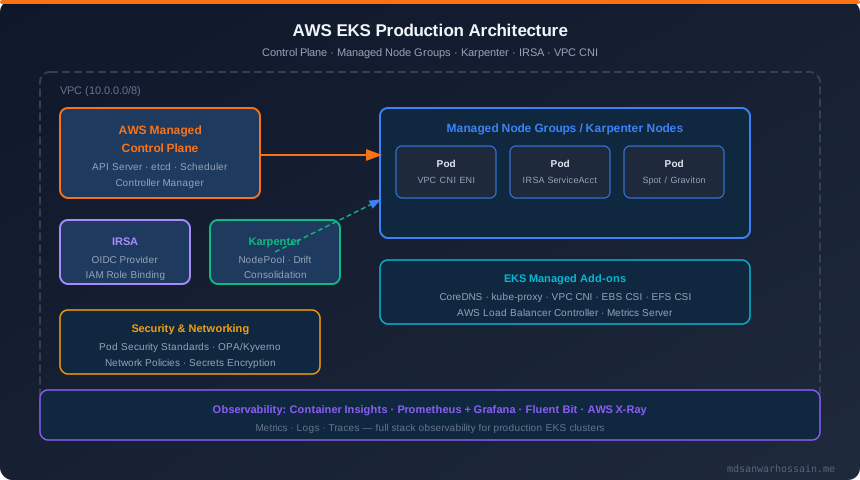
TL;DR — EKS Production in One Paragraph
"Use eksctl or Terraform to provision EKS with managed node groups in private subnets. Grant pods AWS access exclusively through IRSA — never instance profiles. Deploy Karpenter for cost-efficient, topology-aware autoscaling. Enforce Pod Security Standards at the namespace level, scan images with ECR, and encrypt Secrets with AWS KMS. Enable Container Insights, Fluent Bit, and Prometheus for full observability. Use Spot + Graviton nodes with Karpenter consolidation to cut compute costs by 60–70%."
Table of Contents
- Why EKS? EKS vs Self-Managed K8s vs ECS vs Fargate
- EKS Cluster Architecture: Control Plane, Data Plane & Networking
- Cluster Setup Best Practices: eksctl, Terraform & Managed Node Groups
- IRSA: The Right Way to Give Pods AWS Access
- Karpenter Autoscaling: Dynamic Node Provisioning
- EKS Networking: VPC CNI, Security Groups for Pods & Network Policies
- EKS Add-ons: CoreDNS, EBS CSI, EFS CSI & Load Balancer Controller
- EKS Security Hardening: Pod Security Standards, OPA/Kyverno & Encryption
- EKS Observability: Container Insights, Prometheus, Fluent Bit & X-Ray
- Cost Optimization: Spot, Graviton, Savings Plans & Karpenter Consolidation
- EKS Upgrade Strategy: Zero-Downtime Blue-Green Cluster Upgrades
- Conclusion & Production Readiness Checklist
1. Why EKS? EKS vs Self-Managed Kubernetes vs ECS vs Fargate
Choosing the right container orchestration platform on AWS has long-term operational implications. Amazon EKS, self-managed Kubernetes on EC2, Amazon ECS, and AWS Fargate each occupy a different point on the control/convenience spectrum. Understanding the trade-offs prevents costly platform migrations down the road.
Platform Comparison Matrix
| Dimension | Amazon EKS | Self-Managed K8s | Amazon ECS | AWS Fargate |
|---|---|---|---|---|
| Control Plane | AWS managed, HA | Self-managed etcd/API server | AWS managed | Serverless (no nodes) |
| Operational Burden | Low | Very High | Very Low | Near Zero |
| Kubernetes Ecosystem | Full support | Full support | Not Kubernetes | Partial (EKS Fargate) |
| Cost Model | $0.10/hr CP + EC2 | EC2 only (+ ops time) | EC2 / Fargate | vCPU + GB/hr (premium) |
| Networking Flexibility | High (VPC CNI, custom) | Highest | Medium | Limited |
| Best For | Most production teams | Deep K8s experts only | AWS-native simplicity | Bursty, stateless jobs |
For the vast majority of production engineering teams, Amazon EKS with managed node groups is the correct choice in 2026. It eliminates control-plane complexity while retaining the full Kubernetes ecosystem — Helm charts, operators, service meshes, admission controllers — that ECS cannot support. Self-managed Kubernetes on EC2 is only justifiable if you have extremely specific networking or security requirements that EKS cannot meet, and dedicated Kubernetes SRE headcount to sustain it.
EKS node group vs Fargate: Fargate removes node management entirely but imposes significant constraints — no DaemonSets, no privileged pods, no GPU support, higher per-pod cost. Use Fargate selectively for batch jobs, CI runners, or burst workloads where the operational simplicity outweighs the cost premium. For steady-state, latency-sensitive production services, EC2-backed managed node groups with Karpenter are far more cost-efficient.
2. EKS Cluster Architecture: Control Plane, Data Plane & Networking
Before writing a single line of configuration, every EKS engineer must internalize the architecture boundaries. EKS deliberately separates the control plane (AWS-managed) from the data plane (customer-managed), and this separation drives every infrastructure decision.
Control Plane
The EKS control plane runs in an AWS-owned VPC and is fully managed. It consists of at least two API server instances and three etcd nodes spread across three availability zones. AWS handles upgrades, patches, certificate rotation, and HA. You interact with it exclusively through the public or private API endpoint. Always enable the private API endpoint in production and restrict the public endpoint to specific CIDR ranges or disable it entirely, routing kubectl traffic through a VPN or bastion host.
Data Plane
The data plane consists of EC2 worker nodes running in your VPC. Each node runs kubelet, kube-proxy, the VPC CNI plugin, and any DaemonSets you deploy. EKS supports three node provisioning models:
- Managed Node Groups: AWS provisions EC2 instances using a managed Auto Scaling Group. OS patching, node drain on upgrades, and AMI rotation are handled semi-automatically. The recommended default for most workloads.
- Self-managed Node Groups: You manage the Launch Template, ASG, and AMI lifecycle. Required for exotic instance types or deep customization not supported by managed node groups.
- Karpenter: A just-in-time node provisioner that directly calls the EC2 API to launch nodes matching pending pod requirements. Faster, more cost-efficient, and more flexible than Cluster Autoscaler. The preferred autoscaling solution in 2026.
VPC Design for EKS
EKS networking is tightly coupled to your VPC design. Production clusters require:
- At least 3 private subnets (one per AZ) for worker nodes. Nodes should never run in public subnets.
- At least 3 public subnets for AWS Load Balancers (ALB/NLB) and NAT Gateway egress.
- Large CIDR ranges for node subnets (at least /22) because each EC2 node consumes multiple IPs for pod ENIs via the VPC CNI.
- Subnet tags:
kubernetes.io/role/internal-elb=1on private subnets andkubernetes.io/role/elb=1on public subnets for the Load Balancer Controller to auto-discover them. - VPC Flow Logs enabled for security auditing and network troubleshooting.
3. Cluster Setup Best Practices: eksctl, Terraform & Managed Node Groups
Never create EKS clusters manually through the AWS Console in production. Use Infrastructure as Code from day one. The two dominant tools are eksctl (for quick, opinionated setups) and Terraform (for full IaC integration in existing AWS estates). Both should be GitOps-driven and version-controlled.
eksctl Cluster Config YAML
The following eksctl config encodes production-grade defaults: private endpoint, private node subnets, IRSA enabled, encryption at rest, and a Karpenter-ready node group baseline:
# cluster-config.yaml — production EKS cluster with eksctl
apiVersion: eksctl.io/v1alpha5
kind: ClusterConfig

metadata:
  name: prod-cluster
  region: us-east-1
  version: "1.32"
  tags:
    Environment: production
    Team: platform

iam:
  withOIDC: true                  # Required for IRSA
  serviceAccounts: []

vpc:
  clusterEndpoints:
    privateAccess: true
    publicAccess: true            # Restrict in prod via publicAccessCIDRs
  publicAccessCIDRs:
    - "10.0.0.0/8"               # VPN/bastion CIDR only
  nat:
    gateway: HighlyAvailable      # One NAT GW per AZ

managedNodeGroups:
  - name: system-nodes
    instanceType: m7g.large       # Graviton3 — best price/perf
    amiFamily: AmazonLinux2023
    minSize: 2
    maxSize: 4
    desiredCapacity: 2
    availabilityZones: ["us-east-1a", "us-east-1b", "us-east-1c"]
    privateNetworking: true
    labels:
      role: system
      workload-type: system
    taints:
      - key: CriticalAddonsOnly
        value: "true"
        effect: NoSchedule
    iam:
      withAddonPolicies:
        autoScaler: false         # Karpenter replaces CA
        cloudWatch: true
        ebs: true
        efs: true

secretsEncryption:
  keyARN: "arn:aws:kms:us-east-1:123456789012:key/your-kms-key-id"

cloudWatch:
  clusterLogging:
    enableTypes:
      - api
      - audit
      - authenticator
      - controllerManager
      - scheduler
Terraform EKS Module (aws-ia/eks-blueprints)
For teams already using Terraform, the AWS EKS Blueprints module provides a well-structured, production-tested foundation with sane defaults for networking, add-ons, and security:
# main.tf — EKS Blueprints Terraform module
module "eks" {
  source  = "terraform-aws-modules/eks/aws"
  version = "~> 20.0"

  cluster_name                   = "prod-cluster"
  cluster_version                = "1.32"
  cluster_endpoint_public_access = false   # private only in prod

  vpc_id     = module.vpc.vpc_id
  subnet_ids = module.vpc.private_subnets

  # Enable IRSA OIDC provider
  enable_irsa = true

  # KMS encryption for Secrets
  cluster_encryption_config = {
    provider_key_arn = aws_kms_key.eks.arn
    resources        = ["secrets"]
  }

  # Managed node groups
  eks_managed_node_groups = {
    system = {
      instance_types = ["m7g.large"]
      ami_type       = "AL2023_ARM_64_STANDARD"
      min_size       = 2
      max_size       = 4
      desired_size   = 2
      labels = {
        role = "system"
      }
      taints = [{
        key    = "CriticalAddonsOnly"
        value  = "true"
        effect = "NO_SCHEDULE"
      }]
    }
  }

  tags = {
    Environment = "production"
    Terraform   = "true"
  }
}

# KMS key for Secrets encryption
resource "aws_kms_key" "eks" {
  description             = "EKS Secrets encryption key"
  deletion_window_in_days = 30
  enable_key_rotation     = true
}
Launch Template Best Practices
Always use custom Launch Templates for managed node groups in production. They let you enforce IMDSv2 (instance metadata service v2 — disables SSRF credential theft), set custom /etc/eks/bootstrap.sh arguments, configure kubelet --max-pods for prefix delegation, and install security agents at node bootstrap. Never rely on the default EKS-managed Launch Template for production security posture.
Node Group Configuration Checklist
- ✅ Use Amazon Linux 2023 (AL2023) as the node AMI — better security defaults, faster boot, SELinux enforcing
- ✅ Enable IMDSv2 in the Launch Template (
HttpTokens: required) to block SSRF-based credential theft - ✅ Deploy nodes across at least 3 AZs for high availability
- ✅ Use Graviton3 instances (m7g, c7g, r7g) for 20–40% better price/performance than x86 equivalents
- ✅ Tag node groups with
karpenter.sh/discovery=cluster-nameso Karpenter can discover the cluster's subnets and security groups - ✅ Separate system nodes (tainted for critical add-ons only) from application nodes to prevent noisy-neighbor interference
4. IRSA: The Right Way to Give Pods AWS Access
IAM Roles for Service Accounts (IRSA) is the only production-safe mechanism for granting pods access to AWS services. Before IRSA, teams would attach IAM policies to EC2 instance profiles — meaning every pod on that node inherited the same permissions, a massive blast-radius security anti-pattern. IRSA gives each pod its own scoped IAM role, bound via Kubernetes service accounts and the OIDC federation protocol.
How IRSA Works: The Trust Chain
EKS creates an OIDC identity provider for the cluster. When a pod with an annotated service account starts, the EKS Pod Identity webhook injects a projected service account token as a volume mount. The pod exchanges this short-lived JWT with AWS STS using the AssumeRoleWithWebIdentity call. AWS validates the token against the cluster's OIDC endpoint and issues temporary AWS credentials scoped to the assumed role.
IRSA Trust Policy & Pod Annotation
# Step 1: Create IAM Role with IRSA trust policy
# trust-policy.json
{
  "Version": "2012-10-17",
  "Statement": [
    {
      "Effect": "Allow",
      "Principal": {
        "Federated": "arn:aws:iam::123456789012:oidc-provider/oidc.eks.us-east-1.amazonaws.com/id/EXAMPLED539D4633E53DE1B71EXAMPLE"
      },
      "Action": "sts:AssumeRoleWithWebIdentity",
      "Condition": {
        "StringEquals": {
          "oidc.eks.us-east-1.amazonaws.com/id/EXAMPLED539D4633E53DE1B71EXAMPLE:sub":
            "system:serviceaccount:production:s3-reader-sa",
          "oidc.eks.us-east-1.amazonaws.com/id/EXAMPLED539D4633E53DE1B71EXAMPLE:aud":
            "sts.amazonaws.com"
        }
      }
    }
  ]
}

---
# Step 2: Create the Kubernetes ServiceAccount with role annotation
apiVersion: v1
kind: ServiceAccount
metadata:
  name: s3-reader-sa
  namespace: production
  annotations:
    eks.amazonaws.com/role-arn: arn:aws:iam::123456789012:role/s3-reader-role
    eks.amazonaws.com/token-expiration: "86400"   # 24h token TTL

---
# Step 3: Reference the ServiceAccount in your Pod/Deployment
apiVersion: apps/v1
kind: Deployment
metadata:
  name: data-processor
  namespace: production
spec:
  template:
    spec:
      serviceAccountName: s3-reader-sa    # IRSA binding
      containers:
        - name: processor
          image: 123456789012.dkr.ecr.us-east-1.amazonaws.com/processor:v1.2.3
          env:
            - name: AWS_REGION
              value: us-east-1
          # AWS SDK auto-discovers credentials from projected token volume
          # No hardcoded keys, no instance profile, no secret needed
IRSA Security Best Practices
- Always scope the trust policy
Conditionto the exact namespace and service account name — never use wildcards - Use EKS Pod Identity (the newer EKS-native alternative to IRSA) for clusters on EKS 1.29+ — it eliminates the OIDC endpoint dependency and simplifies cross-account role chaining
- Apply least-privilege IAM policies to the assumed role — never attach
AdministratorAccess - Rotate long-lived credentials out of Kubernetes Secrets by migrating workloads to IRSA/Pod Identity
- Audit IRSA usage with AWS CloudTrail — filter on
AssumeRoleWithWebIdentityevents
5. Karpenter Autoscaling: Dynamic Node Provisioning
Karpenter replaces the Cluster Autoscaler as the production-standard node autoscaler for EKS. While CA scales pre-defined ASG node groups, Karpenter directly calls the EC2 API to provision exactly the instance type needed to schedule pending pods — and just as quickly deprovisions nodes when workloads consolidate. The result is significantly faster scale-out (30–60 seconds vs 3–5 minutes with CA) and up to 60% lower compute cost through intelligent instance selection.
Karpenter NodePool Configuration
# karpenter-nodepool.yaml — production NodePool configuration
apiVersion: karpenter.sh/v1
kind: NodePool
metadata:
  name: general-purpose
spec:
  template:
    metadata:
      labels:
        workload-type: application
    spec:
      nodeClassRef:
        group: karpenter.k8s.aws
        kind: EC2NodeClass
        name: default
      requirements:
        - key: karpenter.sh/capacity-type
          operator: In
          values: ["spot", "on-demand"]       # Prefer Spot, fall back to OD
        - key: kubernetes.io/arch
          operator: In
          values: ["arm64"]                    # Graviton-only for cost savings
        - key: karpenter.k8s.aws/instance-category
          operator: In
          values: ["c", "m", "r"]              # Compute, Memory, General
        - key: karpenter.k8s.aws/instance-generation
          operator: Gt
          values: ["6"]                        # 7th gen+ only
        - key: karpenter.k8s.aws/instance-size
          operator: NotIn
          values: ["nano", "micro", "small"]   # Minimum medium
      expireAfter: 720h                        # Force node recycling every 30d

  limits:
    cpu: "1000"
    memory: 4000Gi

  disruption:
    consolidationPolicy: WhenEmptyOrUnderutilized
    consolidateAfter: 5m                       # Consolidate after 5 min idle
    budgets:
      - nodes: "10%"                           # Max 10% nodes disrupted at once

---
apiVersion: karpenter.k8s.aws/v1
kind: EC2NodeClass
metadata:
  name: default
spec:
  amiSelectorTerms:
    - alias: al2023@latest                     # Always use latest AL2023 AMI
  role: "KarpenterNodeRole-prod-cluster"
  subnetSelectorTerms:
    - tags:
        karpenter.sh/discovery: "prod-cluster"
  securityGroupSelectorTerms:
    - tags:
        karpenter.sh/discovery: "prod-cluster"
  blockDeviceMappings:
    - deviceName: /dev/xvda
      ebs:
        volumeSize: 50Gi
        volumeType: gp3
        iops: 3000
        throughput: 125
        encrypted: true
  metadataOptions:
    httpTokens: required                       # IMDSv2 enforced
    httpPutResponseHopLimit: 1
Karpenter Key Features in Production
- Drift detection: Karpenter automatically replaces nodes whose configuration drifts from the NodePool spec (AMI updates, instance type changes). Enable it with
featureGates.drift=true— it eliminates manual node rolling. - Consolidation: When nodes are underutilized, Karpenter cordons and drains pods, then terminates the empty node. This is more aggressive and effective than CA's scale-down, which requires all pods to be reschedulable before terminating a node.
- Topology spread: Works natively with
topologySpreadConstraints— Karpenter selects AZs that satisfy spread requirements when provisioning new nodes. - Weighted capacity types: You can express a preference for Spot over On-Demand within a single NodePool — Karpenter tries Spot first and falls back to On-Demand if no Spot capacity is available.
- Disruption budgets: The
disruption.budgetsfield prevents Karpenter from disrupting too many nodes simultaneously, protecting production availability during consolidation.
6. EKS Networking: VPC CNI, Security Groups for Pods & Network Policies
EKS uses the Amazon VPC CNI plugin as its default networking layer. Unlike most CNI plugins that use overlay networks, the VPC CNI assigns real VPC IP addresses directly to pods. This means pods are first-class VPC citizens — they can communicate with other AWS services using security groups, and network traffic is visible in VPC Flow Logs without decapsulation.
VPC CNI IP Address Management
Each EC2 node gets multiple Elastic Network Interfaces (ENIs), and each ENI gets multiple IP addresses pre-allocated as a "warm pool" for pods. The number of pods per node is bounded by: (number of ENIs × (IPs per ENI - 1)) + 2. For large clusters, this can exhaust VPC CIDR space quickly. The two solutions are:
- Secondary CIDR blocks: Add a secondary RFC 6598 (100.64.0.0/10) CIDR to your VPC, create new subnets from it, and configure the VPC CNI to use these subnets for pod IPs. This completely decouples pod addressing from your primary VPC CIDR.
- Prefix delegation: Instead of assigning individual IPs per pod slot, assign a /28 prefix (16 IPs) per ENI slot. This multiplies pods-per-node by 16 with the same number of ENIs. Enable with
ENABLE_PREFIX_DELEGATION=truein the VPC CNI DaemonSet config.
Security Groups for Pods
The VPC CNI's Security Groups for Pods feature allows you to attach a VPC security group directly to a pod rather than to the entire node. This is critical for workloads that need to access RDS, ElastiCache, or other VPC resources with security group-based access control. Enable it by creating a SecurityGroupPolicy custom resource and enabling the ENABLE_POD_ENI=true env var in the VPC CNI DaemonSet. Note: only supported on Nitro-based EC2 instances.
Network Policies
Kubernetes NetworkPolicy resources are not enforced by default in EKS — you need a network policy engine. The recommended options in 2026 are:
- Amazon VPC CNI Network Policy Controller: AWS's native solution — uses eBPF to enforce NetworkPolicy without a separate CNI. Managed as an EKS add-on. Best for teams wanting minimal operational overhead.
- Cilium: Full-featured eBPF-based CNI with advanced network policy, identity-based security, and Hubble observability. Preferred for teams needing Layer 7 policies, mutual TLS between pods, or multi-cluster networking.
- Calico: Mature, widely used. Good for teams migrating from other Kubernetes distributions with existing Calico policies.
Regardless of engine, establish a default-deny baseline: create a NetworkPolicy that denies all ingress and egress for every namespace, then explicitly allow required traffic. This zero-trust network posture is mandatory for PCI-DSS and SOC 2 compliance.
7. EKS Add-ons: CoreDNS, EBS CSI, EFS CSI & Load Balancer Controller
EKS managed add-ons are the preferred way to deploy and upgrade cluster infrastructure components. AWS manages the versioning lifecycle, tests add-on versions against EKS Kubernetes versions, and can optionally auto-update them. Always prefer managed add-ons over self-managed Helm charts for core components.
Critical Add-ons for Every Production Cluster
| Add-on | Purpose | Deployment Type | IRSA Required |
|---|---|---|---|
| Amazon VPC CNI | Pod networking, IP management | Managed DaemonSet | ✅ Yes |
| CoreDNS | Cluster DNS resolution | Managed Deployment | No |
| kube-proxy | Service networking & iptables | Managed DaemonSet | No |
| EBS CSI Driver | Dynamic EBS volume provisioning | Managed Deployment | ✅ Yes |
| EFS CSI Driver | Shared persistent storage (NFS) | Managed Deployment | ✅ Yes |
| AWS Load Balancer Controller | ALB/NLB for Ingress & Services | Helm (semi-managed) | ✅ Yes |
| Metrics Server | HPA & VPA resource metrics | Managed Deployment | No |
| GuardDuty EKS Runtime | Runtime threat detection | Managed DaemonSet | No |
CoreDNS Production Tuning
CoreDNS is frequently the unrecognized bottleneck in EKS clusters under high pod density. Production tuning essentials:
- Scale CoreDNS replicas to at least 2 (preferably
ceil(nodes/50)) and use PodAntiAffinity to spread across AZs - Enable the
autopathplugin to reduce search domain query churn — pods often make 6 DNS lookups (appending each search domain suffix) before resolving an external FQDN - Set
ndots:2in pods for external services to skip unnecessary search domain lookups - Use
NodeLocal DNSCache (node-local-dns DaemonSet) to cache DNS responses on each node, reducing CoreDNS load by 40–70% in large clusters
8. EKS Security Hardening: Pod Security Standards, OPA/Kyverno & Encryption
Security in EKS is a shared responsibility. AWS secures the control plane; you secure everything else. EKS security hardening has four pillars: workload isolation, access control, image trust, and data protection. Neglecting any pillar leaves you exposed.
Pod Security Standards
Kubernetes Pod Security Admission (PSA) replaced the deprecated PodSecurityPolicy in 1.25+. It enforces three levels — privileged, baseline, and restricted — via namespace labels. Use the following YAML to enforce the restricted profile on application namespaces:
# pod-security-namespace.yaml
# Apply restricted Pod Security Standard to the production namespace
apiVersion: v1
kind: Namespace
metadata:
  name: production
  labels:
    # Enforce: pods violating policy are rejected
    pod-security.kubernetes.io/enforce: restricted
    pod-security.kubernetes.io/enforce-version: latest
    # Audit: violations are logged but not rejected
    pod-security.kubernetes.io/audit: restricted
    pod-security.kubernetes.io/audit-version: latest
    # Warn: violations trigger admission warnings
    pod-security.kubernetes.io/warn: restricted
    pod-security.kubernetes.io/warn-version: latest

---
# Example compliant pod spec for restricted namespace
apiVersion: v1
kind: Pod
metadata:
  name: compliant-pod
  namespace: production
spec:
  securityContext:
    runAsNonRoot: true
    runAsUser: 10000
    runAsGroup: 10000
    fsGroup: 10000
    seccompProfile:
      type: RuntimeDefault            # Mandatory for restricted
  containers:
    - name: app
      image: 123456789012.dkr.ecr.us-east-1.amazonaws.com/app:v2.1.0
      securityContext:
        allowPrivilegeEscalation: false
        readOnlyRootFilesystem: true
        capabilities:
          drop: ["ALL"]             # Drop ALL Linux capabilities
      resources:
        requests:
          cpu: "100m"
          memory: "256Mi"
        limits:
          cpu: "500m"
          memory: "512Mi"
Policy as Code: Kyverno & OPA Gatekeeper
Pod Security Standards cover admission-time checks for pod specs, but production clusters need broader policy enforcement:
- Image registry enforcement: Reject pods referencing images from registries other than your ECR — prevents supply chain attacks from public images with malicious overrides
- Required labels: Every workload must have
app,team,environmentlabels for cost attribution and incident routing - Resource limits required: Prevent OOM-killer incidents and noisy-neighbor CPU starvation by rejecting pods without resource limits
- No latest tag: Reject image references using the
:latesttag — immutable tags only in production
Kyverno is preferred in 2026 for its Kubernetes-native policy syntax (policies are Kubernetes resources, not Rego). OPA Gatekeeper is more powerful for complex, multi-resource policies but requires learning Rego. Use Kyverno for standard guardrails and OPA for custom compliance rules.
Image Scanning & Supply Chain Security
Use Amazon ECR with enhanced scanning (powered by Amazon Inspector) to automatically scan images on push and on a continuous schedule. Integrate scan results into your CI pipeline — block deployments of images with Critical or High CVEs. For a higher security bar, use Cosign and AWS Signer to sign images and enforce signature verification via a Kyverno policy before pods can run.
Secrets Encryption & External Secrets
EKS Secrets are stored in etcd. Enable envelope encryption with AWS KMS to encrypt the etcd data-at-rest (configured in the cluster setup above). For secrets management at runtime, integrate AWS Secrets Manager or AWS Parameter Store using one of these approaches:
- External Secrets Operator (ESO): Syncs Secrets Manager / Parameter Store values into Kubernetes Secrets. Supports automatic rotation propagation.
- AWS Secrets and Configuration Provider (ASCP): Mounts secrets directly as volumes into pod filesystems via the Secrets Store CSI driver. Secrets never live in Kubernetes etcd — zero-exposure architecture for high-security workloads.
RBAC Hardening: Critical Production Rules
- Never grant
cluster-adminto users or service accounts except for break-glass emergency accounts - Use aws-auth ConfigMap or the newer EKS Access Entries API to map IAM roles to Kubernetes RBAC roles — the Access Entries API is preferred for auditability
- Audit
cluster-admin,admin, and wildcard (*) bindings regularly withkubectl get clusterrolebindings -o wide - Restrict
exec,port-forward, andlogAPI access to named users/roles only — these are common lateral movement vectors - Enable EKS audit logging and ship to CloudWatch Logs — alert on unexpected API calls from service accounts and pod identities
9. EKS Observability: Container Insights, Prometheus, Fluent Bit & X-Ray
Production EKS clusters require full-stack observability across three signals: metrics, logs, and traces. The AWS-native stack (Container Insights + Fluent Bit + X-Ray) integrates seamlessly but can be supplemented or replaced by CNCF tools (Prometheus + Grafana + OpenTelemetry + Loki) for teams wanting platform portability.
Metrics: CloudWatch Container Insights & Prometheus
CloudWatch Container Insights is the zero-configuration baseline — deploy the CloudWatch agent as a DaemonSet and it automatically collects cluster, node, pod, and container metrics. The EKS optimized CloudWatch agent (Fluent Bit sidecar) is available as an EKS add-on for one-click deployment.
For custom application metrics and Kubernetes-ecosystem dashboards, deploy kube-prometheus-stack (Prometheus Operator + Grafana + AlertManager). Use the Amazon Managed Service for Prometheus (AMP) and Amazon Managed Grafana (AMG) to eliminate the operational burden of managing Prometheus storage and Grafana HA. Key metrics to instrument:
- Node-level: CPU/memory utilization, disk I/O, network bytes, node conditions
- Pod-level: Container restarts, OOM kills, CPU throttling percentage, memory working set
- Cluster-level: Pending pods, unschedulable pods, Karpenter provisioning latency, APIServer request latency and error rate
- Application-level: Request rate, error rate, latency (P50/P95/P99) — the RED method
Logging: Fluent Bit to CloudWatch Logs & OpenSearch
Deploy Fluent Bit as a DaemonSet to collect all container stdout/stderr logs and ship them to CloudWatch Logs or Amazon OpenSearch. Fluent Bit is significantly more resource-efficient than Fluentd (10–50% lower CPU/memory) while supporting the same output plugins. Configure structured JSON logging in your applications — it makes CloudWatch Logs Insights queries and OpenSearch filters dramatically more powerful than parsing unstructured text.
For log retention cost control: use CloudWatch Log Group retention policies (30 days hot, archive to S3 after), and consider shipping to Amazon OpenSearch Serverless for full-text search without managing OpenSearch cluster capacity.
Distributed Tracing: AWS X-Ray & OpenTelemetry
Instrument applications with the OpenTelemetry SDK and route traces to AWS X-Ray via the OpenTelemetry Collector deployed as a DaemonSet. The ADOT (AWS Distro for OpenTelemetry) Collector handles sampling, attribute enrichment, and fan-out to multiple backends. Configure 100% sampling in development, 1–5% head-based sampling in production, with tail-based sampling for error traces. X-Ray Service Maps provide instant cross-service dependency visualization during incident response.
10. Cost Optimization: Spot, Graviton, Savings Plans & Karpenter Consolidation
EKS compute cost is the largest line item in most cloud bills for containerized workloads. Teams that implement all four cost optimization levers — Spot, Graviton, Savings Plans, and Karpenter consolidation — consistently achieve 60–75% cost reduction versus a naive On-Demand x86 setup.
Spot Instances for EKS
EC2 Spot instances offer 60–90% discount over On-Demand for the same hardware. The trade-off is a 2-minute interruption notice when AWS reclaims capacity. Best practices for Spot in EKS production:
- Configure SIGTERM handlers in applications to gracefully shut down within the 2-minute window
- Use Karpenter's
capacity-type: spotwith multiple instance families — the more instance types you allow, the less likely a simultaneous reclamation of all nodes. Never rely on a single instance type for Spot. - Run stateless services only on Spot — databases, stateful sets, and anything without fast-restart should use On-Demand
- Enable the AWS Node Termination Handler to cordon and drain Spot nodes before the 2-minute deadline, giving Kubernetes time to reschedule pods
Graviton Nodes (ARM64)
AWS Graviton3 (7th-gen, ARM64) instances offer 20–40% better price/performance than equivalent x86 instances. Most Java, Python, Go, Node.js, and containerized applications run on ARM64 without code changes — just rebuild the container image for linux/arm64. Use multi-arch builds in CI (docker buildx) to produce images supporting both amd64 and arm64. Karpenter's kubernetes.io/arch: arm64 requirement selector automatically selects Graviton instances.
Compute Savings Plans
For your predictable baseline workload (On-Demand nodes that are always running), purchase Compute Savings Plans (1-year, no upfront) for 17–30% discount. Compute Savings Plans apply to any EC2 instance regardless of family, size, or region, making them the most flexible commitment vehicle — they work seamlessly with Karpenter's dynamic instance selection. Combine with Spot for burst capacity: Savings Plans cover the floor, Spot covers the burst.
Karpenter Consolidation in Practice
Karpenter's consolidation feature continuously evaluates whether pods on multiple underutilized nodes could be packed onto fewer, smaller nodes. In a cluster where workloads scale down overnight, consolidation can reduce the node count from 20 to 8 within minutes of the traffic drop. Key configuration decisions:
- Set
consolidationPolicy: WhenEmptyOrUnderutilizedfor maximum cost savings (not just empty nodes) - Configure
consolidateAfter: 5m— don't consolidate immediately to avoid oscillation under variable load - Use Pod Disruption Budgets (PDBs) for all production workloads to limit the number of pods disrupted by consolidation at any given time
- Use
karpenter.sh/do-not-disrupt=truenode annotation to protect nodes running long-running batch jobs from consolidation disruption
11. EKS Upgrade Strategy: Zero-Downtime Blue-Green Cluster Upgrades
EKS minor version upgrades are one of the most anxiety-inducing operations for platform teams. AWS supports each Kubernetes minor version for approximately 14 months after release. Missing the support window forces a rushed upgrade — exactly the wrong time to upgrade a production cluster. The solution: a disciplined, quarterly upgrade cadence using a blue-green cluster strategy for major upgrades and in-place rolling upgrades for minor patch releases.
In-Place Rolling Upgrade (Minor Patch Releases)
For patch version upgrades within the same minor version (e.g., 1.31.2 → 1.31.5), perform in-place rolling upgrades:
- Upgrade the EKS control plane first (zero downtime — API server is replaced one instance at a time)
- Upgrade managed add-ons to compatible versions via the EKS Console or IaC
- Upgrade managed node groups using the eksctl or Terraform-managed rolling update — nodes are cordoned, drained, terminated, and replaced one AZ at a time
- Upgrade Karpenter nodes via drift detection — update the
EC2NodeClassto the new AMI alias and Karpenter replaces nodes automatically
Blue-Green Cluster Upgrade (Major Minor Versions)
For minor version upgrades (e.g., 1.31 → 1.32), a blue-green approach provides the safest path to zero downtime and full rollback capability:
- Provision the green cluster running the new Kubernetes version using the same IaC that created the blue cluster
- Deploy all workloads to the green cluster (GitOps with ArgoCD/Flux syncs automatically) and run smoke tests
- Canary traffic shift: Use Route 53 weighted routing or an NLB with target group weighting to gradually shift 5% → 25% → 50% → 100% of traffic to the green cluster's load balancers
- Monitor SLOs at each traffic increment for at least 30 minutes before proceeding
- Decommission blue after 24–48 hours of successful green operation (provides quick rollback window)
Blue-green upgrades require stateless workloads or workloads with shared persistent storage (EFS, RDS, ElastiCache) accessible from both clusters. Applications with cluster-local state (PVCs on EBS) require a different migration path — consider cross-cluster data replication using Velero or application-level database replication.
Pre-Upgrade Checklist
- ✅ Check Kubernetes API deprecation guide for the target version — test manifests with
kubectl convertorpluto - ✅ Verify all add-on versions are compatible with the target Kubernetes version
- ✅ Ensure all Pod Disruption Budgets (PDBs) allow at least one pod disruption
- ✅ Review kube-apiserver audit logs for deprecated API usage in the current cluster
- ✅ Test the upgrade on a staging cluster one version ahead of production
- ✅ Notify stakeholders of the maintenance window with a rollback plan documented
12. Conclusion & Production Readiness Checklist
Running EKS at production scale is a multi-dimensional engineering discipline. The teams that succeed don't just get the cluster running — they build a platform that is secure by default, observable end-to-end, cost-optimized continuously, and upgradeable without drama. The patterns in this guide — IRSA for least-privilege pod identity, Karpenter for intelligent autoscaling, Pod Security Standards for workload isolation, and blue-green upgrades for safe version progression — form the foundation of every mature Amazon EKS 2026 deployment.
EKS Production Readiness Checklist
- ☐ Cluster provisioned via IaC (eksctl or Terraform) — no manual Console changes
- ☐ Private API endpoint enabled; public endpoint restricted to VPN CIDRs or disabled
- ☐ Secrets at-rest encryption enabled via AWS KMS envelope encryption
- ☐ All control plane log types shipped to CloudWatch Logs
- ☐ IRSA / EKS Pod Identity configured — no workload uses EC2 instance profiles
- ☐ IMDSv2 enforced via Launch Template (
HttpTokens: required) - ☐ Karpenter deployed with NodePool, disruption budgets, and drift detection enabled
- ☐ Pod Security Standards enforced at
restrictedlevel on all application namespaces - ☐ Kyverno or OPA Gatekeeper policies enforcing ECR-only images, resource limits, no latest tags
- ☐ ECR enhanced scanning enabled; CI pipeline blocks Critical/High CVE deployments
- ☐ Default-deny NetworkPolicy in all namespaces; explicit allow rules documented
- ☐ Pod Disruption Budgets defined for all production Deployments and StatefulSets
- ☐ HPA configured for all stateless services; Karpenter scales nodes to match
- ☐ Fluent Bit DaemonSet shipping structured JSON logs to CloudWatch / OpenSearch
- ☐ Prometheus + Grafana (or AMP/AMG) with dashboards for RED metrics and node health
- ☐ OpenTelemetry distributed tracing with X-Ray service maps
- ☐ Spot & Graviton instances enabled in Karpenter NodePool for 60–70% cost savings
- ☐ Compute Savings Plans purchased for baseline On-Demand capacity
- ☐ Quarterly upgrade cadence documented; staging cluster runs N+1 version ahead of production
- ☐ Amazon GuardDuty EKS runtime monitoring enabled for threat detection
The EKS ecosystem continues to evolve rapidly — EKS Auto Mode (launched in late 2024) now handles managed node groups, Karpenter, and several add-ons automatically for teams who want an even more managed experience. But understanding the underlying mechanics documented in this guide remains essential for diagnosing issues, customizing behavior, and operating EKS clusters at the scale and security posture that enterprise production demands.
Leave a Comment
Related Posts

Software Engineer · Java · Spring Boot · Kubernetes · AWS · Cloud-Native Architecture