AWS Step Functions: Serverless Workflow Orchestration Patterns for Production
Distributed systems fail in partial, unpredictable ways. Coordinating multi-step workflows across Lambda functions, ECS tasks, and AWS services without a dedicated orchestrator leads to spaghetti code, invisible failures, and untestable business logic. AWS Step Functions gives you a visual, auditable, and resilient workflow engine that handles retries, error handling, branching, and distributed sagas — all without a single server to manage. This guide covers everything you need to build production-grade workflows in 2026.
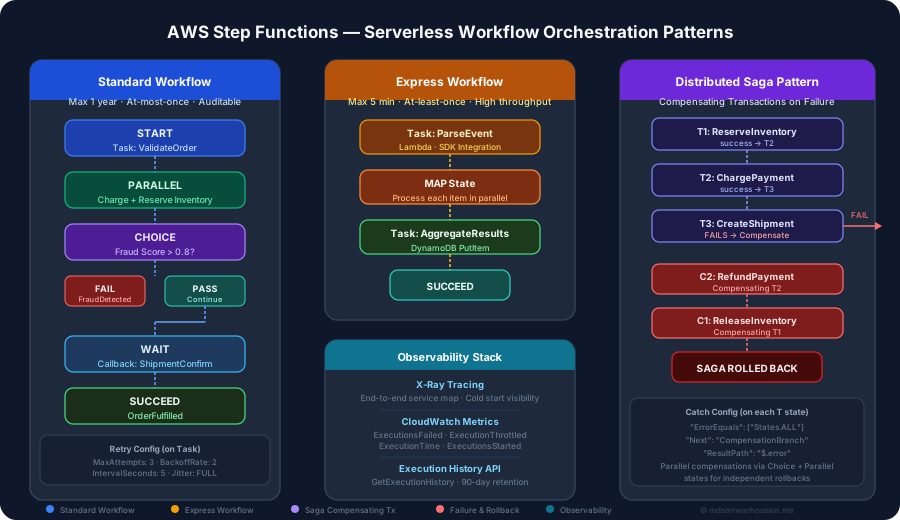
TL;DR — When to Reach for Step Functions
"Use Standard Workflows for long-running, auditable business processes (orders, approvals, onboarding) where exactly-once execution matters. Use Express Workflows for high-throughput event processing and data pipelines where speed and cost matter more than built-in audit history. Implement the Saga pattern with compensating transactions for distributed transactions across microservices — Step Functions makes it the safest, most observable approach available on AWS."
Table of Contents
- Orchestration vs Choreography: The Decision
- Express vs Standard Workflows: When to Use Which
- Amazon States Language: Task, Choice, Parallel, Map & More
- Step Functions Integration Patterns: SDK, Optimistic, Callback
- Error Handling & Retry Strategies
- Distributed Saga Pattern with Step Functions
- Step Functions + Java SDK: Building Workflows Programmatically
- Data Processing: Map State, I/O Processing & ItemReader
- Step Functions vs Alternatives: SQS, EventBridge, Airflow, Temporal
- Observability: X-Ray, CloudWatch, Execution History
- Production Best Practices & Checklist
1. Orchestration vs Choreography: The Decision
Before writing a single state machine, you need to decide whether your distributed workflow needs an orchestrator (central coordinator that calls each step) or should be choreographed (each service reacts to events independently via a message bus like EventBridge or SNS). This is the most consequential architectural decision you'll make at the workflow level.
When Orchestration Wins
Orchestration with Step Functions is the right choice when:
- Visibility is non-negotiable: You need a complete, time-stamped audit trail of every step execution — common in financial, healthcare, and compliance-heavy domains.
- Complex branching logic exists: Multiple decision points, conditional paths, and parallel branches that would require complex event correlations in a choreography model.
- Long-running human approval steps: Workflows that pause for days or weeks awaiting human input (approval gates, callbacks) are a perfect fit for Standard Workflows.
- Compensating transactions are required: Distributed sagas with rollback logic are dramatically easier to implement and reason about when orchestrated centrally.
- Error handling must be centralised: Retry policies, catch blocks, and failure routing defined in one place rather than scattered across dozens of event consumers.
When Choreography Wins
Choose event-driven choreography (EventBridge, SNS, Kafka) when you need maximum decoupling between services, the workflow is linear with no branching, throughput requirements exceed Step Functions limits (150,000 state transitions/second for Express), or when adding new consumers should not require changes to a central coordinator. Choreography scales better horizontally but makes debugging significantly harder.
Key Insight: The Coupling Trade-off
Orchestration introduces temporal coupling (all participants must be available when the orchestrator calls them) but eliminates the invisible coupling of shared event schemas that plagues choreography. In practice, for workflows with more than 3 steps and any error-handling requirements, orchestration with Step Functions almost always reduces total system complexity even though it appears more "coupled" at first glance.
2. Express vs Standard Workflows: When to Use Which
AWS Step Functions offers two fundamentally different execution models. Choosing the wrong type is an expensive mistake — they differ in pricing model, execution semantics, duration limits, and observability capabilities.
| Dimension | Standard Workflow | Express Workflow |
|---|---|---|
| Max Duration | 1 year | 5 minutes |
| Execution Semantics | Exactly-once | At-least-once |
| Pricing Model | Per state transition ($0.025/1K) | Per execution + duration |
| Execution History | Built-in, 90-day retention | CloudWatch Logs only |
| Throughput | 2,000 executions/sec (default) | 100,000 executions/sec |
| Idempotency | Built-in deduplication | Must implement in workers |
| Synchronous Start | Not supported | startSyncExecution (≤5 min) |
| Best For | Orders, approvals, onboarding | ETL pipelines, IoT, API fanout |
Critical: Express Workflow Idempotency
Express Workflows guarantee at-least-once execution. If your Lambda functions perform writes — DynamoDB PutItem, payment charges, notification sends — they must be idempotent. Use a conditional expression with a unique executionId attribute in DynamoDB, or a deduplication key in SQS and SNS. Failing to handle this is the most common production bug in Express Workflow deployments.
3. Amazon States Language: Task, Choice, Parallel, Map & More
Amazon States Language (ASL) is a JSON-based specification for defining state machines. Every state has a Type, optional Next, and type-specific fields. Mastering the eight state types unlocks the full power of Step Functions.
Order Processing Workflow — Full ASL Example
This production-style example demonstrates a complete order workflow: parallel payment + inventory reservation, fraud check via Choice state, callback wait for shipment confirmation, and full Retry/Catch configuration on the payment Task.
{
  "Comment": "Order processing workflow — Standard Workflow",
  "StartAt": "ValidateOrder",
  "States": {
    "ValidateOrder": {
      "Type": "Task",
      "Resource": "arn:aws:lambda:us-east-1:123456789:function:ValidateOrder",
      "ResultPath": "$.validation",
      "Retry": [
        {
          "ErrorEquals": ["Lambda.ServiceException", "Lambda.TooManyRequestsException"],
          "IntervalSeconds": 2,
          "MaxAttempts": 3,
          "BackoffRate": 2,
          "JitterStrategy": "FULL"
        }
      ],
      "Catch": [
        {
          "ErrorEquals": ["InvalidOrderError"],
          "Next": "OrderRejected",
          "ResultPath": "$.error"
        }
      ],
      "Next": "ProcessOrderInParallel"
    },
    "ProcessOrderInParallel": {
      "Type": "Parallel",
      "Branches": [
        {
          "StartAt": "ChargePayment",
          "States": {
            "ChargePayment": {
              "Type": "Task",
              "Resource": "arn:aws:states:::lambda:invoke",
              "Parameters": {
                "FunctionName": "ChargePayment",
                "Payload.$": "$"
              },
              "Retry": [
                {
                  "ErrorEquals": ["States.TaskFailed"],
                  "IntervalSeconds": 5,
                  "MaxAttempts": 3,
                  "BackoffRate": 1.5,
                  "JitterStrategy": "FULL"
                }
              ],
              "End": true
            }
          }
        },
        {
          "StartAt": "ReserveInventory",
          "States": {
            "ReserveInventory": {
              "Type": "Task",
              "Resource": "arn:aws:states:::dynamodb:putItem",
              "Parameters": {
                "TableName": "inventory-reservations",
                "Item": {
                  "orderId": { "S.$": "$.orderId" },
                  "status": { "S": "RESERVED" }
                }
              },
              "End": true
            }
          }
        }
      ],
      "ResultPath": "$.parallel",
      "Next": "FraudCheck"
    },
    "FraudCheck": {
      "Type": "Choice",
      "Choices": [
        {
          "Variable": "$.parallel[0].fraudScore",
          "NumericGreaterThan": 0.8,
          "Next": "FlagForReview"
        }
      ],
      "Default": "WaitForShipment"
    },
    "FlagForReview": {
      "Type": "Task",
      "Resource": "arn:aws:states:::sns:publish",
      "Parameters": {
        "TopicArn": "arn:aws:sns:us-east-1:123456789:fraud-review",
        "Message.$": "States.JsonToString($)"
      },
      "Next": "OrderUnderReview"
    },
    "WaitForShipment": {
      "Type": "Task",
      "Resource": "arn:aws:states:::sqs:sendMessage.waitForTaskToken",
      "Parameters": {
        "QueueUrl": "https://sqs.us-east-1.amazonaws.com/123456789/shipment-queue",
        "MessageBody": {
          "taskToken.$": "$$.Task.Token",
          "orderId.$": "$.orderId"
        }
      },
      "HeartbeatSeconds": 86400,
      "Next": "OrderFulfilled"
    },
    "OrderFulfilled": { "Type": "Succeed" },
    "OrderUnderReview": { "Type": "Succeed" },
    "OrderRejected": {
      "Type": "Fail",
      "Error": "OrderRejected",
      "Cause": "Order validation failed"
    }
  }
}State Type Reference
- Task: Calls an AWS service or activity. The core workhorse — connects to Lambda, DynamoDB, ECS, SNS, SQS, EventBridge, HTTP endpoints, and 200+ SDK integrations. Supports Retry and Catch.
- Choice: Implements branching logic via boolean conditions on input data (StringEquals, NumericGreaterThan, IsPresent, etc.). No Retry/Catch — route errors in the preceding Task.
- Parallel: Executes multiple branches concurrently. All branches must complete before the state exits. Branch failures propagate as
States.BranchFailed. - Map: Iterates over a JSON array, running the same sub-state-machine for each item. Supports
MaxConcurrencyto throttle parallel iterations. DISTRIBUTED mode handles arrays larger than 256KB via S3. - Wait: Pauses execution for a fixed duration (
Seconds), until a timestamp (Timestamp), or for an external callback (waitForTaskToken). - Pass: Transforms input to output without calling any service. Useful for injecting constants, restructuring JSON, and unit-testing state machines with mock data.
- Succeed / Fail: Terminal states.
Failaccepts anErrorandCausefor downstream Catch matching.
4. Step Functions Integration Patterns: SDK, Optimistic & Callback
Step Functions offers three integration patterns for Task states, each optimised for different latency and coupling requirements. Choosing the right pattern is critical — the wrong choice either wastes money on polling or causes workflows to hang indefinitely.
Request-Response (Optimistic / Fire-and-Forget)
The default pattern. Step Functions calls the resource and immediately moves on without waiting for completion. Used when you don't need the result: sending notifications, triggering asynchronous processes, writing audit logs. Resource ARN format: "Resource": "arn:aws:states:::sns:publish".
.sync Integration (SDK Integration)
Step Functions polls the AWS service until the job completes and returns the result. Ideal for long-running async services: ECS RunTask, Glue jobs, CodeBuild, Athena queries, Batch jobs. Add .sync:2 suffix for optimised polling. Resource example: "arn:aws:states:::ecs:runTask.sync:2". Polling costs state transitions — budget accordingly.
.waitForTaskToken (Callback Pattern)
Step Functions pauses indefinitely (up to HeartbeatSeconds) until an external system calls SendTaskSuccess or SendTaskFailure with the provided task token. Perfect for human approval gates, third-party webhook responses, and long-running worker tasks. The token is injected into the request payload via "taskToken.$": "$$.Task.Token".
5. Error Handling & Retry Strategies
Production reliability in Step Functions is almost entirely determined by how well you configure Retry and Catch on your Task states. The default is no retry, no catch — unhandled errors terminate the entire execution.
Retry Configuration Best Practices
Every Task state that calls a Lambda function or external service should include a Retry block at minimum for transient infrastructure errors:
"Retry": [
  {
    "ErrorEquals": [
      "Lambda.ServiceException",
      "Lambda.AWSLambdaException",
      "Lambda.SdkClientException",
      "Lambda.TooManyRequestsException"
    ],
    "IntervalSeconds": 2,
    "MaxAttempts": 6,
    "BackoffRate": 2,
    "JitterStrategy": "FULL",
    "MaxDelaySeconds": 300
  },
  {
    "ErrorEquals": ["States.TaskFailed"],
    "IntervalSeconds": 5,
    "MaxAttempts": 3,
    "BackoffRate": 1.5
  }
]- JitterStrategy: "FULL" (2026 addition) adds random jitter to the retry interval — critical for preventing thundering-herd patterns when many executions fail simultaneously.
- MaxDelaySeconds caps the maximum retry wait even with high BackoffRate values, preventing retries from waiting hours after many doublings.
- List specificity matters: Put more specific error types first. AWS evaluates Retry entries in order; the first match wins.
- Always include the four Lambda infrastructure errors as your first Retry entry — these cover cold start throttling, transient network issues, and Lambda service outages.
Catch, ResultPath & Error Routing
After retries are exhausted, Catch determines what happens. The ResultPath field controls where error details are placed in the execution state — without it, errors overwrite your entire input payload:
"Catch": [
  {
    "ErrorEquals": ["PaymentDeclinedError"],
    "Next": "NotifyPaymentFailed",
    "ResultPath": "$.error"
  },
  {
    "ErrorEquals": ["States.ALL"],
    "Next": "UnhandledErrorHandler",
    "ResultPath": "$.error"
  }
]
Always include a States.ALL catch-all as the last entry to ensure no execution silently fails without a notification or compensation flow. Route catch-all failures to an SNS topic or a Lambda that creates a PagerDuty alert.
Named Error Types
Define domain errors in Lambda by throwing structured exceptions with a name. In Python: raise Exception("PaymentDeclinedError"). In Java, the Lambda runtime serializes the exception class name as the error type. Step Functions matches on the string, enabling precise routing of different business error conditions to appropriate compensation flows.
6. Distributed Saga Pattern with Step Functions
The Saga pattern breaks a distributed transaction into a sequence of local transactions, each with a compensating transaction that undoes its effect if the overall saga fails. Step Functions is the most reliable AWS-native way to implement sagas because the execution history provides a durable, queryable record of which compensations must run.
Saga ASL — Compensating Transaction Flow
{
  "StartAt": "T1_ReserveInventory",
  "States": {
    "T1_ReserveInventory": {
      "Type": "Task",
      "Resource": "arn:aws:lambda:us-east-1:123456789:function:ReserveInventory",
      "ResultPath": "$.t1Result",
      "Catch": [{ "ErrorEquals": ["States.ALL"], "Next": "SagaFailed", "ResultPath": "$.error" }],
      "Next": "T2_ChargePayment"
    },
    "T2_ChargePayment": {
      "Type": "Task",
      "Resource": "arn:aws:lambda:us-east-1:123456789:function:ChargePayment",
      "ResultPath": "$.t2Result",
      "Catch": [{ "ErrorEquals": ["States.ALL"], "Next": "C1_RefundPayment", "ResultPath": "$.error" }],
      "Next": "T3_CreateShipment"
    },
    "T3_CreateShipment": {
      "Type": "Task",
      "Resource": "arn:aws:lambda:us-east-1:123456789:function:CreateShipment",
      "ResultPath": "$.t3Result",
      "Catch": [{ "ErrorEquals": ["States.ALL"], "Next": "C2_CancelShipment", "ResultPath": "$.error" }],
      "Next": "SagaSucceeded"
    },
    "C2_CancelShipment": {
      "Type": "Task",
      "Resource": "arn:aws:lambda:us-east-1:123456789:function:CancelShipment",
      "ResultPath": "$.c2Result",
      "Next": "C1_RefundPayment"
    },
    "C1_RefundPayment": {
      "Type": "Task",
      "Resource": "arn:aws:lambda:us-east-1:123456789:function:RefundPayment",
      "ResultPath": "$.c1Result",
      "Next": "C0_ReleaseInventory"
    },
    "C0_ReleaseInventory": {
      "Type": "Task",
      "Resource": "arn:aws:lambda:us-east-1:123456789:function:ReleaseInventory",
      "ResultPath": "$.c0Result",
      "Next": "SagaFailed"
    },
    "SagaSucceeded": { "Type": "Succeed" },
    "SagaFailed": {
      "Type": "Fail",
      "Error": "SagaRolledBack",
      "Cause": "Distributed transaction failed and compensated"
    }
  }
}
Saga Idempotency Requirement
Both forward transactions and compensating transactions must be idempotent. Step Functions may re-invoke a Lambda if it times out before receiving a response. For compensating transactions, idempotency prevents double-refunds and double-releases. Use DynamoDB conditional writes with a unique transaction ID to enforce exactly-once semantics at the application layer.
7. Step Functions + Java SDK: Building Workflows Programmatically
In production Java microservices, you'll interact with Step Functions from two angles: infrastructure-as-code (defining the state machine with AWS CDK) and runtime SDK calls (starting and monitoring executions from your Spring Boot services).
AWS CDK Java — Defining a StateMachine
import software.amazon.awscdk.services.stepfunctions.*;
import software.amazon.awscdk.services.stepfunctions.tasks.*;
import software.amazon.awscdk.services.lambda.*;
import software.amazon.awscdk.Duration;

// Define Lambda integrations
LambdaInvoke validateOrder = LambdaInvoke.Builder.create(this, "ValidateOrder")
    .lambdaFunction(validateOrderFn)
    .resultPath("$.validation")
    .retryOnServiceExceptions(true)
    .build();

LambdaInvoke chargePayment = LambdaInvoke.Builder.create(this, "ChargePayment")
    .lambdaFunction(chargePaymentFn)
    .resultPath("$.payment")
    .build();

// Add retry policy to Task
chargePayment.addRetry(RetryProps.builder()
    .errors(List.of("States.TaskFailed", "Lambda.TooManyRequestsException"))
    .interval(Duration.seconds(5))
    .maxAttempts(3)
    .backoffRate(2)
    .jitterStrategy(JitterType.FULL)
    .build());

// Add catch for business error
chargePayment.addCatch(CatchProps.builder()
    .errors(List.of("PaymentDeclinedError"))
    .resultPath("$.error")
    .build(), notifyPaymentFailed);

// Choice state for fraud check
Choice fraudCheck = new Choice(this, "FraudCheck")
    .when(Condition.numberGreaterThan("$.parallel[0].fraudScore", 0.8), flagForReview)
    .otherwise(waitForShipment);

// Parallel state for concurrent steps
Parallel processInParallel = new Parallel(this, "ProcessOrderInParallel")
    .branch(chargePayment)
    .branch(reserveInventory);

// Chain states
Chain definition = Chain.start(validateOrder)
    .next(processInParallel)
    .next(fraudCheck);

// Create the Standard state machine
StateMachine orderWorkflow = StateMachine.Builder.create(this, "OrderWorkflow")
    .stateMachineName("order-processing-workflow")
    .stateMachineType(StateMachineType.STANDARD)
    .definitionBody(DefinitionBody.fromChainable(definition))
    .tracingEnabled(true)
    .logs(LogOptions.builder()
        .destination(new LogGroup(this, "StepFunctionsLogs"))
        .level(LogLevel.ALL)
        .includeExecutionData(true)
        .build())
    .build();
Java SDK v2 — Starting an Execution from Spring Boot
import software.amazon.awssdk.services.sfn.SfnClient;
import software.amazon.awssdk.services.sfn.model.*;
import com.fasterxml.jackson.databind.ObjectMapper;

@Service
public class OrderWorkflowService {

    private final SfnClient sfnClient;
    private final ObjectMapper objectMapper;

    @Value("${aws.stepfunctions.order-workflow-arn}")
    private String stateMachineArn;

    public String startOrderWorkflow(OrderRequest request) throws Exception {
        String input = objectMapper.writeValueAsString(request);

        StartExecutionRequest executionRequest = StartExecutionRequest.builder()
            .stateMachineArn(stateMachineArn)
            .name("order-" + request.getOrderId() + "-" + Instant.now().toEpochMilli())
            .input(input)
            .build();

        StartExecutionResponse response = sfnClient.startExecution(executionRequest);
        log.info("Started execution: {}", response.executionArn());
        return response.executionArn();
    }

    public ExecutionStatus getExecutionStatus(String executionArn) {
        DescribeExecutionResponse response = sfnClient.describeExecution(
            DescribeExecutionRequest.builder()
                .executionArn(executionArn)
                .build()
        );
        return response.status();
    }

    // For Express Workflows — synchronous execution (max 5 min)
    public String startSyncOrderValidation(OrderRequest request) throws Exception {
        String input = objectMapper.writeValueAsString(request);

        StartSyncExecutionRequest syncRequest = StartSyncExecutionRequest.builder()
            .stateMachineArn(expressWorkflowArn)
            .input(input)
            .build();

        StartSyncExecutionResponse syncResponse = sfnClient.startSyncExecution(syncRequest);

        if (syncResponse.status() == SyncExecutionStatus.FAILED) {
            throw new WorkflowException("Express workflow failed: " + syncResponse.cause());
        }
        return syncResponse.output();
    }
}
8. Data Processing: Map State, I/O Processing & ItemReader
The Map state is one of Step Functions' most powerful features for data processing workflows. It applies the same sub-state-machine to every element of an array — think of it as a distributed forEach with configurable concurrency, retry, and error handling built in.
Map State — Batch Record Processing
{
  "ProcessRecords": {
    "Type": "Map",
    "ItemsPath": "$.records",
    "ItemSelector": {
      "recordId.$": "$$.Map.Item.Value.id",
      "payload.$": "$$.Map.Item.Value",
      "batchIndex.$": "$$.Map.Item.Index"
    },
    "MaxConcurrency": 10,
    "ToleratedFailurePercentage": 5,
    "Iterator": {
      "StartAt": "ProcessSingleRecord",
      "States": {
        "ProcessSingleRecord": {
          "Type": "Task",
          "Resource": "arn:aws:lambda:us-east-1:123456789:function:ProcessRecord",
          "Retry": [
            {
              "ErrorEquals": ["States.TaskFailed"],
              "IntervalSeconds": 2,
              "MaxAttempts": 3,
              "BackoffRate": 2
            }
          ],
          "End": true
        }
      }
    },
    "ResultPath": "$.processedRecords",
    "Next": "AggregateResults"
  }
}
DISTRIBUTED Mode for Large Datasets (ItemReader)
Standard Map state is limited by the 256KB state payload limit. For datasets with thousands or millions of items, use Map state in DISTRIBUTED mode with ItemReader. This allows Step Functions to read items directly from S3, DynamoDB, or SQS without passing them through the state payload:
{
  "ProcessLargeDataset": {
    "Type": "Map",
    "Label": "LargeDatasetProcessor",
    "MaxConcurrency": 100,
    "ToleratedFailurePercentage": 2,
    "ItemReader": {
      "Resource": "arn:aws:states:::s3:getObject",
      "ReaderConfig": {
        "InputType": "CSV",
        "CSVHeaderLocation": "FIRST_ROW"
      },
      "Parameters": {
        "Bucket.$": "$.sourceBucket",
        "Key.$": "$.sourceKey"
      }
    },
    "ItemBatcher": {
      "MaxItemsPerBatch": 100,
      "MaxInputBytesPerBatch": 262144
    },
    "ResultWriter": {
      "Resource": "arn:aws:states:::s3:putObject",
      "Parameters": {
        "Bucket.$": "$.resultBucket",
        "Prefix": "results/"
      }
    },
    "Iterator": {
      "StartAt": "ProcessBatch",
      "States": {
        "ProcessBatch": {
          "Type": "Task",
          "Resource": "arn:aws:lambda:us-east-1:123456789:function:ProcessBatch",
          "End": true
        }
      }
    },
    "End": true
  }
}
I/O Processing Essentials: Use InputPath to select a subset of input, Parameters to construct the task input with JsonPath expressions and literals, ResultSelector to reshape task output before storing, ResultPath to merge results back into state, and OutputPath to select the final output passed to the next state. Mastering these five fields eliminates the need for pass-through Lambda functions that only reformat data.
9. Step Functions vs Alternatives: SQS, EventBridge, Airflow & Temporal
AWS Step Functions is not the right tool for every workflow problem. Understanding where it excels and where it falls short prevents costly architectural mistakes.
| Tool | Best For | Weakness vs Step Functions | Typical Cost |
|---|---|---|---|
| Step Functions Standard | Business workflows, sagas, approvals | Higher cost at very high volume | $0.025/1K transitions |
| Step Functions Express | High-throughput ETL, IoT, API fanout | No built-in audit history, at-least-once | $1/M executions + duration |
| SQS + Lambda | Simple linear task queues, high volume | No branching, no built-in saga, no visual debugger | ~$0.40/M messages |
| EventBridge Pipes | Point-to-point event enrichment pipelines | No complex branching or long-running state | $0.40/M events processed |
| Apache Airflow (MWAA) | Data engineering DAGs, Python-heavy teams | Not serverless, higher ops burden, slower scaling | $0.49/hour for environment |
| Temporal | Complex workflows in code, cross-cloud | Self-managed infra (unless Temporal Cloud), higher setup cost | Self-hosted or $0.025+/action on Cloud |
Step Functions vs Temporal: The Real Trade-off
Temporal lets you write workflow logic as normal Java/Go/Python code with the full expressiveness of your programming language. Step Functions constrains you to JSON-defined ASL states which limits complex data transformations and dynamic branching. For workflows that are naturally expressed in code (especially those spanning multiple cloud providers), Temporal is often a better fit. For teams deep in the AWS ecosystem who value zero-ops serverless infrastructure, Step Functions wins convincingly on operational simplicity.
10. Observability: X-Ray, CloudWatch & Execution History
A workflow that fails silently in production is worse than one that never ran. Step Functions provides three complementary observability layers that together give you full visibility from the service map down to individual state transition data.
AWS X-Ray Tracing
Enable X-Ray tracing at the state machine level (tracingEnabled: true in CDK). X-Ray automatically creates segments for each state transition and propagates trace context into downstream Lambda invocations, providing an end-to-end service map. In the X-Ray console, you can see exactly which state transition caused a latency spike, and correlate Lambda cold starts with workflow slowdowns. Enable Active tracing in the Lambda functions as well to get complete traces through the entire execution chain.
Essential CloudWatch Metrics & Alarms
Monitor these metrics for every production state machine:
- ExecutionsFailed: Alert on any non-zero value for critical workflows. Set p0 alarm for order processing workflows.
- ExecutionsThrottled: Indicates you've hit the concurrent execution limit (default 1,000 for Standard). Raise limits via Service Quotas before go-live.
- ExecutionTime (p95, p99): Track latency trends. Sudden p99 increases indicate downstream service degradation.
- ExecutionsTimedOut: Often caused by missing
HeartbeatSecondsconfiguration on waitForTaskToken states. - ExecutionsStarted / ExecutionsSucceeded: Calculate success rate = Succeeded / Started. Alert when rate falls below 99%.
Execution History API for Debugging
Standard Workflows store the complete execution history for 90 days via the GetExecutionHistory API. Each event records the state name, timestamp, event type (StateEntered, TaskScheduled, TaskSucceeded, TaskFailed, etc.), and full input/output data. For large payloads, enable includeExecutionData: false on CloudWatch Logs and use the execution history API directly to avoid log bloat. For Express Workflows, all observability flows through CloudWatch Logs — configure a structured log format with execution ARN and correlation IDs to enable cross-log searching.
11. Production Best Practices & Checklist
These practices separate hobby Step Functions deployments from battle-hardened production systems that have survived Black Friday traffic spikes, partial AWS outages, and unexpected business logic edge cases.
Idempotency at Every Level
Generate execution names deterministically from business keys: order-{orderId}-{attempt}. Step Functions rejects duplicate execution names within a state machine, preventing duplicate workflow starts from retry-happy upstream callers. This provides deduplication at the orchestration layer at zero cost.
State Machine Versioning
Step Functions supports Versions and Aliases (released in 2023). Create a new version on each deployment, and route traffic through an alias (LIVE, CANARY). This enables canary deployments for state machine changes without affecting in-flight executions on the previous version. Critical for Standard Workflows where executions may run for hours or days across a deployment window.
Cost Optimisation
- Minimise state transitions: Each state transition in a Standard Workflow costs $0.000025. Avoid intermediate Pass states just for data transformation — use InputPath, Parameters, and ResultSelector within Task states instead.
- Use SDK integrations over Lambda pass-throughs: Direct integrations to DynamoDB, SNS, SQS, and EventBridge save both the Lambda invocation cost and the state transition cost of an intermediate Lambda result-passing step.
- Express Workflows for polling patterns: If you have a workflow that must poll an external API every 30 seconds, use Express Workflow with scheduled EventBridge Pipes rather than a Standard Workflow with recurring Wait states — Express is 10–50× cheaper for short, frequent workflows.
- Avoid storing large payloads in state: Pass S3 keys rather than file contents. The 256KB state size limit enforces good practice, but even below the limit, large payloads increase state transition costs and slow execution history retrieval.
Testing State Machines
Use the Step Functions Local Docker image for unit testing state machine logic without deploying to AWS. For integration testing, use Testcontainers with LocalStack to spin up a real Step Functions environment with mocked Lambda responses. Define test scenarios as JSON input files and assert on execution history events — this catches ASL syntax errors, missing ResultPath configurations, and incorrect Choice conditions before production deployment.
Production Readiness Checklist
- ☐ All Task states have Retry configured for at least Lambda infrastructure errors
- ☐ All Task states have Catch with a
States.ALLcatch-all as last entry - ☐ ResultPath used on all Catch blocks to preserve input payload
- ☐ Execution names are deterministic and based on business keys (deduplication)
- ☐ All Lambda workers are idempotent (Express Workflow: mandatory; Standard: strongly recommended)
- ☐ X-Ray tracing enabled on state machine and all downstream Lambdas
- ☐ CloudWatch alarms set for ExecutionsFailed, ExecutionsThrottled, ExecutionsTimedOut
- ☐ Concurrent execution limits reviewed and raised via Service Quotas for expected peak volume
- ☐ State machine Versions and Aliases configured for safe deployment
- ☐ State payloads stay under 256KB (use S3 for large data, pass S3 keys)
- ☐ waitForTaskToken states have HeartbeatSeconds configured to prevent silent hangs
- ☐ Saga compensating transactions are idempotent and unit-tested independently
- ☐ IAM roles follow least-privilege — each state machine has its own role
- ☐ Map state MaxConcurrency configured to avoid overwhelming downstream services
AWS Step Functions eliminates the most fragile parts of distributed workflow management: manual retry logic, partial failure handling, and ad-hoc audit logging. By encoding your orchestration logic in ASL rather than application code, you gain a visual debugger, built-in retry semantics, and a durable execution history that no custom solution can match without significant operational investment. Whether you're building an e-commerce order pipeline, a multi-service data processing workflow, or a human-in-the-loop approval system, Step Functions in 2026 remains the gold standard for serverless workflow orchestration on AWS.
Leave a Comment
Related Posts

Software Engineer · Java · Spring Boot · Microservices · AWS · Serverless