Container & Runtime Security Hardening Before Production: seccomp, AppArmor, Pod Security Standards & Falco in 2026
Most teams get container security wrong in the same way: they add a USER directive and call it done. But a container breakout doesn't care about the non-root user if the seccomp profile is permissive, the capabilities aren't dropped, and there's no runtime monitoring. This guide walks through every security layer — from build-time image hardening to kernel-level anomaly detection — that you must implement before going to production.
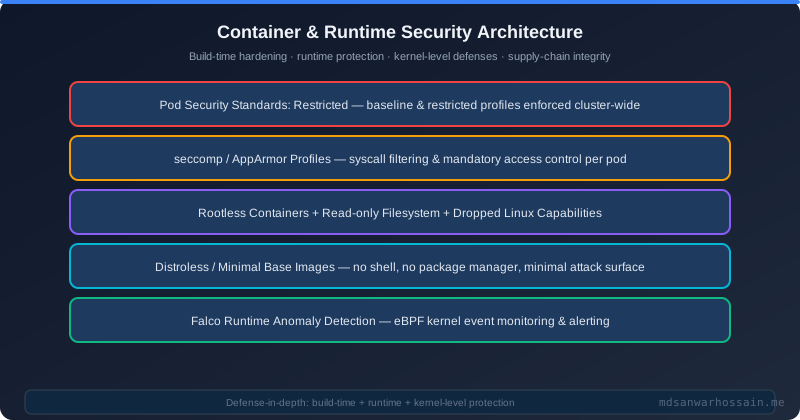
TL;DR — The Layered Defense in One Sentence
"Running containers as root, with no seccomp profile, and no runtime monitoring is the default — and it's dangerous. Lock down production containers with Pod Security Standards (restricted), custom seccomp profiles, AppArmor policies, distroless images, and Falco anomaly detection. Each layer stops a different class of attack."
Table of Contents
- The Container Security Threat Model
- Distroless & Minimal Base Images
- Rootless Containers & Capability Dropping
- seccomp Profiles: Restricting Syscalls
- AppArmor Policies for Docker & Kubernetes
- Kubernetes Pod Security Standards (PSS)
- Read-Only Filesystems & Immutable Containers
- Falco: Runtime Threat Detection
- Image Scanning & Signing in CI/CD
- Production Container Security Checklist
- Conclusion
1. The Container Security Threat Model
Containers share the host kernel. Unlike virtual machines with full hardware isolation, a container breakout attack escalates from container-level access to host-level access through kernel vulnerabilities or misconfigurations. Understanding the threat model is the foundation of every defense decision.
High-Impact Container Vulnerabilities
- CVE-2019-5736 (runc): A container running as root could overwrite the host runc binary, achieving full host code execution. Affected all major container runtimes. The fix requires non-root containers — but you need the other layers too.
- CVE-2022-0492 (cgroups v1): A container could escape to the host via cgroup release_agent exploitation if run without a seccomp profile blocking the relevant syscalls. Non-root alone did NOT prevent this.
- Privileged container abuse: A container with
--privilegedhas full host capabilities. If an attacker compromises a privileged container, the host is compromised. This is equivalent to running code directly on the host. - HostPID/HostNetwork exposure: Sharing the host PID namespace lets a container see and send signals to all host processes. Host network access bypasses all Kubernetes NetworkPolicy.
Defense-in-Depth Model for Containers
No single control stops all container attacks. The defense layers stack on top of each other: a minimal image reduces attack surface, non-root prevents class-1 exploits, seccomp blocks syscall-based escapes, AppArmor restricts filesystem access, PSS enforces the policy at admission, and Falco catches anything that slips through at runtime. You need all layers.
2. Distroless & Minimal Base Images
The attack surface of a container is directly proportional to the number of binaries, libraries, and shell utilities it contains. Every tool you ship is a tool the attacker can use. Distroless images eliminate this surface entirely by shipping only the runtime (JRE for Java, libc for C/C++) with no shell, no package manager, and no debugging utilities.
Multi-Stage Dockerfile with Distroless Final Stage
# Stage 1: Build
FROM eclipse-temurin:21-jdk-alpine AS builder
WORKDIR /app
COPY . .
RUN ./mvnw package -DskipTests

# Stage 2: Distroless runtime — no shell, no apt, no tools for attackers
FROM gcr.io/distroless/java21-debian12:nonroot
WORKDIR /app
COPY --from=builder /app/target/myapp.jar /app/myapp.jar
# No USER directive needed — nonroot tag runs as uid 65532 by default
EXPOSE 8080
ENTRYPOINT ["java", "-jar", "/app/myapp.jar"]
Image Size & Attack Surface Comparison
| Base Image | Size | Shell | Package Manager | CVE Surface |
|---|---|---|---|---|
| openjdk:21-jdk | ~400MB | ✅ bash | ✅ apt | High |
| eclipse-temurin:21-jre-alpine | ~180MB | ✅ sh | ✅ apk | Medium |
| gcr.io/distroless/java21-debian12 | ~85MB | ❌ none | ❌ none | Minimal |
| gcr.io/distroless/java21:nonroot | ~85MB | ❌ none | ❌ none | Minimal + non-root |
3. Rootless Containers & Capability Dropping
Linux capabilities break the monolithic root privilege into 38 distinct capabilities (CAP_NET_ADMIN, CAP_SYS_PTRACE, etc.). Containers by default inherit too many. Drop all capabilities and add back only what is strictly required.
Kubernetes SecurityContext: Correct Configuration
apiVersion: apps/v1
kind: Deployment
spec:
  template:
    spec:
      securityContext:
        runAsNonRoot: true
        runAsUser: 1001
        runAsGroup: 1001
        fsGroup: 1001
        seccompProfile:
          type: RuntimeDefault
      containers:
      - name: myapp
        image: gcr.io/distroless/java21-debian12:nonroot
        securityContext:
          allowPrivilegeEscalation: false
          readOnlyRootFilesystem: true
          capabilities:
            drop:
            - ALL
            add:
            - NET_BIND_SERVICE  # only if binding port <1024
        ports:
        - containerPort: 8080
        volumeMounts:
        - name: tmp
          mountPath: /tmp
      volumes:
      - name: tmp
emptyDir: {}4. seccomp Profiles: Restricting Syscalls
seccomp (secure computing mode) filters the syscalls a process can make. The Linux kernel has over 400 syscalls. A typical Java web application needs fewer than 60. Blocking unused syscalls stops kernel exploit techniques like those used in CVE-2022-0492.
Custom seccomp Profile for Java Applications
{
  "defaultAction": "SCMP_ACT_ERRNO",
  "architectures": ["SCMP_ARCH_X86_64", "SCMP_ARCH_AARCH64"],
  "syscalls": [
    {
      "names": [
        "accept4", "bind", "brk", "clone", "close", "connect",
        "epoll_create1", "epoll_ctl", "epoll_pwait", "epoll_wait",
        "eventfd2", "exit", "exit_group", "fcntl", "fstat", "fstatfs",
        "futex", "getdents64", "getpid", "getppid", "getrandom",
        "gettid", "gettimeofday", "listen", "lseek", "madvise",
        "mmap", "mprotect", "munmap", "nanosleep", "newfstatat",
        "openat", "pipe2", "poll", "prctl", "pread64", "read",
        "readlink", "recvfrom", "recvmsg", "rt_sigaction",
        "rt_sigprocmask", "rt_sigreturn", "sched_getaffinity",
        "sched_yield", "sendmsg", "sendto", "set_robust_list",
        "set_tid_address", "setsockopt", "sigaltstack", "socket",
        "stat", "tgkill", "uname", "wait4", "write", "writev"
      ],
      "action": "SCMP_ACT_ALLOW"
    }
  ]
}
Applying seccomp in Kubernetes
# Use RuntimeDefault (Docker/containerd built-in — blocks 44 dangerous syscalls)
securityContext:
  seccompProfile:
    type: RuntimeDefault

# Use a custom profile (place JSON at /var/lib/kubelet/seccomp/java-app.json on each node)
securityContext:
  seccompProfile:
    type: Localhost
    localhostProfile: java-app.json
5. AppArmor Policies for Docker & Kubernetes
AppArmor is a Linux Security Module (LSM) that restricts filesystem access, network operations, and capability usage per process using path-based policies. Where seccomp filters syscalls by number, AppArmor filters by operation and target path — they are complementary.
Custom AppArmor Profile for a Java API
#include <tunables/global>
profile java-api flags=(attach_disconnected) {
  #include <abstractions/base>
  #include <abstractions/java>

  # Allow reads from app directory and JDK
  /app/** r,
  /opt/java/** rm,

  # Allow temp writes
  /tmp/** rw,

  # Deny dangerous operations
  deny /proc/sysrq-trigger w,
  deny /sys/** w,
  deny @{PROC}/*/mem r,
  deny ptrace,
  deny mount,
  deny pivot_root,

  # Network: allow TCP outbound and inbound on 8080
  network tcp,
}
# Load the profile on each node
sudo apparmor_parser -r -W /etc/apparmor.d/java-api
sudo aa-status | grep java-api
# Apply in Kubernetes via annotation
metadata:
annotations:
container.apparmor.security.beta.kubernetes.io/myapp: localhost/java-api6. Kubernetes Pod Security Standards (PSS)
Kubernetes Pod Security Standards replaced PodSecurityPolicy (deprecated in 1.21, removed in 1.25) with a built-in admission controller that enforces security profiles at the namespace level. Three levels exist: Privileged, Baseline, and Restricted. Production workloads should target Restricted.
| Control | Privileged | Baseline | Restricted |
|---|---|---|---|
| privileged containers | allowed | denied | denied |
| hostPID / hostIPC | allowed | denied | denied |
| allowPrivilegeEscalation | allowed | allowed | denied |
| runAsNonRoot | not required | not required | required |
| seccompProfile | not required | not required | RuntimeDefault required |
| capabilities | unrestricted | limited set | must drop ALL |
# Enforce restricted PSS on a namespace
kubectl label namespace production \
  pod-security.kubernetes.io/enforce=restricted \
  pod-security.kubernetes.io/enforce-version=latest \
  pod-security.kubernetes.io/warn=restricted \
  pod-security.kubernetes.io/audit=restricted
7. Read-Only Filesystems & Immutable Containers
An attacker who achieves code execution in a container typically needs to write files: dropping a backdoor, modifying a binary, or writing credentials. A read-only root filesystem stops all of these. Combine it with ephemeral volumes for the directories that legitimately need writes.
securityContext:
  readOnlyRootFilesystem: true

# Mount writable volumes only where needed
volumeMounts:
- name: tmp
  mountPath: /tmp
- name: app-logs
  mountPath: /app/logs

volumes:
- name: tmp
  emptyDir: {}
- name: app-logs
  emptyDir: {}
Immutable containers take this further: never exec into running containers in production, never allow kubectl exec in production namespaces (block via OPA Gatekeeper), and rebuild rather than patch running containers. Any change to a running container should be an admission that your image is wrong.
8. Falco: Runtime Threat Detection
Falco is a CNCF runtime security tool that monitors kernel system calls in real time using eBPF probes or a kernel module. It applies rules to the syscall stream and fires alerts when suspicious behavior is detected — even behavior that slips past static security controls.
Example Falco Rules
# Detect shell spawned inside a container
- rule: Shell Spawned in Container
  desc: A shell was spawned inside a container. This may indicate an attack.
  condition: >
    spawned_process and container and
    proc.name in (bash, sh, zsh, dash, ksh)
  output: >
    Shell spawned in container (user=%user.name container=%container.name
    image=%container.image.repository proc=%proc.name parent=%proc.pname)
  priority: WARNING
  tags: [container, shell, mitre_execution]

# Detect write to sensitive paths
- rule: Write Below /etc in Container
  desc: An attempt to write to /etc in a container
  condition: >
    open_write and container and fd.name startswith /etc
  output: >
    File opened for writing below /etc (user=%user.name
    container=%container.name file=%fd.name)
  priority: ERROR
  tags: [container, filesystem, mitre_persistence]

# Detect network tool execution (curl, wget)
- rule: Network Tool Launched in Container
  desc: Network tools are typically not needed in production containers
  condition: >
    spawned_process and container and
    proc.name in (curl, wget, nc, ncat, netcat)
  output: >
    Network tool launched (user=%user.name container=%container.name
    tool=%proc.name cmdline=%proc.cmdline)
  priority: WARNING
Falco Alert Routing with Falco Sidekick
Falco Sidekick routes alerts to 50+ destinations: Slack, PagerDuty, Splunk, Elasticsearch, AWS Security Hub, and more. Deploy Falco and Falco Sidekick via Helm:
helm repo add falcosecurity https://falcosecurity.github.io/charts
helm install falco falcosecurity/falco \
  --namespace falco --create-namespace \
  --set driver.kind=ebpf \
  --set falcosidekick.enabled=true \
  --set falcosidekick.config.slack.webhookurl="https://hooks.slack.com/..."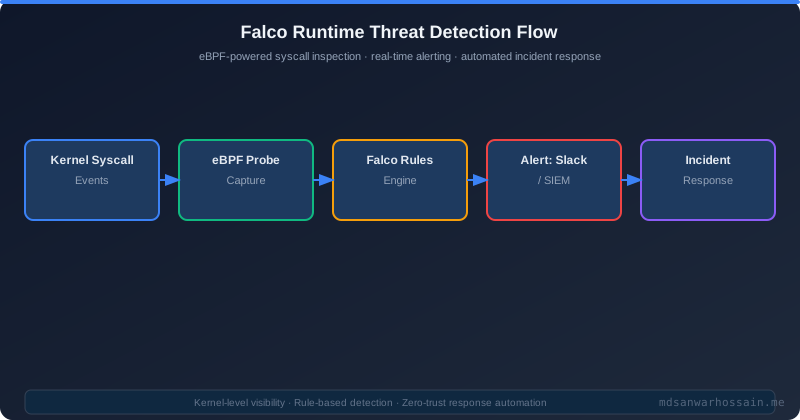
9. Image Scanning & Signing in CI/CD
Runtime security is your last line of defense. Build-time scanning catches vulnerabilities before they reach production. Image signing ensures that only images that passed your security pipeline can run in your cluster.
Trivy in CI/CD — Block on CRITICAL CVEs
# GitHub Actions step
- name: Scan container image with Trivy
  uses: aquasecurity/trivy-action@master
  with:
    image-ref: myapp:${{ github.sha }}
    format: sarif
    output: trivy-results.sarif
    severity: CRITICAL,HIGH
    exit-code: 1          # Fail the build on CRITICAL or HIGH findings
    ignore-unfixed: true  # Only fail on CVEs with available fixes

- name: Upload Trivy scan results to GitHub Security tab
  uses: github/codeql-action/upload-sarif@v3
  with:
    sarif_file: trivy-results.sarif
Image Signing with Cosign (Sigstore)
# Sign the image after push
cosign sign --key cosign.key myregistry.io/myapp:${{ github.sha }}

# Verify signature before deployment (in OPA Gatekeeper or Kyverno policy)
cosign verify --key cosign.pub myregistry.io/myapp:${{ github.sha }}
10. Production Container Security Checklist
- ✅ Distroless or minimal base image — use gcr.io/distroless/java21 or alpine; never ship JDK in production, only JRE
- ✅ Non-root user — USER 1001:1001 in Dockerfile or :nonroot tag; verify with
docker inspect --format='{{.Config.User}}' - ✅ Drop ALL capabilities —
capabilities.drop: [ALL]in SecurityContext; add only NET_BIND_SERVICE if needed - ✅ seccomp: RuntimeDefault or custom profile — never run with Unconfined seccomp in production
- ✅ AppArmor profile loaded — custom profile denying ptrace, mount, /proc writes
- ✅ PSS Restricted namespace label — enforce=restricted on all production namespaces
- ✅ readOnlyRootFilesystem: true — writable tmp via emptyDir volumes only
- ✅ No privileged containers — no
privileged: true, no hostPID, no hostNetwork - ✅ Falco deployed with eBPF driver — rules for shell spawn, sensitive file write, network tool execution
- ✅ Trivy scan in CI/CD — block merges on CRITICAL CVEs; SARIF uploaded to GitHub Security tab
- ✅ Image signed with Cosign — Kyverno or OPA Gatekeeper policy blocks unsigned images
- ✅ No hostPID or hostNetwork — audit with
kubectl get pods -A -o json | jq '.items[] | select(.spec.hostPID==true)'
11. Conclusion
Container security is not a single control — it is a layered system where each layer provides defense against attacks that bypass the previous layer. Distroless images reduce the attack surface. Non-root and capability dropping prevent privilege abuse. seccomp blocks kernel exploit techniques. AppArmor restricts filesystem and capability access. Pod Security Standards enforce these controls at the cluster level. Falco detects threats at runtime. Together, they provide defense-in-depth that matches the threat model of shared-kernel containerized workloads.
The good news: most of these controls require no application code changes. A Kubernetes SecurityContext, a namespace PSS label, a Falco Helm deployment, and a Trivy step in CI/CD implement the majority of this checklist in a single sprint. Start with PSS Restricted on new namespaces and Trivy in CI — both have zero ongoing operational overhead and immediate security benefit.
