Production Secrets Management: HashiCorp Vault, AWS Secrets Manager & Spring Boot in 2026
Hardcoded credentials are the #1 cause of production data breaches. Every developer knows "don't put secrets in code" — yet production incidents keep happening because teams lack a clear, actionable system for secrets lifecycle management. This guide gives you a complete, battle-tested architecture using HashiCorp Vault, AWS Secrets Manager, and Spring Boot to eliminate static credentials from your production stack.
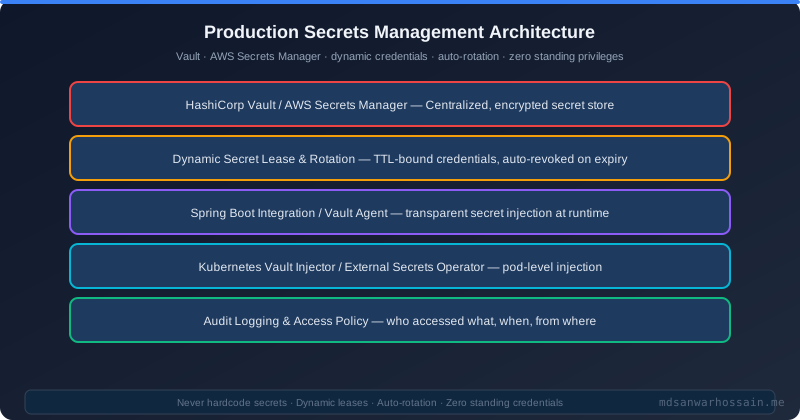
TL;DR — The One Rule You Must Follow
"Never store credentials in code, config files, or environment variables long-term. Use HashiCorp Vault for dynamic, short-lived credentials with automatic rotation — or AWS Secrets Manager for managed rotation on AWS. Both eliminate the #1 cause of production breaches: leaked static credentials."
Table of Contents
- Why Static Secrets Are a Production Disaster
- HashiCorp Vault: Architecture & Core Concepts
- Dynamic Secrets: The Game Changer
- Spring Boot + Spring Cloud Vault Integration
- AWS Secrets Manager: Managed Rotation on AWS
- Kubernetes Secrets: Vault Agent & External Secrets Operator
- The Secret Zero Problem & AppRole Authentication
- Rotation Patterns for Zero-Downtime
- Audit Logging & Least-Privilege Policies
- Production Secrets Management Checklist
- Conclusion
1. Why Static Secrets Are a Production Disaster
Every major breach investigation tells the same story: a developer committed a database password to a Git repository, an intern pasted an AWS key into Slack, or a CI/CD pipeline stored credentials in plaintext environment variables. Static, long-lived credentials are a ticking time bomb in any production system.
The BAD Way: Hardcoded in application.properties
# application.properties — NEVER DO THIS
spring.datasource.url=jdbc:postgresql://prod-db.example.com:5432/appdb
spring.datasource.username=appuser
spring.datasource.password=S3cur3P@ssw0rd!   # <-- static, long-lived, leaked in Git history
aws.access-key=AKIAIOSFODNN7EXAMPLE
aws.secret-key=wJalrXUtnFEMI/K7MDENG/bPxRfiCYEXAMPLEKEY
Even after deletion, this password lives in Git history forever. Any employee, contractor, or attacker who ever clones this repo has those credentials. There is no time-limiting, no audit trail, no revocation.
Real-World Breach Examples
- Uber 2022: An attacker used a compromised contractor's credentials stored in a script on a network share. No rotation, no MFA on the secrets store. Result: internal tools, source code, and security reports exposed. Regulatory fines exceeded $148M.
- CircleCI January 2023: A malware-infected engineer's laptop exfiltrated long-lived environment variable secrets from CircleCI's build system. Because the secrets were static, attackers had weeks to exploit them before anyone knew. The incident prompted mass customer token rotations across GitHub, AWS, and other platforms.
- Credential Sprawl: The average enterprise has 25,000+ secrets scattered across CI/CD pipelines, Kubernetes manifests, developer laptops, Slack messages, and Jira comments. Static credentials in one place become 25,000 attack vectors.
OWASP A02: Cryptographic Failures
OWASP categorizes hardcoded or improperly stored secrets under A02:2021 — Cryptographic Failures (formerly "Sensitive Data Exposure"). The remediation is explicit: use secrets management systems with automatic rotation, never store credentials in source code or config files, and ensure all credentials have the shortest possible TTL. The financial impact of a single secrets breach averages $4.45M according to IBM's 2023 Cost of a Data Breach report.
2. HashiCorp Vault: Architecture & Core Concepts
HashiCorp Vault is the gold standard for secrets management in multi-cloud, Kubernetes, and on-premise environments. Understanding its architecture is essential before integrating it with Spring Boot.
Core Architectural Components
- Storage Backend: Where Vault persists encrypted data. Options include Consul, Integrated Raft (recommended for HA), AWS S3, PostgreSQL. Vault encrypts everything before writing — even a compromised backend reveals nothing without Vault's unseal keys.
- Secrets Engines: Plugins that generate or store secrets. Key/Value (KV) v2 for static secrets, Database engine for dynamic DB credentials, AWS engine for IAM tokens, PKI engine for TLS certificates, Transit engine for encryption-as-a-service.
- Auth Methods: How clients prove their identity to Vault. Kubernetes (service account JWT), AWS IAM, AppRole (for non-cloud workloads), LDAP, OIDC, TLS certificates.
- Policies: HCL or JSON documents that define what a token can do. Principle of least privilege is enforced at this layer — a policy grants access to specific paths and capabilities (read, write, list, delete).
Key Concepts: Leases, TTLs, and Revocation
- Dynamic vs Static Secrets: Static secrets (KV engine) are stored and retrieved. Dynamic secrets (Database engine, AWS engine) are generated on-demand with a TTL and automatically revoked when the lease expires.
- Leases: Every dynamic secret has a lease ID. Clients can renew leases (if allowed by the role) or let them expire for automatic revocation.
- TTL: Default TTL and max TTL are set per role. A database role might have default_ttl=1h, max_ttl=24h — credentials cannot live longer than 24 hours, period.
- Revocation: Any Vault token or lease can be revoked immediately. On an employee's last day, revoking their Vault token instantly invalidates all credentials they obtained through it.
Vault vs AWS Secrets Manager vs Azure Key Vault
| Feature | HashiCorp Vault | AWS Secrets Manager | Azure Key Vault |
|---|---|---|---|
| Hosting | Self-hosted or HCP Vault | AWS managed | Azure managed |
| Dynamic secrets | ✅ Native (DB, AWS, PKI, SSH) | ⚠️ Rotation only | ⚠️ Rotation only |
| Multi-cloud | ✅ Yes | ❌ AWS only | ❌ Azure only |
| Cost | Free OSS / $0.03/hr HCP | $0.40/secret/month | $0.04/10k ops |
| Kubernetes native | ✅ Agent Injector + CSI | ✅ External Secrets Operator | ✅ External Secrets Operator |
| Audit | ✅ Built-in audit log | ✅ CloudTrail | ✅ Azure Monitor |
3. Dynamic Secrets: The Game Changer
Dynamic secrets are the single most powerful feature of HashiCorp Vault. Instead of storing a static database password, Vault generates unique credentials on demand for each application instance, each with a short TTL. When the TTL expires, Vault automatically revokes the credentials directly in the database. Zero standing credentials.
How the Database Secrets Engine Works
When an app requests database credentials, Vault connects to PostgreSQL using a privileged service account, runs a CREATE USER statement with a generated username and random password, and returns those credentials with a lease. When the lease expires, Vault runs DROP USER automatically. The app never sees the same password twice.
# Step 1: Enable the database secrets engine
vault secrets enable database

# Step 2: Configure PostgreSQL connection (Vault connects with a service account)
vault write database/config/postgresql \
    plugin_name=postgresql-database-plugin \
    allowed_roles="app-role" \
    connection_url="postgresql://{{username}}:{{password}}@prod-db:5432/appdb" \
    username="vault_service" \
    password="VaultServicePass123!"

# Step 3: Define a role — Vault will create users matching this template
vault write database/roles/app-role \
    db_name=postgresql \
    creation_statements="CREATE ROLE \"{{name}}\" WITH LOGIN PASSWORD '{{password}}' \
      VALID UNTIL '{{expiration}}'; GRANT SELECT,INSERT,UPDATE ON ALL TABLES \
      IN SCHEMA public TO \"{{name}}\";" \
    default_ttl="1h" \
    max_ttl="24h"

# App requests credentials — each call returns a unique username/password
vault read database/creds/app-role
# Key                Value
# ---                -----
# lease_id           database/creds/app-role/AbC123...
# lease_duration     1h
# username           v-appuser-AbC123
# password           A-random-generated-password
Vault Policy for the App Role
# app-policy.hcl — least-privilege policy for the application
path "database/creds/app-role" {
  capabilities = ["read"]
}

path "secret/data/myapp/*" {
  capabilities = ["read"]
}

path "auth/token/renew-self" {
  capabilities = ["update"]
}

# Apply it:
vault policy write app-policy app-policy.hcl4. Spring Boot + Spring Cloud Vault Integration
Spring Cloud Vault provides seamless integration between Spring Boot and HashiCorp Vault. With a few lines of configuration, your DataSource is automatically populated with fresh Vault-generated credentials on startup — and renewed before they expire.
Maven Dependency
<!-- pom.xml -->
<dependency>
    <groupId>org.springframework.cloud</groupId>
    <artifactId>spring-cloud-starter-vault-config</artifactId>
</dependency>
<dependency>
    <groupId>org.springframework.cloud</groupId>
    <artifactId>spring-cloud-vault-config-databases</artifactId>
</dependency>
bootstrap.yml Configuration (Kubernetes Auth)
# bootstrap.yml
spring:
  cloud:
    vault:
      uri: https://vault.internal.example.com:8200
      authentication: KUBERNETES
      kubernetes:
        role: app-role
        service-account-token-file: /var/run/secrets/kubernetes.io/serviceaccount/token
        kubernetes-host: https://kubernetes.default.svc
      database:
        enabled: true
        role: app-role
        backend: database
      kv:
        enabled: true
        backend: secret
        application-name: myapp
      config:
        lifecycle:
          enabled: true          # Auto-renew leases
          min-renewal: 10s
          expiry-threshold: 1m
Spring Cloud Vault reads the spring.datasource.username and spring.datasource.password from Vault's database engine automatically. Your application.yml needs only the connection URL — no credentials ever touch your config files.
Vault Agent Sidecar Pattern for Kubernetes
For teams that prefer not to add Vault libraries to their application, the Vault Agent Injector runs as a sidecar container and writes secrets to a shared in-memory volume. The application reads secrets from files — no Vault SDK required.
# Kubernetes Pod annotations for Vault Agent Injector
apiVersion: v1
kind: Pod
metadata:
  annotations:
    vault.hashicorp.com/agent-inject: "true"
    vault.hashicorp.com/agent-inject-secret-db-creds: "database/creds/app-role"
    vault.hashicorp.com/agent-inject-template-db-creds: |
      {{- with secret "database/creds/app-role" -}}
      spring.datasource.username={{ .Data.username }}
      spring.datasource.password={{ .Data.password }}
      {{- end }}
    vault.hashicorp.com/role: "app-role"
    vault.hashicorp.com/agent-pre-populate-only: "false"
    vault.hashicorp.com/agent-inject-file-db-creds: "application.properties"
spec:
  serviceAccountName: myapp-sa
5. AWS Secrets Manager: Managed Rotation on AWS
If your stack is AWS-native, AWS Secrets Manager (ASM) offers the simplest path to automatic credential rotation without running Vault. It natively integrates with RDS, DocumentDB, and Redshift to rotate credentials using Lambda functions on a configurable schedule.
Spring Boot Integration with AWS Secrets Manager
<!-- pom.xml -->
<dependency>
    <groupId>io.awspring.cloud</groupId>
    <artifactId>spring-cloud-aws-secrets-manager</artifactId>
    <version>3.1.0</version>
</dependency>
# application.yml — AWS Secrets Manager PropertySource
spring:
config:
import: "aws-secretsmanager:/prod/myapp/db-credentials"
# The secret /prod/myapp/db-credentials is a JSON object in ASM:
# { "username": "appuser", "password": "AutoRotatedPassword!" }
# Spring Cloud AWS maps keys to properties automatically:
# spring.datasource.username = appuser
# spring.datasource.password = AutoRotatedPassword!// Programmatic access via SecretsManagerClient
@Service
public class SecretService {
private final SecretsManagerClient client;
public SecretService(SecretsManagerClient client) {
this.client = client;
}
public String getSecret(String secretName) {
GetSecretValueRequest request = GetSecretValueRequest.builder()
.secretId(secretName)
.build();
GetSecretValueResponse response = client.getSecretValue(request);
return response.secretString(); // JSON string — parse as needed
}
}When to Choose ASM vs Vault
- Choose AWS Secrets Manager when: You're 100% AWS, want zero operational overhead, have fewer than 500 secrets (cost scales linearly at $0.40/secret/month), and need simple Lambda-based rotation for RDS.
- Choose HashiCorp Vault when: You're multi-cloud or hybrid, need dynamic secrets (not just rotation), have hundreds of microservices needing unique credentials, require fine-grained policies, or want open-source tooling with enterprise features.
6. Kubernetes Secrets: Vault Agent & External Secrets Operator
Kubernetes Secrets are a common misconception. They are not encrypted — they are base64-encoded. Anyone with kubectl get secret permission can retrieve the raw value. Storing production database passwords in native Kubernetes Secrets is only marginally better than putting them in application.properties.
External Secrets Operator (ESO)
ESO is the recommended approach for syncing secrets from Vault or ASM into Kubernetes Secrets, with automatic refresh. It's the CNCF-recommended pattern and supports Vault, AWS SM, Azure KV, GCP Secret Manager, and more.
# ExternalSecret YAML — syncs from Vault into a Kubernetes Secret
apiVersion: external-secrets.io/v1beta1
kind: ExternalSecret
metadata:
  name: myapp-db-credentials
  namespace: production
spec:
  refreshInterval: 5m          # ESO re-fetches and updates every 5 minutes
  secretStoreRef:
    name: vault-backend
    kind: ClusterSecretStore
  target:
    name: myapp-db-secret      # Name of the resulting Kubernetes Secret
    creationPolicy: Owner
  data:
    - secretKey: username
      remoteRef:
        key: database/creds/app-role
        property: username
    - secretKey: password
      remoteRef:
        key: database/creds/app-role
        property: password
Additional Hardening: etcd Encryption & Sealed Secrets
- etcd encryption at rest: Enable
EncryptionConfigurationin your API server to encrypt Kubernetes Secrets in etcd using AES-GCM or AES-CBC. Even if etcd is compromised, secrets are ciphertext. - Sealed Secrets (Bitnami): For GitOps workflows, Sealed Secrets encrypts Kubernetes Secrets with a cluster-specific public key. The encrypted SealedSecret manifest is safe to commit to Git — only the in-cluster controller can decrypt it.
- RBAC: Apply least-privilege RBAC so only the specific ServiceAccount running your workload can
getits Secret. Never give wildcard*permissions on Secrets resources.
7. The Secret Zero Problem & AppRole Authentication
Every secrets management system has a bootstrapping problem: how does the application prove its identity to Vault in the first place, without a hardcoded initial secret? This is called the Secret Zero Problem. The answer depends on your runtime environment.
AppRole Authentication (Non-Cloud Workloads)
AppRole uses two pieces: a RoleID (non-sensitive, like a username) and a SecretID (sensitive, like a password). The SecretID is delivered to the app at deployment time via response wrapping — a one-time token that can only be unwrapped once, eliminating the risk of replay attacks.
# AppRole setup
vault auth enable approle
vault write auth/approle/role/myapp \
    secret_id_ttl=10m \          # SecretID expires in 10 minutes
    token_num_uses=10 \
    token_ttl=20m \
    token_max_ttl=30m \
    secret_id_num_uses=1 \       # SecretID can only be used ONCE
    policies="app-policy"

# Fetch RoleID (non-sensitive — can be in CI/CD env var)
vault read auth/approle/role/myapp/role-id
# role_id: 59d6d1ca-47bb-4e7e-a40b-8be3bc5a0ba8

# CI/CD injects a wrapped SecretID (one-time use, 10min TTL)
vault write -wrap-ttl=10m -f auth/approle/role/myapp/secret-id
# wrapping_token: s.mLMHfX2TuDfp6Tma98VjnNLp  <-- give THIS to the app

# App unwraps to get real SecretID, then logs in:
vault unwrap s.mLMHfX2TuDfp6Tma98VjnNLp
Kubernetes & AWS IAM Auth: No Shared Secrets
- Kubernetes auth: The pod's projected service account JWT is sent to Vault, which validates it against the Kubernetes API server. No static SecretID needed — the pod's own Kubernetes identity is the proof. This is the preferred method for K8s workloads.
- AWS IAM auth: The EC2 instance or ECS task uses its IAM role to call
sts:GetCallerIdentity. Vault verifies the signed response against AWS. No shared secrets — the cloud provider's IAM system is the identity source of truth.
8. Rotation Patterns for Zero-Downtime
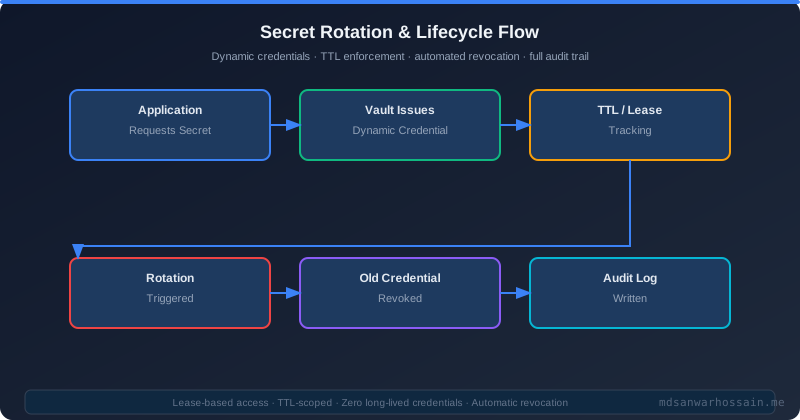
Rotating static secrets without downtime requires careful orchestration. Even with dynamic secrets, your application must handle credential refresh gracefully — especially connection pools that may be holding connections with expiring credentials.
Rotation Strategies Comparison
| Strategy | Downtime | Complexity | Use Case |
|---|---|---|---|
| Immediate Rotation | High (if not handled) | Low | Emergency credential revocation |
| Canary Rotation | None | Medium | Gradual rollout, validate before full rotation |
| Blue-Green Rotation | None | High | High-availability systems, DB version upgrades |
| Dynamic TTL (Vault) | None | Low (Vault handles it) | Recommended default for all DB credentials |
HikariCP Pool Refresh on Credential Rotation
HikariCP connection pools hold open connections with the old credentials. On rotation, you must evict stale connections before they fail. Spring Cloud Vault handles this with DataSourceHealthIndicator and lease renewal events, but for static secret rotation you need to trigger pool eviction explicitly.
// Listen for Vault secret rotation events and evict pool connections
@Component
public class VaultSecretRotationListener {
    private final HikariDataSource dataSource;

    public VaultSecretRotationListener(HikariDataSource dataSource) {
        this.dataSource = dataSource;
    }

    @EventListener(SecretLeaseExpiredEvent.class)
    public void onSecretExpired(SecretLeaseExpiredEvent event) {
        if (event.getSource().toString().contains("database/creds")) {
            log.info("DB credentials rotated — evicting HikariCP pool connections");
            dataSource.getHikariPoolMXBean().softEvictConnections();
        }
    }
}
9. Audit Logging & Least-Privilege Policies
Secrets management isn't just about storage — it's about accountability. Every access to a secret must be logged, timestamped, and attributed to a specific identity. This is a hard requirement for SOC2, PCI-DSS, HIPAA, and ISO 27001 compliance.
Vault Audit Log Configuration
# Enable file audit device (send to stdout for log aggregation)
vault audit enable file file_path=/var/log/vault/audit.log

# Every request/response is logged as JSON:
# {
#   "time": "2026-04-06T10:15:30Z",
#   "type": "request",
#   "auth": { "client_token": "hmac-sha256:abc...", "accessor": "...",
#             "policies": ["app-policy"], "display_name": "kubernetes-myapp-sa" },
#   "request": { "id": "...", "operation": "read",
#                "path": "database/creds/app-role", "remote_address": "10.0.0.5" }
# }

# Ship audit logs to SIEM (Splunk, Elasticsearch, CloudWatch):
vault audit enable syslog tag="vault" facility="AUTH"
Least-Privilege Policy Example
# production-app-policy.hcl — one service, minimum required paths
path "database/creds/app-role" {
  capabilities = ["read"]    # Only READ — cannot write, delete, or list other roles
}

path "secret/data/myapp/config" {
  capabilities = ["read"]
}

path "auth/token/renew-self" {
  capabilities = ["update"]  # Allow the app to renew its own token
}

# Explicitly DENY admin paths
path "sys/*" {
  capabilities = ["deny"]
}

path "auth/*" {
  capabilities = ["deny"]
}
Compliance References
- SOC2 CC6.1: Requires logical access controls and monitoring of access to sensitive credentials. Vault audit logs satisfy this requirement when shipped to a SIEM with alerting.
- PCI-DSS Requirement 10: "Log and monitor all access to system components and cardholder data." Vault's comprehensive JSON audit log, including HMAC-hashed token values, satisfies Requirement 10.2 and 10.3.
- AWS CloudTrail for ASM: Every GetSecretValue, PutSecretValue, and RotateSecret API call is automatically recorded in CloudTrail. Enable CloudTrail in all regions and ship logs to S3 with integrity validation enabled.
10. Production Secrets Management Checklist
- ✅ No hardcoded secrets — run
git-secretsortrufflehogas a pre-commit hook and in CI/CD to block credential commits - ✅ Dynamic secrets with TTL ≤ 1 hour — use Vault's Database engine for all database credentials; static secrets are a last resort only
- ✅ Vault audit logging enabled — ship logs to a SIEM with alerting on unexpected access patterns and failed auth attempts
- ✅ Least-privilege policies — each service gets its own Vault policy granting read access to only its own secret paths; no wildcard policies in production
- ✅ Kubernetes auth (no AppRole SecretIDs in K8s) — use service account JWT auth in Kubernetes; AppRole only for non-cloud workloads with response-wrapped SecretIDs
- ✅ etcd encryption at rest — enable EncryptionConfiguration on your Kubernetes API server; verify with
etcdctl get /registry/secrets/... | hexdump - ✅ Rotate all credentials post-offboarding — on any engineer's last day, revoke their Vault token and rotate any static secrets they had access to within 24 hours
- ✅ Alert on rotation failures — set up CloudWatch alarms (ASM) or Prometheus alerts (Vault) for failed secret rotation events; a silent rotation failure leaves you with expired credentials
- ✅ Test rotation in staging — run full rotation drills monthly in staging; confirm that HikariCP evicts pools, Spring Cloud Vault renews leases, and the application stays healthy
- ✅ Use response wrapping for AppRole SecretIDs — never deliver a raw SecretID; always use
-wrap-ttl=10mandsecret_id_num_uses=1to ensure each SecretID can only be used once
11. Conclusion
Production secrets management is not optional. The $4.45M average cost of a data breach, the reputational destruction of a public credential leak, and the increasing regulatory requirements of SOC2, PCI-DSS, and GDPR make proper secrets hygiene a business-critical engineering concern — not just a security team checkbox.
The architecture is clear: use HashiCorp Vault for multi-cloud environments needing dynamic secrets and fine-grained policies. Use AWS Secrets Manager for AWS-native workloads that want managed rotation with zero operational overhead. In both cases, eliminate static credentials entirely — replace them with short-lived dynamic credentials that expire automatically, are unique per instance, and are fully audited.
Spring Boot teams have excellent tooling: Spring Cloud Vault and Spring Cloud AWS make Vault and ASM integration nearly configuration-free. Kubernetes teams can use Vault Agent Injector or External Secrets Operator to bridge secrets managers with the Kubernetes Secret API without touching application code.
Start with the checklist in Section 10. If you have even one hardcoded credential in your codebase today, that is your highest-priority security debt. The tooling is mature, the integration is straightforward, and the cost of doing it right is a fraction of the cost of a single breach.
