DevSecOps: Shift-Left Security in CI/CD Pipelines with SAST, DAST & Supply Chain Protection
Security vulnerabilities found in production cost 95× more to fix than those caught at commit time. DevSecOps eliminates this gap by weaving security gates into every stage of your CI/CD pipeline — from pre-commit hooks to runtime monitoring. This comprehensive guide covers every tool, technique, and automation pattern needed to build a production-grade DevSecOps pipeline in 2026.
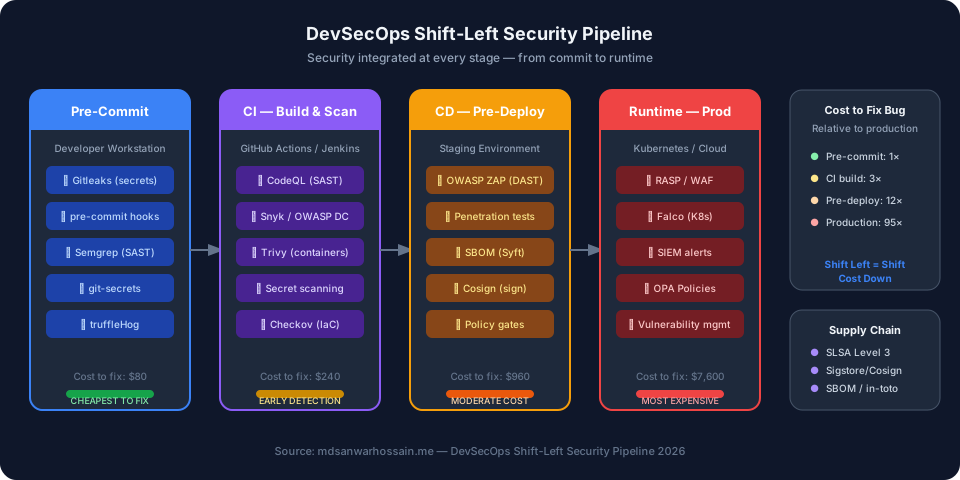
TL;DR — DevSecOps in One Sentence
"Integrate SAST (CodeQL, Semgrep) at build time, SCA (Snyk, Dependabot) for dependencies, container scanning (Trivy) at image build, DAST (OWASP ZAP) in staging, secrets detection (Gitleaks) at pre-commit, and SBOM + Cosign for supply chain trust — all automated in GitHub Actions. Fix security in code review, not in a post-breach incident."
Table of Contents
- What is DevSecOps? Shift-Left Security Explained
- The DevSecOps Pipeline: Security Gates at Every Stage
- SAST: Static Application Security Testing
- DAST: Dynamic Application Security Testing
- SCA: Software Composition Analysis & Dependency Scanning
- Container Image Scanning: From Build to Runtime
- Secret Detection & Prevention: Pre-Commit & CI
- SBOM: Software Bill of Materials for Compliance
- Supply Chain Security: SLSA, Sigstore/Cosign & in-toto
- Infrastructure as Code Security Scanning
- Complete DevSecOps Pipeline in GitHub Actions
- Conclusion & DevSecOps Maturity Checklist
1. What is DevSecOps? Shift-Left Security Explained
DevSecOps is the practice of integrating security controls, testing, and culture throughout the entire software development lifecycle — not as a gate at the end, but as a continuous layer woven into every phase from code authoring to production monitoring. The "shift-left" metaphor refers to moving security earlier (to the left) on a traditional timeline that reads: Design → Code → Build → Test → Deploy → Operate.
Traditional Security vs. Shift-Left Security
In the traditional "perimeter security" model, a dedicated security team performs penetration testing and vulnerability assessments as a separate phase — typically right before or after release. Developers have no visibility into security risks until a formal security review catches them late in the cycle, when context is stale and fixes are costly. The results are predictable: security becomes a bottleneck, developers resent it, and many findings get triaged as "accepted risk" because there's no time to fix them.
Shift-left security changes the economics entirely. According to the IBM Systems Sciences Institute, a bug fixed during design costs $1 to remediate. The same bug found in integration testing costs $10. In production, that cost skyrockets to $100 or more. For security vulnerabilities, the asymmetry is even more extreme — a production breach can cost millions in remediation, regulatory fines, and reputational damage.
The DevSecOps Cultural Shift
DevSecOps is not just a toolchain change — it is a cultural transformation. Security moves from a gatekeeping function to a shared responsibility. Developers own security in their code. Platform engineers embed security into CI/CD pipelines. Security engineers write policies as code and build tooling that gives developers fast, actionable feedback in the tools they already use (IDEs, pull requests, Slack). The goal is to make security frictionless enough that developers choose the secure path by default.
The Business Case: Cost of Fixing Security Bugs
- Pre-commit / IDE: ~$80 per finding (developer self-service, 5–10 minute fix)
- CI build gate: ~$240 per finding (PR review context still fresh, same sprint)
- Pre-deploy / staging: ~$960 per finding (regression testing required, cross-team coordination)
- Production: ~$7,600+ per finding (rollback, hotfix, incident response, customer impact)
- Post-breach: $4.35M average total breach cost (IBM Cost of Data Breach Report 2025)
2. The DevSecOps Pipeline: Security Gates at Every Stage
A mature DevSecOps pipeline implements security controls at four primary stages: pre-commit, CI build, CD pre-deploy, and runtime. Each stage catches different classes of vulnerabilities with different tools and trade-offs in speed vs. depth.
| Pipeline Stage | Security Controls | Latency | Feedback Loop |
|---|---|---|---|
| Pre-Commit (IDE / hooks) | Secrets scan, lint-based SAST, IaC format | < 5 sec | Instant |
| CI Build (PR / merge) | SAST (CodeQL), SCA, container scan, secrets | 2–10 min | PR comment |
| CD Pre-Deploy (staging) | DAST (ZAP), pen test, SBOM, signing | 15–60 min | Deployment gate |
| Runtime (production) | WAF, RASP, Falco, SIEM, vuln mgmt | Continuous | Alert / incident |
The key design principle is fail fast at the cheapest stage. A critical secret leaked in a pre-commit hook costs a developer 30 seconds to fix. The same secret discovered in a production security audit triggers an incident response requiring key rotation across dozens of services, notifications to compliance teams, and potentially breach disclosure.
3. SAST: Static Application Security Testing
Static Application Security Testing (SAST) analyzes source code, bytecode, or binary without executing the application. It finds vulnerabilities like SQL injection, XSS, path traversal, insecure deserialization, and hardcoded credentials by pattern-matching against a ruleset or using data-flow analysis to trace tainted inputs to dangerous sinks.
SAST Tools: SonarQube, Semgrep, and CodeQL Compared
| Tool | Analysis Type | Languages | CI Speed | Best For |
|---|---|---|---|---|
| CodeQL (GitHub) | Data-flow / taint | Java, JS, Python, C++, Go, Ruby | 3–8 min | Deep vulnerability detection, GitHub repos |
| Semgrep | Pattern matching + AST | 30+ languages | < 30 sec | Custom rules, fast CI, secrets, OWASP Top 10 |
| SonarQube | Pattern + data-flow | 25+ languages | 2–6 min | Enterprise dashboards, quality gates, code smells |
| SpotBugs / FindSecBugs | Bytecode analysis | Java / JVM | < 1 min | Java Spring Boot, existing Maven/Gradle builds |
Semgrep Custom Rule for Java Security
One of Semgrep's most powerful features is writing custom rules that match your organization's specific security policies. Here's a rule that catches dangerous use of Runtime.exec() with user-controlled input — a classic OS command injection pattern in Spring Boot applications:
# semgrep-rules/java-security.yaml
rules:
  - id: java-os-command-injection
    patterns:
      - pattern: Runtime.getRuntime().exec($CMD)
      - pattern-not: Runtime.getRuntime().exec("...")  # static string is safe
    message: |
      OS command injection: $CMD is potentially user-controlled.
      Use ProcessBuilder with argument lists instead of shell string concatenation.
    languages: [java]
    severity: ERROR
    metadata:
      cwe: CWE-78
      owasp: A03:2021 - Injection
      fix: "Use ProcessBuilder(List.of(...)) with explicit arguments"

  - id: java-sql-injection-concatenation
    pattern: |
      $STMT.executeQuery("..." + $USER_INPUT + "...")
    message: "Potential SQL injection via string concatenation. Use PreparedStatement."
    languages: [java]
    severity: ERROR
    metadata:
      cwe: CWE-89

  - id: java-insecure-deserialization
    pattern: |
      new ObjectInputStream($STREAM).readObject()
    message: |
      Insecure deserialization detected. Validate class whitelist before deserializing
      or use a safe serialization format (JSON, Protobuf).
    languages: [java]
    severity: WARNING
    metadata:
      cwe: CWE-502
Managing SAST False Positives
The biggest practical challenge with SAST tools is false positives. A pipeline that generates hundreds of false alarms trains developers to ignore warnings — the opposite of the desired effect. Effective false positive management strategies include:
- Baseline scanning: Run SAST on the existing codebase and suppress pre-existing findings. Only fail the build on new findings introduced in the PR diff.
- Severity thresholds: Block builds only on Critical/High; report Medium/Low as informational. Tune over time as the security posture improves.
- Rule customization: Disable rules that consistently produce false positives in your codebase. A team with no JavaScript frontend can disable all XSS rules.
- Inline suppression with justification: Allow developers to suppress specific findings with a comment that requires a security reason (code-reviewed in PRs).
- Weekly triage meetings: Security champions review SAST trends, tune rules, and track mean-time-to-remediate per severity.
4. DAST: Dynamic Application Security Testing
Dynamic Application Security Testing (DAST) tests the running application by sending malicious HTTP requests and analyzing responses. Unlike SAST, DAST doesn't need source code — it treats the application as a black box, making it excellent for catching authentication bypasses, session management flaws, CSRF, and injection vulnerabilities that only manifest at runtime.
OWASP ZAP Automation in CI/CD
OWASP ZAP (Zed Attack Proxy) is the industry standard open-source DAST tool. In CI/CD, you deploy the application to a staging environment and run ZAP's Automation Framework against it:
# .github/workflows/dast-zap.yml (excerpt)
- name: Run OWASP ZAP API Scan
  uses: zaproxy/action-api-scan@v0.9.0
  with:
    target: 'https://staging.myapp.example.com/v1/openapi.json'
    format: openapi
    fail_action: true
    rules_file_name: '.zap/rules.tsv'
    cmd_options: '-a'   # include alpha passive rules

- name: ZAP Baseline Scan (passive only)
  uses: zaproxy/action-baseline@v0.12.0
  with:
    target: 'https://staging.myapp.example.com'
    fail_action: warn   # warn on baseline; block on full scan

# rules.tsv — tune alert thresholds per rule ID
# 10096  IGNORE  (Web Browser XSS Protection Not Enabled — handled by WAF)
# 10038  WARN    (Content Security Policy)
# 90022  FAIL    (Application Error Disclosure)
Burp Suite Enterprise for Authenticated Scanning
For applications requiring authentication or complex session handling, Burp Suite Enterprise provides REST API-driven scanning that integrates with CI/CD. Key features for pipeline integration include: recorded login sequences to maintain authenticated sessions, out-of-band (OAST) detection for blind injection vulnerabilities, and OpenAPI/Swagger-based crawling to ensure full endpoint coverage.
API Security Testing with DAST
Modern applications are predominantly API-driven. Traditional web crawling DAST misses 60–80% of an API surface. Use OpenAPI/Swagger specifications to seed DAST scanners with the complete endpoint inventory, including request bodies, parameter types, and authentication schemes. Key API-specific checks include: broken object level authorization (BOLA/IDOR), missing rate limiting, JWT algorithm confusion, and mass assignment vulnerabilities.
5. SCA: Software Composition Analysis & Dependency Scanning
Software Composition Analysis (SCA) identifies known vulnerabilities in your open-source dependencies by comparing them against vulnerability databases (NVD, GitHub Advisory, OSV). Given that 70–90% of modern application code is open-source libraries, SCA has become one of the highest-ROI security controls in any pipeline.
SAST vs. DAST vs. SCA: The Complete Comparison
| Dimension | SAST | DAST | SCA |
|---|---|---|---|
| What it tests | Source code, bytecode | Running application | 3rd-party dependencies |
| When to run | Pre-commit, CI build | Staging / pre-deploy | CI build + continuous |
| False positive rate | High (10–30%) | Low (2–8%) | Very low (CVE-based) |
| Key tools | CodeQL, Semgrep, SonarQube | OWASP ZAP, Burp Suite | Snyk, Dependabot, OWASP DC |
| Needs running app | No | Yes | No |
| Catches 0-days | No (rule-based) | Sometimes | No (CVE-based) |
Snyk and OWASP Dependency Check in Practice
Snyk provides the most developer-friendly SCA experience: inline PR comments, fix PRs that auto-upgrade vulnerable dependencies, and a license compliance engine. It integrates natively with GitHub, GitLab, Jenkins, and all major CI systems. OWASP Dependency Check is the gold standard open-source alternative — it scans Maven, Gradle, npm, NuGet, and pip manifests against the NVD database and generates detailed HTML/XML reports suitable for compliance evidence.
GitHub Dependabot provides always-on dependency monitoring that auto-creates PRs when new CVEs are published for your dependencies. Configure it with severity thresholds to auto-merge patch-level security updates in low-risk projects, reducing the operational overhead of dependency maintenance.
6. Container Image Scanning: From Build to Runtime
Containers have become the primary deployment artifact for cloud-native applications, and they bring a unique attack surface: the base image, installed OS packages, language runtime, and application dependencies all contribute to the vulnerability surface. Container scanning must happen at multiple points: during image build, before registry push, at deployment admission, and continuously at runtime.
Trivy: The Industry Standard Container Scanner
Trivy (by Aqua Security) scans container images, filesystems, Git repositories, and Kubernetes clusters for OS vulnerabilities, language dependencies, IaC misconfigurations, and exposed secrets. Here's how to integrate it with a critical-severity build gate:
# Trivy container scan with critical/high threshold
- name: Build Docker image
  run: docker build -t myapp:${{ github.sha }} .

- name: Run Trivy vulnerability scanner
  uses: aquasecurity/trivy-action@master
  with:
    image-ref: 'myapp:${{ github.sha }}'
    format: 'sarif'
    output: 'trivy-results.sarif'
    severity: 'CRITICAL,HIGH'
    exit-code: '1'           # fail build on CRITICAL or HIGH findings
    ignore-unfixed: true     # skip vulnerabilities with no fix yet
    vuln-type: 'os,library'
    timeout: '10m0s'

- name: Upload Trivy results to GitHub Security tab
  uses: github/codeql-action/upload-sarif@v3
  if: always()   # upload even if scan fails
  with:
    sarif_file: 'trivy-results.sarif'
    category: 'container-scanning'

- name: Trivy config scan (IaC / Dockerfile misconfigs)
  uses: aquasecurity/trivy-action@master
  with:
    scan-type: 'config'
    scan-ref: '.'
    severity: 'HIGH,CRITICAL'
    exit-code: '1'
Distroless and Minimal Base Images
The most effective container hardening strategy is reducing the attack surface of the base image itself. Distroless images (gcr.io/distroless/java21-debian12) contain only the application runtime — no shell, no package manager, no coreutils. This eliminates entire categories of vulnerabilities and makes post-exploitation significantly harder since an attacker who achieves RCE has no tools to work with.
For Spring Boot applications, the recommended pattern is multi-stage builds: compile in a full JDK image, then copy only the JAR into a distroless JRE image. Pair this with Docker Scout for continuous registry monitoring — it watches your production images and alerts when new CVEs are published for packages in already-deployed images.
7. Secret Detection & Prevention: Pre-Commit & CI
Exposed secrets — API keys, database credentials, private certificates, OAuth tokens — are the single most common cause of cloud security breaches. According to GitGuardian's 2025 State of Secrets Sprawl report, 1 in 10 public GitHub repositories has a live secret exposure. The average time to detect and remediate an exposed secret is 27 days, during which it may have already been exploited.
Gitleaks: Pre-Commit and CI Integration
Gitleaks scans Git history, staged changes, and repository contents for secrets using a high-signal ruleset covering 150+ secret patterns (AWS keys, Stripe tokens, GitHub PATs, private keys, JWT secrets, and more). Configure it as a pre-commit hook to catch secrets before they ever reach a remote:
# .pre-commit-config.yaml
repos:
  - repo: https://github.com/gitleaks/gitleaks
    rev: v8.18.4
    hooks:
      - id: gitleaks

# Custom .gitleaks.toml for organization-specific patterns
[extend]
useDefault = true

[[rules]]
  id = "internal-api-token"
  description = "Internal MYCO API token"
  regex = '''MYCO_[A-Z0-9]{32}'''
  tags = ["key", "internal"]

[[allowlist]]
  description = "Test fixtures"
  paths = ['''test/fixtures/.*''']
  regexes = ['''FAKE_SECRET_FOR_TESTING''']

# In GitHub Actions CI
- name: Scan for secrets with Gitleaks
  uses: gitleaks/gitleaks-action@v2
  env:
    GITHUB_TOKEN: ${{ secrets.GITHUB_TOKEN }}
    GITLEAKS_LICENSE: ${{ secrets.GITLEAKS_LICENSE }}  # required for orgs
GitHub Native Secret Scanning & Push Protection
GitHub Advanced Security provides built-in secret scanning with push protection — a server-side control that rejects pushes containing detected secrets before they land in the repository. This is complementary to pre-commit hooks (which can be bypassed with --no-verify) and provides a mandatory network-level control. GitHub's secret scanning covers 200+ partner token types with validity checking — it can confirm in real time whether a detected AWS key is still active.
HashiCorp Vault Integration: Secrets at Runtime
The best secret is one that never exists in your codebase at all. Replace static credentials with dynamic secrets from HashiCorp Vault or AWS Secrets Manager. In CI/CD, use the Vault GitHub Actions integration to inject short-lived credentials at pipeline runtime — the credentials expire automatically, so even if leaked from a log, they're worthless within minutes. In Kubernetes, use the Vault Agent Injector or External Secrets Operator to inject secrets as environment variables or mounted files without persisting them in etcd.
8. SBOM: Software Bill of Materials for Compliance
A Software Bill of Materials (SBOM) is a machine-readable inventory of all components, libraries, and dependencies in a software artifact — the digital equivalent of an ingredient list. Following Executive Order 14028 (US) and EU Cyber Resilience Act requirements, SBOMs have moved from "best practice" to a compliance mandate for software sold to government and many enterprise customers in 2026.
SBOM Formats: CycloneDX vs. SPDX
CycloneDX (OWASP) is optimized for security use cases — it supports vulnerability disclosure, license compliance, and hardware/firmware BOMs. It's the preferred format for DevSecOps pipelines. SPDX (Linux Foundation) is the ISO standard (ISO 5962:2021) and better suited for license compliance workflows. Most enterprise tooling supports both.
Generating and Attesting SBOMs with Syft and Cosign
# SBOM generation with Syft + attestation with Cosign
# Step 1: Generate SBOM in both formats
- name: Generate SBOM (CycloneDX)
  uses: anchore/sbom-action@v0.15.8
  with:
    image: myapp:${{ github.sha }}
    format: cyclonedx-json
    output-file: sbom.cdx.json

- name: Generate SBOM (SPDX)
  run: |
    syft myapp:${{ github.sha }} \
      --output spdx-json=sbom.spdx.json \
      --output cyclonedx-json=sbom.cyclonedx.json

# Step 2: Sign the container image with Cosign (keyless OIDC)
- name: Install Cosign
  uses: sigstore/cosign-installer@v3.4.0

- name: Sign container image
  run: |
    cosign sign --yes \
      --rekor-url https://rekor.sigstore.dev \
      registry.example.com/myapp:${{ github.sha }}

# Step 3: Attach SBOM as signed attestation
- name: Attest SBOM
  run: |
    cosign attest --yes \
      --type cyclonedx \
      --predicate sbom.cdx.json \
      registry.example.com/myapp:${{ github.sha }}

# Step 4: Verify at deployment time (in CD pipeline or admission webhook)
- name: Verify image signature and SBOM
  run: |
    cosign verify \
      --certificate-identity-regexp="https://github.com/myorg/myrepo" \
      --certificate-oidc-issuer="https://token.actions.githubusercontent.com" \
      registry.example.com/myapp:${{ github.sha }}
9. Supply Chain Security: SLSA, Sigstore/Cosign & in-toto Attestations
The SolarWinds and Log4Shell incidents demonstrated that even perfectly written application code can be compromised through its build toolchain or dependencies. Supply chain security addresses the entire provenance chain: from source commit to deployed artifact, every transformation must be verifiable.
SLSA Framework: Supply chain Levels for Software Artifacts
SLSA (pronounced "salsa") is a framework developed by Google and the OpenSSF that defines four security levels for build provenance. Each level adds stronger guarantees about the integrity of the build process:
- SLSA Level 1: Build process is documented. Provenance is generated but not authenticated. Minimum viable baseline.
- SLSA Level 2: Hosted build service (e.g., GitHub Actions). Provenance is signed by the build service. Prevents tampering after the build.
- SLSA Level 3: Hardened build environment. Source is two-party reviewed; builds are hermetic (no network access). Prevents insider threats and build poisoning.
- SLSA Level 4 (aspirational): Two-party review of all changes + reproducible builds. Very few projects achieve this in practice.
For most production pipelines, targeting SLSA Level 2–3 provides excellent protection against the most common supply chain attacks. Use the slsa-github-generator to automatically generate SLSA provenance in GitHub Actions with no changes to your existing build scripts.
Sigstore Ecosystem: Keyless Signing for the Masses
Sigstore provides a free, open, non-profit infrastructure for signing software artifacts using short-lived OIDC-based identities — no key management required. The ecosystem consists of: Cosign (sign and verify container images and artifacts), Fulcio (certificate authority that issues short-lived signing certificates), and Rekor (transparency log that provides tamper-evident audit trail of all signatures). All npm packages published to the npm registry since late 2023 include Sigstore provenance by default.
in-toto Attestations: Linking the Entire Chain
in-toto attestations allow you to assert facts about your build process in a tamper-evident way: "this build was performed on commit X", "these tests passed", "this SBOM was generated by Syft". Consumers of your artifacts can verify the complete attestation chain — from source commit, through build steps, to the final image — without trusting any single party.
10. Infrastructure as Code Security Scanning
Infrastructure as Code (IaC) has moved security misconfigurations upstream — a misconfigured S3 bucket or an overly permissive security group is now a code defect that can be caught in a PR review before it ever reaches a cloud account. IaC security scanning is SAST applied to Terraform, CloudFormation, Kubernetes manifests, Helm charts, and Dockerfiles.
Checkov, tfsec, and KICS in CI/CD
Checkov (Bridgecrew) is the most comprehensive IaC scanner — it supports Terraform, CloudFormation, ARM, Kubernetes, Helm, Dockerfile, and GitHub Actions with 2,000+ built-in policies. tfsec is faster and more Terraform-focused. KICS (Checkmarx) covers the widest range of IaC formats. Here's a Checkov integration for a Terraform + Kubernetes repo:
# Checkov IaC scan in CI pipeline
- name: Run Checkov IaC Security Scan
  uses: bridgecrewio/checkov-action@v12
  with:
    directory: .
    framework: terraform,kubernetes,helm,dockerfile
    output_format: sarif
    output_file_path: checkov-results.sarif
    soft_fail: false          # fail build on policy violations
    skip_check: CKV_AWS_18,CKV_AWS_21   # suppress accepted risks
    check: CKV_AWS_*,CKV_K8S_*

- name: Upload Checkov results
  uses: github/codeql-action/upload-sarif@v3
  if: always()
  with:
    sarif_file: checkov-results.sarif
    category: 'iac-scanning'

# Example Terraform: detect public S3 bucket
# resource "aws_s3_bucket_public_access_block" must be present
# and all four block_public_* flags must be true
# Checkov rule CKV2_AWS_6 catches missing public access block
# Checkov rule CKV_AWS_18 catches missing access logging
Kubernetes-Specific Security Policies
For Kubernetes workloads, complement static IaC scanning with admission-time policy enforcement using OPA/Gatekeeper or Kyverno. Common production policies include: no privileged containers, no containers running as root, all images must come from approved registries, all images must have a valid Cosign signature, and resource limits must be specified. These policies provide a runtime safety net that catches misconfigurations even when IaC scanning is bypassed.
11. Building the Complete DevSecOps Pipeline in GitHub Actions
Here is a production-grade GitHub Actions workflow that orchestrates all the security controls discussed in this guide. It runs SAST, container scanning, secret detection, SCA, IaC scanning, SBOM generation, and image signing in a single coordinated pipeline with appropriate parallelism and fail-fast gates.
# .github/workflows/devsecops-pipeline.yml
name: DevSecOps Security Pipeline

on:
  push:
    branches: [main, develop]
  pull_request:
    branches: [main]

permissions:
  contents: read
  security-events: write   # upload SARIF to GitHub Security tab
  id-token: write          # required for Cosign keyless signing
  packages: write          # push signed images to GHCR

env:
  IMAGE_NAME: ghcr.io/${{ github.repository }}:${{ github.sha }}

jobs:
  # ─────────────── SAST: Static Code Analysis ───────────────
  sast-codeql:
    name: SAST — CodeQL
    runs-on: ubuntu-latest
    strategy:
      matrix:
        language: [java, javascript]
    steps:
      - uses: actions/checkout@v4
      - uses: github/codeql-action/init@v3
        with:
          languages: ${{ matrix.language }}
          queries: security-and-quality
      - uses: github/codeql-action/autobuild@v3
      - uses: github/codeql-action/analyze@v3
        with:
          category: "codeql-${{ matrix.language }}"

  sast-semgrep:
    name: SAST — Semgrep
    runs-on: ubuntu-latest
    steps:
      - uses: actions/checkout@v4
      - uses: semgrep/semgrep-action@v1
        with:
          config: >-
            p/java
            p/spring
            p/owasp-top-ten
            p/secrets
          publishToken: ${{ secrets.SEMGREP_APP_TOKEN }}
          generateSarif: "1"
      - uses: github/codeql-action/upload-sarif@v3
        if: always()
        with:
          sarif_file: semgrep.sarif

  # ─────────────── Secrets Detection ───────────────
  secrets-scan:
    name: Secrets — Gitleaks
    runs-on: ubuntu-latest
    steps:
      - uses: actions/checkout@v4
        with:
          fetch-depth: 0   # full history for git log scanning
      - uses: gitleaks/gitleaks-action@v2
        env:
          GITHUB_TOKEN: ${{ secrets.GITHUB_TOKEN }}

  # ─────────────── SCA: Dependency Scanning ───────────────
  sca-snyk:
    name: SCA — Snyk Dependencies
    runs-on: ubuntu-latest
    steps:
      - uses: actions/checkout@v4
      - uses: snyk/actions/maven@master
        env:
          SNYK_TOKEN: ${{ secrets.SNYK_TOKEN }}
        with:
          args: --severity-threshold=high --sarif-file-output=snyk.sarif
      - uses: github/codeql-action/upload-sarif@v3
        if: always()
        with:
          sarif_file: snyk.sarif

  # ─────────────── Container Build & Scan ───────────────
  container-security:
    name: Container — Build & Trivy Scan
    runs-on: ubuntu-latest
    needs: [sast-codeql, secrets-scan]
    outputs:
      image-digest: ${{ steps.build.outputs.digest }}
    steps:
      - uses: actions/checkout@v4

      - name: Set up Docker Buildx
        uses: docker/setup-buildx-action@v3

      - name: Build container image
        id: build
        uses: docker/build-push-action@v5
        with:
          context: .
          push: false
          tags: ${{ env.IMAGE_NAME }}
          cache-from: type=gha
          cache-to: type=gha,mode=max
          load: true

      - name: Trivy image scan (CRITICAL/HIGH gate)
        uses: aquasecurity/trivy-action@master
        with:
          image-ref: ${{ env.IMAGE_NAME }}
          format: sarif
          output: trivy-image.sarif
          severity: CRITICAL,HIGH
          exit-code: '1'
          ignore-unfixed: true

      - uses: github/codeql-action/upload-sarif@v3
        if: always()
        with:
          sarif_file: trivy-image.sarif
          category: container-scan

      - name: Trivy config/Dockerfile scan
        uses: aquasecurity/trivy-action@master
        with:
          scan-type: config
          scan-ref: .
          severity: HIGH,CRITICAL
          exit-code: '1'

  # ─────────────── IaC Security Scanning ───────────────
  iac-scan:
    name: IaC — Checkov
    runs-on: ubuntu-latest
    steps:
      - uses: actions/checkout@v4
      - uses: bridgecrewio/checkov-action@v12
        with:
          directory: infrastructure/
          framework: terraform,kubernetes
          output_format: sarif
          output_file_path: checkov.sarif
          soft_fail: false
      - uses: github/codeql-action/upload-sarif@v3
        if: always()
        with:
          sarif_file: checkov.sarif
          category: iac-scan

  # ─────────────── SBOM + Image Signing ───────────────
  sbom-and-sign:
    name: SBOM + Cosign Signing
    runs-on: ubuntu-latest
    needs: [container-security]
    if: github.ref == 'refs/heads/main'
    steps:
      - uses: actions/checkout@v4

      - name: Log in to GHCR
        uses: docker/login-action@v3
        with:
          registry: ghcr.io
          username: ${{ github.actor }}
          password: ${{ secrets.GITHUB_TOKEN }}

      - name: Push signed image
        uses: docker/build-push-action@v5
        with:
          context: .
          push: true
          tags: ${{ env.IMAGE_NAME }}

      - name: Install Cosign
        uses: sigstore/cosign-installer@v3.4.0

      - name: Generate SBOM
        uses: anchore/sbom-action@v0.15.8
        with:
          image: ${{ env.IMAGE_NAME }}
          format: cyclonedx-json
          output-file: sbom.cdx.json

      - name: Sign image (keyless)
        run: cosign sign --yes ${{ env.IMAGE_NAME }}

      - name: Attest SBOM
        run: |
          cosign attest --yes \
            --type cyclonedx \
            --predicate sbom.cdx.json \
            ${{ env.IMAGE_NAME }}

      - name: Upload SBOM artifact
        uses: actions/upload-artifact@v4
        with:
          name: sbom-cyclonedx
          path: sbom.cdx.json
Pipeline Design Principles
- Parallelize aggressively: SAST, secrets scan, SCA, and IaC scan can all run in parallel — total pipeline time should be < 8 minutes for most repos
- Gate on severity, not volume: Block builds only on CRITICAL/HIGH; report lower severities as warnings to avoid alert fatigue
- Upload SARIF to GitHub Security tab: Centralizes all findings in one place — developers don't need to dig through CI logs
- Sign only on main branch merges: Signing every PR commit wastes Rekor transparency log space and creates noise
- Cache tool databases: NVD databases and container layer caches dramatically reduce CI time on repeated runs
12. Conclusion & DevSecOps Maturity Checklist
Building a mature DevSecOps pipeline is not a one-sprint project — it is an incremental journey that pays compounding returns as each control reduces your exposure and the cognitive load of your security team. The teams that do it best follow a pragmatic progression: start with the highest-ROI, lowest-friction controls first (secrets scanning, dependency scanning, CodeQL), then add deeper controls as the team's security maturity grows.
The key cultural insight is that security must be a developer experience problem, not just a compliance problem. If your SAST tool generates 500 false positives per PR and takes 20 minutes to run, developers will find ways to bypass it. If it generates 2 high-confidence findings, runs in under 60 seconds, and provides a one-click fix suggestion in the PR, developers will engage with it as a useful tool. Optimize for developer experience first; coverage second.
DevSecOps Maturity Checklist
Level 1 — Foundation (Days 1–30)
- ☐ Gitleaks pre-commit hook installed across all repos
- ☐ GitHub Dependabot enabled with weekly security update PRs
- ☐ CodeQL enabled via GitHub Advanced Security (free for public repos)
- ☐ Trivy container scan added to CI build, warning on CRITICAL
- ☐ GitHub Push Protection enabled to block secret commits
Level 2 — Intermediate (Days 30–90)
- ☐ Semgrep with custom rules tuned to your tech stack
- ☐ OWASP ZAP baseline scan in staging pipeline
- ☐ Checkov / tfsec integrated for all Terraform & Kubernetes IaC
- ☐ Trivy blocking builds on CRITICAL container findings
- ☐ Snyk SCA integrated with auto-fix PR capability
- ☐ Secrets rotated to HashiCorp Vault or AWS Secrets Manager
Level 3 — Advanced (Days 90–180)
- ☐ SBOM generated for every release in CycloneDX format
- ☐ Container images signed with Cosign (keyless, OIDC-based)
- ☐ SLSA Level 2 provenance via slsa-github-generator
- ☐ OPA/Gatekeeper admission policies enforcing image signing
- ☐ Falco deployed in Kubernetes for runtime threat detection
- ☐ Security champions program with metrics-driven security reviews
- ☐ DAST full scan (not just baseline) with authenticated session coverage
The organizations that treat DevSecOps as a product — with an owner, a roadmap, and developer NPS as a success metric — consistently outperform those that treat it as a compliance checkbox. Security tooling that developers love to use is security that actually gets used. Start with the foundation, ship incrementally, and measure everything.
Leave a Comment
Related Posts

Software Engineer · Java · Spring Boot · Kubernetes · DevSecOps & Cloud Security