Java ThreadPoolExecutor Sizing Anti-patterns: Why Your Spring Boot Service Has Thread Starvation
Thread starvation is one of the most insidious failures in Java services — everything works fine at normal load, then a traffic spike reveals that your carefully configured thread pool has been silently misconfigured from day one. This guide dissects the exact executor internals that cause starvation, the queue type decisions that make or break your pool, and the sizing formulas engineers get wrong in production.
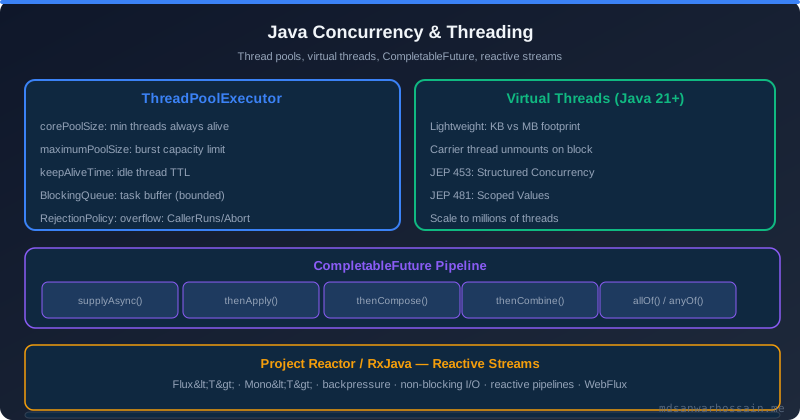
Table of Contents
- The Production Incident
- ThreadPoolExecutor Internals: Core, Max, and Queue
- Queue Types and Their Dangerous Defaults
- Thread Starvation Anti-patterns
- Correct Pool Sizing for CPU-bound vs IO-bound Tasks
- Spring @Async Thread Pool Configuration
- Monitoring ThreadPools with Micrometer
- Failure Scenarios and Trade-offs
- When NOT to Use Thread Pools
- Key Takeaways
The Production Incident
An order notification service uses Spring @Async to send emails and Kafka messages asynchronously. Under normal load — a few hundred orders per minute — everything works perfectly. Emails dispatch in under a second, Kafka messages publish without issue, and thread pool metrics look healthy. Then a marketing campaign drives 10× the usual traffic. Within minutes, all async task processing hangs. A thread dump shows all 200 threads in a waiting state. No work is being done. The service is alive but completely frozen on its async path.
Two separate misconfigurations contributed to the incident. The first was Spring's default SimpleAsyncTaskExecutor, which creates a new OS thread for every single submitted task — completely unbounded. Under a sustained 10× traffic spike, this exhausted the operating system's thread limit, causing task submission to fail with out-of-memory errors on thread creation. The second was a custom executor that had been added to fix the first problem but was itself misconfigured:
// Custom executor added to "fix" the default — but still broken
ThreadPoolTaskExecutor executor = new ThreadPoolTaskExecutor();
executor.setCorePoolSize(10);
executor.setMaxPoolSize(10);           // maxPoolSize equals corePoolSize
executor.setQueueCapacity(Integer.MAX_VALUE);  // effectively unbounded queue
executor.initialize();
Because the queue was effectively unbounded, the pool never scaled beyond 10 threads. Tasks submitted during the traffic spike simply accumulated in the queue — all 50,000 of them. With 10 threads processing at normal throughput, the queue took 45 minutes to drain. Customers experienced a 45-minute delay on order confirmation emails. The warning in application logs, which had been silently appearing for months, finally became a visible incident:
[2026-03-22T14:21:44.033+0000] WARN  o.s.s.concurrent.ThreadPoolTaskExecutor -
  An Executor is required to handle java.util.concurrent.RejectedExecutionException
  TaskRejectedException: Executor [ThreadPoolTaskExecutor] did not accept task
This warning had appeared in logs whenever brief spikes briefly saturated the pool, but because the unbounded queue absorbed the overflow without visible failure, it was never investigated. Unbounded queues are dangerous precisely because they hide saturation problems until the queue has grown large enough to cause OOM or unacceptable latency.
ThreadPoolExecutor Internals: Core, Max, and Queue
Understanding ThreadPoolExecutor's task submission logic is essential to configuring it correctly. The Java documentation describes the algorithm, but its implications for common configurations are counterintuitive. The exact decision sequence on every task submission is:
- If running threads <
corePoolSize: create a new thread to handle this task (even if idle threads exist). - If running threads ≥
corePoolSizeand queue is not full: add the task to the queue. - If queue is full and running threads <
maxPoolSize: create a new thread to handle this task. - If queue is full and running threads ≥
maxPoolSize: invoke theRejectedExecutionHandler.
The critical insight: step 3 only triggers when the queue is full. With an unbounded LinkedBlockingQueue, the queue is never full — it always accepts tasks. Step 3 never fires. maxPoolSize is completely irrelevant when using an unbounded queue. This is a common and dangerous misconfiguration:
// MISLEADING — maxPoolSize=50 is NEVER reached
new ThreadPoolExecutor(
    10,                          // corePoolSize
    50,                          // maxPoolSize — ignored!
    60L, TimeUnit.SECONDS,
    new LinkedBlockingQueue<>()  // unbounded queue — always accepts
);
Engineers configure maxPoolSize=50 believing the pool will scale up to 50 threads under load. It will not — it will permanently stay at 10 threads regardless of queue depth. This configuration is semantically identical to setting both core and max to 10 with an unbounded queue. The maxPoolSize parameter is window dressing that communicates false intent to anyone reading the code.
Another subtle point: core threads are only created on demand as tasks are submitted, not at startup. To pre-warm all core threads so the first burst of traffic does not pay thread creation cost, call executor.prestartAllCoreThreads() after construction. For latency-sensitive services handling bursty traffic, this reduces the cold-start penalty on the first traffic wave.
Queue Types and Their Dangerous Defaults
The queue implementation choice is the most consequential decision when configuring a ThreadPoolExecutor. Each type has fundamentally different behavior under load:
LinkedBlockingQueue() — unbounded FIFO. The no-argument constructor creates an unbounded queue with capacity Integer.MAX_VALUE. As explained above, this makes maxPoolSize irrelevant. Under sustained load, the queue grows without bound until the JVM runs out of heap. Each queued task holds references to its arguments — if tasks carry large payloads (e.g., serialized order objects, request context), 50,000 queued tasks can exhaust heap memory well before the queue's theoretical limit. This is the queue type used by Executors.newFixedThreadPool(n) — which is why that factory method is considered problematic for production use.
LinkedBlockingQueue(n) — bounded FIFO. Setting a capacity bound is what makes maxPoolSize actually work. When the bounded queue fills, step 3 of the submission algorithm fires and additional threads are created up to maxPoolSize. When both queue and thread count are at maximum, the rejection handler fires. This is the correct configuration for most production services.
ArrayBlockingQueue(n) — bounded FIFO with fixed memory. Similar semantics to bounded LinkedBlockingQueue, but backed by an array rather than linked nodes. Fixed memory allocation (no GC pressure from node allocation), slightly higher contention under extreme concurrency. Prefer this when queue capacity is small and memory predictability matters.
SynchronousQueue — zero-capacity, no buffering. Every submitted task must be immediately handed off to a waiting thread. If no thread is available, a new thread is created (up to maxPoolSize), or the rejection handler fires. This makes maxPoolSize the direct scaling control — the pool grows aggressively on load spikes with no buffering delay. Used by Executors.newCachedThreadPool(), which pairs it with maxPoolSize=Integer.MAX_VALUE — creating unbounded threads, which is dangerous in production.
PriorityBlockingQueue — priority ordering. Tasks are dequeued by priority rather than FIFO order. Tasks must implement Comparable or a Comparator must be supplied. Useful when certain task types (e.g., real-time user-facing requests) must be processed before lower-priority background jobs, but introduces complexity and risk of low-priority task starvation under sustained high load.
A particularly dangerous failure mode occurs with unbounded queues during traffic spikes where tasks carry large payloads. Consider a notification service where each task holds a serialized 50KB order object. At 1,000 tasks/second inbound and 10 threads processing at 200ms each (50 tasks/second throughput), the queue grows by 950 tasks/second. After 60 seconds, 57,000 tasks × 50KB = 2.7GB of queue payload — enough to trigger OOM on a typical microservice container.
Thread Starvation Anti-patterns
Nested async tasks on the same executor. This is the most severe pattern because it causes complete, unrecoverable deadlock. A parent task submits child tasks to the same thread pool and then blocks waiting for the child results. If all pool threads are occupied by parent tasks, child tasks queue up but can never execute because all threads are held by waiting parents. The pool is deadlocked:
// DEADLOCK: child task submitted to same executor, parent waits
@Async("myExecutor")
public CompletableFuture<Result> parentTask() {
    CompletableFuture<SubResult> child = subService.childTask(); // @Async("myExecutor")
    return child.thenApply(sub -> buildResult(sub)); // parent thread blocked
}
With corePoolSize=10, exactly 10 concurrent parent tasks fill the pool. Each waits for a child task. The 10 child tasks sit in the queue, never executing because all 10 threads are blocked. The service hangs indefinitely — no timeout will help because the threads are not idle, they are blocked waiting on futures that will never complete. The fix is to use separate executors for parent and child tasks, ensuring the child tasks always have dedicated threads available regardless of parent task saturation. Alternatively, use CompletableFuture.supplyAsync() with a dedicated child pool to make the dependency explicit and avoid the shared-pool trap.
Synchronous blocking inside async tasks. Performing synchronous JDBC queries, synchronous HTTP calls, or file I/O inside @Async tasks ties up the pool thread for the full duration of the blocking operation. A pool of 20 threads making 500ms database calls can sustain at most 40 operations/second. During a spike, all 20 threads block on DB calls and the queue fills rapidly. Virtual threads (Java 21) solve this by parking the carrier thread during IO — but for legacy blocking code in thread pools, the mitigation is to size the pool using the IO-bound formula (described in the next section) and monitor queue depth aggressively.
Using @Transactional on @Async methods. Spring cannot propagate transaction context across thread boundaries. A method annotated with both @Async and @Transactional will run in a new transaction context on the async thread — silently ignoring the caller's transaction. This means work done in the async method is not part of the caller's transaction and cannot be rolled back together. If transactional consistency is required, use synchronous execution or an outbox pattern with a separate transactional coordinator.
Sharing one executor across services with different SLAs. A low-priority bulk-export task sharing a pool with high-priority user-facing notifications can starve the notifications under load. Bulk tasks fill the queue and keep threads busy, while urgent user-facing tasks wait in the same queue. The fix is dedicated executors per task category, sized independently for their respective workloads.
Correct Pool Sizing for CPU-bound vs IO-bound Tasks
Pool sizing is not a matter of picking a round number like 200. There are well-established formulas based on the nature of the work being done.
CPU-bound tasks — tasks that perform computation (sorting, compression, cryptography, data transformation) with minimal blocking. The optimal thread count is bounded by physical CPU cores: adding more threads than cores causes context switching overhead that degrades throughput. The formula is:
N_threads = N_cpu * CPU_utilization_target
// For pure computation targeting 100% CPU utilization:
N_threads = N_cpu       // or N_cpu + 1 to cover occasional thread preemption
On an 8-core machine, a CPU-bound pool should have 8–9 threads. Setting 200 threads for CPU-bound work wastes resources and adds context switching overhead. The JVM's Runtime.getRuntime().availableProcessors() returns the available CPU count at runtime — use it rather than hardcoding.
IO-bound tasks — tasks that spend most of their time waiting for network, database, or disk IO. Threads are blocked during the wait, so more threads are needed to keep CPUs busy. Little's Law and the CPU utilization formula give:
N_threads = N_cpu * (1 + W/C)
// W = average wait time per task (IO blocking time)
// C = average compute time per task (CPU time)
For a typical microservice making database queries and downstream HTTP calls, W/C might be 20–50× (20ms compute, 400–1000ms waiting on DB + HTTP). On an 8-core machine with W/C = 50: N_threads = 8 × (1 + 50) = 408. This explains why thread pools for IO-heavy work are often sized in the hundreds. However, the correct answer for IO-bound async work in Java 21 is virtual threads, not a large thread pool — virtual threads park during IO without blocking OS threads, eliminating the need to estimate W/C ratios. For legacy blocking code where virtual threads are not available, use the formula as a starting point and iterate based on observed queue depth under load.
A practical Spring Boot configuration for an IO-bound async executor applying these principles:
@Configuration
@EnableAsync
public class AsyncConfig {
    @Bean(name = "ioTaskExecutor")
    public Executor ioTaskExecutor() {
        ThreadPoolTaskExecutor executor = new ThreadPoolTaskExecutor();
        executor.setCorePoolSize(20);
        executor.setMaxPoolSize(100);
        executor.setQueueCapacity(500);      // bounded queue — maxPoolSize NOW works
        executor.setThreadNamePrefix("io-async-");
        executor.setRejectedExecutionHandler(new ThreadPoolExecutor.CallerRunsPolicy());
        executor.setKeepAliveSeconds(60);
        executor.setAllowCoreThreadTimeOut(true);
        executor.initialize();
        return executor;
    }
}
Key decisions in this configuration: setQueueCapacity(500) is the critical change — bounded queue means maxPoolSize is now effective. setAllowCoreThreadTimeOut(true) allows core threads to time out during idle periods, freeing resources in low-traffic windows (important for Kubernetes pods with tight memory limits). CallerRunsPolicy provides natural backpressure: when the pool is saturated, the submitting thread runs the task itself, slowing inbound submission rate without data loss. Start with corePoolSize=20 and maxPoolSize=100 for an 8-core service doing IO-bound work, then adjust based on observed executor.queued metrics under peak load.
Spring @Async Thread Pool Configuration
Spring's default async executor is SimpleAsyncTaskExecutor, which creates a brand new OS thread for every submitted task with no pooling, no queue, and no bound on thread count. This is only safe for extremely low-volume async work in development environments. In production, it will exhaust OS thread limits under moderate load. Never use the default for production services. The warning sign in logs is tasks being submitted without any rejection — because SimpleAsyncTaskExecutor never rejects, it just keeps creating threads until the OS says no.
Override the default by implementing AsyncConfigurer or by declaring a TaskExecutor bean named taskExecutor:
@Configuration
@EnableAsync
public class AsyncConfig implements AsyncConfigurer {
    @Override
    public Executor getAsyncExecutor() {
        ThreadPoolTaskExecutor executor = new ThreadPoolTaskExecutor();
        executor.setCorePoolSize(20);
        executor.setMaxPoolSize(100);
        executor.setQueueCapacity(500);
        executor.setThreadNamePrefix("async-");
        executor.initialize();
        return executor;
    }
}
For method-level executor selection — when different service methods need different pool configurations — use the @Async("beanName") form with named beans:
// Method uses the named executor bean
@Async("ioTaskExecutor")
public CompletableFuture<Void> sendEmail(Order order) { ... }

@Async("cpuTaskExecutor")
public CompletableFuture<Report> generateReport(ReportRequest req) { ... }
For teams that prefer externalized configuration, Spring Boot's auto-configuration supports executor tuning through application.yml:
spring:
  task:
    execution:
      pool:
        core-size: 20
        max-size: 100
        queue-capacity: 500
        keep-alive: 60s
      thread-name-prefix: async-
This configures the default ThreadPoolTaskExecutor bean that Spring Boot auto-creates when @EnableAsync is present. Note that application.yml configuration only controls the single default executor — for multiple named executors with different configurations, you must define @Bean methods explicitly. Profile and staging environment overrides can use Spring profiles to vary pool sizes without code changes.
Monitoring ThreadPools with Micrometer
Spring Boot Actuator automatically registers Micrometer metrics for all ThreadPoolTaskExecutor beans. The metrics are available at /actuator/metrics/executor.* and in Prometheus format at /actuator/prometheus. Meaningful thread pool observability requires knowing which metrics to alert on:
executor.pool.size — current number of threads in the pool. Watch for this approaching maxPoolSize consistently; it signals the pool is under sustained load and the queue is filling.
executor.active — threads currently executing tasks. Active close to pool size means low idle capacity. Active equals pool size for extended periods means the queue is absorbing all overflow.
executor.queued — tasks currently sitting in the queue waiting for a thread. This is the most important saturation metric. Alert when queued exceeds 80% of queueCapacity. At 100%, the rejection handler fires and tasks are either dropped or block the submitting thread (depending on your rejection policy). Set a Prometheus alert:
# Alert when queue is above 80% capacity — fires before rejection handler triggers
alert: ThreadPoolQueueSaturation
expr: executor_queued_tasks{name="ioTaskExecutor"} /
      executor_queue_remaining_tasks{name="ioTaskExecutor"} > 0.8
for: 2m
labels:
  severity: warning
annotations:
  summary: "Thread pool queue saturation: {{ $labels.name }}"
executor.completed — cumulative completed task count (counter). Use the rate: rate(executor_completed_tasks_total[5m]) gives tasks/second throughput. Compare this to inbound task submission rate to detect growing lag.
executor.queue.remaining — remaining queue capacity before rejection. Use this with executor.queued to compute utilization percentage.
Thread naming is critical for production diagnostics. Without meaningful thread names, a thread dump shows hundreds of threads named pool-1-thread-23 — impossible to correlate to application context. Always set setThreadNamePrefix():
executor.setThreadNamePrefix("order-notify-");
// Thread dump will show: order-notify-1, order-notify-2, ...
// Immediately identifies which pool the stuck thread belongs to
Thread dumps captured during an incident (via jcmd <pid> Thread.print or kill -3 <pid>) will show your named threads, their stack traces, and their lock states — enabling immediate identification of whether threads are blocked on IO, waiting for a lock, or executing normally.
Failure Scenarios and Trade-offs
When both the queue and thread pool are at maximum capacity, the RejectedExecutionHandler determines what happens to the overflow task. The four built-in policies have very different production implications:
CallerRunsPolicy (recommended default for most services). The thread that submitted the task runs it inline, synchronously. This provides natural backpressure: the submitting thread is occupied running the task, slowing the rate at which new tasks can be submitted. Under sustained overload, this cascades upstream — the HTTP request thread runs the async task itself, increasing request latency proportionally to task execution time. No data loss, no exceptions to handle. The trade-off is that the submitting thread (e.g., a Tomcat worker thread) is blocked running the async task, temporarily reducing HTTP serving capacity. This is usually acceptable — you are already overloaded, and slowing inbound requests is the correct response.
AbortPolicy (JDK default). Throws RejectedExecutionException to the submitting thread. The caller must catch and handle this exception — if not caught, it propagates up the call stack, potentially failing the entire HTTP request. Appropriate when callers implement explicit fallback logic (circuit breakers, retry with backoff) but dangerous when code assumes @Async submission always succeeds silently.
DiscardPolicy — silently drops the task. The submitted task is silently discarded with no exception and no notification. This is almost always the wrong choice for application business logic — a dropped notification task means a customer never receives their order confirmation. Appropriate only for truly fire-and-forget metrics or sampling tasks where some loss is acceptable by design.
DiscardOldestPolicy — drops the oldest queued task. Removes the head of the queue (the task that has been waiting longest) and retries submission of the new task. Semantically unfair — the tasks that have waited longest are the ones discarded. This can cause complete starvation of the oldest tasks under continuous overload. Use only for priority-based scenarios where newer tasks are genuinely more important than older ones.
When NOT to Use Thread Pools
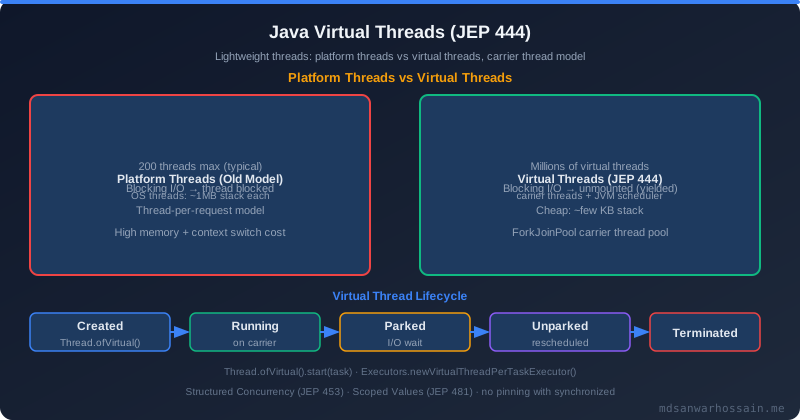
Java 21 Virtual Threads change the calculus for IO-bound async work entirely. A virtual thread is a JVM-managed thread that is cheaply suspended (parked) when it blocks on IO, freeing the underlying OS carrier thread to run other virtual threads. The JVM can sustain millions of concurrent virtual threads with a small fixed number of carrier threads — typically N_cpu carrier threads supporting hundreds of thousands of virtual threads.
Replacing a blocking thread pool with virtual threads requires minimal code change:
// Replace this:
Executors.newFixedThreadPool(200)

// With this (Java 21+):
Executors.newVirtualThreadPerTaskExecutor()

// Or for Spring Boot 3.2+ with virtual thread support:
spring.threads.virtual.enabled=true
With virtual threads, there is no pool to size. There is no queue to tune. There is no rejection handler to configure. Each task gets its own virtual thread; the JVM scheduler handles multiplexing onto carrier threads transparently. The W/C ratio formula becomes irrelevant — virtual threads park during IO, so the number of concurrent tasks is limited only by heap memory (each virtual thread uses a small amount of stack space, typically a few KB vs 256KB–1MB for platform threads).
Thread pools remain the correct tool for CPU-bound work where parallelism must be bounded to prevent CPU saturation. A pool of N_cpu threads for CPU-intensive computation prevents the system from thrashing under concurrent CPU-bound tasks. Virtual threads do not help here — a CPU-bound virtual thread holds its carrier thread continuously and provides no advantage over a platform thread. For mixed workloads (some CPU, some IO), separate pools: a bounded platform thread pool sized to CPU count for computation, and virtual threads for the IO-bound portions.
If you are on Java 17 or earlier and cannot use virtual threads, structured concurrency (available as a preview API in Java 21) and reactive programming (Project Reactor, RxJava) are the alternatives. Both avoid the blocking thread pool model but require significant code restructuring. The pragmatic choice for most teams on Java 17 blocking code is: apply the IO-bound sizing formula, set bounded queues, use CallerRunsPolicy, monitor queue depth, and plan migration to virtual threads on the Java 21 upgrade path.
Key Takeaways
- Unbounded queues make maxPoolSize irrelevant:
LinkedBlockingQueue()without a capacity argument means your pool will never scale beyondcorePoolSize. Always set a boundedqueueCapacityinThreadPoolTaskExecutorso thatmaxPoolSizeactually functions as designed. - Never use Spring's default
SimpleAsyncTaskExecutorin production: It creates an unbounded new OS thread per task and will exhaust system thread limits under any non-trivial load. Always configure an explicitThreadPoolTaskExecutorwith bounded queue and pool. - Nested async tasks on the same pool cause unrecoverable deadlock: If parent tasks submit child tasks to the same executor and block waiting for results, the pool will deadlock once all threads are held by waiting parents. Use separate dedicated executors for parent and child task categories.
- Size IO-bound pools with the formula
N_cpu × (1 + W/C): For typical Spring Boot microservices with DB and HTTP dependencies, W/C ratios of 20–50× result in pool sizes of 100–400 threads on an 8-core machine. Alternatively, use Java 21 virtual threads and eliminate pool sizing complexity entirely. - Use
CallerRunsPolicyas your default rejection handler: It provides automatic backpressure without data loss — the submitting thread runs the overflowed task, naturally slowing inbound submission rate. This is far safer thanDiscardPolicy(silent data loss) orAbortPolicy(exception propagation that may not be handled). - Alert on queue depth, not just thread count: Monitor
executor.queuedrelative toqueueCapacityand alert at 80% utilization. Queue saturation is the leading indicator of impending rejection handler firing — catching it at 80% gives time to scale horizontally before customers experience failures.
Leave a Comment
Related Posts

Software Engineer · Java · Spring Boot · Microservices