Kubernetes Pod Disruption Budgets: Zero-Downtime Drain, Cluster Upgrades & SLO Protection
Pod replicas alone do not protect availability during planned disruption events. This guide shows how to use PodDisruptionBudgets (PDBs) to enforce safe eviction limits during node drains, upgrades, and autoscaler actions so critical services keep meeting reliability targets.
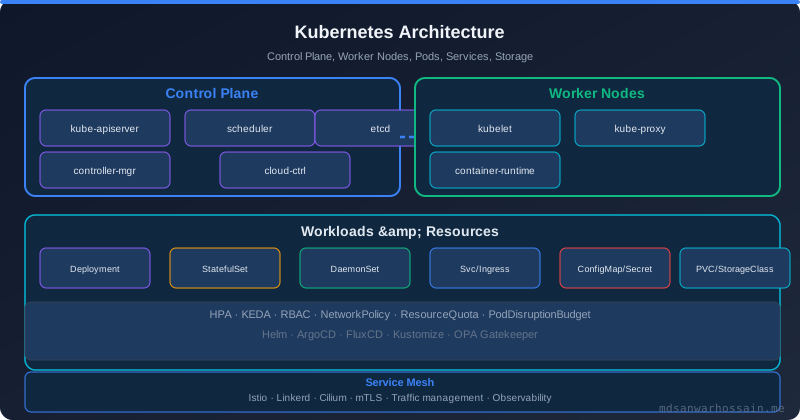
Table of Contents
- The Node Upgrade That Took Down Payments
- What Is a PodDisruptionBudget?
- minAvailable vs maxUnavailable: Choosing Your Strategy
- Voluntary vs Involuntary Disruptions
- PDB + HPA Interaction: The Scaling Floor Problem
- Node Drain Workflow with PDB Enforcement
- Cluster Upgrade Strategies
- PDB with StatefulSets
- Common PDB Misconfigurations
- Monitoring Disruption Budget Status
- PDB + Cluster Autoscaler Scale-Down
- Key Takeaways
- Read More
The Node Upgrade That Took Down Payments
It was a routine Tuesday morning maintenance window. The platform team was upgrading the Kubernetes node group from version 1.28 to 1.29. The upgrade script was straightforward: cordon each node, drain it, terminate the old EC2 instance, and let the node group launch a fresh replacement. Automated, tested in staging, nothing to worry about.
At 09:47 UTC, the on-call phone lit up. The payments service was returning 503s. The SLO dashboard turned red. Investigation revealed that three of the four payment service pods had been evicted simultaneously during the drain of two adjacent nodes. The fourth pod—the one survivor—was overwhelmed and crashing under the load. The payment service had a 99.95% availability SLO. In eight minutes, it burned through six hours of error budget.
The team had Kubernetes. They had multiple pod replicas. They had a node upgrade process. What they didn't have was a PodDisruptionBudget—the Kubernetes API object specifically designed to prevent exactly this scenario.
What Is a PodDisruptionBudget?
A PodDisruptionBudget (PDB) is a Kubernetes policy resource that limits the number of pods of a replicated application that can be voluntarily disrupted at any given time. "Voluntary disruption" includes:
kubectl drainon a node (for maintenance or upgrades)- Cluster Autoscaler scale-down evictions
- Manual
kubectl delete podcommands - Deployment rollouts (via eviction API)
- Node auto-repair operations (GKE, EKS managed node groups)
PDBs do not protect against involuntary disruptions: node hardware failure, kernel panics, OOM kills, or pods being killed by the kubelet due to resource limits. Those are handled by replication, affinity rules, and resource quotas.
apiVersion: policy/v1
kind: PodDisruptionBudget
metadata:
  name: payment-service-pdb
  namespace: production
spec:
  minAvailable: 3          # At least 3 pods must always be available
  selector:
    matchLabels:
      app: payment-service
With this PDB in place, when kubectl drain attempts to evict a payment service pod, it first consults the PDB. If evicting that pod would drop available pods below 3, the eviction is blocked and the drain pauses until a replacement pod is running.
minAvailable vs maxUnavailable: Choosing Your Strategy
PDBs offer two complementary constraints. Use exactly one in a given PDB.
minAvailable
Guarantees that at least N pods (or N% of desired) remain available at all times. Best for critical services where you have a hard minimum capacity floor.
# Absolute count
spec:
  minAvailable: 3

# Percentage — rounds down (e.g., 75% of 4 pods = 3)
spec:
  minAvailable: "75%"
Use minAvailable when: you know the minimum number of pods needed to handle production load, and you want to be explicit about that floor.
maxUnavailable
Allows at most N pods (or N%) to be disrupted simultaneously. Best when you think in terms of "how many can I take out at once" rather than "what's my minimum."
# Allow only 1 pod to be disrupted at a time
spec:
  maxUnavailable: 1

# Allow up to 25% to be disrupted at once
spec:
  maxUnavailable: "25%"
Use maxUnavailable when: your service can tolerate some unavailability and you want to control the pace of disruption rather than guarantee an absolute floor.
Which to use?
| Scenario | Recommended |
|---|---|
| Critical payment/auth service | minAvailable: N-1 |
| Worker pool with many replicas | maxUnavailable: "20%" |
| Single-replica service (bad!) | Scale to 2+ replicas first |
| StatefulSet with quorum requirements | minAvailable: majority |
Voluntary vs Involuntary Disruptions
Understanding this distinction is critical for setting realistic expectations about what PDBs can and cannot do.
Voluntary disruptions (PDB-protected)
- Node drain for maintenance/upgrade
- Cluster Autoscaler scale-down
- Manual pod deletion via
kubectl delete - Deployment rolling update (eviction path)
- Cloud provider managed node group rotation
Involuntary disruptions (PDB does NOT apply)
- Node hardware failure
- OOM kill by kubelet
- Container crash / liveness probe failure
- Network partition between nodes
- Spot/preemptible instance reclamation (though the node drain path may be PDB-aware in managed offerings)
For involuntary disruptions, your protection comes from multi-zone pod topology spread constraints, anti-affinity rules, and sufficient replica counts to absorb a zone failure.
PDB + HPA Interaction: The Scaling Floor Problem
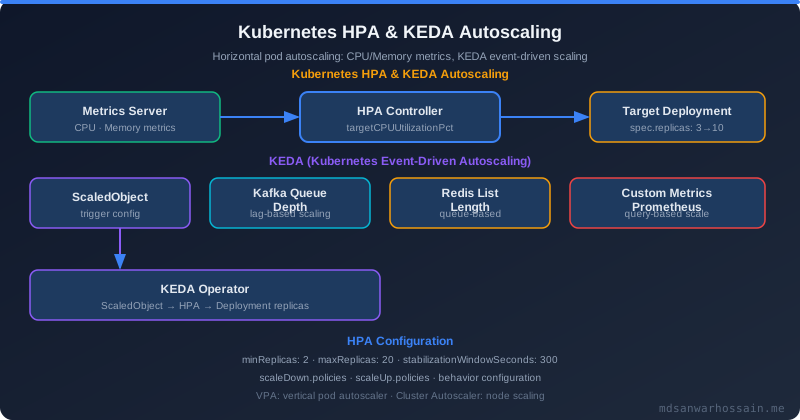
A frequently overlooked interaction: if your HPA (Horizontal Pod Autoscaler) scales your deployment down to minReplicas and your PDB specifies minAvailable: N where N equals or exceeds minReplicas, the Cluster Autoscaler will be permanently blocked from evicting any pods of that deployment. This means nodes can never be drained during scale-down.
# Dangerous configuration:
# HPA minReplicas: 2
# PDB minAvailable: 2
# Result: 0 pods can ever be disrupted voluntarily!

# Correct configuration:
# HPA minReplicas: 3
# PDB minAvailable: 2
# Result: 1 pod can be disrupted; node drain can proceed
The rule of thumb: minAvailable should always be strictly less than HPA's minReplicas. If you set them equal, you deadlock voluntary disruptions during scale-down periods.
# Check current PDB status to detect blocked evictions:
kubectl get pdb -n production

# Output:
# NAME                  MIN AVAILABLE   MAX UNAVAILABLE   ALLOWED DISRUPTIONS   AGE
# payment-service-pdb   3               N/A               0                     5d
#
# ALLOWED DISRUPTIONS = 0 means the PDB is blocking all evictions right now
Node Drain Workflow with PDB Enforcement
Here is what happens step by step when you run kubectl drain node-1 against a node hosting payment service pods:
- Cordon: The node is marked unschedulable. No new pods will be scheduled on it.
- List pods: kubectl identifies all evictable pods on the node (excludes DaemonSet pods by default).
- For each pod, call the Eviction API:
POST /api/v1/namespaces/{ns}/pods/{pod}/eviction - API server checks PDB: If evicting this pod would violate the PDB, the API returns HTTP 429 (Too Many Requests).
- kubectl drain retries: The drain command retries the eviction periodically (default retry period) until the PDB budget opens up (i.e., a replacement pod becomes Running and Ready).
- Graceful termination: Once the eviction is approved, the pod receives SIGTERM and the
terminationGracePeriodSecondswindow begins.
# Safe node drain with timeout (fail if stuck for more than 10 minutes)
kubectl drain node-1 \
  --ignore-daemonsets \
  --delete-emptydir-data \
  --timeout=600s \
  --pod-selector='app notin (critical-singleton)'

# Monitor drain progress in another terminal:
watch kubectl get pods -n production -o wide | grep node-1
If the drain times out (because PDB keeps blocking), do not force it. Investigate why replacement pods are not becoming Ready—this is often a resource constraint, image pull failure, or liveness probe issue on the new node.
Cluster Upgrade Strategies
Rolling node upgrade (recommended for most cases)
Upgrade nodes one at a time (or in small batches). With PDBs in place, each node drain waits for pod replacements before proceeding. This is the default for managed Kubernetes offerings (EKS managed node groups, GKE node pool upgrades).
# EKS managed node group rolling upgrade (respects PDBs automatically):
aws eks update-nodegroup-version \
  --cluster-name prod-cluster \
  --nodegroup-name payment-nodes \
  --kubernetes-version 1.29

# Check upgrade progress:
aws eks describe-nodegroup \
  --cluster-name prod-cluster \
  --nodegroup-name payment-nodes \
  --query 'nodegroup.status'
Blue/green node pool upgrade
Create a new node pool with the target Kubernetes version alongside the old one. Gradually cordon and drain old nodes while new pods schedule onto new nodes. Provides the cleanest upgrade path with zero risk of disruption blocking, at the cost of running double capacity during the transition.
# Step 1: Create new node pool (Kubernetes 1.29)
# Step 2: Cordon all old nodes (prevents new scheduling)
for node in $(kubectl get nodes -l pool=old -o name); do
  kubectl cordon $node
done

# Step 3: Drain old nodes one by one (PDB-aware)
for node in $(kubectl get nodes -l pool=old -o name); do
  kubectl drain $node --ignore-daemonsets --delete-emptydir-data --timeout=300s
  echo "Drained: $node"
  sleep 30  # allow system to stabilize
done
PDB with StatefulSets
StatefulSets require special consideration. Unlike Deployments, StatefulSet pods have stable identity and often store state. For quorum-based systems (Kafka, Zookeeper, etcd, Elasticsearch), the PDB must preserve the quorum majority:
# Kafka with 3 brokers — quorum requires at least 2
apiVersion: policy/v1
kind: PodDisruptionBudget
metadata:
  name: kafka-pdb
spec:
  minAvailable: 2
  selector:
    matchLabels:
      app: kafka

---
# Elasticsearch with 3 master nodes — never disrupt more than 1
apiVersion: policy/v1
kind: PodDisruptionBudget
metadata:
  name: elasticsearch-master-pdb
spec:
  maxUnavailable: 1
  selector:
    matchLabels:
      app: elasticsearch
      role: master
For StatefulSets that use podManagementPolicy: Parallel, be extra careful—the StatefulSet controller can scale multiple pods simultaneously, and without a PDB that constrains this, node drains can still evict multiple pods at once. The lifecycle discipline here parallels what you'd enforce with Java Structured Concurrency scopes, where you define explicit boundaries for concurrent operations.
Common PDB Misconfigurations
Misconfiguration 1: PDB selector matches no pods
If the PDB's matchLabels selector doesn't match any running pods, the PDB has no effect. Always verify after applying:
kubectl describe pdb payment-service-pdb -n production
# Check "Disruptions Allowed" — should be > 0 if pods are running
# Check "Current Healthy" — should match your running replica count
Misconfiguration 2: minAvailable equals replica count
Setting minAvailable: 4 when you have exactly 4 replicas means zero disruptions are ever allowed. The PDB will permanently block all node drains. Set minAvailable to at most replicas - 1.
Misconfiguration 3: No PDB on single-replica services
A single-replica service is disrupted entirely by a node drain. If you cannot tolerate any downtime, you must have at least 2 replicas plus a PDB. There is no way to protect a single-replica service from voluntary disruptions.
Misconfiguration 4: PDB without pod readiness probe
The drain waits for replacement pods to become "Available" according to the PDB—which counts pods that pass their readiness probe. If your pods don't have a readiness probe, Kubernetes considers them immediately ready, even if they are still warming up. This can cause traffic to be routed to cold pods during a drain.
readinessProbe:
  httpGet:
    path: /actuator/health/readiness
    port: 8080
  initialDelaySeconds: 10
  periodSeconds: 5
  failureThreshold: 3
Misconfiguration 5: Forgetting terminationGracePeriodSeconds
When a pod is evicted, it gets a SIGTERM. If your application takes longer than terminationGracePeriodSeconds (default 30s) to shut down gracefully, it is killed with SIGKILL. For Java services with JVM warmup and connection draining, 60–120 seconds is common. Set this explicitly:
spec:
  terminationGracePeriodSeconds: 90
  containers:
  - name: payment-service
    lifecycle:
      preStop:
        exec:
          command: ["/bin/sh", "-c", "sleep 10"]  # wait for load balancer to deregister
Monitoring Disruption Budget Status
PDB status should be part of your cluster health dashboard. Key metrics to track:
Kubernetes metrics
# Current disruption allowance (Prometheus query via kube-state-metrics):
kube_poddisruptionbudget_status_disruptions_allowed{namespace="production"}

# Expected vs observed healthy pods:
kube_poddisruptionbudget_status_current_healthy{namespace="production"}
kube_poddisruptionbudget_status_desired_healthy{namespace="production"}
Alert: PDB blocking for too long
# Alert when PDB has 0 allowed disruptions for more than 30 minutes
# This indicates a stuck drain or unhealthy pod preventing progress
- alert: PodDisruptionBudgetBlocking
  expr: |
    kube_poddisruptionbudget_status_disruptions_allowed == 0
  for: 30m
  labels:
    severity: warning
  annotations:
    summary: "PDB {{ $labels.poddisruptionbudget }} blocking disruptions in {{ $labels.namespace }}"
Event-based monitoring
# Watch for disruption-related events:
kubectl get events -n production --field-selector reason=Evicting
kubectl get events -n production --field-selector reason=EvictionBlocked
PDB + Cluster Autoscaler Scale-Down
The Cluster Autoscaler respects PDBs when deciding whether to evict pods from underutilized nodes. If a node's pods cannot all be evicted without violating PDBs, the Cluster Autoscaler will not scale down that node. This is the correct behavior—but it can cause cost inefficiencies if PDBs are too restrictive.
# Annotation to prevent Cluster Autoscaler from evicting specific pods:
# (use only when truly needed—prefer PDBs for service-wide policies)
metadata:
  annotations:
    cluster-autoscaler.kubernetes.io/safe-to-evict: "false"
A healthy practice is to review Cluster Autoscaler logs weekly and look for pod_not_safe_to_evict_reason=pdb entries on nodes that have been un-evictable for more than 24 hours. These often indicate misconfigured PDBs or stuck pods that are preventing cost optimization.
Key Takeaways
- Every production service with more than one replica should have a PDB. Without one, a node drain can evict all replicas simultaneously.
- Set
minAvailablestrictly less than HPA'sminReplicasto avoid deadlocking voluntary disruptions during scale-down. - Use
minAvailablefor critical services (payments, auth); usemaxUnavailablefor worker pools. - PDBs only protect against voluntary disruptions. Use multi-zone scheduling and sufficient replicas for involuntary failure protection.
- Always pair PDBs with readiness probes and appropriate
terminationGracePeriodSeconds. The drain waits for "ready" replacements—without probes, this guarantee is hollow. - Monitor
disruptions_allowed == 0for extended periods. This is the early warning sign of a stuck cluster upgrade or unhealthy pod. - For StatefulSets, preserve quorum. A PDB that allows more than one Kafka or Elasticsearch master pod to be disrupted simultaneously can cause data loss.
Tags:
Read More
Explore related posts on Kubernetes reliability and backend engineering:
- Java Structured Concurrency — lifecycle discipline for concurrent systems that complements cluster-level disruption management
- Browse all DevOps, Kubernetes, and reliability engineering articles →
Leave a Comment
Related Posts

Software Engineer · Java · Spring Boot · Microservices