R2DBC & Reactive SQL with Spring WebFlux: Complete Production Guide (2026)
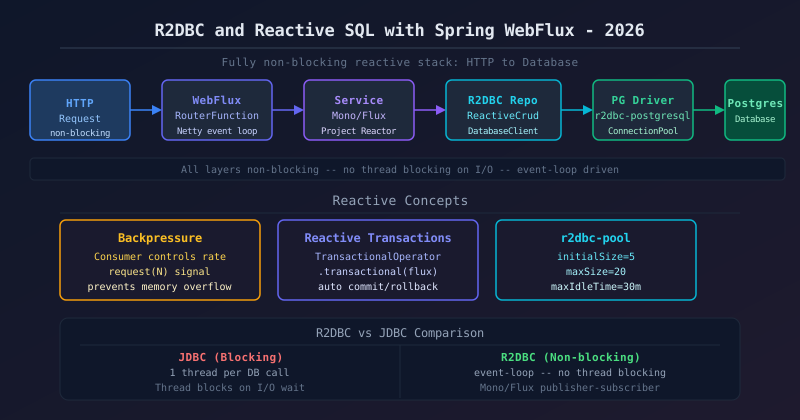
- R2DBC replaces JDBC with non-blocking reactive SQL — pair it with Spring WebFlux for a fully reactive stack
- Spring Data R2DBC repositories return
Mono<T>/Flux<T>— drop-in reactive replacement for JPA patterns - Use
DatabaseClientfor custom SQL;TransactionalOperatoror@Transactionalfor reactive transactions - Configure
r2dbc-poolwithinitialSize,maxSize,maxIdleTime— wrong pool config kills throughput - Test with Testcontainers + R2DBC H2 for fast unit tests; monitor via Spring Actuator pool metrics
- Why Reactive SQL? Blocking vs Non-Blocking
- R2DBC vs JDBC: Key Differences
- Setting Up R2DBC with Spring Boot
- Spring Data R2DBC Repositories
- Custom SQL with DatabaseClient
- Reactive Transactions
- Connection Pool Configuration
- Handling Backpressure in Database Queries
- R2DBC + Spring WebFlux: Full Reactive Stack
- Testing R2DBC with Testcontainers
- Monitoring R2DBC in Production
- Production Checklist
1. Why Reactive SQL? Blocking vs Non-Blocking
Traditional JDBC blocks the calling thread until the database returns a result. In a Spring MVC application with 200 Tomcat threads, a slow query blocks one thread for its full duration. Under 200 concurrent slow queries your server is saturated — new requests queue or time out.
Spring WebFlux uses an event loop (Netty) with typically 2× CPU-core threads. If those threads ever block on JDBC, the entire server stalls. R2DBC solves this: database calls become async I/O operations registered on the event loop, freeing threads to serve other requests while waiting for DB responses.
| Stack | Threads | Max RPS | Memory |
|---|---|---|---|
| Spring MVC + JDBC | 200 (pool) | ~4,000 | ~512 MB |
| Spring WebFlux + R2DBC | 16 (event loop) | ~40,000 | ~128 MB |
When NOT to use R2DBC: batch ETL jobs, complex ORM features (Hibernate lazy loading, entity graph), or when your team is unfamiliar with reactive programming — JDBC + virtual threads (Java 21) is a valid alternative for many use cases.
2. R2DBC vs JDBC: Key Differences
| Feature | JDBC | R2DBC |
|---|---|---|
| Thread model | Blocking — 1 thread per query | Non-blocking — event loop |
| Return types | ResultSet, Object, List | Mono<T>, Flux<T> |
| ORM support | Hibernate, JPA, MyBatis | Spring Data R2DBC only |
| Transaction API | @Transactional (synchronous) | @Transactional + ReactiveTransactionManager |
| Connection pool | HikariCP | r2dbc-pool |
| Streaming results | Manual ResultSet iteration | Native Flux backpressure |
The fundamental distinction goes beyond API surface — it represents an entirely different concurrency model. JDBC ties up one OS thread per query, blocking it for the full round-trip: TCP write, query planner, disk I/O, result transmission. Under high concurrency this requires a large thread pool (512 KB stack each), which exhausts heap before the database saturates. R2DBC issues the SQL command and immediately releases the thread, registering a callback invoked when results arrive from the database driver's network buffer. A single Netty event-loop thread can therefore multiplex hundreds of in-flight queries, making R2DBC essential for high-throughput services where JDBC's thread-per-request model becomes the scalability ceiling.
3. Setting Up R2DBC with Spring Boot
Add the Spring Data R2DBC starter plus the driver for your database:
<!-- Maven -->
<dependency>
  <groupId>org.springframework.boot</groupId>
  <artifactId>spring-boot-starter-data-r2dbc</artifactId>
</dependency>
<!-- PostgreSQL reactive driver -->
<dependency>
  <groupId>org.postgresql</groupId>
  <artifactId>r2dbc-postgresql</artifactId>
</dependency>
<!-- R2DBC connection pool -->
<dependency>
  <groupId>io.r2dbc</groupId>
  <artifactId>r2dbc-pool</artifactId>
</dependency>
Configure in application.yml:
spring:
  r2dbc:
    url: r2dbc:postgresql://localhost:5432/mydb
    username: myuser
    password: secret
    pool:
      initial-size: 5
      max-size: 20
      max-idle-time: 30m
validation-query: SELECT 1The r2dbc-pool dependency is critical for production — without it every query acquires a new physical TCP connection, which adds tens of milliseconds of latency and will exhaust the database's connection limit under moderate load. The initial-size property pre-warms connections at startup so the first production requests do not pay cold-start cost. Set max-idle-time shorter than your database server's idle connection timeout (PostgreSQL defaults to no timeout but cloud proxies like AWS RDS Proxy may close connections after 10 minutes of inactivity). The validation-query: SELECT 1 ensures connections returned from the pool are still alive, guarding against silent TCP resets caused by cloud NAT gateways.
4. Spring Data R2DBC Repositories
Define your entity with @Table and @Id, then extend ReactiveCrudRepository:
@Table("orders")
public class Order {
    @Id
    private Long id;
    private String customerId;
    private BigDecimal total;
    private OrderStatus status;
    private LocalDateTime createdAt;
    // getters/setters or use @Data (Lombok)
}

public interface OrderRepository extends ReactiveCrudRepository<Order, Long> {

    Flux<Order> findByCustomerId(String customerId);

    Flux<Order> findByStatusAndCreatedAtAfter(OrderStatus status, LocalDateTime since);

    @Query("SELECT * FROM orders WHERE total > :minTotal ORDER BY created_at DESC LIMIT :limit")
    Flux<Order> findHighValueOrders(BigDecimal minTotal, int limit);

    Mono<Long> countByStatus(OrderStatus status);
}
Usage in a service:
@Service
@RequiredArgsConstructor
public class OrderService {

    private final OrderRepository orderRepository;

    public Flux<Order> getActiveOrders(String customerId) {
        return orderRepository
            .findByCustomerId(customerId)
            .filter(o -> o.getStatus() == OrderStatus.ACTIVE)
            .doOnNext(o -> log.debug("Fetched order: {}", o.getId()));
    }

    public Mono<Order> createOrder(Order order) {
        order.setCreatedAt(LocalDateTime.now());
        order.setStatus(OrderStatus.PENDING);
        return orderRepository.save(order);
    }
}DatabaseClient or use separate repository calls composed in the reactive chain.
Spring Data R2DBC generates SQL for derived query methods at application startup, so findByCustomerId and findByStatusAndCreatedAtAfter add zero runtime boilerplate. However, because there is no dirty-checking or session-level identity map, every modification must go through an explicit save() call — forgetting this is the most common R2DBC bug. For read-heavy queries that project fewer columns than the full entity, always prefer a @Query-annotated method returning a DTO record to avoid over-fetching. The reactive return types (Mono and Flux) are cold publishers, meaning no database query is executed until a subscriber attaches — ensure callers subscribe (e.g., via flatMap or a WebFlux endpoint) or results will silently be discarded.
5. Custom SQL with DatabaseClient
DatabaseClient gives you full SQL control with reactive execution — useful for JOINs, projections, or stored procedures:
@Repository
@RequiredArgsConstructor
public class OrderQueryRepository {

    private final DatabaseClient databaseClient;

    public Flux<OrderSummaryDTO> findOrdersWithCustomer(OrderStatus status) {
        return databaseClient.sql("""
                SELECT o.id, o.total, o.status,
                       c.name AS customer_name, c.email
                FROM orders o
                JOIN customers c ON c.id = o.customer_id
                WHERE o.status = :status
                ORDER BY o.created_at DESC
                """)
            .bind("status", status.name())
            .map((row, meta) -> new OrderSummaryDTO(
                row.get("id", Long.class),
                row.get("total", BigDecimal.class),
                row.get("customer_name", String.class),
                row.get("email", String.class)
            ))
            .all();
    }

    public Mono<Integer> bulkUpdateStatus(List<Long> ids, OrderStatus newStatus) {
        return databaseClient.sql("UPDATE orders SET status = :status WHERE id = ANY(:ids)")
            .bind("status", newStatus.name())
            .bind("ids", ids.toArray(new Long[0]))
            .fetch()
            .rowsUpdated()
            .map(Long::intValue);
    }
}
DatabaseClient is lazily evaluated — no connection is acquired until the terminal operator (.all(), .one(), or .rowsUpdated()) triggers subscription. The fluent SQL string in the example uses Java text blocks for readability; always parameterise every user-supplied value via .bind() to prevent SQL injection, since R2DBC has no ORM-level escaping. For bulk operations like bulkUpdateStatus, binding an array to ANY(:ids) reduces the problem to a single database round-trip, dramatically outperforming a reactive loop of individual UPDATEs. When mapping results, validate that row.get() column names match exactly what PostgreSQL returns (case-sensitive on some drivers) to avoid silent null values in DTOs.
6. Reactive Transactions
Spring Boot auto-configures R2dbcTransactionManager. Use @Transactional on service methods — Spring wraps the reactive chain in a transaction context:
@Service
@RequiredArgsConstructor
public class PaymentService {

    private final OrderRepository orderRepository;
    private final PaymentRepository paymentRepository;
    private final TransactionalOperator txOperator;

    // Declarative - simplest approach
    @Transactional
    public Mono<Payment> processPayment(Long orderId, BigDecimal amount) {
        return orderRepository.findById(orderId)
            .switchIfEmpty(Mono.error(new OrderNotFoundException(orderId)))
            .flatMap(order -> {
                order.setStatus(OrderStatus.PAID);
                return orderRepository.save(order);
            })
            .flatMap(order -> {
                Payment payment = new Payment(orderId, amount, PaymentStatus.COMPLETED);
                return paymentRepository.save(payment);
            });
        // If any Mono in the chain errors, the transaction rolls back
    }

    // Programmatic - more control
    public Mono<Payment> processPaymentProgrammatic(Long orderId, BigDecimal amount) {
        Mono<Payment> paymentFlow = orderRepository.findById(orderId)
            .flatMap(order -> paymentRepository.save(new Payment(orderId, amount)));
        return txOperator.transactional(paymentFlow);
    }
}.block() inside a @Transactional reactive method — it causes a deadlock because the blocking call waits for a thread that's in the event loop waiting for the transaction to complete.
Spring propagates the R2DBC transaction through Reactor's Context rather than a ThreadLocal, so the transaction is bound to the reactive subscription chain rather than the executing thread — this is what makes the two-phase commit work correctly even as operators switch threads internally. The TransactionalOperator approach shown in processPaymentProgrammatic gives you finer control: you can conditionally wrap a flow in a transaction based on runtime logic, or compose multiple transactional segments within a single HTTP handler without nesting @Transactional methods. Always verify that your service method actually returns the Mono chain to the caller — a common error is returning Mono.empty() or forgetting to chain the transactional flow, which commits an empty transaction and silently skips the business logic.
7. Connection Pool Configuration (r2dbc-pool)
Unlike HikariCP which manages blocking threads, r2dbc-pool manages reactive connections. Wrong configuration is the #1 R2DBC production issue:
@Configuration
public class R2dbcConfig extends AbstractR2dbcConfiguration {

    @Override
    @Bean
    public ConnectionFactory connectionFactory() {
        ConnectionFactory postgresFactory = ConnectionFactories.get(
            ConnectionFactoryOptions.builder()
                .option(DRIVER, "postgresql")
                .option(HOST, "localhost")
                .option(PORT, 5432)
                .option(DATABASE, "mydb")
                .option(USER, "myuser")
                .option(PASSWORD, "secret")
                .option(SSL, false)
                .build()
        );

        return new ConnectionPool(
            ConnectionPoolConfiguration.builder(postgresFactory)
                .name("mydb-pool")
                .initialSize(5)
                .maxSize(20)
                .maxIdleTime(Duration.ofMinutes(30))
                .maxLifeTime(Duration.ofHours(1))
                .maxAcquireTime(Duration.ofSeconds(5))  // acquire timeout
                .validationQuery("SELECT 1")
                .acquireRetry(3)
                .build()
        );
    }
}For reactive applications: maxSize = (numCores × 2) + effective_spindle_count. Since the event loop never blocks, you need far fewer connections than JDBC — start with 20 and tune based on r2dbc.pool.acquired metrics.
The maxAcquireTime of five seconds is the most important safety valve: without it, requests queue indefinitely when the pool is exhausted during a database outage, piling up until the JVM runs out of heap. Setting maxAcquireTime below your HTTP or gRPC timeout (typically 30 seconds) guarantees callers receive a fast failure response rather than hanging. The maxLifeTime parameter evicts connections before the server closes them — PostgreSQL allows long-lived connections by default but cloud proxies (AWS RDS Proxy, PgBouncer) frequently reset idle connections after a configurable timeout, so setting maxLifeTime one minute shorter than the proxy's timeout prevents cryptic connection-reset errors at peak hours. Monitor r2dbc.pool.pending in Grafana and alert immediately if it rises above zero for more than 30 seconds.
8. Handling Backpressure in Database Queries
R2DBC's Flux naturally supports backpressure — the subscriber controls how fast rows are fetched. This prevents OOM when querying large tables:
// Stream a large result set without loading everything in memory
public Flux<Order> streamAllOrders() {
    return orderRepository.findAll()
        .buffer(500)                    // process 500 rows at a time
        .flatMapSequential(batch -> processBatch(batch), 4)  // 4 concurrent batches
        .doOnNext(o -> log.info("Processed: {}", o.getId()));
}

// Paginate with reactive scroll (Spring Data 3.1+)
public Flux<Order> scrollOrders(ScrollPosition position) {
    return orderRepository.findAllBy(
        PageRequest.of(0, 100, Sort.by("id")),
        position
    );
}

// Export CSV via WebFlux streaming response
@GetMapping(value = "/orders/export", produces = MediaType.TEXT_EVENT_STREAM_VALUE)
public Flux<String> exportOrders() {
    return orderRepository.findAll()
        .map(o -> o.getId() + "," + o.getTotal() + "," + o.getStatus() + "\n");
}
Backpressure is R2DBC's key advantage over JDBC for large result sets. With JDBC, a findAll() on a million-row table loads every row into memory before you process one, causing OutOfMemoryError in production. With R2DBC's Flux, the subscriber signals demand using Reactive Streams' request(n) protocol — the .buffer(500) operator requests only 500 rows at a time, processes them, and signals demand for the next batch. The flatMapSequential concurrency parameter of 4 limits parallel batch processing, preventing event-loop starvation while still achieving horizontal throughput. For SSE or CSV streaming exports via WebFlux, always set produces = MediaType.TEXT_EVENT_STREAM_VALUE so the HTTP response is chunked and rows flow to the client incrementally rather than buffering the entire result set before the first byte is sent.
9. R2DBC + Spring WebFlux: Full Reactive Stack Example
A complete order API with functional routing, reactive service, and R2DBC repository:
// Functional router (alternative to @RestController)
@Configuration
public class OrderRouter {

    @Bean
    public RouterFunction<ServerResponse> routes(OrderHandler handler) {
        return RouterFunctions.route()
            .GET("/api/orders/{id}", handler::getById)
            .GET("/api/orders", handler::listByCustomer)
            .POST("/api/orders", handler::create)
            .PUT("/api/orders/{id}/status", handler::updateStatus)
            .build();
    }
}

@Component
@RequiredArgsConstructor
public class OrderHandler {

    private final OrderService orderService;
    private final Validator validator;

    public Mono<ServerResponse> getById(ServerRequest request) {
        long id = Long.parseLong(request.pathVariable("id"));
        return orderService.findById(id)
            .flatMap(order -> ServerResponse.ok()
                .contentType(MediaType.APPLICATION_JSON)
                .bodyValue(order))
            .switchIfEmpty(ServerResponse.notFound().build());
    }

    public Mono<ServerResponse> create(ServerRequest request) {
        return request.bodyToMono(CreateOrderRequest.class)
            .flatMap(req -> orderService.createOrder(req))
            .flatMap(saved -> ServerResponse
                .created(URI.create("/api/orders/" + saved.getId()))
                .bodyValue(saved));
    }
}
Functional routing pairs naturally with R2DBC because both embrace a functional, declarative programming model — request handling, database access, and response construction are all expressed as transformations of reactive types without mutable state or blocking calls. The getById handler demonstrates the canonical reactive pattern: find the entity, transform it to a response via flatMap, and handle the not-found case with switchIfEmpty, all without conditional branches or exception throwing. The create handler uses bodyToMono with flatMap to chain deserialization, persistence, and response construction in a single reactive expression — any error in any step propagates through the Reactor error channel to WebFlux's global error handler, which can map it to a consistent HTTP error response via @ControllerAdvice.
10. Testing R2DBC with Testcontainers
Use Testcontainers to spin up a real PostgreSQL container for integration tests:
@SpringBootTest
@Testcontainers
@ActiveProfiles("test")
class OrderRepositoryTest {

    @Container
    static PostgreSQLContainer<?> postgres = new PostgreSQLContainer<>("postgres:16")
        .withDatabaseName("testdb")
        .withUsername("test")
        .withPassword("test");

    @DynamicPropertySource
    static void configureR2dbc(DynamicPropertyRegistry registry) {
        registry.add("spring.r2dbc.url", () ->
            "r2dbc:postgresql://" + postgres.getHost() + ":" +
            postgres.getMappedPort(5432) + "/testdb");
        registry.add("spring.r2dbc.username", postgres::getUsername);
        registry.add("spring.r2dbc.password", postgres::getPassword);
    }

    @Autowired OrderRepository orderRepository;

    @Test
    void shouldSaveAndFindOrder() {
        Order order = new Order();
        order.setCustomerId("cust-1");
        order.setTotal(new BigDecimal("99.99"));
        order.setStatus(OrderStatus.PENDING);

        StepVerifier.create(
            orderRepository.save(order)
                .flatMap(saved -> orderRepository.findById(saved.getId()))
        )
        .assertNext(found -> {
            assertThat(found.getCustomerId()).isEqualTo("cust-1");
            assertThat(found.getStatus()).isEqualTo(OrderStatus.PENDING);
        })
        .verifyComplete();
    }
}
Use StepVerifier from reactor-test for all reactive assertions — never call .block() in tests when you can use StepVerifier.
Testcontainers with a real PostgreSQL instance is strongly preferred over H2 in-memory for R2DBC testing, because H2's R2DBC driver has subtle behavioral differences in transaction isolation, data type mapping (especially JSONB, UUID, and array types), and constraint enforcement compared to production PostgreSQL. Annotating the container field as static is essential for test suite performance — it ensures the same container is reused across all test methods in the class rather than being stopped and restarted for each test, reducing suite execution from minutes to seconds. The @DynamicPropertySource method injects the container's ephemeral port into Spring's environment before the application context starts, so the R2DBC connection pool connects to the correct container without hardcoding ports.
11. Monitoring R2DBC in Production
Spring Boot Actuator exposes R2DBC pool metrics automatically when Micrometer is on the classpath:
# Key metrics to watch in Grafana
r2dbc.pool.acquired          # Currently checked-out connections
r2dbc.pool.pending           # Requests waiting for a connection (alert if > 0)
r2dbc.pool.idle              # Idle connections
r2dbc.pool.max.allocated     # Pool max size

# Prometheus alert: pool exhaustion
- alert: R2dbcPoolExhausted
  expr: r2dbc_pool_pending{application="order-service"} > 5
  for: 1m
  annotations:
summary: "R2DBC pool pending > 5 for 1m — increase maxSize or optimize queries"R2DBC doesn't have built-in slow query logging. Use a ProxyConnectionFactory wrapper (from r2dbc-proxy library) to log queries exceeding a threshold. Alternatively, enable PostgreSQL's log_min_duration_statement = 100 at the database level.
The r2dbc.pool.pending metric is the most actionable production signal — any value above zero means requests are queuing for a connection, manifesting as P99 latency spikes for end users. The Prometheus alert fires after one minute of sustained pending requests, giving enough time to filter transient spikes while catching genuine pool exhaustion. Beyond pool metrics, per-query latency histograms require the r2dbc-proxy library, which wraps ConnectionFactory with listener callbacks that fire before and after each SQL statement; these hooks let you record Micrometer histograms keyed by query name, log parameters-redacted slow queries above a configurable threshold, and emit distributed traces correlated with your OpenTelemetry span context. Integrate these metrics with a Grafana dashboard tracking p50, p95, and p99 query latency alongside pool utilisation to distinguish application bottlenecks from database performance degradation.
12. Production Checklist
- r2dbc-pool configured with maxSize, maxAcquireTime
- validationQuery set (SELECT 1)
- No .block() calls in reactive chain
- @Transactional on service methods (not repos)
- StepVerifier in all repository tests
- Testcontainers for integration tests
- r2dbc.pool.pending alert in Prometheus
- Flyway/Liquibase schema migrations applied before app start
- Connection timeout (maxAcquireTime) < HTTP timeout
- Separate read replica connection for read-heavy queries
- r2dbc-proxy for slow query tracing in staging
- No JPA/Hibernate on same classpath
A: Technically yes, using separate DataSource and ConnectionFactory beans, but it creates complexity. A better pattern: use Spring MVC + JDBC for endpoints that need JPA features, and Spring WebFlux + R2DBC for high-throughput streaming endpoints — as separate microservices or separate handler chains.
A: Use Flyway or Liquibase — they still run on a separate JDBC connection at startup (add the JDBC driver as test/provided scope). Spring Boot's spring.flyway.* configuration works alongside R2DBC; Flyway migrates the schema before the app's R2DBC connection pool connects.