Security Headers & TLS Hardening for Production APIs: HSTS, CSP, CORS & TLS 1.3 in 2026
Security headers and TLS configuration are the most commonly skipped production security controls — they don't affect functionality, so they're easy to ignore. But OWASP A05:2021 Security Misconfiguration includes missing security headers, and weak TLS enables MITM attacks that steal session tokens and API credentials. This guide gives you a complete, copy-paste Spring Boot configuration for headers and TLS that passes SSL Labs A+ and securityheaders.com A grade.
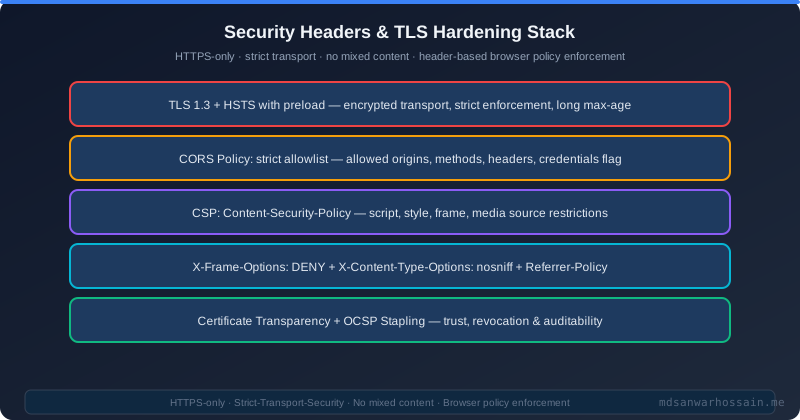
TL;DR — Test Before You Ship
"Misconfigured security headers and weak TLS are silent vulnerabilities — your API works fine, but attackers can exploit clickjacking, MIME sniffing, cookie theft, or downgrade attacks. Implement HSTS with preload, strict CSP, CORS allowlist, X-Frame-Options, and TLS 1.3-only. Test with securityheaders.com and SSL Labs before every production release."
Table of Contents
- Why Security Headers & TLS Are Skipped and Shouldn't Be
- HTTP Security Headers: The Complete List
- HSTS: HTTP Strict Transport Security
- Content Security Policy (CSP) for APIs
- CORS: The Most Misunderstood Security Control
- Spring Boot Security Headers Configuration
- TLS 1.3: Configuration & Cipher Suite Hardening
- Certificate Lifecycle: Let's Encrypt, ACM & OCSP
- Testing: SSL Labs, securityheaders.com & HSTS Preload
- Security Headers Checklist for Production
- Conclusion
1. Why Security Headers & TLS Are Skipped and Shouldn't Be
OWASP A05:2021 — Security Misconfiguration is the fifth most critical web application security risk, affecting 90% of applications tested. Missing security headers are explicitly called out as a misconfiguration. They're skipped because: they have no functional impact in normal usage, they're not tested by default in integration or unit tests, and developers rarely see the consequences until an actual attack.
The attacks they prevent are real: clickjacking (iframe embedding to trick users into unintended clicks), MIME-type sniffing attacks, protocol downgrade attacks from HTTPS to HTTP (enabling MITM), cookie theft via insecure cookie attributes, and cross-site scripting enabled by missing CSP. Spring Boot's default security headers are better than none but insufficient for production.
2. HTTP Security Headers: The Complete List
| Header | Attack Prevented | Recommended Value |
|---|---|---|
| Strict-Transport-Security | HTTP downgrade / MITM | max-age=31536000; includeSubDomains; preload |
| Content-Security-Policy | XSS, data injection | default-src 'none'; frame-ancestors 'none' |
| X-Frame-Options | Clickjacking | DENY |
| X-Content-Type-Options | MIME sniffing attacks | nosniff |
| Referrer-Policy | Referrer information leak | strict-origin-when-cross-origin |
| Permissions-Policy | Camera/mic/geolocation abuse | camera=(), microphone=(), geolocation=() |
| X-XSS-Protection | Legacy XSS filter | 0 (deprecated — use CSP instead) |
3. HSTS: HTTP Strict Transport Security
HSTS instructs browsers to only communicate with your domain over HTTPS — no HTTP fallback, ever. The preload directive goes further: browsers ship with a preloaded HSTS list, so they never send even the first request over HTTP, even to a domain they've never visited before.
Strict-Transport-Security: max-age=31536000; includeSubDomains; preload

// Spring Security Java config
http.headers(headers -> headers
    .httpStrictTransportSecurity(hsts -> hsts
        .maxAgeInSeconds(31536000)
        .includeSubDomains(true)
        .preload(true)
    )
);
HSTS Preload requirements: serve only HTTPS (no HTTP), have HSTS header with max-age ≥ 31536000, includeSubDomains, and preload directive. Submit at hstspreload.org. Warning: once on the preload list, removing yourself takes months.
4. Content Security Policy (CSP) for APIs
CSP for REST APIs is simpler than for web apps: since browsers don't render your API responses as HTML, you only need to prevent your API from being embedded in frames and restrict what can be loaded if content is ever rendered.
# For REST APIs (no HTML rendering):
Content-Security-Policy: default-src 'none'; frame-ancestors 'none'

# For web apps with inline scripts (use nonces):
Content-Security-Policy: default-src 'self';
  script-src 'self' 'nonce-{RANDOM_NONCE}';
  style-src 'self' 'nonce-{RANDOM_NONCE}';
  img-src 'self' data: https:;
  font-src 'self';
  connect-src 'self' https://api.myservice.com;
  frame-ancestors 'none';
  base-uri 'self';
  form-action 'self';
  report-uri https://mdsanwarhossain.me/csp-report

# Spring Security: add via headers filter
http.headers(h -> h.contentSecurityPolicy(csp ->
    csp.policyDirectives("default-src 'none'; frame-ancestors 'none'")
));
5. CORS: The Most Misunderstood Security Control
Critical Misconception: CORS is enforced by browsers, not by servers. A server with Access-Control-Allow-Origin: * will still respond to requests from curl, Postman, or malicious server-side code. CORS only protects against browser-based cross-origin requests — it is NOT a substitute for authentication and authorization.
// WRONG — allows any origin with credentials
@CrossOrigin(origins = "*", allowCredentials = "true")
// This causes a browser error but signals misconfiguration

// CORRECT — explicit origin allowlist
@Bean
public CorsConfigurationSource corsConfigurationSource() {
    CorsConfiguration config = new CorsConfiguration();
    config.setAllowedOrigins(List.of(
        "https://app.myservice.com",
        "https://admin.myservice.com"
    ));
    config.setAllowedMethods(List.of("GET", "POST", "PUT", "DELETE", "OPTIONS"));
    config.setAllowedHeaders(List.of("Authorization", "Content-Type", "X-Request-ID"));
    config.setAllowCredentials(true);
    config.setMaxAge(3600L);

    UrlBasedCorsConfigurationSource source = new UrlBasedCorsConfigurationSource();
    source.registerCorsConfiguration("/api/**", config);
    return source;
}6. Spring Boot Security Headers Configuration
@Configuration
@EnableWebSecurity
public class SecurityConfig {

    @Bean
    public SecurityFilterChain filterChain(HttpSecurity http) throws Exception {
        http
            .cors(cors -> cors.configurationSource(corsConfigurationSource()))
            .csrf(AbstractHttpConfigurer::disable) // REST APIs use stateless JWT
            .headers(headers -> headers
                .httpStrictTransportSecurity(hsts -> hsts
                    .maxAgeInSeconds(31536000)
                    .includeSubDomains(true)
                    .preload(true))
                .frameOptions(frame -> frame.deny())
                .contentTypeOptions(Customizer.withDefaults())
                .referrerPolicy(referrer -> referrer
                    .policy(ReferrerPolicyHeaderWriter.ReferrerPolicy.STRICT_ORIGIN_WHEN_CROSS_ORIGIN))
                .permissionsPolicy(permissions -> permissions
                    .policy("camera=(), microphone=(), geolocation=(), interest-cohort=()"))
                .contentSecurityPolicy(csp -> csp
                    .policyDirectives("default-src 'none'; frame-ancestors 'none'"))
            )
            .sessionManagement(session -> session
                .sessionCreationPolicy(SessionCreationPolicy.STATELESS));
        return http.build();
    }
}
7. TLS 1.3: Configuration & Cipher Suite Hardening
TLS 1.0 and 1.1 are officially deprecated (RFC 8996). PCI-DSS 3.2+ requires disabling TLS 1.0. TLS 1.2 is acceptable but TLS 1.3 is preferred: it eliminates weak cipher suites, mandates Perfect Forward Secrecy (PFS), and reduces handshake latency by one round-trip. Java 11+ (JDK 11) supports TLS 1.3 natively.
# application.yml — Spring Boot embedded Tomcat TLS config
server:
  port: 8443
  ssl:
    enabled: true
    enabled-protocols: TLSv1.3,TLSv1.2
    protocol: TLS
    key-store: classpath:keystore.p12
    key-store-password: ${SSL_KEYSTORE_PASSWORD}
    key-store-type: PKCS12
    # TLS 1.3 cipher suites (Java 11+)
    ciphers: >
      TLS_AES_256_GCM_SHA384,
      TLS_AES_128_GCM_SHA256,
      TLS_CHACHA20_POLY1305_SHA256,
      TLS_ECDHE_RSA_WITH_AES_256_GCM_SHA384,
      TLS_ECDHE_RSA_WITH_AES_128_GCM_SHA256
Key cipher suite properties: All TLS 1.3 cipher suites provide AEAD (authenticated encryption) and mandatory PFS via ECDHE key exchange. Avoid: RSA key exchange (no PFS), RC4, 3DES, MD5, SHA-1 based suites, anonymous DH suites.
8. Certificate Lifecycle: Let's Encrypt, ACM & OCSP
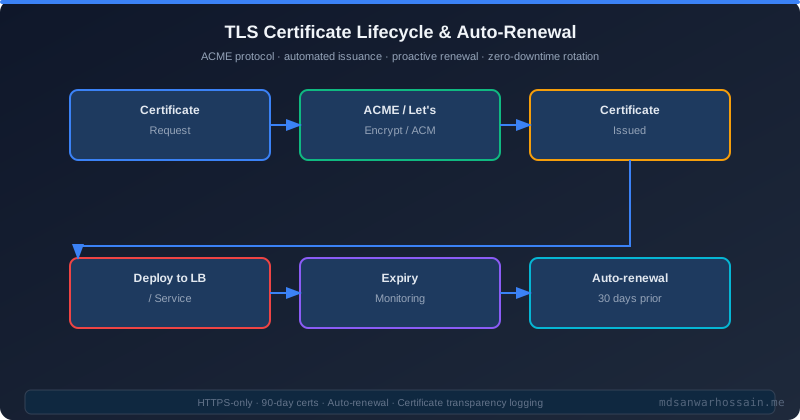
Certificate expiry is one of the most common self-inflicted production outages. Automate certificate lifecycle end-to-end.
- Let's Encrypt + Certbot: Free, automated 90-day certs. Auto-renewal via cron:
certbot renew --quiet. Deploy via cert-manager in Kubernetes withClusterIssuerusing ACME/ECDSA keys. - AWS Certificate Manager (ACM): Free managed certs for AWS load balancers. Auto-renews 60 days before expiry. Zero operational overhead for AWS workloads.
- OCSP Stapling: Reduces latency by having the server staple the OCSP response (certificate validity proof) directly in the TLS handshake, eliminating the client's need to contact the CA's OCSP responder.
- Certificate Transparency: All public certificates must be logged to CT logs. Monitor your CT logs at crt.sh for unauthorized certificate issuance for your domain.
- Expiry monitoring: Alert at 30 days and 7 days before expiry. Use Prometheus blackbox exporter
probe_ssl_earliest_cert_expirymetric or Datadog SSL integration.
9. Testing: SSL Labs, securityheaders.com & HSTS Preload
- SSL Labs (ssllabs.com/ssltest): Comprehensive TLS analysis. Tests protocol support, cipher suites, certificate chain, HSTS, key strength. Target: A+ grade. Common reasons for missing A+: TLS 1.2 still enabled without TLS 1.3 preference, or HSTS max-age below 180 days.
- securityheaders.com: Tests all HTTP security headers. Shows current values, missing headers, and correct configurations. Target: A grade. Missing headers show as red — each is a specific attack vector.
- Mozilla Observatory (observatory.mozilla.org): Combined security header + TLS testing with scoring. Good for executive-level security reporting.
- Automate in CI/CD: Use curl to validate headers in integration tests:
curl -I https://api.myservice.com/ | grep -i "strict-transport\|x-frame\|content-security"
10. Security Headers Checklist for Production
- ✅ HSTS with max-age=31536000, includeSubDomains, preload — submitted to HSTS preload list
- ✅ No allowedOrigins("*") with allowCredentials — use explicit origin allowlist in CORS config
- ✅ Content-Security-Policy header set — default-src 'none' for REST APIs, nonce-based for web apps
- ✅ X-Frame-Options: DENY — prevents clickjacking (use frame-ancestors 'none' in CSP as well)
- ✅ X-Content-Type-Options: nosniff — prevents MIME type sniffing attacks
- ✅ Referrer-Policy: strict-origin-when-cross-origin — prevents referrer information leakage
- ✅ TLS 1.2 minimum, TLS 1.3 preferred — no SSLv3, no TLS 1.0, no TLS 1.1
- ✅ Only AEAD cipher suites — no RC4, 3DES, MD5, SHA-1, no anonymous DH
- ✅ Certificate expiry alert at 30 and 7 days — auto-renewal configured (certbot/cert-manager/ACM)
- ✅ SSL Labs A+ grade verified — run before each production release
- ✅ securityheaders.com A grade verified — all required headers present and correctly configured
- ✅ CT log monitoring enabled — crt.sh alerts for unexpected certificate issuance on your domains
11. Conclusion
Security headers and TLS hardening are high-value, low-effort production security controls. The Spring Security configuration in Section 6, combined with the TLS configuration in Section 7, takes under an hour to implement and gives you protection against clickjacking, MIME sniffing, protocol downgrade attacks, and weak cipher exploitation.
Run SSL Labs and securityheaders.com after every significant infrastructure change. These free tools give you an objective, external view of your security posture that internal testing often misses. A+ on SSL Labs and A on securityheaders.com should be a build gate for every production release, not an afterthought.
12. mTLS for Service-to-Service Communication
TLS secures browser-to-server traffic, but in microservice architectures the most critical attack surface is lateral movement between services. Mutual TLS (mTLS) requires both client and server to present certificates, eliminating the risk of a compromised service impersonating another. In Spring Boot microservices, configure mTLS at the Tomcat/Netty level or delegate to your service mesh (Istio/Linkerd):
# application.yml — Spring Boot mTLS server config
server:
  ssl:
    enabled: true
    key-store: classpath:keystore/server.p12
    key-store-password: ${KEYSTORE_PASSWORD}
    key-store-type: PKCS12
    trust-store: classpath:keystore/truststore.p12
    trust-store-password: ${TRUSTSTORE_PASSWORD}
    client-auth: need           # REQUIRE client certificate
    protocol: TLSv1.3
    enabled-protocols: TLSv1.3
// Spring Security: extract identity from client certificate
@Configuration
public class MtlsSecurityConfig {
@Bean
SecurityFilterChain filterChain(HttpSecurity http) throws Exception {
return http
.x509(x509 -> x509
.subjectPrincipalRegex("CN=(.*?),") // extract service name from CN
.userDetailsService(mtlsUserDetailsService())
)
.authorizeHttpRequests(auth -> auth
.requestMatchers("/internal/**").hasRole("SERVICE")
.anyRequest().authenticated()
)
.build();
}
}For Istio-managed mTLS (the production choice for large deployments), enable strict mode at the namespace level and rely on Istio's automatic certificate rotation via SPIFFE/SPIRE — your Spring Boot app needs zero certificate management code:
# Istio PeerAuthentication — strict mTLS for namespace
apiVersion: security.istio.io/v1beta1
kind: PeerAuthentication
metadata:
  name: default
  namespace: production
spec:
  mtls:
    mode: STRICT     # Reject plaintext traffic — no exceptions
13. WAF Integration and Rate Limiting Patterns
Even with A+ TLS and airtight security headers, your API is exposed to Layer 7 attacks — SQLi via query parameters, XSS in JSON bodies, and HTTP flood DDoS. A Web Application Firewall (WAF) inspects HTTP request content and blocks malicious patterns before they reach your Spring Boot application. AWS WAF, Cloudflare WAF, and Nginx with ModSecurity all integrate cleanly with Spring Boot deployments:
# AWS WAF association via CloudFormation
WebACLAssociation:
  Type: AWS::WAFv2::WebACLAssociation
  Properties:
    WebACLArn: !Ref WAFWebACL
    ResourceArn: !Ref ALBArn

# WAF rules — OWASP Core Rule Set managed by AWS
ManagedRuleGroups:
  - Name: AWSManagedRulesCommonRuleSet
    Priority: 10
    OverrideAction: None   # Block matching requests
  - Name: AWSManagedRulesKnownBadInputsRuleSet
    Priority: 20
    OverrideAction: None
Complement WAF with application-level rate limiting using Spring's Bucket4j integration. Rate limits protect against credential stuffing, scraping, and brute-force attacks that bypass WAF because they use valid HTTP syntax:
// Bucket4j rate limiter — 100 requests/min per IP
@Component
public class RateLimitFilter extends OncePerRequestFilter {

    private final Map<String, Bucket> buckets = new ConcurrentHashMap<>();

    private Bucket bucketFor(String ip) {
        return buckets.computeIfAbsent(ip, k ->
            Bucket.builder()
                .addLimit(Bandwidth.classic(100,
                    Refill.greedy(100, Duration.ofMinutes(1))))
                .build()
        );
    }

    @Override
    protected void doFilterInternal(HttpServletRequest req,
            HttpServletResponse res, FilterChain chain)
            throws ServletException, IOException {

        String ip = req.getRemoteAddr();
        Bucket bucket = bucketFor(ip);

        if (bucket.tryConsume(1)) {
            res.addHeader("X-RateLimit-Remaining",
                String.valueOf(bucket.getAvailableTokens()));
            chain.doFilter(req, res);
        } else {
            res.setStatus(429);
            res.addHeader("Retry-After", "60");
            res.getWriter().write("{\"error\":\"Rate limit exceeded\"}");
        }
    }
}
The security layering model for a production Spring Boot API: DNS → Cloudflare WAF (Layer 7 attack blocking) → AWS ALB with WAF (rate limiting and geo-blocking) → Nginx (TLS termination, security headers) → Spring Boot (application-level rate limiting, Spring Security). Each layer catches different attack vectors, and no single misconfiguration can expose you end-to-end.
14. Automating Security Header Validation in CI/CD
Manually testing security headers after each release is error-prone. Automate the validation in your CI pipeline with a combination of OWASP ZAP passive scan and a dedicated security headers check. Here's how to integrate both into a GitHub Actions pipeline:
# .github/workflows/security-headers-check.yml
name: Security Headers Validation
on:
  push:
    branches: [main, release/*]

jobs:
  security-scan:
    runs-on: ubuntu-latest
    steps:
      - uses: actions/checkout@v4
      - name: Start application
        run: docker compose up -d app
      - name: Wait for health check
        run: curl --retry 10 --retry-delay 2 http://localhost:8080/actuator/health
      - name: Run OWASP ZAP baseline scan
        uses: zaproxy/action-baseline@v0.12.0
        with:
          target: http://localhost:8080
          rules_file_name: .zap/rules.tsv
          fail_action: true
      - name: Check critical headers
        run: |
          headers=$(curl -sI http://localhost:8080/api/health)
          echo "$headers" | grep -i "Strict-Transport-Security" || exit 1
          echo "$headers" | grep -i "X-Content-Type-Options: nosniff" || exit 1
          echo "$headers" | grep -i "X-Frame-Options" || exit 1
          echo "$headers" | grep -i "Content-Security-Policy" || exit 1
          echo "✅ All critical security headers present"
Additionally, write JUnit integration tests using MockMvc to assert on security header values. This catches regressions when Spring Security configuration changes:
@SpringBootTest
@AutoConfigureMockMvc
class SecurityHeadersTest {

    @Autowired
    private MockMvc mockMvc;

    @Test
    void everyResponse_hasRequiredSecurityHeaders() throws Exception {
        mockMvc.perform(get("/api/health"))
            .andExpect(header().string(
                "X-Content-Type-Options", "nosniff"))
            .andExpect(header().string(
                "X-Frame-Options", "DENY"))
            .andExpect(header().exists(
                "Strict-Transport-Security"))
            .andExpect(header().exists(
                "Content-Security-Policy"));
    }

    @Test
    void hstsHeader_includesMaxAgeAndSubdomains() throws Exception {
        mockMvc.perform(get("/api/health"))
            .andExpect(header().string(
                "Strict-Transport-Security",
                containsString("max-age=31536000")))
            .andExpect(header().string(
                "Strict-Transport-Security",
                containsString("includeSubDomains")));
    }
}
Make security header tests mandatory in your PR checks — a failed security header regression should block deployment just like a failing unit test. The combination of automated CI validation and manual SSL Labs checks gives you defense-in-depth against accidental security header regressions.
15. Subresource Integrity and Supply Chain Security for Frontend Assets
Even with a hardened server, a compromised CDN delivering your JavaScript is a critical attack vector. Subresource Integrity (SRI) allows browsers to verify that files delivered from CDNs haven't been tampered with. Any CDN-hosted script or stylesheet that deviates from its expected cryptographic hash is blocked before execution — protecting your users from CDN-level supply chain attacks:
<!-- SRI-protected CDN scripts -->
<script
  src="https://cdn.jsdelivr.net/npm/bootstrap@5.3.2/dist/js/bootstrap.bundle.min.js"
  integrity="sha384-C6RzsynM9kWDrMNeT87bh95OGNyZPhcTNXj1NW7RuBCsyN/o0jlpcV8Qyq46cDfL"
  crossorigin="anonymous"></script>

<!-- SRI-protected stylesheet -->
<link
  rel="stylesheet"
  href="https://cdn.jsdelivr.net/npm/bootstrap@5.3.2/dist/css/bootstrap.min.css"
  integrity="sha384-T3c6CoIi6uLrA9TneNEoa7RxnatzjcDSCmG1MXxSR1GAsXEV/Dwwykc2MPK8M2HN"
  crossorigin="anonymous">
Generate SRI hashes with the openssl tool or the online SRI Hash Generator. Automate hash generation in your build pipeline so that every CDN library upgrade automatically generates the new hash — preventing the common mistake of forgetting to update the hash after a version bump:
# Generate SRI hash from a CDN URL
curl -s https://cdn.example.com/lib.js | \
  openssl dgst -sha384 -binary | \
  openssl base64 -A | \
  awk '{print "sha384-"$0}'

# Expected output: sha384-C6RzsynM9kWDrMNeT87bh95OGNyZPhcTNXj1NW7RuBCsyN/...
Combine SRI with a strict Content Security Policy that disallows inline scripts and only permits scripts from your own origin and approved CDNs. This two-layer defence blocks both CDN compromise (SRI) and injected inline JavaScript (CSP). For Spring Boot Thymeleaf applications, configure SRI in your layout templates and use the th:integrity attribute for dynamic hash binding during the build. Self-hosted assets (your application's own JS/CSS) don't require SRI since they're served from your origin and protected by TLS, but all third-party CDN dependencies should have SRI hashes.
16. Measuring and Tracking Your Security Posture Over Time
Security hardening without measurement is incomplete. Establish a baseline security posture score for your production API on day one, then track it over time with automated weekly scans. The combination of SSL Labs, securityheaders.com, and OWASP ZAP gives you three independent data points that cover different attack surfaces — TLS configuration, HTTP response headers, and application-level vulnerabilities respectively.
Build a simple security scorecard dashboard using your CI/CD pipeline that runs all three checks weekly and stores the results. Define minimum acceptable scores (SSL Labs: A+, securityheaders.com: A, ZAP: zero high findings) as quality gates. Any regression below these thresholds automatically creates a security ticket and notifies the engineering team. This transforms security from a one-time hardening exercise into a continuous engineering practice.
Track these metrics on a rolling 90-day chart: number of security headers correctly configured, TLS protocol version support (TLS 1.3 adoption), certificate expiry days remaining (alert at 30 days), and number of open ZAP medium/high findings. When these metrics are visible on your engineering dashboard alongside deployment frequency and error rates, security becomes a first-class engineering concern rather than a compliance checkbox that gets attention only before audits.
