Zero-Downtime Database Schema Migration: Flyway, Liquibase & Expand-Contract Pattern in Production
Database migrations are the most dangerous operation in a production deployment. A single ALTER TABLE on the wrong table at the wrong time can take down your entire application for hours. This guide gives you a complete playbook for zero-downtime schema changes using Flyway, Liquibase, and the battle-tested expand-contract pattern.
TL;DR — The Core Rule
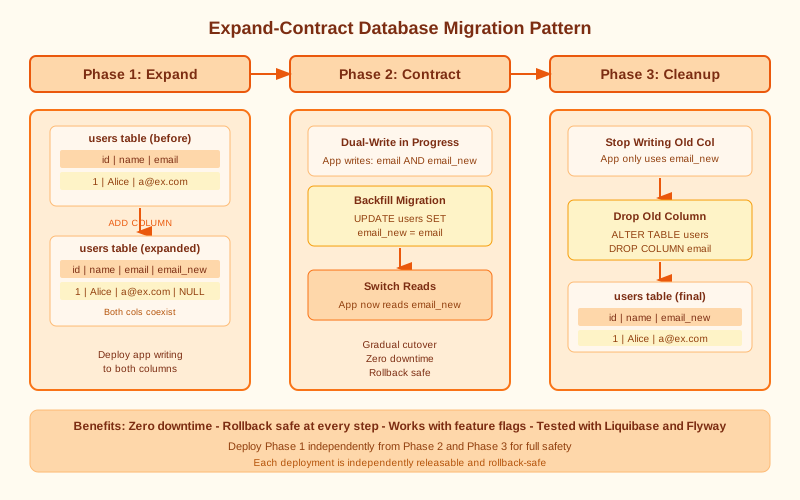
"Never use destructive migrations on live databases. Use expand-contract: Phase 1 (Expand) adds new structures while keeping old ones. Phase 2 (Migrate) backfills data. Phase 3 (Contract) removes old structures after all services updated. Always test rollback. Use Flyway or Liquibase with Spring Boot for automated versioning."
Table of Contents
- Why Database Migrations Break Production Deployments
- The Expand-Contract Pattern: Step-by-Step
- Flyway with Spring Boot: Configuration & Best Practices
- Liquibase with Spring Boot: When and How
- Flyway vs Liquibase: Decision Guide
- Online Index Builds Without Downtime
- Shadow Columns & Data Backfilling at Scale
- Rollback Strategies and Safety Nets
- CI/CD Integration & Migration Testing
- Production Checklist
1. Why Database Migrations Break Production Deployments
Most production outages caused by database migrations are entirely preventable. The root cause is almost always one of six classic failure modes that engineering teams repeat because they don't understand the locking semantics of their database engine.
The Six Classic Failure Modes
1. ALTER TABLE Acquires Exclusive Locks
ALTER TABLE with ADD COLUMN NOT NULL DEFAULT on MySQL/PostgreSQL locks the entire table. For a 500M row table, this can take 20–60 minutes. All reads AND writes are blocked for the duration. This is the most common cause of "the site went down during a deployment."
2. Column Rename Breaks Old Code
You rename username to user_name. Old code — still running during a rolling deployment — writes to username. The result is NULL violations or silent data loss as writes to the old column name fail or are discarded.
3. Adding NOT NULL Constraint
Adding NOT NULL without a DEFAULT fails immediately if existing rows have NULLs. With a DEFAULT, it rewrites the entire table on older MySQL versions — a full table lock. On PostgreSQL 11+, adding a column with a constant default is instant, but NOT NULL still requires a full table scan to validate.
4. DROP COLUMN With Live Traffic
Dropping a column while old code still reads it causes crashes or silent failures. During a rolling deployment, you may have two versions of your application running simultaneously. If v1 expects a column that v2's migration has already dropped, v1 will crash on every query.
5. Table Rebuild Operations
OPTIMIZE TABLE, certain column type changes (e.g., VARCHAR to TEXT), and adding a PRIMARY KEY to a table that lacks one all trigger full table rebuilds. These operations can take hours on large tables and block all concurrent access.
6. Index Creation Without CONCURRENTLY (PostgreSQL)
Regular CREATE INDEX in PostgreSQL acquires an ACCESS SHARE lock that blocks writes for the entire build duration. CREATE INDEX CONCURRENTLY does not block writes but takes 2–3× longer and cannot run inside a transaction block.
Real Incident: Black Friday 2023
An e-commerce platform ran ALTER TABLE to add a column with NOT NULL DEFAULT on their 800M-row orders table at 11 PM. The migration ran for 47 minutes, taking the entire checkout flow down during peak traffic. Revenue loss exceeded $2M. The fix: rewrite the migration using the expand-contract pattern deployed over three separate releases.
2. The Expand-Contract Pattern: Step-by-Step
The expand-contract pattern (also called parallel change) solves the root cause of migration outages: code and schema are deployed together. The pattern decouples them into three phases, each backward-compatible with all running service versions.
Phase 1: Expand (Safe to deploy immediately)
Goal: Add new structures without removing anything old code depends on. New columns must be nullable. New tables must not break existing foreign key references. This phase is immediately safe to deploy.
-- Safe: Add new column as nullable (no lock on PostgreSQL 11+)
ALTER TABLE users ADD COLUMN full_name VARCHAR(500);

-- Safe: Create new table
CREATE TABLE user_profiles (
    user_id BIGINT PRIMARY KEY REFERENCES users(id),
    full_name VARCHAR(500),
    bio TEXT,
    created_at TIMESTAMP DEFAULT NOW()
);

-- Safe: Create index concurrently (PostgreSQL)
CREATE INDEX CONCURRENTLY idx_users_email_lower
ON users (LOWER(email));
Phase 2: Migrate (Backfill data while both versions run)
Goal: Populate new columns/tables from old data while the application writes to both old and new structures. This ensures consistency during the transition window. Use batch updates to avoid long-running transactions.
-- Batch backfill to avoid long transactions
UPDATE users
SET full_name = first_name || ' ' || last_name
WHERE id BETWEEN 1 AND 100000
  AND full_name IS NULL;
-- Run in batches until all rows backfilled
-- Application: write to BOTH old columns AND new column
Phase 3: Contract (Remove old structures after all services updated)
Goal: Clean up old structures once 100% of service instances have been updated to the new code version. This is the "cleanup" release. Only run after confirming all pods/instances are on the new version.
-- Only run after ALL services deployed with new code
ALTER TABLE users DROP COLUMN first_name;
ALTER TABLE users DROP COLUMN last_name;

-- Add NOT NULL now that all rows have values
ALTER TABLE users ALTER COLUMN full_name SET NOT NULL;
Key rule: Phases 1 and 2 must be backward-compatible with all running service versions. Phase 3 is the "cleanup" that runs after 100% deployment is confirmed. Never combine Phase 1 and Phase 3 into a single migration script.
3. Flyway with Spring Boot: Configuration & Best Practices
Flyway is the most widely used database migration tool in the Java ecosystem. Its SQL-first, version-ordered approach is simple, predictable, and integrates natively with Spring Boot's auto-configuration.
Maven Dependency
<dependency>
    <groupId>org.flywaydb</groupId>
    <artifactId>flyway-core</artifactId>
</dependency>
Application Properties Configuration
spring.flyway.enabled=true
spring.flyway.locations=classpath:db/migration
spring.flyway.baseline-on-migrate=true
spring.flyway.validate-on-migrate=true
spring.flyway.out-of-order=false
spring.flyway.table=flyway_schema_history
spring.flyway.clean-disabled=true
File Naming Convention
V1__init_schema.sql— versioned migration (runs once, in order)V2__add_user_profiles.sql— versioned migrationR__seed_reference_data.sql— repeatable migration (runs when checksum changes)U2__undo_add_user_profiles.sql— undo migration (Flyway Teams only)
The double underscore (__) separates version from description. Never modify an already-applied versioned migration — Flyway validates checksums on startup and will refuse to start if a mismatch is detected.
Java-Based Migration Example
For complex data migrations that require Java logic (e.g., hashing, encryption, conditional logic), Flyway supports Java-based migrations:
@Component
public class V5__DataMigration extends BaseJavaMigration {
    @Override
    public void migrate(Context context) throws Exception {
        new JdbcTemplate(new SingleConnectionDataSource(
                context.getConnection(), true))
            .execute("UPDATE users SET status = 'ACTIVE' WHERE status IS NULL");
    }
}
Flyway Repair Command
When a migration fails partway through, Flyway marks it as failed in flyway_schema_history and refuses to run further migrations. After fixing the underlying issue, use repair to allow Flyway to continue:
flyway repair # marks failed migration as resolvedProduction tip: Always set spring.flyway.clean-disabled=true in production. The flyway clean command drops all objects in the schema — a catastrophic operation that has accidentally wiped production databases more than once.
4. Liquibase with Spring Boot: When and How
Liquibase takes a more abstracted approach than Flyway. Migrations are defined as changesets in XML, YAML, JSON, or SQL. The key advantage is native rollback support and database-agnostic migrations that can target PostgreSQL, MySQL, Oracle, and others from the same changelog.
Maven Dependency
<dependency>
    <groupId>org.liquibase</groupId>
    <artifactId>liquibase-core</artifactId>
</dependency>
Master Changelog File (XML format)
<?xml version="1.0" encoding="UTF-8"?>
<databaseChangeLog
    xmlns="http://www.liquibase.org/xml/ns/dbchangelog"
    xmlns:xsi="http://www.w3.org/2001/XMLSchema-instance"
    xsi:schemaLocation="http://www.liquibase.org/xml/ns/dbchangelog
        http://www.liquibase.org/xml/ns/dbchangelog/dbchangelog-4.20.xsd">

    <include file="changelogs/v1-init.xml"/>
    <include file="changelogs/v2-user-profiles.xml"/>
</databaseChangeLog>
Changeset with Rollback
<changeSet id="add-full-name-column" author="sanwar">
    <addColumn tableName="users">
        <column name="full_name" type="VARCHAR(500)"/>
    </addColumn>
    <rollback>
        <dropColumn tableName="users" columnName="full_name"/>
    </rollback>
</changeSet>
YAML Format Alternative
databaseChangeLog:
  - changeSet:
      id: add-user-bio
      author: sanwar
      changes:
        - addColumn:
            tableName: users
            columns:
              - column:
                  name: bio
                  type: TEXT
Liquibase Tags for Rollback
liquibase tag VERSION_2_3_0      # tags current database state
liquibase rollback VERSION_2_3_0 # rolls back to tagged state
5. Flyway vs Liquibase: Decision Guide
Both tools integrate identically with Spring Boot auto-configuration. The choice comes down to your team's workflow preferences and enterprise requirements.
| Feature | Flyway | Liquibase |
|---|---|---|
| Migration format | SQL-native (+ Java) | XML/YAML/JSON/SQL |
| Rollback | Undo migrations (paid) | Native rollback support |
| Complexity | Simple, SQL-first | Complex, abstracted |
| Team size | Small-medium teams | Enterprise teams |
| Database portability | SQL per database type | Abstracted (runs on any DB) |
| Dry-run | Yes | Yes |
| Diff tool | No | Liquibase diff |
| License | Community + Teams | Community + Pro |
| Spring Boot integration | Auto-configured | Auto-configured |
| Best for | SQL-heavy teams, simplicity | Multi-DB, enterprise rollback |
Recommendations
- ✅ Use Flyway if your team writes SQL fluently and you want simplicity with predictable version ordering
- ✅ Use Liquibase if you need reliable rollback, multi-database support, or enterprise compliance features
- ✅ Both integrate identically with Spring Boot auto-configuration — switching is straightforward
- ✅ Whichever you choose, apply the expand-contract pattern — the tool doesn't make a migration safe, the pattern does
6. Online Index Builds Without Downtime
Adding indexes to large tables is one of the most common migration tasks — and one of the most dangerous. Each database engine has a different mechanism for non-blocking index creation.
PostgreSQL — CREATE INDEX CONCURRENTLY
-- Non-blocking: uses background worker, allows reads & writes during build
CREATE INDEX CONCURRENTLY idx_orders_user_id
ON orders (user_id);

-- Caveat: takes 2-3x longer than regular CREATE INDEX
-- Caveat: cannot run inside a transaction
-- Check progress in pg_stat_progress_create_index
MySQL — pt-online-schema-change
Percona's pt-online-schema-change works by creating a shadow table, copying data in chunks, and using triggers to keep the shadow table in sync while traffic continues on the original:
pt-online-schema-change \
  --alter "ADD INDEX idx_orders_user_id (user_id)" \
  --host=localhost \
  --user=root \
  --password=secret \
  --execute \
  D=mydb,t=orders
gh-ost (GitHub's Online Schema Migration for MySQL)
gh-ost \
  --user="root" --password="secret" \
  --host=replica-host \
  --database="mydb" \
  --table="orders" \
  --alter="ADD INDEX idx_orders_user_id (user_id)" \
--execute- gh-ost works via binary log replication, does not use triggers (safer than pt-osc for high-write tables)
- Supports postpone, throttle, and cut-over controls — you can pause the migration if load spikes
- Used at GitHub on 1-billion+ row tables in continuous production deployments
7. Shadow Columns & Data Backfilling at Scale
The shadow column technique is the expand-contract pattern applied specifically to column renaming or type changes. It's the safest way to rename a column without downtime or data loss.
Shadow Column Workflow
- Phase 1 (Expand): Add
full_namealongside existingfirst_name+last_namecolumns - Deploy new code: Write to all three columns —
first_name,last_name, andfull_name - Phase 2 (Backfill): Run a batch job to populate
full_namefor all existing rows - Verify:
SELECT COUNT(*) FROM users WHERE full_name IS NULL— must return 0 - Switch reads: Update code to read from
full_name, stop writing to old columns - Phase 3 (Contract): Drop
first_nameandlast_nameafter 100% rollout confirmed
Spring Batch Backfill Job
@Configuration
public class BackfillJobConfig {

    @Bean
    public Job backfillFullNameJob(JobBuilderFactory jobs, Step backfillStep) {
        return jobs.get("backfillFullNameJob")
            .start(backfillStep)
            .build();
    }

    @Bean
    public Step backfillStep(StepBuilderFactory steps,
                              JdbcCursorItemReader<User> reader,
                              ItemProcessor<User, User> processor,
                              JdbcBatchItemWriter<User> writer) {
        return steps.get("backfillStep")
            .<User, User>chunk(1000)
            .reader(reader)
            .processor(processor)
            .writer(writer)
            .build();
    }
}
Batch Size Recommendations
- Chunk size: 1,000–5,000 rows per transaction — balances memory and transaction overhead
- Rate limiting: Add a configurable sleep between chunks (50–200ms) to avoid overwhelming the primary
- Replication lag monitoring: Watch replica lag during backfills on primary-replica setups
- Use Spring Batch for any backfill involving more than 1 million rows — it provides restart, skip, and retry semantics out of the box
8. Rollback Strategies and Safety Nets
No migration strategy is complete without a tested rollback plan. "Tested" is the key word — rollback scripts that have never been run in staging are not safety nets, they are false confidence.
Flyway Repair
Mark a failed migration as resolved to allow Flyway to continue after the underlying issue is fixed manually. Use flyway repair to delete the failed entry from flyway_schema_history.
Undo Migrations (Flyway Teams)
-- U2__undo_add_user_profiles.sql
DROP TABLE IF EXISTS user_profiles;
ALTER TABLE users DROP COLUMN IF EXISTS full_name;
Liquibase Rollback Tags
liquibase --changeLogFile=changelog.xml tag BEFORE_V2_MIGRATION
# ... run migration ...
# If rollback needed:
liquibase --changeLogFile=changelog.xml rollback BEFORE_V2_MIGRATION
Additional Safety Nets
- Blue-green database strategy: Maintain two schemas (blue/green), swap traffic after migration verified on the inactive side
- Read replicas as rollback points: Promote a replica before running risky migrations — gives an instant point-in-time rollback target
- Application-level feature flags: Deploy new code behind a flag; keep old code path active as fallback for instant application-level rollback
- AWS RDS automated snapshots: Trigger a manual snapshot before major migrations — RDS supports point-in-time recovery with <5 minute granularity
- GCP Cloud SQL point-in-time recovery: Enabled by binary logging; can restore to any second within the retention window
9. CI/CD Integration & Migration Testing
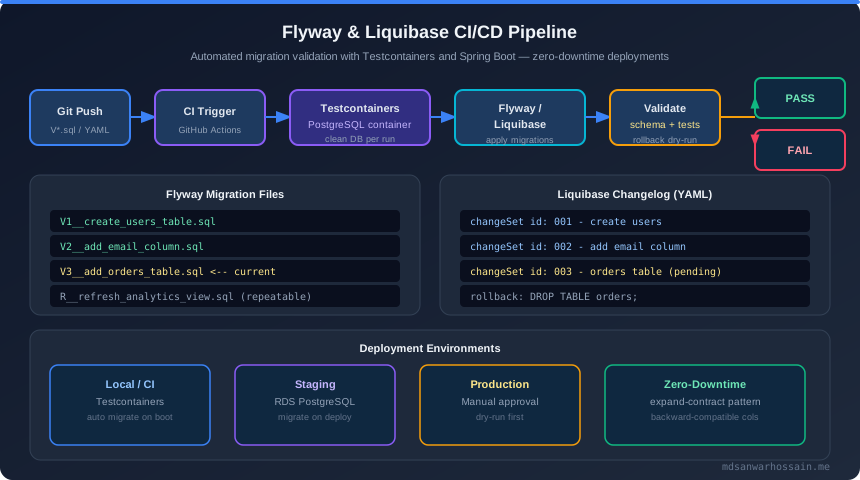
Migrations must be validated in CI before reaching production. A migration that passes checksum validation but fails against real data volumes is a ticking time bomb. Use Testcontainers to test against a real database engine, not an in-memory H2 substitute.
GitHub Actions Pipeline
- name: Run Flyway Migrations (dry-run)
  run: |
    ./gradlew flywayInfo
    ./gradlew flywayValidate

- name: Run integration tests with Testcontainers
  run: ./gradlew test
Testcontainers Migration Test
@Testcontainers
@SpringBootTest
class FlywayMigrationTest {

    @Container
    static PostgreSQLContainer<?> postgres = new PostgreSQLContainer<>("postgres:16")
        .withDatabaseName("testdb")
        .withUsername("test")
        .withPassword("test");

    @DynamicPropertySource
    static void configureProperties(DynamicPropertyRegistry registry) {
        registry.add("spring.datasource.url", postgres::getJdbcUrl);
    }

    @Autowired
    private Flyway flyway;

    @Test
    void shouldRunAllMigrations() {
        MigrationInfoService info = flyway.info();
        assertThat(info.pending()).isEmpty();
        assertThat(info.applied()).isNotEmpty();
    }

    @Test
    void shouldValidateMigrationChecksum() {
        assertThatCode(() -> flyway.validate()).doesNotThrowAnyException();
    }
}
Pre-Deployment Checklist in CI
- ✅
flyway validate— checksum verification against applied migrations - ✅
flyway info— show all pending migrations before they run - ✅ Test against production-like data volume in staging (not just schema)
- ✅ Dry-run with
--dry-runflag (Flyway Teams feature) - ✅ Verify rollback script executes successfully in staging environment
10. Production Checklist
Use this checklist before every production migration. Treating database migrations as "just another code change" is the fastest way to a 3 AM incident call.
- ✅ Never run
DROP COLUMN/DROP TABLEin the same deployment as code using the old column - ✅ Always use expand-contract: add first, remove only after all pods updated
- ✅ Test migrations on a replica or copy of production data before production
- ✅ Use
CREATE INDEX CONCURRENTLY(PostgreSQL) / gh-ost (MySQL) for large tables - ✅ Set
flyway.clean-disabled=truein all production environment configurations - ✅ Configure
flyway.validate-on-migrate=trueto catch checksum mismatches on startup - ✅ Always have a rollback plan documented and tested before running risky migrations
- ✅ Monitor table lock wait events (
pg_locks,SHOW ENGINE INNODB STATUS) during migration windows - ✅ Run migrations during lowest-traffic windows with on-call engineer available
- ✅ Keep
spring.flyway.out-of-order=falsein production to enforce strict ordering - ✅ Use Spring Batch for data backfills exceeding 1 million rows
- ✅ Tag database state before major migrations (Liquibase tag) or take an RDS snapshot
The Golden Rule
A database migration is safe when every version of your code that could be running during a rolling deployment can work correctly with every version of the schema that could exist at that moment. If you can answer "yes" to that, your migration is zero-downtime. If not, break it into phases.
