FinOps for Cloud Engineers: Cutting AWS/GCP/Azure Costs by 40% in Production
Cloud bills grow faster than anyone expects. A startup that starts with a $500/month AWS bill can find itself at $80,000/month eighteen months later without any deliberate cost management. FinOps — the practice of bringing financial accountability to cloud spending — is no longer optional for engineering teams. It is a core competency that directly affects product sustainability.
Table of Contents
- FinOps Principles and the Culture Challenge
- AWS Cost Pillars: Compute, Storage, Network
- EC2 Rightsizing and Spot Instances
- Reserved Instances vs Compute Savings Plans
- Kubernetes Resource Optimization
- S3 Lifecycle Policies
- Cost Allocation Tagging Strategy
- Tooling: AWS Cost Explorer, Infracost, Kubecost
- Real Case Study: 40% Cost Reduction in 90 Days
FinOps Principles and the Culture Challenge
The FinOps Foundation defines cloud financial management around a core principle: everyone on the engineering team owns their cloud costs, not just the finance department. This cultural shift is the hardest part of FinOps. Engineers who have never seen a cloud bill are making infrastructure decisions that cost thousands of dollars per month. Engineers who understand costs make fundamentally different architectural choices.
The FinOps cycle has three phases: Inform (make costs visible — tagging, dashboards, anomaly alerts), Optimize (take action — rightsizing, reserved capacity, lifecycle policies), and Operate (embed cost discipline into processes — PR checks with cost estimates, budget alerts, weekly cost reviews). Most teams jump straight to optimization without completing the Inform phase, making optimization guesswork. You cannot optimize what you cannot see.
The first step in any FinOps engagement is establishing a cost allocation taxonomy through resource tagging. Every AWS resource must be tagged with at minimum: Team, Service, Environment (prod/staging/dev), and CostCenter. Without tags, AWS Cost Explorer shows you the total bill but cannot tell you which team or service is responsible for the surge in EC2 costs last Tuesday.
AWS Cost Pillars: Compute, Storage, Network
AWS costs divide across three major pillars, each with distinct optimization levers. Understanding which pillar dominates your bill determines where to focus. For most SaaS companies, the breakdown is roughly: compute (EC2, ECS, Lambda) 50–65%, storage (S3, EBS, RDS) 15–25%, network (data transfer out, NAT Gateway, CloudFront) 10–20%, with the remainder in managed services (SQS, DynamoDB, ElastiCache).
Compute is typically the largest opportunity. The average AWS customer runs EC2 instances at 15–30% CPU utilization on average — meaning they are paying for 70–85% of their compute capacity that is never used. This happens because teams provision for peak capacity and forget to right-size after peak loads stabilize, because developer instances are provisioned for convenience and never terminated, and because autoscaling groups have minimum sizes set for comfort rather than need.
Storage costs grow silently. EBS volumes orphaned from terminated instances continue to accrue charges. S3 buckets accumulate objects indefinitely without lifecycle policies. RDS snapshots pile up weekly without expiry rules. A mature organization will have lifecycle policies for every storage resource and automated cleanup for unattached EBS volumes.
Network is the most misunderstood cost category. Data transfer within an AWS Availability Zone is free; between AZs in the same region costs $0.01/GB each way. Data transfer out to the internet costs $0.09/GB for the first 10TB/month. NAT Gateway charges $0.045/GB of data processed — a microservices architecture with multiple services making external API calls through a NAT Gateway can generate surprisingly large NAT bills. Using VPC endpoints for S3 and DynamoDB eliminates NAT Gateway charges for those services, often saving hundreds of dollars per month.
EC2 Rightsizing and Spot Instances
Rightsizing is the single highest-ROI optimization action available. AWS Compute Optimizer analyzes CloudWatch metrics over a 14-day window and recommends instance type changes based on actual CPU, memory, network, and disk I/O patterns. A m5.4xlarge running at 8% average CPU is almost certainly a candidate for downsizing to m5.xlarge, saving approximately 75% of that instance's hourly cost.
# List rightsizing recommendations using AWS CLI
aws compute-optimizer get-ec2-instance-recommendations \
    --filters name=Finding,values=Overprovisioned \
    --output table \
    --query 'instanceRecommendations[*].{
        Instance:instanceArn,
        CurrentType:currentInstanceType,
        RecommendedType:recommendationOptions[0].instanceType,
        MonthlySavings:recommendationOptions[0].estimatedMonthlySavings.value
    }'
Spot Instances offer up to 90% discount compared to On-Demand pricing, with the trade-off of potential interruption with 2 minutes notice when EC2 capacity is reclaimed. The key to using Spot effectively is designing for interruption-tolerance: stateless workloads that can restart from checkpoints (batch processing, ML training, CI/CD runners) are ideal. Use Spot Instance Interruption Notices (via instance metadata or EventBridge) to checkpoint work and drain gracefully before termination.
Spot Fleet and EC2 Auto Scaling with mixed instance policies enable you to specify a priority-ordered list of instance types. By mixing Spot and On-Demand in an 80/20 ratio, workloads get Spot pricing 80% of the time while maintaining availability through On-Demand fallback. This alone typically reduces compute costs by 50–70% for interrupt-tolerant workloads.
Reserved Instances vs Compute Savings Plans
For workloads that run continuously (production databases, always-on API services), Reserved Instances (RI) and Savings Plans provide significant discounts in exchange for a 1- or 3-year commitment. The discount structure is: 1-year No Upfront RI ≈ 20–30% savings, 1-year All Upfront RI ≈ 30–40% savings, 3-year All Upfront RI ≈ 50–60% savings.
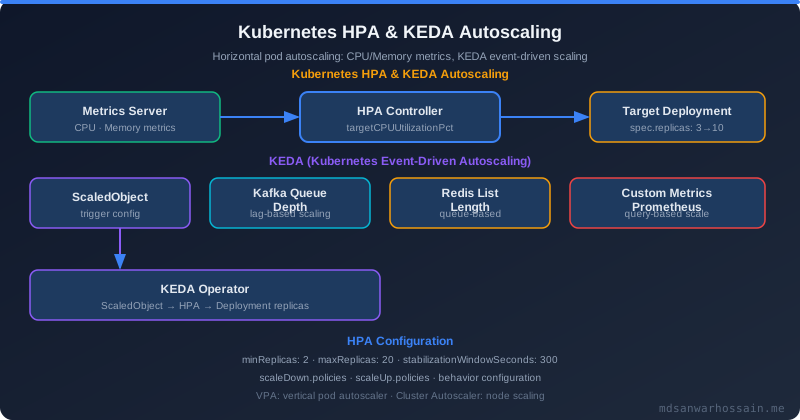
Compute Savings Plans are more flexible than RIs. A Savings Plan commitment applies to any EC2 usage (any instance family, any size, any region for Compute Savings Plans) as long as the committed $/hour is met. This flexibility is valuable because your instance type needs change over time — committing to a specific instance type with an RI and then migrating to a different instance family leaves the RI underutilized. Compute Savings Plans cover Lambda and Fargate in addition to EC2, further improving utilization.
The recommended strategy: use AWS Cost Explorer's Savings Plans recommendations feature, which analyzes 7–30 days of your usage and recommends a commitment amount. Purchase Savings Plans to cover your consistent baseline load (the minimum you run regardless of traffic), and let Spot Instances handle variable load above that baseline. Never over-commit to RIs for workloads where usage is unpredictable.
Kubernetes Resource Optimization
Kubernetes resource management is a major source of cloud waste in organizations that have adopted container orchestration. Pods with incorrect resource requests cause two problems: over-requesting wastes node capacity (nodes appear full when 40% of CPU is actually used, causing unnecessary scale-out), and under-requesting causes CPU throttling and memory OOMKills.
# Example: Well-tuned production pod resource specification
apiVersion: apps/v1
kind: Deployment
metadata:
  name: api-service
spec:
  template:
    spec:
      containers:
      - name: api
        resources:
          requests:
            cpu: "250m"      # Actual P95 CPU usage from metrics
            memory: "512Mi"  # Actual P99 memory usage + 20% headroom
          limits:
            cpu: "500m"      # 2x request — allows bursting
            memory: "768Mi"  # 1.5x request — prevents OOMKill on spikes
Vertical Pod Autoscaler (VPA) in recommendation mode analyzes actual pod resource usage and suggests right-sized requests/limits. Run VPA in recommendation mode for 2–3 weeks before applying changes to understand the actual usage profile of each workload. Kubecost and OpenCost provide per-namespace, per-deployment cost breakdowns, enabling teams to see exactly which services are driving Kubernetes node costs.
Cluster autoscaler with node consolidation (Karpenter on AWS) is transformative for cost optimization. Karpenter provisions exactly the instance type that fits the pending pod's requirements rather than waiting for autoscaling group scaling policies. This eliminates the typical 30–40% wasted node capacity from mismatched pod-to-node bin packing. See Kubernetes cost optimization for a deep dive.
S3 Lifecycle Policies
S3 storage classes span a 100x cost range: S3 Standard ($0.023/GB/month) to S3 Glacier Deep Archive ($0.00099/GB/month). Objects that are accessed frequently belong in Standard; objects accessed less than once per quarter belong in Infrequent Access; objects accessed rarely or only for compliance belong in Glacier. Without lifecycle policies, everything stays in Standard indefinitely.
# S3 lifecycle policy: Transition to IA after 30 days, Glacier after 90
aws s3api put-bucket-lifecycle-configuration \
  --bucket my-application-logs \
  --lifecycle-configuration '{
    "Rules": [{
      "ID": "log-archival",
      "Status": "Enabled",
      "Transitions": [
        {"Days": 30, "StorageClass": "STANDARD_IA"},
        {"Days": 90, "StorageClass": "GLACIER"}
      ],
      "Expiration": {"Days": 365},
      "Filter": {"Prefix": "logs/"}
    }]
  }'
S3 Intelligent-Tiering automatically moves objects between access tiers based on actual access patterns, eliminating the need to predict access frequency. For buckets where access patterns are unpredictable (user-uploaded content, ML datasets), Intelligent-Tiering typically reduces storage costs by 40–68% compared to leaving everything in Standard. The monitoring fee ($0.0025 per 1,000 objects) is negligible compared to the storage savings for objects larger than 128KB.
Cost Allocation Tagging Strategy
A tagging strategy is only useful if it is enforced. Teams that define tagging standards but rely on manual compliance will have 30–50% of resources untagged within six months. Enforce tagging through AWS Service Control Policies (SCPs) that deny resource creation without required tags, and through Terraform/CloudFormation default tags at the provider level.
# Terraform: Set default tags at the provider level
provider "aws" {
  region = "us-east-1"
  default_tags {
    tags = {
      Team        = var.team_name
      Service     = var.service_name
      Environment = var.environment
      ManagedBy   = "terraform"
      CostCenter  = var.cost_center
    }
  }
}
Showback vs chargeback: Showback means teams see their costs in dashboards but are not actually charged back to their budget. Chargeback means cloud costs are allocated to each team's actual P&L. Showback is the recommended starting point — it builds awareness without the organizational friction of internal billing. Chargeback is appropriate for mature organizations where business units operate with independent P&Ls. Most companies should spend 6–12 months on showback before considering chargeback.
Tooling: AWS Cost Explorer, Infracost, Kubecost
AWS Cost Explorer is the baseline tool — it provides historical spend analysis, forecasting, and Savings Plans recommendations. Cost Anomaly Detection (part of Cost Explorer) uses ML to detect unusual spending patterns and sends alerts when a service spends significantly more than its historical baseline. This catches runaway processes, misconfigured autoscaling, and data transfer spikes within hours rather than at month-end billing review.
Infracost integrates into CI/CD pipelines to show cost estimates for every infrastructure change before it is applied. A PR that adds a new RDS instance will show the estimated monthly cost increase as a PR comment, making engineers aware of cost implications at decision time rather than after the fact. This is the single most effective cultural intervention for cost awareness. See IaC with Terraform for integration patterns.
Kubecost (commercial) and OpenCost (open-source CNCF project) provide Kubernetes-specific cost allocation by namespace, deployment, label, and pod. They integrate with cloud billing APIs to show actual costs (not just estimated costs based on list prices) and provide right-sizing recommendations based on actual resource utilization. For organizations spending more than $50K/month on Kubernetes, the cost savings from right-sizing recommendations typically pay for the tooling within the first month.
Real Case Study: 40% Cost Reduction in 90 Days
A Series B SaaS company with a $180,000/month AWS bill engaged in a 90-day FinOps sprint. Phase 1 (weeks 1–4): Established mandatory tagging and found 23% of spend was untagged. Deployed Cost Anomaly Detection alerts. Found 12 developer EC2 instances running 24/7 that were not being used (developers had moved to Cloud9 but never terminated the old instances) — saving $3,400/month immediately.
Phase 2 (weeks 5–8): Implemented rightsizing recommendations from Compute Optimizer for 47 production EC2 instances, reducing average instance size by 1.5 tiers. Converted 8 overprovisioned RDS instances from Multi-AZ to Single-AZ in non-production environments. Added S3 lifecycle policies to 14 buckets containing log files and build artifacts that had been accumulating in Standard tier. Combined savings: $28,000/month.
Phase 3 (weeks 9–12): Purchased Compute Savings Plans at 70% of baseline EC2/Fargate spend (identified via Cost Explorer recommendations). Migrated batch processing workloads (nightly ETL, weekly report generation) to Spot Instances using AWS Batch. Implemented NAT Gateway VPC endpoints for S3 and DynamoDB, eliminating $8,200/month in NAT processing charges. Combined savings: $41,000/month. Total 90-day result: $72,400/month reduction on a $180,000/month bill — a 40.2% reduction. See DevOps observability and GitOps with ArgoCD for complementary practices that support cost governance. For platform-level cost strategies, see platform engineering in 2026.
Key Takeaways
- Tagging is the foundation: You cannot optimize what you cannot attribute. Enforce tags via SCPs and IaC provider defaults, not voluntary compliance.
- Rightsizing delivers the fastest ROI: Most production environments run at 15–30% CPU utilization. Compute Optimizer recommendations are actionable and low-risk for stateless services.
- Savings Plans over Reserved Instances: Compute Savings Plans provide equivalent discounts with greater flexibility as instance types evolve.
- Spot for interrupt-tolerant workloads: Batch jobs, CI/CD runners, ML training, and development environments are ideal Spot candidates with 70–90% cost savings.
- S3 lifecycle policies should be mandatory: Every bucket with retention requirements should have Transition and Expiration rules. Intelligent-Tiering for unpredictable access patterns.
- Infracost in CI/CD changes behavior: Showing engineers the cost of their infrastructure changes at PR review time is the highest-leverage cultural intervention for cost discipline.
Leave a Comment
Related Posts

Software Engineer · Java · Spring Boot · Microservices